Many organizations have already migrated video conferencing, messaging, and file sharing to cloud-based collaboration platforms, but the audio component of enterprise meetings often still relies on traditional telephone networks. This hybrid approach can increase telephony costs, add unnecessary infrastructure complexity, and make it more difficult to deliver a consistent meeting experience. Cloud Connected Audio (CCA) addresses these challenges by routing meeting voice traffic over a secure, IP-based cloud infrastructure, enabling audio to integrate more efficiently with modern collaboration environments.
While the underlying technology is well-established, a successful Cloud Connected Audio setup depends on careful planning and execution rather than on the platform alone. Organizations that overlook network readiness, Quality of Service (QoS), firewall configurations, service provider integration, or pilot testing can experience deployment issues that could have been avoided. A structured implementation helps improve audio reliability, simplify management, and reduce operational risks throughout the rollout.
This guide explains five practical steps for completing a successful Cloud Connected Audio setup, from assessing network readiness and preparing the environment to deploying, validating, and optimizing. It also examines Cisco Webex Cloud Connected Audio (CCA), compares cloud and hybrid deployment models, and outlines implementation best practices.
Key Takeaways
- Cloud Connected Audio routes voice traffic over IP and cloud infrastructure, reducing costs and improving audio quality for enterprise meetings.
- Successful Cloud Connected Audio implementation requires five steps: network readiness audit, architecture selection, connection configuration, pilot testing, and wave-based rollout.
- Key benchmarks include ~100 kbps bandwidth per stream, latency under 150 ms, and packet loss under 1% to ensure call quality.
- Cisco Webex Cloud Connected Audio is ideal for organizations with high call volumes and existing provider relationships, while smaller entities may prefer Cloud PSTN.
- Common mistakes include skipping the network audit, leaving SIP ALG enabled, and attempting big-bang rollouts, which can lead to implementation failures.
Table of Contents
What Is Cloud Connected Audio?
Cloud Connected Audio is a communication architecture that transmits meeting voice traffic over cloud infrastructure via Internet Protocol, rather than through traditional conference bridges on the public telephone network. A cloud-based mixer combines the audio streams of all participants. Whether they join from an app, a desk phone, or a dial-in number, it delivers the blended audio into the meeting.
The concept matters because audio has historically been the last part of enterprise conferencing to modernize. Video and screen sharing moved to the cloud years ago, yet many organizations still pay per-minute PSTN charges for the voice portion of every meeting. Cloud Connected Audio closes that gap by keeping voice on IP networks end-to-end wherever possible.
The best-known implementation is Cisco Webex Cloud Connected Audio, often abbreviated as CCA. In the Webex CCA model, an organization’s audio conferencing calls flow over a service provider’s telephony network. While Cisco handles audio mixing in its cloud. Other collaboration platforms offer comparable capabilities under different names, direct routing, cloud PSTN, or operator connect, but the underlying idea is the same: unify audio with the rest of the cloud collaboration stack.
The shift reflects a broader industry trend. Analyst firm Metrigy reported that the UCaaS (Unified Communications as a Service) market grew to roughly $23 billion in 2025 while the on-premises PBX market declined, with less than half of telephony seats worldwide still running on customer-owned platforms. Voice is moving to the cloud, a transformation that many technology podcasts have explored while examining the future of business communication and digital innovation. Cloud Connected Audio is how meeting voice gets there.
How Cloud Connected Audio Works
At its core, the call path in a Cloud Connected Audio deployment looks like this:
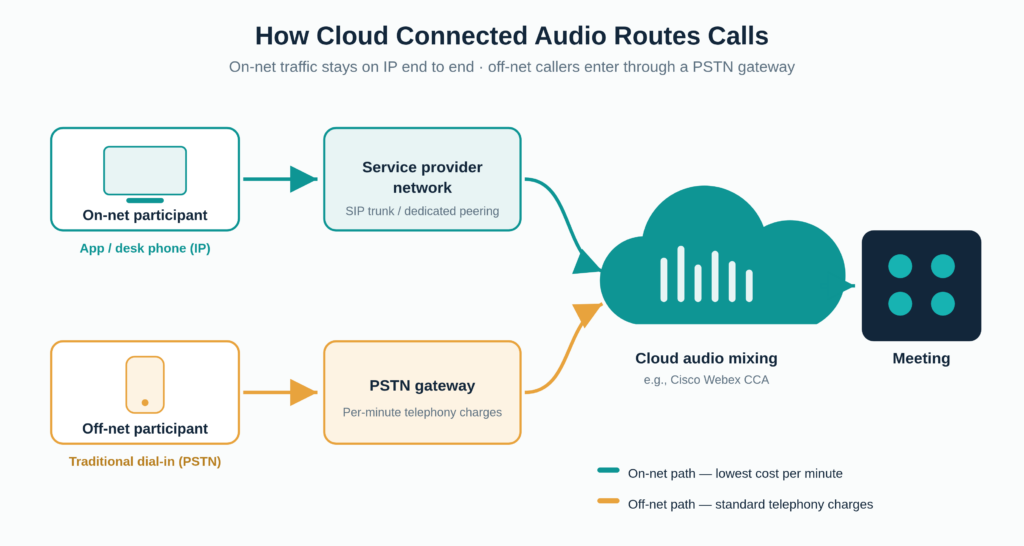
Instead of each participant dialling into a hardware bridge over the phone network, audio streams travel over IP across the enterprise network, a service provider’s backbone, or the public internet to a cloud mixer that combines all streams and feeds the result into the meeting in real time.
On-Net vs Off-Net Call Paths
Understanding these two paths explains where the cost savings come from:
- On-net calls originate inside the organization’s network or its service provider’s network and never touch the public telephone system. They are dramatically cheaper per minute, often close to free at the margin.
- Off-net calls come from external participants dialing in over traditional phone lines. They enter the cloud through a PSTN gateway and carry standard telephony charges.
The more traffic an organization keeps on-net, the stronger the economics. This single principle shapes most architectural decisions during setup.
The Role of Service Provider Integration
In the Cisco Webex Cloud Connected Audio model, service provider integration is the defining feature: the enterprise’s chosen carrier establishes dedicated peering with Cisco’s cloud, and all audio from both on-net and off-net users flows over that carrier’s network, with Cisco handling the mixing. Carriers such as Verizon offer this as a packaged service; Verizon Cloud Connected Audio is one of the established CCA service provider offerings in North America, alongside other Cisco-certified partners.
This Webex Cloud Connected Audio SP integration is what distinguishes true CCA from simpler cloud PSTN services. Cisco documents the partner requirements, capacity planning, and provisioning process in its Cloud Connected Audio ordering guide, which the service provider and enterprise work through together during onboarding.
For historical context, integrated cloud meeting audio is not a new idea; legacy platforms such as IBM Connections Cloud offered meetings with built-in audio years ago, but the modern CCA architecture, with dedicated carrier peering and cloud mixing at scale, is a substantially more robust evolution of that concept.
Blessings of Cloud Connected Audio
The business case rests on four measurable benefits:
| Benefit | How It Works | Who Gains Most |
|---|---|---|
| Lower audio costs | On-net routing avoids per-minute PSTN charges | Meeting-heavy enterprises with global teams |
| Better call quality | IP paths with QoS outperform congested PSTN gateways | Organizations with remote and hybrid workforces |
| Simplified management | One audio architecture across all meetings and regions | IT teams supporting multiple offices |
| Scalability | Capacity grows with a contract change, not new hardware | Fast-growing companies |
Two of these deserve elaboration:
Cost. For a large enterprise running thousands of meeting hours monthly, per-minute PSTN audio charges compound quickly. Routing the majority of that traffic on-net through Cloud Connected Audio typically produces the largest single line-item saving in the collaboration budget. The exact figure depends on call volume, geography, and the carrier contract, which is why Step 2 below includes building a cost projection to validate after rollout.
Quality. Because IP audio paths can be actively managed with Quality of Service (QoS) policies, organizations can control voice performance in ways the public telephone network never allowed. Wideband codecs such as G.722 and Opus also deliver noticeably clearer audio than the narrowband codecs on which the PSTN was built.
Hybrid work has raised the stakes for both. With distributed teams treating meetings as their primary workspace, audio reliability is no longer a convenience metric; it is an operational one.
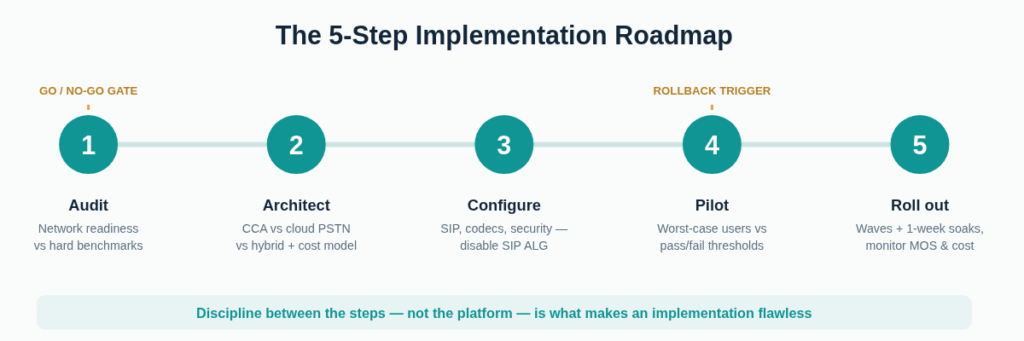
5 Simple Steps to a Flawless Cloud Connected Audio Implementation
Step 1: Run a Network Readiness Audit
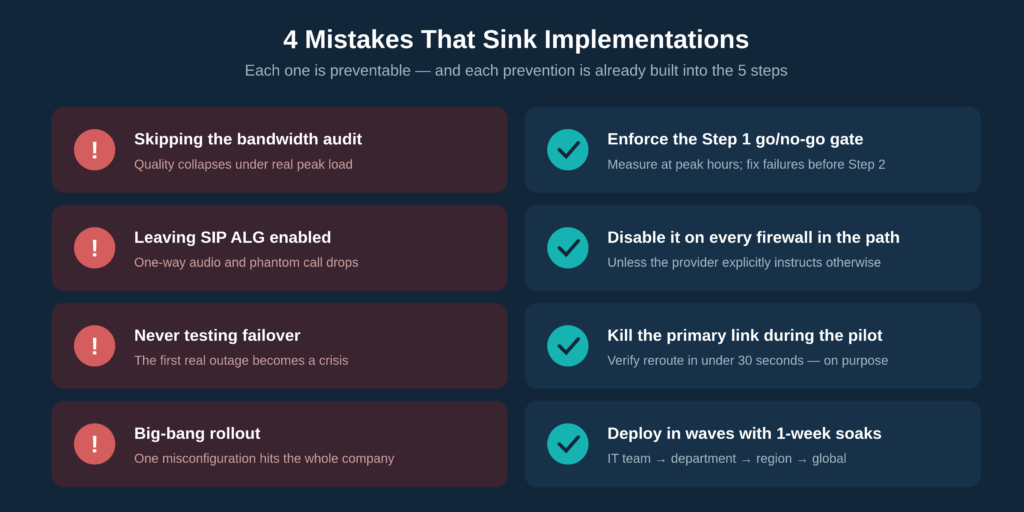
Every failed Cloud Connected Audio rollout traces back to the same root cause: no one verified that the network could carry the load. The audit comes first, before any conversation with a provider.
The Benchmarks the Network Must Meet
The best network for 5 Steps to Flawless Cloud Connected Audio Implementation meets these thresholds per concurrent call stream, measured during peak business hours:
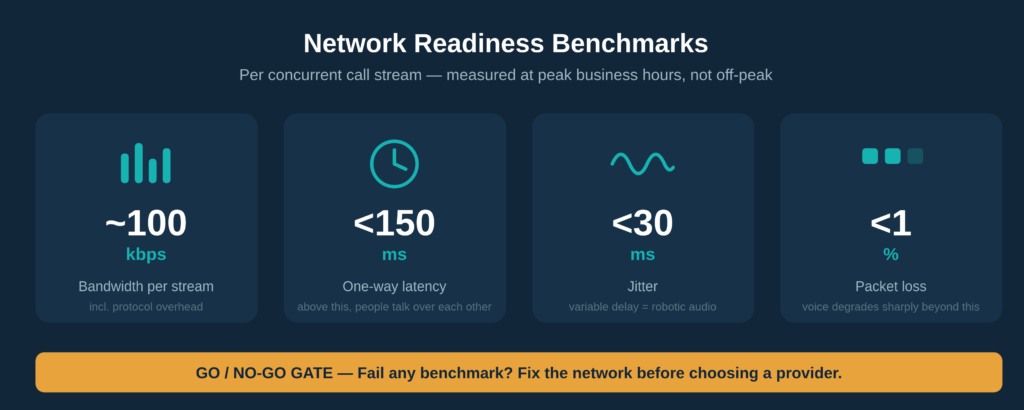
Measurements taken at 7 AM on an empty network are worthless. Peak-hour numbers are the only ones that matter.
Calculating Concurrent Call Load
Organizations do not need bandwidth for every employee, only for peak concurrent streams. A practical planning rule: expect 10–15% of the headcount to be on calls simultaneously during peak periods.
Worked example: A 500-employee organization should plan for roughly 50–75 peak concurrent streams. At approximately 100 kbps each, that is a sustained 5–7.5 Mbps of voice traffic that must be protected. A modest number, but only if it is prioritized correctly.
QoS Configuration Essentials
Raw bandwidth is not enough. Voice packets must win when the network gets congested.
DSCP Marking for Voice Traffic
Voice traffic should be marked with DSCP value EF (Expedited Forwarding, decimal 46), and every switch and router in the path must be configured to honor that marking. A QoS policy that exists on only one device, or only on paper, is the most common silent killer of call quality.
Firewall Ports and UDP Ranges
Providers publish specific port requirements; typical deployments need SIP signalling ports (commonly TCP/UDP 5060–5061) and a wide UDP range for RTP media traffic. Security teams need lead time to review these openings, so this belongs in week one, not launch week.
Go/no-go gate: if the network fails any of the benchmarks above, the correct move is to stop and remediate before proceeding to Step 2. Continuing anyway is the number-one cause of failed implementations; no provider or codec can compensate for a network that drops voice packets.
Step 2: Choose the Right Cloud Connected Audio Architecture
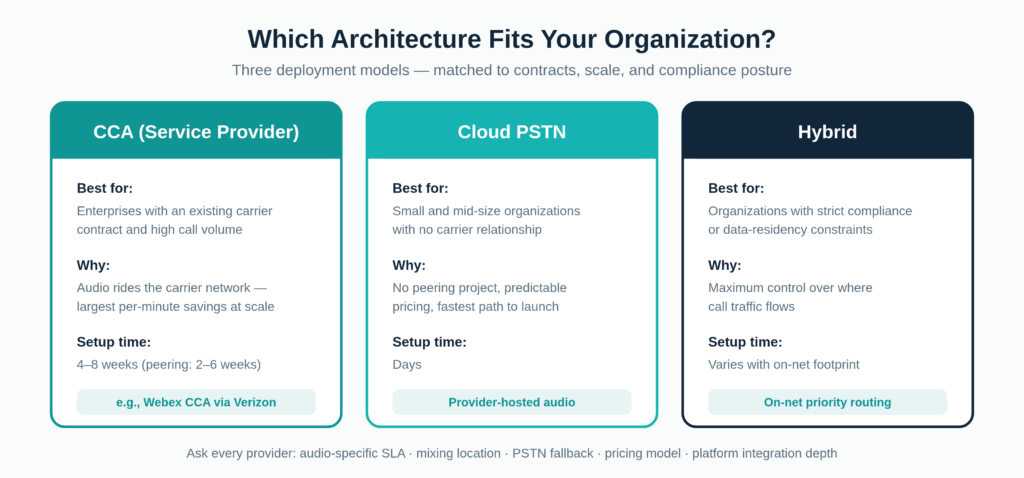
There is no single best architecture for Cloud Connected Audio, only the best fit for a given organization’s contracts, scale, and compliance posture.
CCA vs Cloud PSTN vs Hybrid
| Organization Profile | Recommended Architecture | Reason |
|---|---|---|
| Existing carrier contract, high call volume | CCA (service provider model) | Audio rides the carrier’s network; largest per-minute savings at scale |
| No carrier relationship, small to mid-size | Cloud PSTN / provider-hosted audio | Live in days, no peering project, predictable pricing |
| Strict compliance or data-residency constraints | Hybrid / on-net priority routing | Maximum control over where call traffic flows |
The Webex route, full CCA with a Cisco-certified service provider such as Verizon, makes economic sense when meeting volume is high enough to justify the peering setup effort. Cisco’s published materials, including the Webex Cloud Connected Audio ordering guide, detail minimum commitments and provisioning steps, and the numbers generally favor enterprise-scale deployments. Smaller organizations get most of the same benefits from cloud PSTN without the peering complexity.
Five Questions to Ask Every Provider
The answers to these separate marketing from architecture:
- What SLA uptime percentage applies specifically to the audio service, not the platform as a whole?
- Where does audio mixing happen geographically, and can it be constrained to specific regions?
- Is automatic PSTN fallback included if the IP path degrades mid-call?
- Is pricing per-minute or flat-rate, and how do on-net and off-net minutes bill differently?
- How deep is the platform integration with Webex, Microsoft Teams, and Zoom?
Regarding Cisco Webex Cloud Connected Audio costs specifically, pricing is negotiated through the service provider rather than published as a flat-rate card, which makes the cost-projection exercise in this step essential. The projection built here becomes the yardstick for the 30-day ROI review in Step 5.
Step 3: Configure the Connection
Configuration is a two-sided effort, and knowing which side owns what prevents the finger-pointing that stalls deployments.
One sequencing note: the security and compliance requirements covered later in this guide should be settled before configuration is finalized; data residency and encryption requirements can change both the provider choice and the setup parameters.
What the Enterprise Configures
SIP Trunk Credentials and Codec Selection
The provider issues SIP trunk credentials (or peering parameters for CCA), which the enterprise team applies to its session border controller or gateway. Codec selection follows:
- Opus; adaptive bitrate, best resilience on imperfect networks
- G.722; wideband HD voice at reasonable bandwidth
- G.711; the universal-compatibility PSTN fallback, at the highest bandwidth cost
A sensible default for most deployments: Opus for internal traffic, G.711 as the PSTN fallback.
The SIP ALG Trap
This is the classic “everything looks right but audio drops” bug. SIP ALG (Application Layer Gateway), enabled by default on many firewalls and routers, silently rewrites SIP packets in ways that corrupt modern cloud audio traffic, resulting in one-way audio, dropped calls, and registration failures that no log clearly explains. Unless the provider explicitly instructs otherwise, SIP ALG should be disabled on every firewall in the call path. This single checkbox has consumed more troubleshooting hours than any other setting in VoIP history.
What the Provider Configures
On the provider side: peering establishment (for Cloud Connected Audio architectures), dial-in number provisioning across required countries, and mixing configuration.
Timeline expectations should be set honestly with stakeholders: full Cloud Connected Audio peering typically takes 2 to 6 weeks because it involves coordinated network engineering on both sides, whereas cloud PSTN setups can be live in days. Any vendor promising carrier peering “by Friday” deserves more questions.
Step 4: Pilot Test Against Pass/Fail Criteria
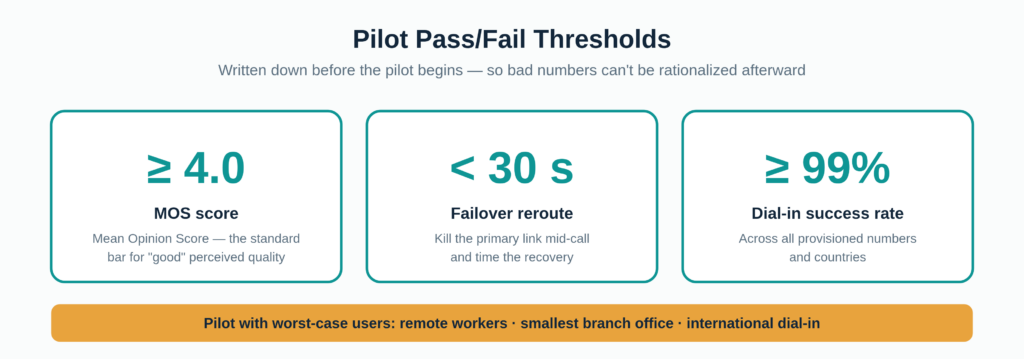
A pilot without defined pass/fail criteria is just a soft launch with extra steps.
Designing a Worst-Case Pilot Group
The pilot group should consist of 10–15 users representing the organization’s hardest scenarios, not its easiest: remote workers on home broadband, staff at the smallest branch office with the thinnest connectivity, and international participants using off-net dial-in. A pilot composed entirely of headquarters power users on gigabit fiber will pass, and the rollout will then fail.
The Failover Test Most Teams Skip
During a live pilot call, the team should deliberately kill the primary network link and verify that audio reroutes within the threshold. Almost nobody does this, and it is precisely the scenario production will eventually deliver. It is far better to discover a broken failover path with twelve pilot users than with the entire company on a quarterly all-hands call.
Rollback trigger: the metric failure that sends the project back to Step 3 should be written down in advance, for example, “MOS below 3.8 on more than 10% of pilot calls means halt, reconfigure, and re-pilot.” Committing to this before the pilot removes the temptation to rationalize bad numbers afterwards.
Step 5: Roll Out in Waves and Monitor
Big-bang rollouts convert small configuration oversights into company-wide incidents. Waves contain the blast radius.
The Wave Structure
Deployment proceeds in this order: IT team → one full department → one region → global, with a one-week soak period after each wave. The soak week is non-negotiable; certain issues, such as peak-load congestion or region-specific dial-in failures, only surface under sustained real-world traffic.
The Three Post-Launch Metrics That Matter
Rather than drowning in dashboards, teams should watch three numbers:
- MOS trend: is average call quality stable or degrading as load grows?
- PSTN fallback rate: how often do calls fall back to the expensive path? A rising rate signals IP-path problems.
- Actual vs projected per-minute cost; is the economic case from Step 2 holding up?
The 30-Day ROI Review
Thirty days after full rollout, actual costs are compared against the Step 2 projection and the delta presented to stakeholders. From there, a recurring habit: re-validate QoS thresholds and the concurrent-call math whenever headcount or call volume grows meaningfully. The network that passed its audit at 500 employees may quietly fail at 800.
Security and Compliance Considerations
Once the rollout is complete, company conversations travel through third-party infrastructure, which warrants deliberate scrutiny before the project is declared finished.
Encryption in Transit
The provider’s specification sheet should confirm, ideally before contract signature, that media is encrypted with SRTP (Secure Real-time Transport Protocol) and signalling is protected with TLS. There is a meaningful difference between “supports encryption” and “encrypts by default”; the distinction is worth a direct question.
Compliance Questions to Settle Before Go-Live
- Data residency: where is audio mixed geographically, and where are call recordings stored? For organizations with EU participants, this determines GDPR exposure.
- Recordings: where calls are recorded, GDPR and HIPAA may impose consent, retention, and access requirements for healthcare organizations. The retention policy should be in place before the first recorded call, not after the first audit.
Access Control for Dial-In Numbers
Dial-in numbers are internet-facing assets. Standard protections include meeting PINs, lobby controls that require unknown dial-in participants to wait for host admission, and confirmation of the provider’s toll fraud protections; compromised dial-in access is a real and expensive attack vector across the industry.
Cloud Connected Audio Implementation Checklist
A condensed, sequential checklist for the full Cloud Connected Audio implementation:
- ☐ Measure peak-hour bandwidth, latency, jitter, and packet loss
- ☐ Calculate peak concurrent streams (10–15% of headcount) and required bandwidth
- ☐ Configure DSCP EF/46 marking end to end
- ☐ Confirm firewall ports and UDP media ranges with the security team
- ☐ Select architecture: CCA, cloud PSTN, or hybrid
- ☐ Put the five provider questions to every shortlisted vendor
- ☐ Build the per-minute cost projection
- ☐ Settle data residency, encryption, and recording retention requirements
- ☐ Apply SIP credentials; select codecs; disable SIP ALG
- ☐ Run the worst-case pilot against written pass/fail thresholds
- ☐ Execute the live failover test
- ☐ Roll out in waves with one-week soaks
- ☐ Monitor MOS trend, PSTN fallback rate, and cost vs projection
- ☐ Complete the 30-day ROI review
Conclusion
A flawless Cloud Connected Audio implementation is less about any single technical decision and more about sequence and discipline: audit the network against hard benchmarks before talking to vendors; choose between CCA, cloud PSTN, and hybrid based on real contracts and compliance needs rather than marketing; configure both sides of the connection with SIP ALG disabled and security settled early; pilot against written pass/fail criteria including a live failover test; and roll out in waves while watching quality, fallback rate, and cost against projection.
Organizations that follow these five steps and respect the go/no-go gates between them consistently land the boring, uneventful deployment that “flawless” actually looks like in practice. The next actions are concrete: run the peak-hour network measurements this week, shortlist providers against the five questions, and put the rollback trigger in writing before the pilot begins.
FAQs
Cloud Connected Audio is a way to route meeting voice traffic over the internet and cloud infrastructure rather than through traditional phone lines. A cloud-based system mixes all participants’ audio and delivers it to the meeting, reducing costs and improving call quality compared with dialing into a conventional conference bridge.
No. VoIP is the underlying transport technology that carries voice over IP networks. Cloud Connected Audio is a conferencing architecture built on top of VoIP; it specifically describes meeting audio routed through cloud infrastructure and cloud-based mixing rather than through traditional conference bridges.
Webex Cloud Connected Audio is Cisco’s implementation of this architecture. An audio conferencing service integrated into Webex meetings in which calls flow over a certified service provider’s telephony network. Verizon is one established partner, while Cisco provides cloud-based audio mixing. It targets enterprises with existing carrier relationships and significant meeting volume.
Cloud PSTN deployments can be live in a few days. Full CCA implementations typically take four to eight weeks end-to-end, with the service provider peering alone accounting for two to six weeks of that timeline.
Yes, usually through the cloud PSTN model rather than full CCA. Carrier peering generally makes economic sense only at enterprise call volumes. Smaller organizations can achieve equivalent benefits with provider-hosted cloud audio without the peering complexity.