
In today’s technology-driven work culture, professionals rely heavily on connected devices, cloud-based workflows, and multi-screen environments to stay productive. Whether you’re a remote developer, digital marketer, designer, or business professional, your tech workspace setup directly impacts your efficiency, focus, and overall performance. An optimized tech workspace is no longer a luxury — it’s a necessity.
One of the biggest obstacles to productivity in modern work environments is digital friction. This refers to the interruptions and inefficiencies caused by poor device connectivity, cable clutter, incompatible accessories, and disorganized workstation layouts. Even small disruptions can break concentration and reduce workflow momentum throughout the day.
A streamlined workspace helps eliminate those barriers and allows professionals to focus on high-value tasks instead of technical inconveniences. One of the most effective ways to build a seamless workstation is by integrating a USB-C docking station into your setup. By centralizing device connectivity, users can create a smarter and more efficient digital workspace that supports modern productivity demands.
Key Takeaways
- In today’s digital work culture, productivity relies on optimized workspaces and efficient technology, making setup crucial.
- Digital friction, such as cable clutter and poor device connectivity, hinders workflow and focus.
- Using a USB-C docking station simplifies connectivity, reduces desk clutter, and enhances ergonomics for better productivity.
- The Mukiya USB-C docking station for MacBook centralizes device management, supporting seamless transitions between locations and improving overall efficiency.
- Investing in high-quality technology tools, like a USB-C docking station, transforms workspaces by minimizing distractions and maximizing performance.
Table of contents
- Understanding Digital Workspace Friction
- Smart Technology Solutions for Modern Workspaces
- Why Workspace Optimization Matters in Tech Environments
- Building a Workspace Designed for Focus
- Key Benefits of a USB-C Docking Setup in your Tech Workspace
- The Connection Between Technology and Productivity
- Final Thoughts
Understanding Digital Workspace Friction
Technology has transformed how people work, but it has also introduced new challenges. Many professionals switch between multiple devices daily — laptops, monitors, tablets, external drives, keyboards, webcams, and mobile devices. Without a centralized system, managing these devices can become frustrating and time-consuming.
Consider the number of repetitive tasks many users face every day:
- Connecting external displays manually
- Managing tangled charging cables
- Reattaching USB accessories repeatedly
- Adjusting workstation layouts
- Switching between office and remote work environments
These recurring interruptions create workflow friction. While each task may seem minor individually, together they consume valuable time and mental energy.
For professionals who depend on efficiency, reducing these interruptions is essential. A modern workspace should support fast transitions, clean connectivity, and ergonomic functionality without adding unnecessary complexity.
Smart Technology Solutions for Modern Workspaces
The easiest way to reduce workspace friction is by adopting tools designed for connectivity and workstation optimization. A portable docking station that uses USB simplifies how devices interact by allowing users to connect multiple peripherals through a single interface.
Instead of plugging in separate cables for monitors, keyboards, storage devices, and charging adapters, a docking station consolidates everything into one streamlined connection. This improves desk organization while also reducing setup time and technical frustration.
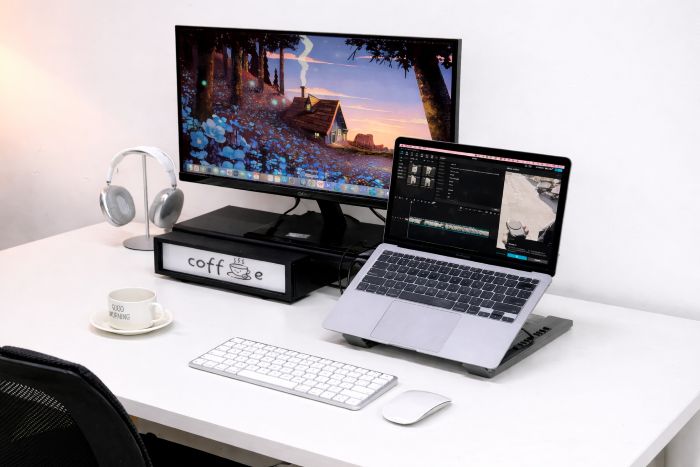
The Mukiya USB-C docking station for MacBook is an excellent example of technology designed to improve workspace functionality. Built specifically for MacBook users, it combines connectivity, ergonomics, and workspace organization into one efficient device.
Rather than functioning as just another adapter, the docking station transforms the MacBook into a fully integrated workstation capable of supporting modern multitasking requirements. Users can instantly connect external monitors, transfer data, charge devices, and organize accessories through a single compact solution.
Why Workspace Optimization Matters in Tech Environments
In the technology sector, productivity often depends on uninterrupted workflows. Developers need efficient coding environments. Designers require multi-display support. Content creators depend on fast file transfers and reliable peripheral connectivity. Even remote teams rely on smooth digital collaboration setups.
An intentional workspace design improves all of these functions by minimizing unnecessary friction points.
When your devices connect instantly and your workspace remains organized, your brain spends less energy dealing with technical distractions. This allows greater concentration on strategic thinking, creative work, communication, and problem-solving.
The Mukiya USB-C dock stand for MacBook supports this approach by creating a more intelligent workstation layout. Instead of scattered accessories and inconsistent connections, users gain a centralized productivity hub that supports modern digital workflows.
Building a Workspace Designed for Focus
A productive tech workspace is not simply about aesthetics. It is about creating an environment where technology works efficiently and supports concentration rather than disrupting it.
An intentional workstation should include:
- Reliable device connectivity
- Minimal cable clutter
- Ergonomic monitor positioning
- Fast access to peripherals
- Efficient desk organization
- Flexible support for remote and hybrid work
Using a docking station that supports USB-C technology helps accomplish all these goals simultaneously.
The Mukiya USB-C docking station for MacBook helps users create a workstation where every component has a defined purpose. External displays connect instantly, accessories remain accessible, and the laptop itself becomes part of a more professional desktop environment.
This type of setup is especially valuable for hybrid workers who frequently transition between locations. Instead of rebuilding a workspace every day, users can maintain consistency and efficiency wherever they work.
Key Benefits of a USB-C Docking Setup in your Tech Workspace
Simplified Cable Management
Cable clutter is one of the most common workspace problems in modern offices and home setups. Multiple chargers and accessory cables create visual distractions and reduce efficiency.
A docking station with USB-C support consolidates these connections into one streamlined interface. This creates a cleaner workstation and reduces the frustration of managing multiple ports and adapters.
Improved Ergonomics
Poor workstation ergonomics can negatively affect productivity and physical comfort. Long hours spent looking downward at a laptop screen may contribute to neck strain, shoulder tension, and posture issues.
The Mukiya USB-C docking station for MacBook raises the device to a more ergonomic viewing height, helping users maintain healthier posture during extended work sessions.
Faster Connectivity
Modern professionals depend on speed and convenience. With a centralized docking station, users can connect monitors, external storage, keyboards, webcams, and charging systems instantly through a single cable.
This plug-and-play functionality reduces setup delays and improves workflow continuity throughout the day.
Better Support for Hybrid Work
Remote and hybrid work models require flexible workstation setups. A portable docking solution allows professionals to transition smoothly between office environments and home workstations without constantly reconnecting devices individually.
This flexibility is increasingly important in today’s technology-focused work culture.
The Connection Between Technology and Productivity
Technology should remove obstacles, not create them. However, poorly designed workspaces often introduce unnecessary complexity that slows productivity and increases stress.
An optimized digital workspace improves:
- Workflow consistency
- Focus and concentration
- Device efficiency
- Collaboration capabilities
- Comfort during long work sessions
- Overall productivity
By integrating solutions like the Mukiya USB-C docking station for MacBook, professionals can create an environment where technology supports their goals instead of interrupting them.
Final Thoughts
Creating a productive tech workspace requires more than simply arranging a desk. It involves designing a technology ecosystem that minimizes friction, supports efficiency, and improves focus throughout the workday.
As digital workflows continue to evolve, professionals need smarter solutions that simplify connectivity and reduce distractions. A high-quality USB-C docking station can play a major role in achieving that balance.
The Mukiya USB-C docking station for MacBook provides a practical solution for users who want cleaner connectivity, improved ergonomics, and a more intentional digital workspace. By reducing technical interruptions and streamlining device management, it helps create an environment optimized for modern productivity.
If you want to improve focus, enhance workflow efficiency, and build a smarter workstation, investing in the right technology tools can make a measurable difference in your daily performance.