The CDP vs CRM question matters more in 2026 than it did five years ago, because companies whose AI initiatives succeed invest up to four times more of their revenue in data foundations than companies whose AI projects disappoint (Source: Gartner, April 2026). For most B2B teams, the CRM is the first piece of that foundation, and the CDP is the one they argue about.
The question rarely comes up on its own, though. It usually arrives inside a sales deck. A CDP vendor tells you your CRM can’t give you a single view of the customer. A CRM vendor tells you their platform already does everything a CDP does. Each pitch has some truth in it. Neither one is neutral.
If you are still mapping the rest of your tools, start with the layers of a marketing tech stack, because CDP and CRM both sit in the bottom one.
Key Takeaways
- A CRM manages relationships with people and accounts you already know.
- A CDP collects behavior from every source, including anonymous visitors, and turns it into profiles.
- They are built for different users. Sales and service live in the CRM. Marketing and data teams live in the CDP.
- Most small and mid-size B2B teams need a clean CRM long before they need a CDP.
- When you run both, data has to flow in both directions, or you have built two silos.
Table of contents
- Key Takeaways
- The Short Answer
- What a CRM Does Well, and Where It Struggles
- What a CDP Does Well, and Where It Struggles
- CDP vs CRM: The Differences Side by Side
- How a CDP and a CRM Work Together
- When a CRM Alone Is Enough
- When You Need Both
- Packaged CDP, Suite Feature or Composable?
- CDP, CRM and Privacy: Deletions Have to Reach Both
- Common CDP and CRM Mistakes
- Conclusion
- Read Next
- Frequently Asked Questions
The Short Answer
A CRM (customer relationship management system) is where your team manages known contacts, accounts and deals. Salespeople log calls, move opportunities through stages and forecast revenue there. Service teams track tickets. It runs on data that people type in or that forms capture.
A CDP (customer data platform) is a system that collects customer data from every source you have, matches it to the right person, and builds one profile that other tools can use. It runs on events: page views, product usage, email clicks, purchases, support interactions. Most of that data no human ever types.
A CRM is built around the people your team works with. A CDP is built around events nobody types in.
What a CRM Does Well, and Where It Struggles
A CRM is the system of record for revenue. When finance asks what is in the pipeline, the answer comes from the CRM. When a new rep takes over an account, the history they read is in the CRM.
It does that job well because it is structured around people doing work: contacts, companies, deals, tasks, notes, stages. Salesforce, HubSpot, Microsoft Dynamics and Zoho all follow roughly this model.
Where it struggles is volume and variety. A CRM was never designed to store every page view from every visitor, or millions of product events a day. Most can’t track anonymous visitors properly until they fill in a form. And when you push large volumes of behavioral data into a CRM, two things happen. Performance drops, and your sales team stops trusting the records because they are full of noise.
The other weakness is that CRM data is only as good as the people entering it. Ask any sales leader about the deal that sat at 90% for three quarters.
What a CDP Does Well, and Where It Struggles
A CDP is built for collection and unification. It pulls data from your website, app, product, email platform, ad accounts, support desk and offline sources, then resolves identity: the anonymous visitor who read three pricing pages last week is the same person who just requested a demo.
From those unified profiles, a CDP builds audiences and pushes them to the tools that act on them. Your ad platform gets a suppression list of current customers. Your email platform gets a segment of trial users who stalled at onboarding step two. Your CRM gets a score or a set of intent signals.
Where it struggles is with the things a CRM does naturally. A CDP is not a place for a rep to log a call, manage a deal or forecast a quarter. It also needs clean inputs and a clear owner. Without both, it fills up and nobody looks at it.
In its 2026 Magic Quadrant for customer data platforms, Gartner described a market splitting between platformization and agentification, and now expects CDPs to ship packaged AI agents (CX Today, February 2026). In practice, some CDPs are being folded into big enterprise suites, and others are becoming the data layer that AI agents run on.
CDP vs CRM: The Differences Side by Side
| CRM | CDP | |
|---|---|---|
| Main job | Manage relationships and the sales pipeline | Unify customer data and activate it across tools |
| Primary users | Sales, account management, service | Marketing, growth, data teams |
| Type of data | Contact details, deals, notes, tasks, tickets | Behavioral events, transactions, product usage, consent |
| Anonymous visitors | Rarely, usually only after a form fill | Yes, matched to known profiles later |
| How data gets in | People type it, forms and integrations add it | Automatic collection from many sources |
| Data volume | Moderate | High, often millions of events |
| Main output | Pipeline, forecasts, account history | Unified profiles and audiences sent to other tools |
| Typical owner | Sales or revenue operations | Marketing operations or data team |
If you only remember one row, make it the anonymous visitors row. A CRM usually learns about a buyer when she fills in a form. By then, a CDP has been recording her visits for weeks.
How a CDP and a CRM Work Together
When both are set up properly, data moves between them in both directions.
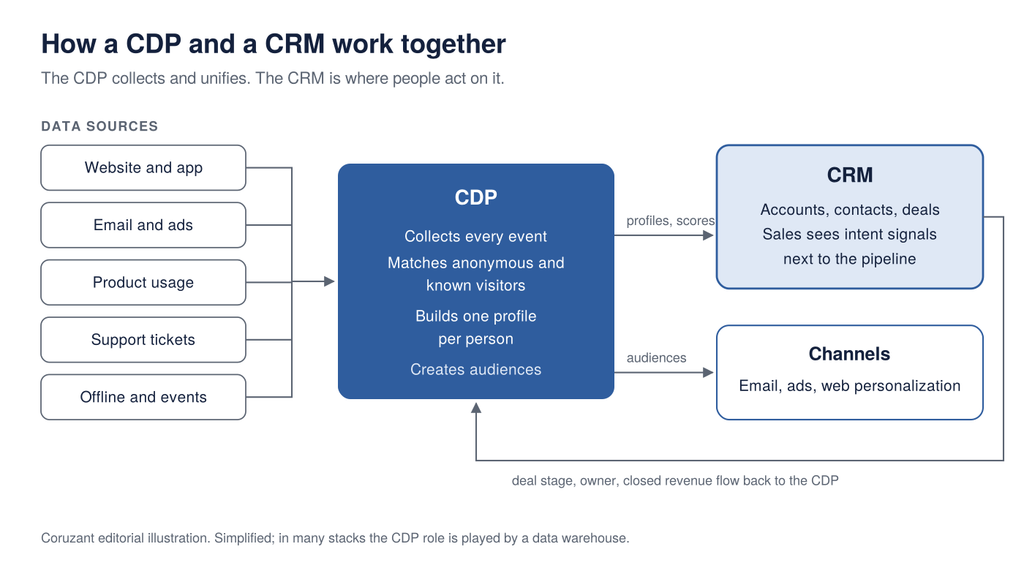
Here is what that looks like for a B2B software company. A buyer from a target account visits the pricing page twice and reads two case studies, all anonymously. The CDP records every visit. When she downloads a guide, the CDP matches her past sessions to her new email address and adds her to the account’s profile. It sends a high-intent signal to the CRM, where the account owner sees it next to the open opportunity. Meanwhile the ad platform stops showing her top-of-funnel ads, because the CDP has moved her into a different audience.
Then the data flows back. When the deal closes, the CRM sends stage, owner and contract value to the CDP. Now marketing can see which campaigns touched accounts that actually bought, not just which ones produced form fills.
If data only moves from the CDP into the CRM, sales gets more signals but marketing never learns what worked. If it only moves the other way, you have built a reporting tool with a CDP price tag.
Edwin Miranda, founder of Konsultora, made a related point about where these systems are heading when he spoke on The Digital Executive in August 2026. In his words, “your CRMs are not gonna disappear.” What changes, he said, is that companies add “an intelligent layer across those systems” that connects them. I agree. Nobody is ripping out Salesforce to make room for a CDP. The open question is what connects it to everything else, and how much of that work you want a CDP to do.
When a CRM Alone Is Enough
Plenty of companies buy a CDP years before they need one. You can probably wait if most of these are true:
- Your marketing team is small, and most leads come from a handful of channels.
- You sell to a defined list of accounts, and sales already knows most of them by name.
- Your CRM has built-in website tracking, forms and email, and you use them.
- You don’t have a product with meaningful usage data, or you don’t act on it yet.
- Nobody on the team would own a CDP day to day.
In that situation, a well-run CRM with its native marketing features will get you further than a CDP bolted onto a messy CRM. HubSpot, Salesforce and others now include lighter CDP-style features inside their suites, and for many teams that is plenty.
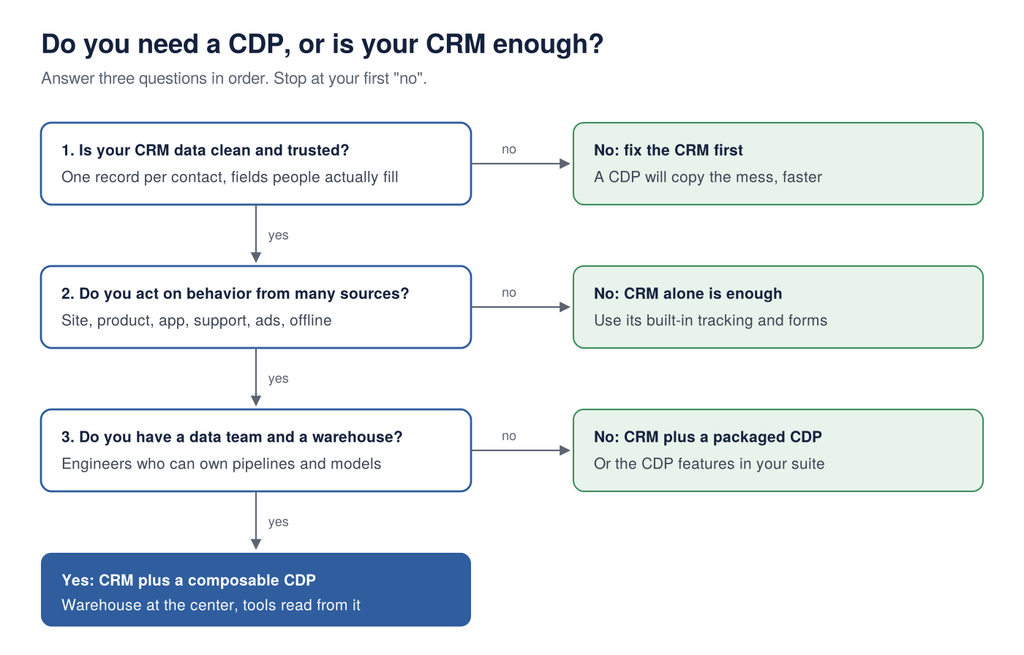
My blunt rule: if your CRM has duplicate contacts and a lifecycle stage field nobody trusts, a CDP will not fix it. It will copy the mess into every tool it connects to, faster than you could have done by hand.
When You Need Both
The case for adding a CDP gets strong when your data outgrows what people can type in:
- You have a product, app or platform that generates usage data, and you want marketing and sales to act on it.
- You run campaigns across many channels and need consistent audiences everywhere.
- A large share of your buyers research anonymously before they ever fill in a form.
- You need consent and preferences applied the same way across every tool.
- Your team spends hours each week exporting lists from one system and uploading them to another.
That last one is a good test on its own. Manual list movement is what a CDP replaces most directly.
Packaged CDP, Suite Feature or Composable?
If you decide you need CDP capabilities, you have three broad routes. A packaged CDP from a dedicated vendor, the CDP features built into your existing CRM or marketing suite, or a composable setup where your data warehouse sits at the center and lighter tools activate the data from there.
The composable route is where the market is moving fastest. More than 25% of CDPs now support warehouse-centric architecture, according to the CDP Institute’s February 2026 industry update, and composable, warehouse-native vendors grew nearly six times faster than the industry average.
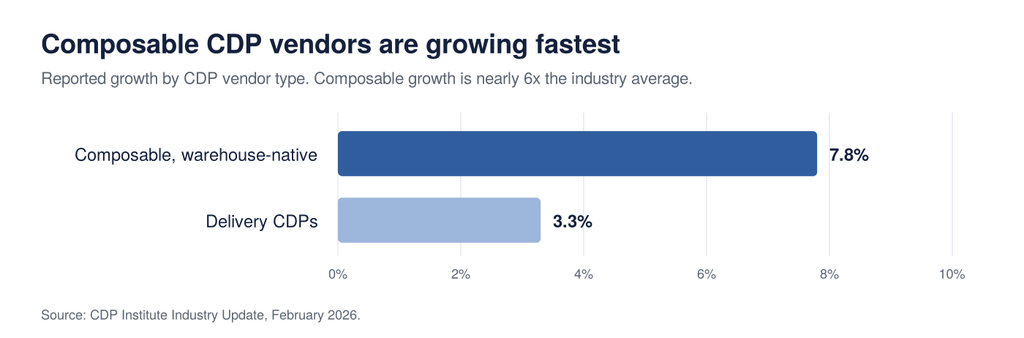
That growth does not mean composable is right for you. It needs a data warehouse and people who can maintain pipelines and models. If you have a data team, it is worth a serious look. If you don’t, a packaged CDP or your suite’s built-in features will be easier to live with.
CDP, CRM and Privacy: Deletions Have to Reach Both
Running a CDP and a CRM side by side doubles the number of places personal data lives.
Take deletion requests. Under UK GDPR, you must respond to a request for erasure without undue delay and within one month at the latest. If you have shared that person’s data with others, you must contact each recipient and tell them about the erasure, unless that is impossible or involves disproportionate effort, according to the Information Commissioner’s Office. EU GDPR sets the same one-month limit, and many US state privacy laws include deletion rights too.
In practice, that means a deletion in your CRM has to reach your CDP, and the CDP has to push it to every tool it fed. The same goes for consent. If someone opts out of marketing email in one system and the other keeps mailing them, the problem is your integration, and the regulator won’t care which tool caused it.
Before you sign a CDP contract, ask the vendor to show you exactly how a deletion and an opt-out travel through your stack. If the demo goes quiet, you have learned something useful.
Common CDP and CRM Mistakes
Buying a CDP to fix bad CRM data. Covered above, and still the most common one. Clean the CRM first.
Turning the CRM into a marketing database. Pushing every web event into CRM records slows the system down and buries the signals reps actually need. Keep raw behavior in the CDP or warehouse, and send the CRM summaries: scores, intent flags, last meaningful activity.
No owner for the CDP. A CDP needs someone who decides which data comes in, which audiences go out, and what happens when a sync breaks. Without that person it slowly fills up and stops being used.
One-way integrations. If closed revenue never flows from the CRM back to the CDP, marketing keeps optimizing for leads instead of revenue.
Treating it as an IT project. The setup is easy. The arguments about definitions are not. What counts as an active customer? Which system wins when two of them disagree on a job title? Settle those questions in writing before go-live. Teams that skip that conversation tend to hit it later, as the challenges B2B companies face as they grow show.
Conclusion
The CDP vs CRM decision is mostly a question of sequence. A CRM is where your team manages relationships and revenue, and almost every B2B company needs one from day one. A CDP becomes worth its cost once your customer data comes from more sources, at more volume, than people can manage by hand. If you run both, connect them in both directions.
Start with the CRM and get it clean. Add CDP capabilities when your channels, product data or anonymous traffic demand it, and choose the route that matches your team: suite features, a packaged CDP, or a composable setup on your warehouse. Then make sure every deletion and every opt-out reaches both systems, because that is the part regulators will check.
Read Next
For more on building the data layer of your marketing stack:
- The Marketing Tech Stack in 2026: Layers, Tools and B2B Examples
- What Is Martech? A Complete Guide to Marketing Technology in 2026
- How Data Creates Customer Relations
Frequently Asked Questions
The difference between a CDP and a CRM is what each is built around. A CRM manages relationships with known contacts and accounts, and it is used mainly by sales and service. A CDP collects behavioral data from every source, including anonymous visitors, and turns it into unified profiles that other tools use.
A CDP cannot replace a CRM for most businesses. A CDP does not handle deal management, forecasting or the day-to-day work of sales teams. The two systems do different jobs and work best when connected.
You need a CDP alongside your CRM only if your customer data comes from many sources at high volume, such as product usage, apps and anonymous web traffic. Many small and mid-size teams do well with a clean CRM and its built-in marketing features. Fix CRM data quality before adding a CDP.
Salesforce is best known as a CRM, and it also sells a separate customer data platform product. Several large vendors, including Adobe and Oracle, now offer both CRM and CDP capabilities. Check which product you are being quoted, because they are usually licensed separately.
A composable CDP is a customer data platform built on top of your own data warehouse rather than as a separate data store. Your warehouse holds the unified customer data, and lighter tools activate it in your channels. It suits companies that already have a data team and a warehouse.