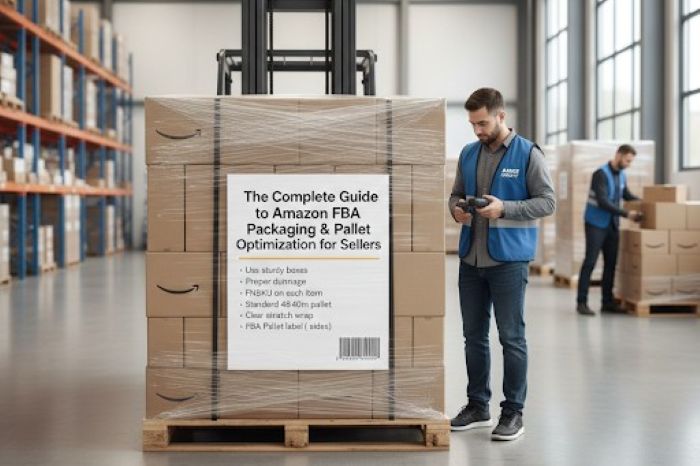
Selling on Amazon FBA sounds simple. You send your products, Amazon stores them, and customers get fast delivery. But there’s a big step in the middle that trips up a lot of sellers – packaging and palletizing your shipments correctly. Get FBA packaging and pallet optimization wrong, and Amazon can reject your inventory. That means delays, extra fees, and a very bad day.
Get it right, and your shipments flow smoothly into Amazon’s fulfillment centers without a hitch.
This guide breaks it all down in plain language. No confusion, no guesswork.
Key Takeaways
- FBA packaging involves strict rules on box strength, weight limits, labels, and proper padding for fragile items.
- Common mistakes include skipping prep on fragile items, using the wrong tape, and mixing SKUs in one box.
- Smart pallet planning saves money by maximizing space and adhering to weight limits, using tools like pallet calculators.
- Accurately stacking pallets and proper labeling are crucial to prevent shipping delays and rejections at Amazon fulfillment centers.
- Following FBA packaging guidelines streamlines shipments and improves seller metrics, minimizing costs and delays.
Table of contents
Why Amazon’s FBA Packaging Rules Are Not Optional
Amazon runs hundreds of fulfillment centers across the world. They move millions of products every single day. To do that at scale, everything has to be packed and labeled in a very specific way.
If your items arrive damaged, unlabeled, or packed wrong, Amazon’s team has to fix the problem. And they’ll charge you for it.
Here’s what Amazon checks when your shipment arrives:
Box and carton rules
Each box must be strong enough to handle stacking and movement. Amazon requires boxes to pass a basic drop test. Six-sided boxes only, and no open tops or irregular shapes.
Weight and size limits
A single box cannot weigh more than 50 lbs. unless it contains one oversized item. Box dimensions also have limits depending on the product category.
Poly bagging and suffocation warnings
Any soft, loose, or flexible product must go into a sealed poly bag. If the bag opening is larger than 5 inches, it needs a suffocation warning printed on it.
Labels and barcodes
Every unit needs a scannable barcode. Every box needs a shipping label. If your labels aren’t readable, Amazon’s scanners can’t process your shipment.
Understanding the full scope of Amazon fba packaging rules before you ship is the smartest move you can make as a seller.
The Most Common FBA Packaging Prep Mistakes Sellers Make
Even experienced sellers slip up here. These are the mistakes that cause the most headaches.
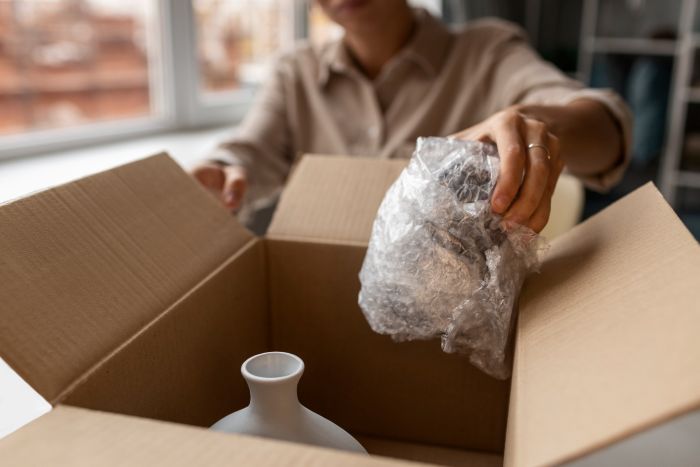
Skipping prep on fragile items
Amazon requires bubble wrap, foam, or similar protection for breakable products. Just tossing a glass item in a box with no padding is a fast way to get a damage complaint.
Using the wrong tape
Amazon only accepts pressure-sensitive tape that is at least 2 inches wide. Masking tape, scotch tape, and duct tape are all no-go options.
Forgetting expiration dates
Products with expiration dates must have the date printed clearly on the outside. The format must be MM/DD/YYYY. Amazon also requires a minimum shelf life of 90 days from the date of arrival.
Mixing SKUs in one box
Each box in a shipment should contain only one type of product unless Amazon’s shipping plan specifically allows mixed boxes. Mixing SKUs incorrectly leads to receiving errors.
Loose products without packaging
Items that are sold as sets must be packaged together clearly. Amazon needs to know it’s receiving one unit, not multiple separate items.
These FBA prep requirements exist to protect your inventory, Amazon’s systems, and your customers. Following them isn’t just about compliance, it directly affects your seller metrics.
How Pallet Planning Saves You Real Money
Once your boxes are ready, the next step is building your pallets. This is where a lot of sellers leave money on the table.
Shipping pallets have size and weight rules too. A standard pallet used in Amazon’s partnered carrier program is 40 x 48 inches. The max height with the pallet included is 72 inches. The max weight is 1,500 lbs.
If you don’t plan your pallet layout carefully, you end up wasting space. Wasted space means you’re paying to ship air. Over dozens of shipments, that adds up fast.
This is where smart tools make a difference. Using a pallet calculator helps you figure out exactly how many boxes fit on each pallet. It shows you the best arrangement to maximize space and stay within weight limits.
A good pallet loading calculator takes your box dimensions and weight, then works out the ideal stacking configuration. You don’t have to guess or rearrange boxes on the warehouse floor. You go in with a plan.
Some sellers still do this manually with pen and paper. That works, but it’s slow and easy to miscalculate. A free pallet configuration generator does the same job in seconds.
Building Pallets the Right Way
Once you have your layout planned, here’s how to actually build a pallet that Amazon will accept.
Stack boxes in columns, not pyramids
Column stacking keeps the weight evenly distributed. Pyramid stacking looks stable but puts pressure on lower boxes unevenly.
Alternate box orientation per layer
This is called ‘brick-laying.’ It locks the layers together and stops the stack from tipping.
Wrap with stretch film
Amazon requires pallets to be wrapped in stretch wrap. Go around the pallet at least 4 to 5 times from bottom to top. Don’t cover the pallet label.
Place the pallet label in the right spot
Amazon needs the pallet label on the outside of the stretch wrap, centered on the longest side, between 15 and 50 inches from the floor.
Don’t hang boxes over the edge
All boxes must stay within the 40 x 48 inch footprint of the pallet. Overhang causes damage and Amazon can refuse the shipment.
Getting your pallet configuration right is just as important as getting your box prep right. One bad pallet can delay your entire shipment.
Final Thoughts on Getting FBA Shipments Right
Amazon FBA gives you access to millions of customers and world-class logistics. But that access comes with rules. And those rules exist for a good reason.
When your FBA packaging is solid, your shipments move fast. When your pallets are built right, you avoid costly rejections. When you plan ahead, you stop paying for mistakes that were 100% avoidable.
The sellers who grow consistently on Amazon are not just good at finding products. They are good at the boring stuff too, like packing boxes correctly and stacking pallets the right way.
It doesn’t have to feel overwhelming. Start with the basics. Know the weight limits. Label everything properly. Wrap your pallets tight. Use tools that do the heavy thinking for you.
Small improvements in how you prep and ship add up over time. Lower costs, fewer delays, and a healthier seller account are all waiting on the other side of a well-packed shipment.
Get the prep right once, build it into your process, and you won’t have to think about it again. That’s how you scale without the chaos.
Frequently Asked Questions
What are Amazon’s basic FBA packaging requirements?
Every product must be securely packed, labeled with a scannable barcode, and protected from damage. Boxes must be six-sided, weigh under 50 lbs, and sealed with pressure-sensitive tape.
What happens if my shipment doesn’t meet FBA prep requirements?
Amazon may refuse the shipment, charge you a prep fee, or dispose of non-compliant items. Repeated issues can also affect your seller account health.
Is a pallet calculator really necessary?
It’s not required, but it saves time and money. A pallet configuration calculator helps you maximize space, reduce shipping costs, and avoid pallet rejection at Amazon’s receiving docks.
What size pallets does Amazon accept?
for FBA packaging, Amazon’s standard pallet size is 40 x 48 inches. Maximum height is 72 inches including the pallet. Maximum weight is 1,500 lbs.
How far in advance should I plan my pallet layout?
Plan it before you start packing boxes. Knowing your pallet configuration in advance helps you pack boxes to the right dimensions and avoid wasted space.