
Longer clips, steadier characters, and real control with AI Video, here’s why this one is worth your afternoon.
Let’s be honest about AI video for a second. The demos are always stunning. You watch a flawless ten-second clip, sign up full of hope, type your first prompt, and what comes back is a character whose face quietly melts, a camera that wanders off, and a clip that ends right when it was getting good. The tool looked like a film studio in the trailer. In your hands it behaves like a slot machine.
The pain is always the same four things. You can’t get a clip long enough to actually say something. Your character won’t stay the same person across shots. The motion looks floaty and fake. And you have almost no real control over what the model decides to do. Every creator who has tried to make a product ad or a short scene with AI knows that wall.
This is the context worth keeping in mind as you meet Seedance 2.5, ByteDance’s newest video model, now available on Topview. It is built around exactly those four frustrations. Not flashier effects, longer, sharper, steadier, and more controllable video. The kind of thing you can put your name on.
Thirty Seconds Is the Whole Game
Here is the upgrade that changes everything else: Seedance 2.5 generates up to a full 30 seconds in a single clip. That sounds like a small spec bump until you remember what you were working with before, six, maybe fifteen seconds, then a hard stop and a frantic attempt to stitch fragments together in an editor.
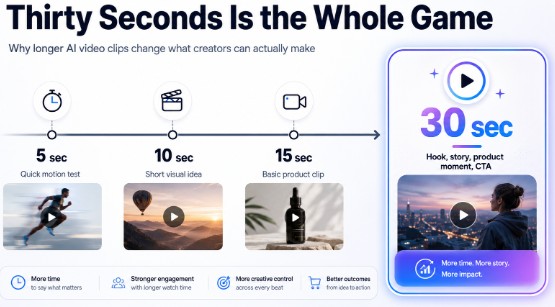
Thirty seconds is enough to breathe. It is enough for a setup, a moment, and a payoff. A product can be revealed, used, and sold inside one continuous take. A small scene can actually open and close.
You stop building videos like a ransom note, cutting and taping little pieces, and start directing something whole. If you make short ads or social clips, this single change will save you more time than any other feature on the list.
Characters That Stop Wandering Off
The old curse of AI video was drift. Generate a few seconds and the person looks fine. Push longer, or cut to a new angle, and suddenly their hair changes, their jacket shifts color, and they age five years between shots. It broke the spell instantly, and it made the tools useless for anything with a recurring face or product.
Seedance 2.5 is built to hold a subject steady. Characters, products, scenes, and styles stay far more consistent across a longer clip and across multiple shots, so a story can move between angles without falling apart.
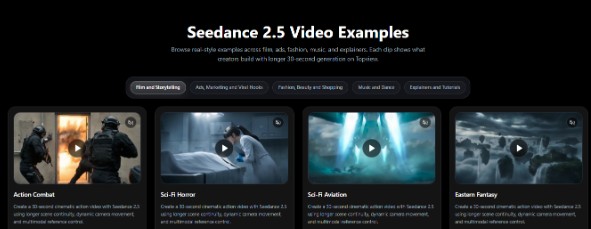
When you make a small edit to one part of a video, the rest is designed to stay where you left it instead of regenerating into something new. For brand work, where the logo and the product have to look identical every single time, that reliability is the entire ballgame.
Feeding the Model What You Actually Mean
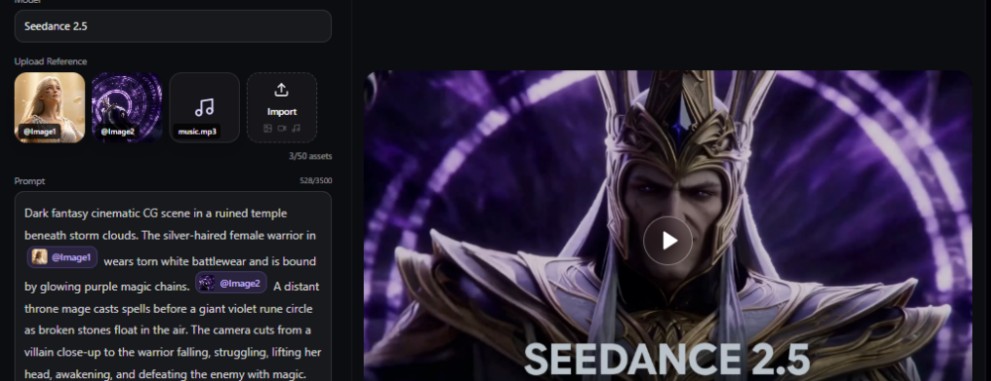
Most weak AI video comes from weak input. A text prompt is a rough sketch of an idea, and the model fills the gaps with guesses. Seedance 2.5 closes that gap by letting you hand it real material to follow, up to 50 reference assets in a single brief, mixing prompts, images, video clips, and audio.
The input mix below shows how different reference types can work together to give Seedance 2.5 better control over the final video.
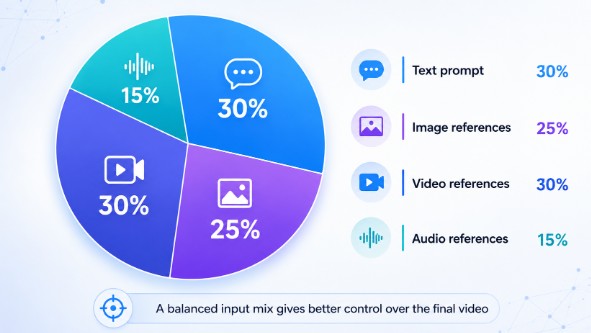
Each kind of reference pulls a different lever. An image pins down a face, a product, or a lighting mood. A video clip carries motion and camera movement, so instead of describing “a slow push-in” and hoping, you show the model the exact move and it follows the timing and path. An audio reference sets the rhythm so the cuts land where you want them. And the text ties it all together, telling the model what to keep sacred and what it’s free to reinterpret. The difference in feel is hard to overstate: you go from describing a shot to genuinely directing one.
When the Sound Already Lands on the Beat
Audio is usually the afterthought in AI video, something you bolt on later and pray it lines up. Seedance 2.5 treats sound as part of the generation, not a patch applied afterward. Because the model builds the clip with audio awareness, the visuals and the sound tend to arrive on the same beat, which means far less nudging clips around a timeline trying to sync a cut to a drum hit.
For music, dance, and ad content especially, this is a quiet luxury. The rhythm of the edit and the rhythm of the track feel related instead of accidental, and the whole thing reads as more intentional with no extra work from you.
It Simply Looks Better Now
None of the above matters if the picture is mushy. Seedance 2.5 sharpens the actual image quality, cleaner detail, more stable motion, 4K-ready output, and it generates faster while doing it. The “flat AI look” that gave older clips away is less pronounced, and text rendered inside frames comes out clearer, which is a small thing until you need a readable label or caption baked into the shot.
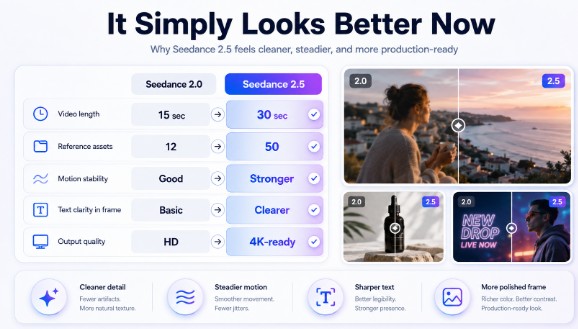
Stacked against the model it replaces, the pattern is consistent: longer clips, steadier subjects, broader reference control, and a more polished frame. It is less a new coat of paint and more a model that finally does the boring, essential things well.
Where This Earns Its Keep
So who is this actually for? In practice, the people who will feel the upgrade fastest are the ones making video at volume. Social creators chasing a content calendar can finally produce watchable, on-brand clips without a studio behind them. Ecommerce sellers can turn a few product photos into a complete 30-second ad sized for TikTok Shop, Reels, Shorts, or a Shopify page, close-up, lifestyle moment, and call to action in one piece.
It suits the storytellers too. AI filmmakers building concept trailers and multi-shot scenes get the continuity they always needed. Avatar creators making explainers, tutorials, and multilingual presenter videos get steadier performance and cleaner dialogue flow. And agencies juggling client work at scale get the thing they care about most: a low, predictable cost per video without a production pipeline. If you make one video a month, any tool will do. If you make twenty, this is where the hours come back.
Thinking in 3D Before You Hit Generate AI Video
Here is a part worth understanding without getting carried away. Seedance 2.5 is not a 3D modeling program, and it won’t replace Blender. But it pairs beautifully with a bit of 3D thinking, and that combination is where some of the most controlled, cinematic results are coming from right now.
The idea is simple. You can rough out a scene in Blender using nothing fancier than basic shapes, grey boxes standing in for your subjects, a simple block for a product, and a camera animated along the path you want. You don’t light it or render it properly. You just capture the spatial plan: the camera angle, the staging, the sense of depth, the motion path. Then you feed that rough clip into Seedance 2.5 as a reference and let the model turn your blockout into finished, polished video.
It works because a rough 3D scene gives the model the one thing words struggle to convey, real spatial information. Where things sit, how the camera travels, when it pushes in. The model tracks that far more faithfully than any text description. For product demos, you get a repeatable hero shot that frames the item exactly the same way every time.
For concept visuals and cinematic scenes, you get camera planning and lighting intent baked in before you generate. You don’t need to be a 3D expert to try it; a handful of shapes and one camera move is enough to feel the difference between guessing at a shot and planning one.
Why There’s No Better Week to Test Your AI Video
Now for the part that turns “interesting” into “do it this week.” Topview is running a real launch push around Seedance 2.5. You get 30 days of Unlimited Seedance 2.5 Generation, currently paired with an 80% off promotion, and the model is live across all of Topview’s tools, the agent, the canvas, the ad and avatar workflows, not walled off inside one premium mode.
The unlimited month is the detail to take seriously. The hidden tax on AI video has always been the credit counter; it quietly makes you ration your experiments, and rationing is the enemy of good work.
Take the meter away for thirty days and the smart play is to go wide, batch a month of content, test the angles you’d normally skip, and build a small library of clips while generation costs you nothing. If you only want to confirm the output quality first, there’s a free tier to look at, though its exports carry a watermark.
From Blank Page to Finished Clip
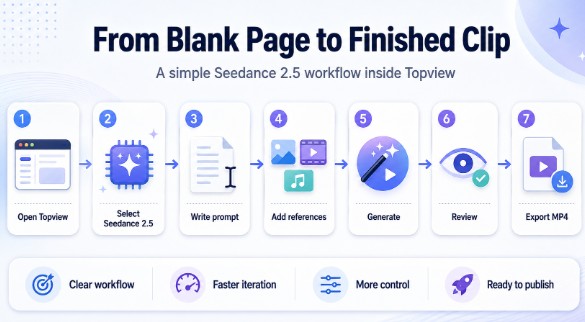
The workflow stays refreshingly short, and it lives entirely in your browser. You open Topview, start a new video, and pick Seedance 2.5 as the model. You write a clear prompt, subject, setting, camera move, and how the scene should begin and end. You add your references, whether that’s a product image, a motion clip, an audio cue, or all three for tighter control. You set the length and aspect ratio, generate, and let the model build the clip. Then you review it, fix any small detail that drifted, and export a clean MP4.
One habit makes everything better: treat the generator like a shot planner, not a vending machine. A complete brief, the story beat, the references, the camera language, gets you something usable far faster than firing off vague prompts and regenerating on hope.
The AI Video Honest Take
I’ve watched a lot of AI video tools promise the moon and hand over a blurry six-second loop. This one is different in the ways that actually matter to someone making content for a living. The longer clips, the steady characters, the deep reference control, and the cleaner frame add up to a tool you can build a real workflow around instead of a toy you show your friends once.
One more useful detail: Topview Canvas and Topview Drama Studio are also set to be supported by Seedance 2.5, which should make the upgrade feel more complete across Topview’s wider creative suite.
Is it perfect? No model is, and you’ll still find shots where it misses. But with a full month of unlimited generation at 80% off, the cost of finding out is close to nothing. My advice is plain: pick one real project this week, an ad you’d actually run, a clip you’d actually post, and push it through Seedance 2.5 on Topview. That single piece will tell you more than any article, this one included.