
Building a 3D model used to mean hours of manual sculpting, retopology, and technical guesswork. That barrier kept many creators, hobbyists, and small studios locked out of 3D work entirely. A text to 3D AI tool flips that process on its head—you describe an object in plain language, and a usable model appears in minutes. This guide breaks down how these tools work, where they fit into real production, and what makes platforms like Meshy stand out.
What you’ll learn:
- How text and image prompts turn into 3D assets
- Practical use cases across game dev, printing, and design
- A step-by-step look at generating your first model
Key Takeaways
- Text to 3D AI tools allow users to create 3D models quickly by describing objects in plain language.
- Meshy stands out as a leading AI 3D model generator that runs entirely in the browser with a free entry-level tier.
- Users can easily switch between text and image input modes, enhancing model accuracy with multi-image uploads.
- The platform supports standard exports like STL, OBJ, GLB, and FBX, integrating well with various production workflows.
- Meshy also offers a range of extra tools, including a 3D Tool Kit for file conversion and repair, plus API access for developers.
Table of contents
- What a Text to 3D AI Tool Actually Does
- Why Designers Are Adopting These Tools So Quickly
- Text Mode vs. Image Mode: Two Ways In
- How to Generate Your First 3D Model: A Step-by-Step Walkthrough
- Fitting 3D AI Tool and Models Into Real Production Workflows
- Extra 3d AI Tools That Round Out the Experience
- Common Questions About Text to 3D AI Tools
- The Bottom Line
What a Text to 3D AI Tool Actually Does
A text to 3D AI tool converts written descriptions into three-dimensional mesh geometry. You type something like “a weathered wooden treasure chest with iron bands,” and the system generates a textured model you can rotate, refine, and export.
The technology reads your prompt, predicts shape and surface detail, then builds the geometry automatically. What once required strong sculpting skills now starts with a sentence. That shift matters most for people who have ideas but lack the years of modeling practice traditional software demands.
Why Designers Are Adopting These Tools So Quickly
The appeal comes down to speed and access. Concept artists can visualize dozens of variations before committing to a final direction. Indie developers can populate a scene without hiring a full modeling team.
Meshy is one of the leading AI 3D model generators, and part of its draw is that it runs entirely in the browser. There’s no heavy software to install or configure—you open a tab and start creating. A free tier lets newcomers test the workflow without paying upfront, which lowers the risk of trying something new.
That combination of zero setup and a no-cost entry point removes two of the biggest friction points in 3D creation.
Text Mode vs. Image Mode: Two Ways In
Not every project starts with words. Sometimes you already have reference art or a photo, and that’s where dual generation modes help.
Text to 3D
You write a description and the tool interprets it. This works well for brainstorming, rapid prototyping, and building assets from imagination alone.
Image to 3D
You upload a picture and the system reconstructs a model from it. Meshy supports multi-image input, meaning you can feed several angles of the same subject for higher accuracy. More reference views give the AI better information, so the final mesh matches your intent more closely.
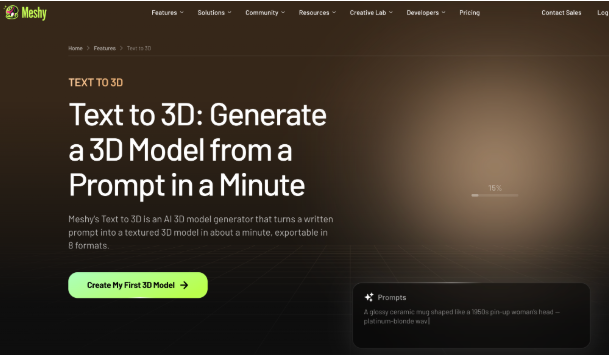
If you want to explore the text-driven side further, Meshy’s text to 3D AI tool shows how a single prompt turns into a complete, textured asset.
How to Generate Your First 3D Model: A Step-by-Step Walkthrough
Getting a usable model doesn’t take long. Here’s a practical sequence to follow:
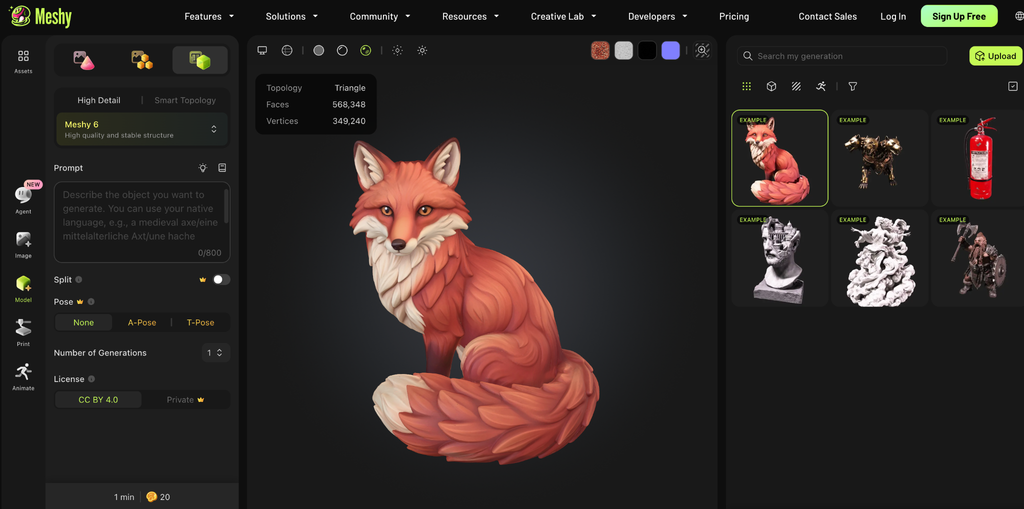
- Open the platform in your browser. No download or install—just log in and start a new project.
- Choose your mode. Pick text to 3D if you’re describing an object, or image to 3D if you have reference photos.
- Write a clear prompt or upload images. Be specific about material, style, and detail. For image mode, add multiple angles for better results.
- Generate and review. The tool builds a draft model in minutes. Rotate it and check the shape.
- Refine with AI texturing. Adjust surface colors, materials, and finish until it fits your vision.
- Export in your format of choice. Download the file and drop it into your pipeline.
Following these steps gets most users from idea to exportable asset on their very first try.
[Screenshot: AI Texturing panel in Meshy workspace]
Fitting 3D AI Tool and Models Into Real Production Workflows
A generated model only matters if it plays nicely with the software you already use. Meshy handles this with full export format coverage—STL, OBJ, GLB, and FBX are all supported.
That range covers most creative pipelines:
- Game development 3D assets move smoothly into engines using GLB and FBX.
- 3D printing workflows rely on STL, which slicers read directly.
- Design and animation in tools like Blender accept OBJ and FBX without conversion headaches.
Because the exports are standard, you’re never locked into one ecosystem. You generate in the browser, then take the file wherever your project lives.
Extra 3d AI Tools That Round Out the Experience
Beyond generation, Meshy includes a free browser-based 3D Tool Kit that solves common file problems. It offers a Converter for switching between formats, an Online Viewer for quick inspection, and an STL Repair tool for fixing broken meshes before printing.
These utilities matter more than they sound. A cracked STL file can ruin a print, and manual repair usually means opening separate software. Having repair and conversion built into the same browser tab saves real time.
For teams building their own products, developer API access lets you plug generation directly into apps, games, or custom pipelines. That flexibility turns the platform from a standalone tool into a component you can build around.
Common Questions About Text to 3D AI Tools
Do I need modeling experience to use one?
No. The whole point is to lower that barrier. If you can describe an object clearly, you can generate it. Refinement skills help polish results, but they aren’t required to start.
Are the models ready for professional use?
They’re a strong starting point. Many creators use generated assets directly for prototypes, background objects, or printing, then refine hero pieces further in dedicated software.
Can I use these 3D AI tools for free?
Yes. Meshy’s free tier and free Tool Kit let you explore both generation modes and file utilities without spending anything upfront.
Will the files work with my existing software?
Almost certainly. With STL, OBJ, GLB, and FBX exports covered, the output fits into game engines, slicers, and design programs like Blender.
The Bottom Line
A text to 3D AI tool takes the hardest part of 3D creation—building geometry from scratch—and turns it into a conversation. Meshy pushes this further with a free tier, a fully browser-based setup, both text and image modes, multi-image input for accuracy, wide export support, a free tool suite, and developer API access. Whether you’re printing prototypes, filling a game world, or testing design concepts, the path from idea to model is shorter than ever.
Try this today:
- Open Meshy in your browser and start a free project
- Write one clear text prompt and generate a model
- Test image mode with a few reference photos
- Export your result in the format your pipeline needs