If you’re running an e-commerce business, managing a warehouse, or handling regular shipments, you’ve probably felt the pain: printing labels through your standard desktop printer is slow, inconsistent, and drains ink like it’s going out of style. A single order might require you to fuss with label alignment, waste sheets of paper, and spend minutes per package when you should be focusing on shipping faster. Modern label printers are essential to run any business.
Here’s what most people don’t realize: a dedicated label printer isn’t a luxury—it’s an operational necessity that pays for itself within weeks through time savings alone.
This guide walks you through everything you need to know about label printers, why a label printer for shipping is different from general-purpose printers, and how to choose the right solution for your business.
Key Takeaways
- Modern label printers accelerate shipping processes and save time compared to traditional desktop printers.
- They provide cost efficiency and reliability, essential for high-volume printing needs.
- When choosing, consider speed, connectivity, and media compatibility to meet business demands.
- Thermal label printers are the most efficient choice for businesses printing more than 50 labels daily.
- Evaluate integration with shipping platforms to streamline your fulfillment workflow.
Table of contents
- What Is a Label Printer, and Why Does It Matter?
- Thermal vs. Inkjet Label Printers: Understanding Your Options
- Why a Label Printer for Shipping Is a Game-Changer
- Key Features to Evaluate When Choosing a Label Printer
- Finding the Right Label Printer for Your Business
- Exploring Quality Modern Label Printer Solutions
- Common Mistakes to Avoid
- The Bottom Line
- If you’re shipping more than a handful of packages weekly, a dedicated shipping label printer isn’t a luxury, it’s infrastructure. The combination of time savings, cost reduction, and reliability improvements creates immediate ROI.
What Is a Label Printer, and Why Does It Matter?
A label printer is a specialized device designed to print shipping labels, product labels, barcodes, and address stickers with precision and speed. Unlike your standard inkjet or laser printer, label printers are optimized for label media in various sizes and materials.
Key differences from regular printers:
- Speed: Label printers can produce a shipping label in 2-4 seconds, while a desktop printer takes 30+ seconds
- Cost efficiency: They use ribbon or thermal printing technology instead of expensive ink cartridges
- Reliability: Built for high-volume printing without jamming or degradation
- Durability: Labels resist moisture, temperature changes, and handling, essential for shipping environments
- Integration: They connect seamlessly with shipping software like Shopify, Amazon, and FedEx
If you’ve ever waited for an inkjet printer to warm up, heard the frustrating jam sound, or watched ink costs climb, you understand the appeal. A label printer for shipping changes the game entirely.
Thermal vs. Inkjet Label Printers: Understanding Your Options
Thermal Label Printers
Thermal printers use heat to transfer ink onto label material without requiring cartridges or ribbons (direct thermal) or with a ribbon (thermal transfer). They dominate the shipping and logistics world for good reason.
Advantages:
- Lowest cost per label
- Fastest print speeds (up to 150mm per second)
- Minimal maintenance
- Professional, consistent output
- Works with most shipping platforms
Best for: High-volume shippers, e-commerce businesses, warehouses
Inkjet Label Printers
These work like desktop printers but are optimized for label stock. They offer color printing and flexibility with media types.
Advantages:
- Print in full color (great for branding)
- Lower upfront cost
- Versatile label options
Disadvantages:
- Higher per-label cost due to ink expenses
- Slower printing speed
- Requires more maintenance
- Less durable in humid environments
Best for: Small businesses prioritizing color or printing fewer than 50 labels daily
For most businesses shipping regularly, thermal technology is the clear winner. The math is simple: if you’re printing 20+ labels daily, thermal pays for itself in ink savings alone within a month.
Why a Label Printer for Shipping Is a Game-Changer

Shipping is where label printers prove their value most dramatically. Here’s why:
1. Speed Transforms Order Fulfillment
A thermal label printer for shipping can print dozens of labels faster than you can prepare packages. When you’re fulfilling 50+ orders daily, this speed multiplies into hours saved weekly. That’s time you redirect to customer service, product development, or simply reducing overtime costs.
2. Integration with Shipping Platforms
Modern label printers for shipping connect directly to your fulfillment software. Whether you use Shopify, WooCommerce, Amazon, or custom systems, a printer that integrates with your workflow eliminates the manual data entry nightmare. Print labels on-demand as orders arrive.
3. Reduced Waste and Environmental Impact
Desktop printers encourage printing multiple test labels, reprints due to alignment issues, and wasted label sheets. Thermal label printers for shipping eliminate most of this waste. You print one label, once, and it’s right the first time.
4. Professional Appearance
Customers notice. A perfectly printed thermal label with your logo, tracking number, and delivery instructions looks professional and reduces shipping-related customer inquiries. When labels are crisp and clear, barcodes scan reliably on the first try—reducing logistics errors.
5. Cost Savings at Scale
A thermal label printer for shipping costs $200-$500 initially. Compare this to the ongoing ink costs of desktop printing. At 100 labels per month, thermal printers save $30-$50 monthly in supplies. Over two years, that’s $720-$1,200 in savings—often more than the device costs.
Key Features to Evaluate When Choosing a Label Printer
Print Speed
Measured in millimeters per second or inches per second, print speed directly impacts your productivity. Most thermal label printers for shipping range from 100-150mm/s. If you’re processing more than 100 labels daily, don’t compromise on speed.
Connectivity Options
Modern label printers for shipping offer multiple connection methods:
- USB: Direct computer connection, most reliable
- Bluetooth: Wireless freedom, essential for mobile fulfillment
- WiFi: Network printing for shared warehouse environments
- Cloud integration: Direct order-to-label printing without intermediate steps
Media Compatibility
Confirm the printer handles your label sizes. Standard shipping labels are 4×6 inches, but you might also need 100x150mm or custom sizes for international shipping. Check maximum and minimum label dimensions.
Print Quality and Resolution
For shipping, 203 DPI (dots per inch) is standard and sufficient. Barcode scanners reliably read this quality. If you’re printing small barcodes or product details, consider 300 DPI options.
Ease of Use
The best label printer for shipping should feel intuitive. Look for devices with simple paper loading, clear display screens, and straightforward driver installation. If setup takes more than 15 minutes, you’ll dread troubleshooting later.
Finding the Right Label Printer for Your Business
For Small E-Commerce Businesses (50-200 labels/day)
You need speed and reliability without enterprise-level complexity. A compact thermal label printer for shipping is ideal. Look for Bluetooth connectivity to print directly from your phone if you’re mobile. Budget: $300-$500
For Growing Operations (200-500 labels/day)
Speed becomes critical. Prioritize 150mm/s print speeds and robust connectivity options. You’ll want cloud integration to eliminate manual data entry. Budget: $400-$800
For High-Volume Warehouses (500+ labels/day)
Invest in industrial-grade label printers for shipping with proven durability, fast speeds, and extensive platform integration. Redundancy matters—consider having backup units. Budget: $800-$2,000+
Exploring Quality Modern Label Printer Solutions
When evaluating specific products, consider both general specifications and real-world performance. For example, thermal label printers designed specifically for shipping combine speed, reliability, and cost-effectiveness in ways that generic printers simply can’t match.
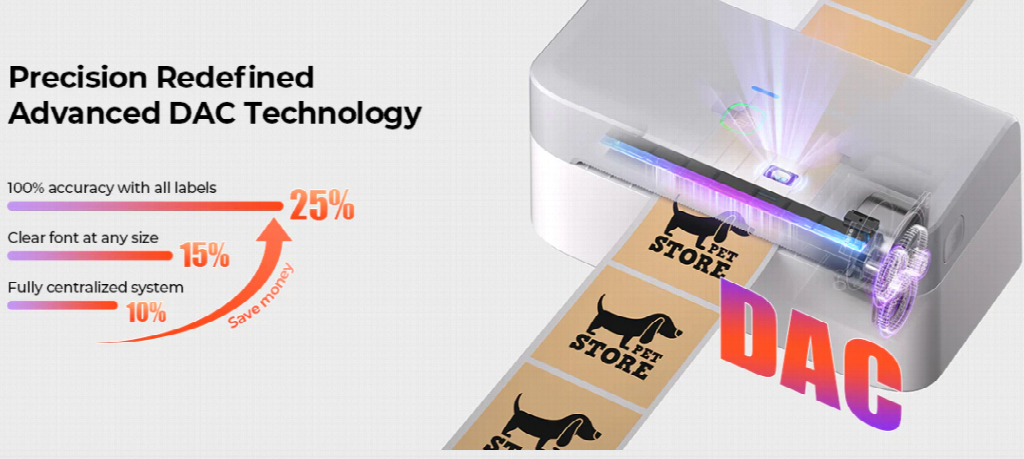
If you’re looking at mid-range options that balance professional features with affordability, models like the MUNBYN RW403B Label Printer for Shipping exemplify what modern label printers for shipping can deliver. This printer offers:
- Fast printing: 150mm/s thermal printing speed
- Wireless connectivity: Bluetooth for mobile flexibility plus USB backup
- Easy integration: Compatible with major shipping platforms and fulfillment software
- Compact design: Fits standard warehouse workstations without taking up much space
- Reliable performance: Designed for continuous operation in busy environments
This represents the type of solution that bridges the gap between basic equipment and enterprise systems—powerful enough for demanding operations yet accessible enough for growing businesses.
Common Mistakes to Avoid
- Choosing based on price alone: The cheapest label printer for shipping often lacks reliability. You’ll spend more on downtime than you save upfront.
- Ignoring connectivity needs: If you’re mobile or multi-location, Bluetooth connectivity isn’t optional—it’s essential.
- Underestimating print volume: Choose a printer built for your actual volume plus a 30% growth buffer. A printer rated for 1,000 labels per day will fail sooner if you regularly max it out.
- Skipping software compatibility checks: Before buying, verify your label printer works with your shipping platform. A printer that doesn’t integrate seamlessly becomes a frustration, not a solution.
- Not budgeting for supplies: Factor in label costs when calculating ROI. Cheap labels that jam your printer or have poor print quality will frustrate your workflow.
The Bottom Line
If you’re shipping more than a handful of packages weekly, a dedicated shipping label printer isn’t a luxury, it’s infrastructure. The combination of time savings, cost reduction, and reliability improvements creates immediate ROI.
The right label printer transforms a painful manual process into an automated, reliable system. Your team moves faster. Your customers receive packages with professional labeling. Your costs drop. These aren’t incremental improvements—they’re operational transformations that compound over months.
Whether you’re evaluating your first label printer or upgrading from older equipment, prioritize speed, connectivity, and platform integration. Test before committing. And remember: the cheapest solution rarely delivers the best results. Choose a label printer for shipping that matches your actual needs and growth trajectory.