Text prompts are useful for defining intent, but they often leave too many visual decisions open. A practical multimodal workflow assigns a different job to each reference: images define identity and appearance, video defines motion and camera behavior, audio defines timing, and text explains priorities and constraints. The goal is not to add as many references as possible. It is to build a small, non-conflicting control set, test it systematically, and evaluate continuity before polishing resolution.
AI video production has improved quickly, yet consistency remains one of its most visible weaknesses. A product changes shape between shots. A character’s clothing shifts color. A camera move begins smoothly and ends with an unexpected jump. These problems can appear even when the prompt is detailed, and the individual frames look impressive.
The underlying challenge is that a prompt describes a result without fully specifying it. Words such as “cinematic,” “premium,” or “dynamic camera movement” still leave room for many interpretations. A video model must make choices about composition, lighting, motion, identity, timing, and continuity. When those choices are not constrained, each generation can move in a different direction.
Multimodal references reduce that uncertainty. Instead of using a single prompt to control every production variable, the creator provides concise evidence for the variables that matter most. The workflow becomes closer to directing: show the desired identity, demonstrate the motion, describe the objective, and define what must not change.
Table of contents
Why Text Alone Often Produces Inconsistent Results
A text prompt is an abstraction. It can name a person, object, location, mood, lens, or movement, but it rarely defines the exact appearance of each element. Two creators may interpret “a minimalist silver speaker in a warm studio” differently, and a generative model has even more plausible options.
Video also adds a temporal problem that does not exist in a single still image. The model must maintain relationships across frames while objects move, the camera changes position, and previously hidden surfaces become visible. Early research on Video Diffusion Models (Ho et al., 2022) treated temporal coherence as a central challenge rather than a simple extension of image generation. Current tools are much more capable, but the production lesson remains useful: visual production quality in one frame does not guarantee continuity across a clip.
Longer prompts are not always the solution. Adding more adjectives can introduce conflicts or bury the most important instruction. A better approach is to decide which information is best communicated through words and which information should be demonstrated through a reference.
Give Each Reference One Clear Job
The most reliable reference sets are small and purposeful. Each input should answer a specific production question.
Image references: what should remain recognizable?
Use an image to establish identity, shape, color, materials, wardrobe, or a key composition. For product work, a clean reference image can define the proportions and surface details that must survive across shots. For character work, a reference can establish facial features, hair, clothing, and accessories.
Avoid mixing images that disagree about important details. If one product reference shows a black control panel and another shows a silver panel, the model may alternate between them or invent a hybrid. Resolve that conflict before generation rather than hoping the prompt will do it later.
When reference assets span multiple formats, teams need a clear way to manage them. A browser-based environment such as Seedance2AI can organize text, image, video, and audio inputs in one place and make reference-driven results easier to compare.
Video references: how should the scene move?
A motion reference is useful when movement is difficult to describe precisely. It can demonstrate camera speed, orbit direction, subject timing, body movement, or the rhythm of a transition. The reference does not need to resemble the final scene in every detail. Its job may be only to communicate the movement pattern.
This distinction matters. Appearance and motion are separate control dimensions. Asking one source clip to define both can accidentally transfer unwanted styling, background elements, or framing. When the workflow permits it, use one reference for appearance and another for motion, then state which source has priority for each property.
Audio references: when should events happen?
Audio can act as a timing map. A beat, spoken phrase, or sound effect provides anchors for cuts, gestures, reveals, and transitions. For short marketing clips, timing references are often more useful than vague directions such as “make it energetic.” A clearly identified cue“the product rotates on the second beat” is easier to review and reproduce.
Text direction: what is the intent and what must not change?
Text is still essential. Its strongest role is to connect the references, define the scene, and state priorities. A practical prompt should explain the desired action, camera behavior, environment, and invariants. Invariants are the details that must stay fixed: logo placement, product color, wardrobe, time of day, or direction of movement.
Use direct language. “Preserve the exact red casing and white front label from the product reference” is more actionable than “maintain strong brand consistency.”
Build a Reference Hierarchy Before Generating
Reference overload is a common failure mode. More inputs can create more ambiguity when the creator has not defined which source controls which attribute. Before uploading anything, create a simple hierarchy:
- Primary identity reference: the authoritative source for the person, product, or environment.
- Motion reference: the source for subject movement or camera behavior.
- Style reference: optional evidence for palette, lighting, texture, or finish.
- Audio reference: optional timing and synchronization cues.
- Written invariants: a short list of elements that cannot change.
If two references compete for the same job, remove one or explain the priority explicitly. This small preparation step often saves more time than repeatedly rewriting the prompt after inconsistent outputs appear.
Worked Example: Keeping a Product Consistent Across Three Shots
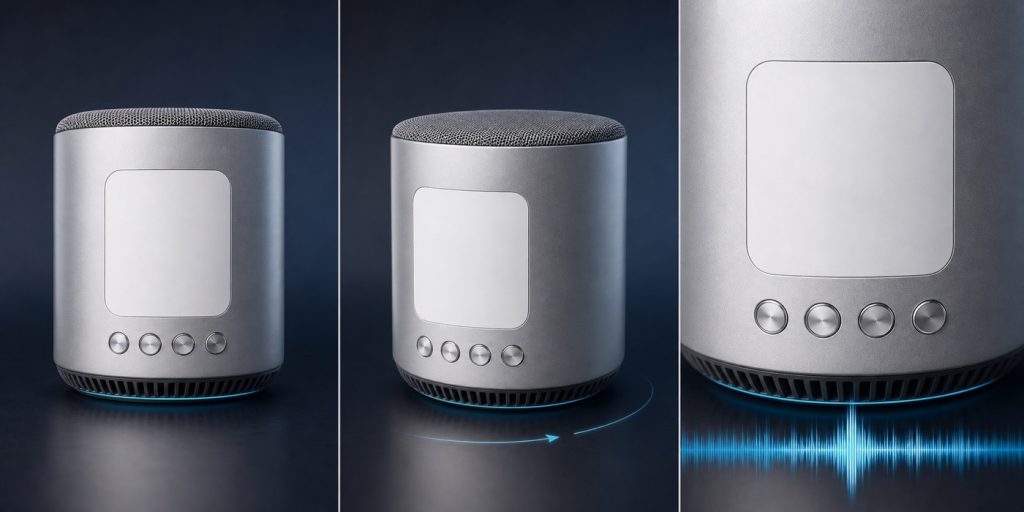
Consider a hypothetical ten-second advertisement for a compact silver speaker. The sequence needs a front-facing hero shot, a slow clockwise orbit, and a final close-up synchronized with a beat. A text-only prompt can describe all three moments, but it does not fully lock the speaker’s proportions, label placement, or camera rhythm.
- Identity reference: a clean product image defines the silver casing, white front label, button positions, and overall proportions.
- Motion reference: a short orbit clip defines the clockwise direction, camera height, and speed without controlling the product’s appearance.
- Audio reference: a beat track sets the timing for the final close-up and product reveal.
- Written invariants: the prompt states that the casing, label, logo position, and rotation direction must not change across shots.
Using the workflow above, the team first generates a text-only baseline, then adds the identity image, followed by the motion and audio references. Reviewers check whether the casing, label, color, timing, and rotation direction remain consistent in every shot. If the label drifts, they strengthen the image reference or written invariant without changing the motion input. If the orbit speed is wrong, they adjust only the motion reference. This controlled process makes it clear which modality solved each continuity problem.
A Repeatable Production Workflow
1. Define the continuity target
Consistency is not one universal score. Decide what matters for the project. A product image may prioritize geometry, label accuracy, and brand color. A character sequence may prioritize facial identity, wardrobe, and screen direction. A music visual may tolerate visual variation but require tight beat alignment.
Write three to five continuity targets before generating. This makes review objective enough for a team to discuss.
2. Create a compact reference set
Choose the minimum evidence needed to control those targets; crop away irrelevant material. Use clear source images. Trim motion references to the useful action. Keep filenames descriptive so collaborators understand each source without opening it.
3. Establish one baseline prompt
Write a short prompt that states the subject, action, setting, camera behavior, and invariants. Do not change the prompt during the first comparison. A stable baseline makes it possible to learn whether a reference improved the result.
4. Run a small test matrix
Generate controlled variations rather than random attempts. A useful sequence is:
- text only;
- text plus the primary image;
- text plus the primary image and motion reference;
- the full reference set with written priorities.
Compare the outputs using the same continuity checklist. This reveals which input is doing useful work and which input is adding noise.
5. Evaluate motion before surface polish
Review the clip at normal speed, then scrub through it frame by frame. Look for identity drift, object deformation, background jumps, sudden lighting changes, and physically implausible motion. Fix these structural problems before spending time on upscaling, color finishing, or sound design.
6. Extend from approved material
For multi-shot work, treat an approved frame or clip as the next reference whenever the tool supports that workflow. This creates a continuity chain. It is usually more reliable than regenerating every shot independently from the original prompt.
Measure Consistency with a Human Checklist
Teams do not need a research laboratory to review continuity. A short checklist can make evaluation repeatable:
- Does the subject remain recognizable from beginning to end?
- Do colors, materials, wardrobe, and logos remain stable?
- Does the background preserve its basic geography?
- Does the camera move in the intended direction and speed?
- Are entrances, exits, and screen direction continuous?
- Do audio cues align with the intended visual events?
- Can the final frame serve as a clean reference for the next shot?
Score each category on a simple pass, revise, or reject scale. Record the prompt, sources, settings, and chosen output. The record is valuable because a successful result is only production-ready when the team can understand how it was made.
Where a Unified Workspace Helps
The practical difficulty is often not generating one clip but managing prompts, images, motion sources, audio, and iterations without losing context. Teams exploring this workflow can use a browser-based environment such as Seedance2AI to organize text, image, video, and audio inputs in one place and compare reference-driven results.
Whatever tool a team selects, the evaluation method should remain portable. Keep the same source package, baseline prompt, and continuity checklist when comparing models. That prevents a visually impressive one-off result from being mistaken for a reliable production workflow.
Common Mistakes to Avoid
The first mistake is adding references without assigning roles. The second is changing the prompt, model settings, source assets, and output format at the same time. Both make it impossible to identify the cause of improvement or failure.
Another mistake is evaluating only the opening frame. A clip may begin with a faithful product or character and drift after motion starts. Review the full temporal sequence. Finally, avoid using higher resolution as a substitute for continuity. A sharper inconsistency is still an inconsistency.
The Takeaway
Multimodal references improve AI video production consistency when they reduce ambiguity, not merely when they increase input volume. Images can lock appearance, video can demonstrate motion, audio can define timing, and text can establish priorities and invariants. A small reference hierarchy, controlled test matrix, and explicit continuity checklist turn generation from repeated guessing into a AI video production process.
The result is not perfect control, and no workflow removes the need for human review. It does, however, give creative teams a clearer way to diagnose failure, preserve approved decisions, and build multi-shot sequences with fewer surprises.