Quick Answer
Hybrid work depends on more than video platforms, collaboration software, and reliable networks. Employees also need physical spaces that match the task in front of them. A one-person private call may need an enclosed phone booth, while a small hybrid meeting needs a space designed for several people, screens, cameras, and shared conversation.
The right choice depends on the work pattern, privacy requirement, session length, technology setup, and available floor space. Treating every enclosed space as interchangeable is one of the fastest ways to create a workplace that looks modern but remains difficult to use.
Key Takeaways
- Hybrid work relies on the right physical spaces for different tasks, not just technology.
- Digital collaboration still needs physical privacy; interruptions can disrupt meetings and focus.
- Define the task first when planning workplace privacy; select spaces based on the type of work required.
- Distinguish between phone booths for private calls and meeting pods for group discussions; they serve different purposes.
- Follow a deployment sequence: map work patterns, identify needs, select space types, and review usage post-launch.
Table of contents
- Quick Answer
- Digital Collaboration with Hybrid Work Still Depends on Physical Space
- Start With the Work Task, Not the Product Name
- When an Acoustic Phone Booth Fits with Hybrid Work
- When an Acoustic Meeting Pod Fits with Hybrid Work
- Specify the Technology and the Enclosure Together
- Common Procurement Mistakes with Hybrid Work
- A Practical Deployment Sequence
- FAQ
Digital Collaboration with Hybrid Work Still Depends on Physical Space
Modern workplace technology makes it easier to connect distributed teams. A meeting can begin in seconds, a document can be shared across continents, and an AI assistant can summarize the conversation afterward.
None of those tools controls what happens around the user.
A nearby conversation can interrupt a video call. A confidential discussion can be overheard from an open workstation. A person joining a client meeting may be visible and audible to everyone nearby. Even when the software works perfectly, the physical setting can still reduce privacy, concentration, and perceived professionalism.
This creates a missing layer in many hybrid workplace strategies: physical privacy infrastructure.
The goal is not to make every part of the office silent or enclosed. The goal is to give people an appropriate place for the work they need to complete.
Start With the Work Task, Not the Product Name
A workplace privacy plan should begin with the task, the number of people involved, and the consequences of interruption or overhearing.
| Work task | Suitable space pattern | Priority checks | Common mismatch |
| Short private call | One-person enclosed call space | Speech privacy, door closure, ventilation, power | A meeting room is occupied for a short call |
| Confidential HR or finance conversation | Enclosed space with stronger visual and speech privacy | Sightlines, access, acoustic performance, session comfort | The user is technically enclosed but still visible to everyone |
| One-person video meeting | Phone booth or compact solo space | Camera position, lighting, background, power, network | The camera works, but the user appears poorly lit or distracted |
| Two- to six-person hybrid meeting | Small meeting enclosure | Camera coverage, screen position, table, power, network | A phone booth is used for a group task |
| Deep individual work | Quiet zone or enclosed solo workspace | Interruption control, ergonomics, lighting, session length | A short-call booth is expected to support long work sessions |
| Team workshop | Meeting room or larger collaboration space | Movement, shared display, whiteboard, equipment access | A compact enclosure limits the activity |
This matrix does not replace a floor-plan review. It gives facilities and IT teams a common starting point before they begin comparing products.
When an Acoustic Phone Booth Fits with Hybrid Work
An individual call space is useful when one person needs a private place for a conversation, video meeting, interview, or focused task without reserving an entire meeting room.
Acoustic phone booths are most suitable when the main requirement is fast access to a compact, enclosed space. They can help separate a user from nearby conversations and visual distractions, especially in open-plan workplaces where private rooms are limited.
The decision should still be based on the actual use case. A booth for five-minute calls has different comfort requirements from one used for frequent video meetings or longer client conversations.
Before selecting a model, buyers should check:
- whether the door closes consistently and seals evenly;
- how users enter and leave without disrupting nearby work;
- whether the lighting works for the camera position;
- whether power and charging access are within comfortable reach;
- whether ventilation supports the expected session length;
- how the booth will be cleaned, serviced, and supported; and
- what acoustic evidence applies to the complete quoted configuration.
The word “acoustic” should also be treated precisely. It does not automatically mean that a booth is completely soundproof. Buyers should ask whether a stated result refers to speech level reduction, sound level difference, component testing, or another measurement. Acoustic results vary with the test method, installation, surrounding construction, and measurement setup.
A phone booth is therefore a focused workplace tool. It creates a destination for a specific type of individual work. It does not repair a noisy HVAC system, replace room-level acoustic treatment, or solve every privacy problem in an office.
When an Acoustic Meeting Pod Fits with Hybrid Work
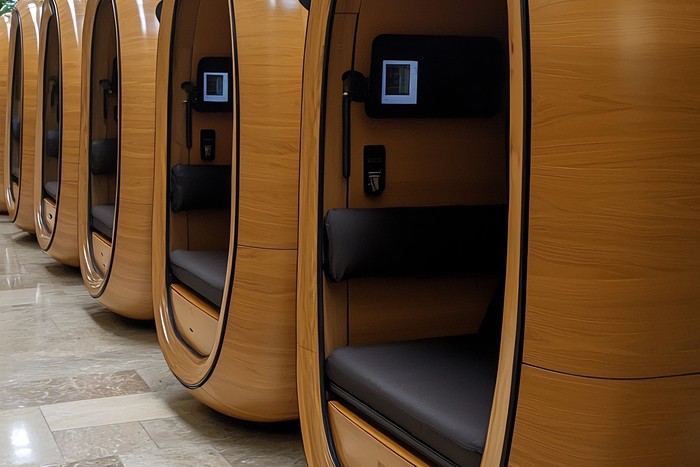
A small group needs a different physical environment from an individual caller. People need to see one another, share a screen, position a camera, use a table, and enter or leave without forcing someone to move every time the door opens.
Acoustic meeting pods are designed for this broader collaboration pattern. They can support small hybrid meetings, manager conversations, interviews, client discussions, and focused group work when a permanent meeting room is unavailable or unsuitable.
The technology plan should be developed with the enclosure rather than after it. A meeting pod may need to accommodate:
- a display or shared screen;
- a camera that captures every participant;
- microphones and speakers;
- laptop connections;
- charging access;
- network connectivity;
- adequate lighting for both local and remote participants; and
- enough circulation for people to sit, stand, and leave comfortably.
A small group space also changes the importance of sightlines. A screen that works for the person nearest the door may be uncomfortable for someone seated at the opposite end. A camera that frames one participant well may exclude another. These issues are easier to resolve on a coordinated layout drawing than after installation.
The acoustic objective must also be stated clearly. The buyer may need lower distraction, better speech privacy, reduced sound transfer, or a more controlled setting for remote meetings. Those are related goals, but they are not identical. The required product and evidence should follow the actual business risk.
Specify the Technology and the Enclosure Together
A common procurement mistake is to approve the enclosure first and treat technology as a later accessory. That approach can create avoidable problems with power, cable reach, camera location, screen mounting, and service access.
A better specification records the physical and digital workflow together.
Camera and Screen with Hybrid Work
Confirm where the camera will sit, what it needs to capture, and whether every participant has a clear view of the screen. Test the camera from the normal seated position rather than judging the layout from an empty room.
Power and Charging
Document the building connection, internal outlets, USB options, cable routes, and the party responsible for the final electrical connection. A product description that says “power available” is not enough for project approval.
Network
Decide whether the normal workflow uses Wi-Fi, Ethernet, or another approved connection. An Ethernet port does not guarantee reliable service by itself. The building still needs an active network path, suitable cabling, configuration, and an accountable IT owner.
Comfort and Maintenance with Hybrid Work
Ventilation, lighting, door movement, cleaning, and service access all influence whether employees continue using the space after the initial installation. A booth or pod that is difficult to enter, uncomfortable during a normal call, or hard to maintain will gradually lose its value.
Acoustic Evidence
Ask the supplier to identify the exact model, configuration, test method, and conditions associated with any acoustic result. Avoid comparing unrelated numbers as if they describe the same performance. A component rating, a whole-enclosure measurement, and a speech privacy result answer different questions.
Common Procurement Mistakes with Hybrid Work
Choosing by Appearance Alone
A visually attractive enclosure can still be poorly matched to the work. Start with the task, frequency, occupancy, and privacy requirement before selecting finishes.
Treating Every Enclosure as Interchangeable
A one-person call booth is not simply a smaller meeting room. A meeting pod is not simply a larger phone booth. The furniture, technology, airflow, sightlines, and movement requirements change with the task.
Placing the Space Where It Will Not Be Used
If a private call space is too far from the teams that need it, employees will continue taking calls at their desks. Placement should follow work behavior and circulation, not only unused floor area.
Ignoring the Handover
The project should finish with a clear record of how users start a call, connect devices, reset the space, report faults, and request service. Without that handover, a technically successful installation can still become a daily support problem.
A Practical Deployment Sequence
Facilities and IT teams can reduce risk by following a simple sequence:
- Map the work patterns. Record where private calls, video meetings, interviews, and group discussions currently happen.
- Separate individual and group demand. Do not use one occupancy assumption for every task.
- Identify the consequence of failure. Consider interruptions, overheard speech, poor camera framing, lost meeting-room capacity, and user avoidance.
- Select the space type. Match the enclosure to the task, session length, occupancy, and technology.
- Review the layout before ordering. Confirm door movement, circulation, power, network, screen position, camera field of view, and service access.
- Test the installed workflow. Use the real devices, accounts, cables, network path, and user instructions.
- Review usage after launch. If employees avoid the space, investigate placement, comfort, access, or workflow before assuming the product itself has failed.
FAQ
Are phone booths and meeting pods interchangeable?
No. A phone booth is intended primarily for individual calls and compact solo work. A meeting pod supports several people and requires more attention to seating, screens, cameras, movement, power, and network access.
Does an acoustic enclosure guarantee complete privacy?
No single label is enough to answer that question. Buyers should review the relevant test method, complete configuration, installation conditions, door performance, ventilation paths, and the level of privacy required for the task.
Should technology be selected before the pod with Hybrid Work?
The physical enclosure and technology should be planned together. Camera position, screen mounting, power, cable routing, network access, lighting, and service space can affect the final configuration.
What is the best first step for a hybrid office?
Document the work patterns that currently fail: private calls at open desks, meetings held in unsuitable rooms, poor remote-participant visibility, or employees avoiding available spaces. Then select the smallest number of space types that directly address those problems.
A successful hybrid workplace is not built from digital tools alone. It combines the software people use to collaborate with physical spaces that let them speak, focus, meet, and work without creating unnecessary friction for everyone nearby.