
Losing important photos from an SD card can happen unexpectedly. Whether the files were deleted accidentally, the card was formatted by mistake, or the storage device became corrupted, there is often still a chance to recover deleted photos if the data has not been overwritten.
If you need to recover deleted photos from SD card storage, the most important step is to stop using the card immediately. Every new photo, video, or file written to the card increases the risk of overwriting recoverable data and reduces the likelihood of a successful recovery.
Fortunately, modern SD card recovery tools can scan storage devices, identify deleted image files, and restore them safely to another location. Solutions such as Recoverit are commonly used because they support a wide range of memory cards, image formats, and recovery scenarios.
This issue commonly affects:
- DSLR and mirrorless camera SD cards
- Android microSD cards
- Drone memory cards
- Action camera storage devices
- Portable media cards used for travel, work, or content creation
For users facing inaccessible or corrupted storage devices, memory card recovery software can often recover files even when folders appear empty or missing.
Key Takeaways
- To recover deleted photos from an SD card, stop using the card immediately to prevent overwriting data.
- Modern SD card recovery tools can effectively identify and restore deleted images, with Recoverit being a popular choice.
- Users can typically recover deleted photos from various types of SD cards, including those used in cameras and drones.
- Follow important precautions before recovery, such as avoiding new file transfers and using a reliable card reader.
- For successful recovery, act quickly and use a trusted recovery tool like Recoverit, which supports numerous image formats and devices.
Table of contents
- How to Recover Deleted Photos – And Why Its Possible
- Common Causes of SD Card Photo Loss
- What You Should Do Before You Recover Deleted Photos
- SD Card Recovery on Windows Computers
- How to Choose an SD Card Recovery Tool
- How to Recover Deleted Photos in 3 Steps
- Why Many Users Choose Recoverit to Recover Deleted Photos
- Tips to Improve Photo Recovery Success
- Final Thoughts
How to Recover Deleted Photos – And Why Its Possible
Many users assume that deleted photos disappear permanently. In reality, most operating systems and cameras do not immediately erase the underlying data.
When a file is deleted, the system usually removes the file reference and marks the storage space as available. The actual photo data often remains on the card until new information overwrites it.
This is why acting quickly is so important. If no new data has been written to the card, photo recovery software may still be able to locate and restore the original files.
In many SD card recovery cases, users successfully recover deleted photos from SD card devices days or even weeks after the loss occurred, provided the storage has remained largely untouched.
Common Causes of SD Card Photo Loss
Photo loss can happen for several reasons:
Accidental Deletion
A simple mistake while reviewing photos on a camera, phone, or computer can remove valuable images within seconds.
Formatting the SD Card
Many cameras prompt users to format a card when read errors occur. Confirming the format may make photos inaccessible.
Interrupted File Transfers
Removing an SD card during data transfers can cause incomplete file structures and missing images.
File System Corruption
Power failures, improper ejection, and bad sectors may damage the card and prevent access to stored photos.
Virus or Malware Issues
Malicious software can hide, damage, or delete files stored on memory cards.
Regardless of the cause, recovery should begin as soon as possible to maximize success rates.
What You Should Do Before You Recover Deleted Photos
Before attempting recovery, follow these precautions carefully:
- Stop using the SD card immediately
- Do not save new photos or videos
- Avoid formatting the card again
- Do not run repair tools repeatedly
- Use a reliable card reader
- Save recovered files to another drive
These steps significantly improve the chances of successful photo recovery and help prevent additional data loss.
SD Card Recovery on Windows Computers
Many users perform SD card recovery using Windows because it remains the most widely used desktop operating system.
A reliable data recovery for Windows solution can scan removable storage devices, identify deleted files, and restore them without modifying the original data stored on the card.
Whether the card comes from a DSLR camera, drone, smartphone, or action camera, recovery software running on Windows can help locate deleted photos, formatted files, and inaccessible image folders.
For best results, connect the SD card using a stable card reader and allow the software to complete a full scan before recovering files.
How to Choose an SD Card Recovery Tool
Not all recovery applications provide the same capabilities. When evaluating a recovery solution, consider the following features:
| Feature | Why It Matters |
| Photo Preview | Allows verification before recovery |
| Deep Scan Technology | Finds deleted and formatted files |
| RAW Format Support | Important for photographers |
| Read-Only Recovery Process | Helps prevent data overwriting |
| File Filtering | Speeds up locating specific photos |
| Device Compatibility | Supports SD and microSD cards |
The best SD card recovery tools balance powerful scanning capabilities with a simple user experience.
How to Recover Deleted Photos in 3 Steps
Step 1: Connect the SD Card to Recover Deleted Photos and Start the Scan
Insert the SD card into your computer using a card reader. Open Recoverit and select the SD card from the device list.
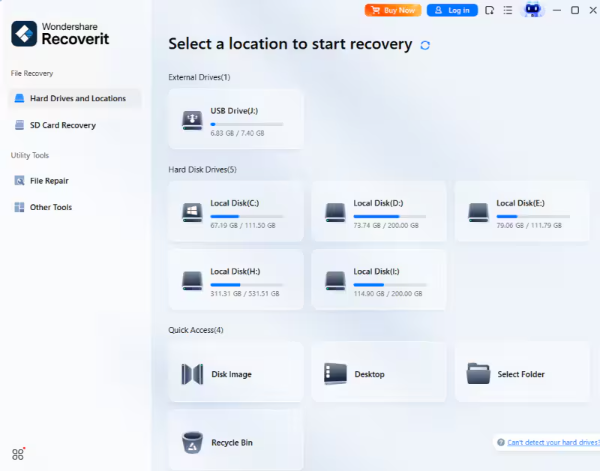
The software will identify the storage device and prepare it for scanning.
Step 2: Scan for Lost Photos
Start the scan process. Recoverit will search for deleted, formatted, hidden, or inaccessible image files.
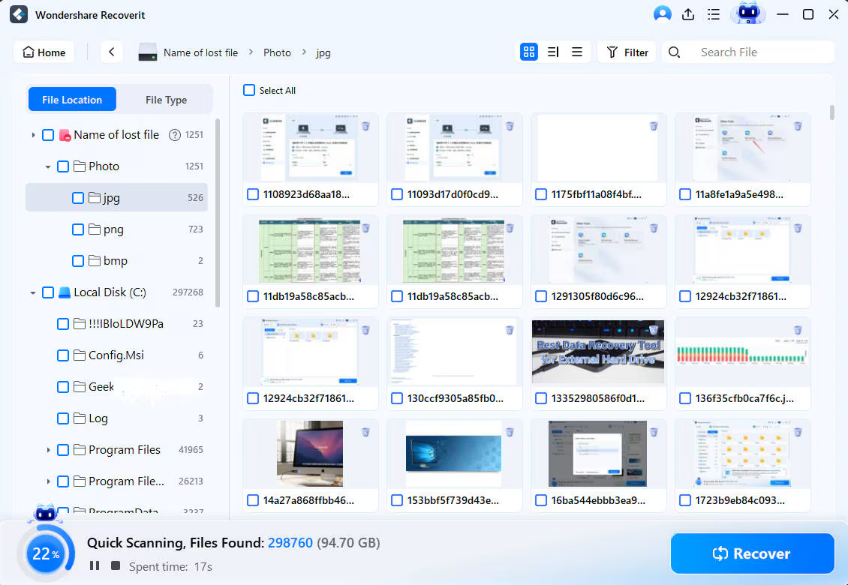
Depending on the card size and condition, the scan may take several minutes.
During the process, recoverable JPG, PNG, RAW, and other image formats will appear in the results.
Step 3: Preview and Recover Deleted Photos
Preview the recoverable photos to confirm their quality before restoration.
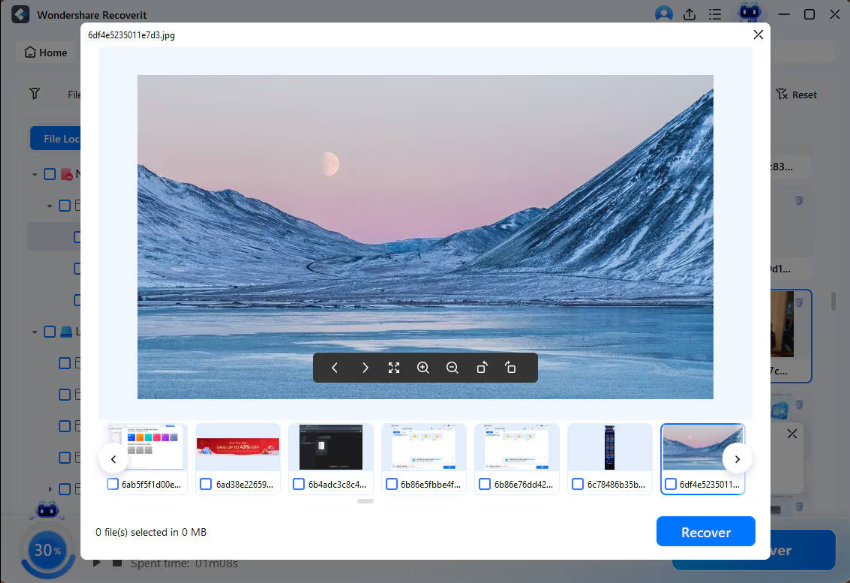
Select the files you want to recover and save them to your computer, SSD, or another external drive.
Never save recovered files back to the original SD card, as this may overwrite additional recoverable data.
Why Many Users Choose Recoverit to Recover Deleted Photos
When comparing SD card recovery solutions, many users look for a tool that offers strong recovery capabilities without requiring advanced technical knowledge.
Recoverit is commonly used because it provides:
- SD card recovery and microSD card recovery support
- Recovery of deleted, formatted, or inaccessible files
- Photo recovery for JPG, PNG, RAW, CR3, NEF, ARW, and other image formats
- Data recovery for Windows computers
- Preview before recovery
- Support for cameras, drones, smartphones, USB drives, and external storage devices
These features make it a practical option for both everyday users and professionals who need to recover important photos quickly.
Tips to Improve Photo Recovery Success
Although recovery is never guaranteed, following a few best practices can improve the outcome:
- Start recovery immediately after data loss
- Avoid taking additional photos
- Do not format the card again
- Use a trusted recovery tool
- Save recovered files to a separate storage device
- Create backups regularly to prevent future losses
Many failed recovery attempts occur because the original data has already been overwritten before recovery begins.
Final Thoughts
If you want to recover deleted photos from SD card devices successfully, speed is critical. Stop using the card as soon as you notice missing files, avoid overwriting the storage, and begin the recovery process immediately.
Because deleted photos often remain on the card until new data replaces them, recovery software can frequently restore files that appear to be permanently lost. Whether the issue was caused by accidental deletion, formatting, corruption, or transfer errors, using a dedicated recovery solution can significantly improve your chances of success.
For users seeking reliable SD card recovery, photo recovery, and data recovery for Windows, Recoverit offers a straightforward workflow that helps restore valuable photos from cameras, phones, drones, and other removable storage devices with minimal risk.