



The parts of headphones sit inside a product people keep buying at scale: worldwide smart personal audio shipments held roughly flat at 108 million units in the second quarter of 2026, while revenue rose 9% year over year (Source: Omdia). Flat volume with rising revenue means buyers are paying more per pair. Most of that extra money goes into components, such as better drivers, noise-cancelling microphones, and bigger batteries.
Knowing what each part does makes those price gaps easier to judge. It also tells you what to fix when something fails. A flat ear pad, a crackling cable, and a battery that dies by lunchtime are three different problems with three different fixes.
Key Takeaways
- The driver turns an electrical signal into sound and shapes most of the tone.
- Ear cups and ear pads control isolation, bass, and comfort.
- Cables, strain reliefs, and plugs are the most common failure points on wired models.
- Wireless pairs add a Bluetooth chip, a DAC, an amplifier, a battery, and microphones.
- Pads, cables, and batteries wear out first, and many are replaceable.
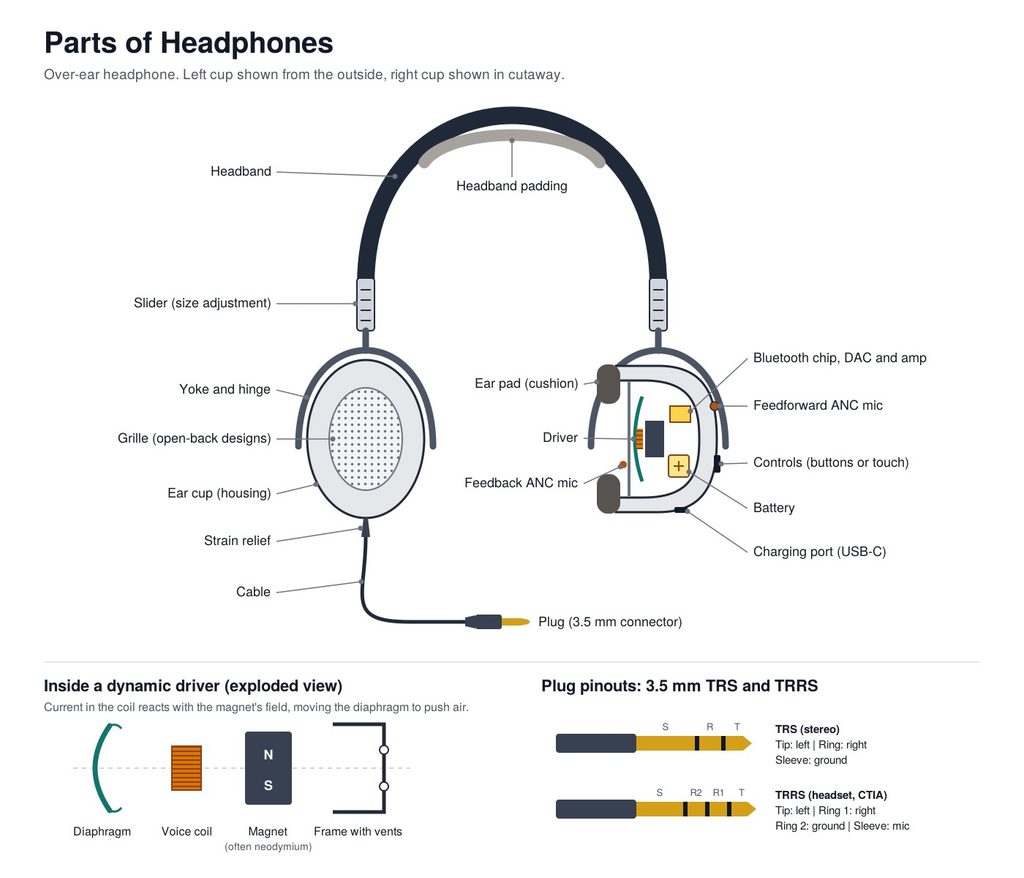
How Headphones Turn a Signal Into Sound
Every pair of headphones does the same basic job. An audio signal arrives, gets converted into motion, and that motion pushes air into your ear canal.
On wired headphones, the signal is already analog when it reaches you. Your phone, laptop, or amplifier has done the digital-to-analog conversion, and the cable carries a small alternating current to each earcup. Wireless headphones receive digital data over Bluetooth instead, so they need their own converter and amplifier inside the housing.
The rest of the hardware exists to support that conversion. The headband and yokes hold the drivers at the right angle to your ears. The cups and pads control how much sound leaks in or out. The cable or battery keeps the whole thing powered and connected.
The Driver: Where the Sound Comes From
The driver is a miniature speaker. It is the single part that most decides how a pair of headphones sounds.
Diaphragm, Voice Coil, and Magnet
Most headphones use a dynamic driver, which has three core pieces. The diaphragm is a thin, light membrane, usually a dome or cone of plastic film, paper, or a coated composite. A voice coil of fine copper or aluminum wire is glued to the back of it. Behind the coil sits a permanent magnet, often neodymium because it packs a strong field into a small, light block.
When the audio current flows through the coil, the coil becomes a small electromagnet. It pushes against and pulls toward the permanent magnet thousands of times per second, following the waveform of the music. The diaphragm moves with it and pushes air. A frame, sometimes called the basket, holds everything in alignment, and small vents behind it let air move so the diaphragm is not fighting a sealed pocket.
Over-ear headphones typically use drivers around 40 to 50 mm across. Earbuds use far smaller ones. Size matters less than many spec sheets suggest, though. Diaphragm material, coil weight, magnet strength, and tuning of the surrounding chamber decide whether a driver sounds clean or muddy.
The Four Main Driver Types
| Driver type | How it works | Where you find it |
|---|---|---|
| Dynamic | Voice coil moves a diaphragm inside a magnetic field | Most consumer headphones and earbuds |
| Planar magnetic | A flat, thin film with embedded conductive traces sits between magnet arrays | High-end over-ear headphones |
| Balanced armature | A tiny armature pivots between magnets and drives a small diaphragm | In-ear monitors and hearing aids |
| Electrostatic | A charged membrane moves between two perforated plates | Specialist audiophile systems |
Planar magnetic drivers spread the driving force across the whole film, which tends to keep distortion low. They are also heavier and usually need more power. Balanced armatures are small enough that in-ear monitors often stack two or more per side, each handling part of the frequency range. Electrostatic headphones need a dedicated energizer that supplies a bias voltage in the hundreds of volts, so you cannot plug them into a phone.
Two specs on the box relate directly to the driver. Impedance, measured in ohms, tells you how much the driver resists current; 32-ohm headphones run easily from a phone, while 250 or 300-ohm studio models need a stronger amplifier. Sensitivity tells you how loud the driver gets for a given input.
Ear Cups, Grilles, and Ear Pads
The ear cup, or housing, holds the driver. Its shape and openness change the sound almost as much as the driver does.
Closed-Back vs. Open-Back
A closed-back cup is sealed on the outside. It blocks outside noise, keeps your music from leaking to the person next to you, and usually produces stronger bass. That makes it the default for commuting, offices, and recording studios, where a microphone must not pick up the click track.
An open-back cup has a grille on the outside, so air and sound pass through freely. The result often feels more spacious, closer to listening to speakers in a room. The trade-off is plain: everyone nearby hears what you hear, and you hear them. Open-back models suit quiet rooms, not trains.
Inside both types, a baffle plate holds the driver in place, and foam or felt damping inside the cup absorbs stray reflections that would otherwise color the sound.
Ear Pads and the Seal
Ear pads are the cushions between the cup and your head. They usually combine a foam core with a cover of protein leather, real leather, velour, or fabric. Leatherette seals well and isolates better. Velour breathes and stays cooler during long sessions.
Pads matter for sound, not only comfort. They set the distance between the driver and your ear and form the seal around it. A leak in that seal, from glasses arms, hair, or a pad that has gone flat, lets low frequencies escape, so the bass thins out. Worn pads are one of the most common reasons a pair of headphones suddenly sounds worse. Fit also matters a great deal for listening with hearing loss, where a consistent seal keeps volume and clarity predictable.
On-ear headphones press pads directly onto the outer ear. Over-ear, or circumaural, headphones surround the ear entirely, which spreads pressure and usually seals better.
Headband, Sliders, and Yokes
The headband carries the weight and sets the clamping force. Too little force and the cups slide; too much and you get a headache within an hour. Bands are made from spring steel, aluminum, or reinforced plastic, often with padding underneath. Some designs use a suspension strap that floats below a rigid outer band, spreading the load across a wider area of your head.
Sliders let you extend each side to fit your head size. They work on a ratchet with click stops or on smooth friction rails. Cheap sliders lose their grip over time and drift loose.
The yoke is the fork or arm that connects the band to each cup. Hinges and pivots in the yoke let the cups swivel and tilt, so the pads sit flat against the side of your head instead of pressing harder at the top or bottom. Yokes and hinges also take a lot of stress every time you put the headphones on or fold them, which is why cracked hinges are a classic failure on budget plastic models.
Cables, Strain Relief, and Plugs
On wired headphones, the cable is the only link between your device and the drivers.
Inside the Cable
A headphone cable holds several thin conductors, typically copper strands, each insulated so the left channel, right channel, and ground do not short against each other. An outer jacket of rubber, PVC, or braided fabric protects the bundle. Some cables add a shielding layer to keep interference out; the same principle applies to EMI shielding in other electronics.
Where the cable meets the cup and the plug, you will see a short, tapered rubber collar. That is the strain relief. It stops the wire from bending sharply at one point, which is exactly where conductors break. If one channel cuts in and out when you wiggle the cable near the plug, the break is usually right there.
Detachable cables solve this cleanly. When the wire fails, you replace the cable instead of the whole headset.
Plugs: 3.5 mm, 6.35 mm, 4.4 mm, and USB-C
People often call the metal tip at the end of the cable a jack. Strictly, that part is the plug. The jack is the socket you push it into.
The 3.5 mm plug is the standard on phones, laptops, and portable players. A TRS version has three contacts, tip, ring, and sleeve, carrying left, right, and ground. Headsets with a microphone use a TRRS plug with a fourth contact. Under the widely used CTIA wiring, the tip carries left, ring 1 carries right, ring 2 is ground, and the sleeve carries the microphone.
The 6.35 mm, or quarter-inch, plug is common on studio gear and home amplifiers. The 4.4 mm balanced plug, a five-contact design, keeps left and right signals fully separate and is popular on portable audio players. USB-C headphones carry digital audio, so the conversion to analog happens in a chip inside the headphones or inside a small dongle on the cable.
Gold plating on a plug resists corrosion and keeps contact reliable over time. It does not make the music sound better.
What Wireless and Noise-Cancelling Headphones Add
Cut the cable and a lot of electronics move inside the ear cups.
The Bluetooth chip handles the radio link, decodes the audio, and often runs the noise cancellation and touch controls as well. An antenna, usually a small trace on the circuit board or along the band, carries the signal. The audio arrives compressed by a codec. SBC is the baseline every Bluetooth headphone supports, AAC is common with Apple devices, and aptX and LDAC offer higher bitrates on compatible Android phones. Newer Bluetooth LE Audio devices use the LC3 codec, which aims for better quality at lower bitrates.
After decoding, a built-in DAC turns the data into an analog signal, and a small amplifier powers the drivers. A rechargeable lithium-ion or lithium-polymer battery runs all of it, charged through a USB-C port.
Active noise cancellation adds microphones. Feedforward mics on the outside of the cup hear ambient noise before it reaches you. Feedback mics inside the cup, near the driver, hear what actually reaches your ear. The processor generates an inverted sound wave that cancels much of the steady, low-frequency noise, like engine hum. Hybrid ANC uses both sets of mics. Separate beamforming microphones pick up your voice for calls, and processing for features such as spatial audio runs on the same chip.
Many pairs also include proximity or wear sensors that pause playback when you take them off. If you mostly use headphones with a TV, a model that pairs with a dedicated TV transmitter can avoid the lip-sync lag some Bluetooth connections introduce.
Which Parts Wear Out First
Not every part ages at the same pace. Knowing the usual order helps you decide whether to repair or replace.
Ear pads. Foam compresses and covers crack or peel, often within one to three years of daily use. Replacement pads are cheap and usually clip or twist on.
Cables and strain reliefs. Bending at the plug end is the classic killer. Wrap cables loosely, never around your phone, and pull the plug rather than the wire.
Batteries. Lithium cells lose capacity with every charge cycle. A pair that once lasted 30 hours might manage far less a few years later. Some models allow battery replacement; many do not.
Hinges and sliders. Plastic pivots crack under repeated folding. Metal yokes last longer.
Drivers rarely fail on their own unless they are overdriven at very high volume or physically damaged. When the sound distorts, check the pads, cable, and source first.
Conclusion
Headphones look simple from the outside, but each part has a specific job. The driver creates the sound. The cups and pads shape it and keep outside noise away. The headband, sliders, and yokes hold everything in place, and the cable or the Bluetooth electronics deliver the signal and power.
When you shop, read the specs with those roles in mind: driver type and impedance for sound and power needs, closed or open back for where you will listen, and replaceable pads, cables, and batteries for how long the pair will last. When something goes wrong, the same map tells you where to look first.
Read Next
For more on how audio hardware and software are changing, try these:
- How AI-Driven Audio Software Enhances Sound Quality in Wireless Devices
- Best AI Tools for Cleaning Audio Noise in 2026
- How Beats Are Made Today: Inside the Modern Music Production Process
Frequently Asked Questions
The main parts of headphones are the driver, ear cups, ear pads, headband, sliders, and yokes, plus a cable and plug on wired models. Wireless models replace the cable with a Bluetooth chip, a DAC, an amplifier, a battery, and microphones. The driver is the part that actually produces sound.
The driver affects sound quality the most, because it converts the electrical signal into sound waves. The ear cup design and ear pad seal come next. A worn pad or a poor seal can noticeably weaken bass even with an excellent driver.
The part of headphones that plugs into a device is called the plug or connector. The socket on the phone or laptop is the jack. Common plug sizes are 3.5 mm, 6.35 mm, and 4.4 mm, and many newer headphones use USB-C instead.
The parts of headphones most often replaced are ear pads, detachable cables, and headband cushions. Some models also allow battery, hinge, or yoke replacement. Check the manufacturer’s spare parts before buying if repairability matters to you.
Noise-cancelling headphones have extra microphones and a processing chip. Feedforward microphones sit outside the ear cup and feedback microphones sit inside near the driver. The chip uses their input to create an inverted sound wave that cancels steady background noise.