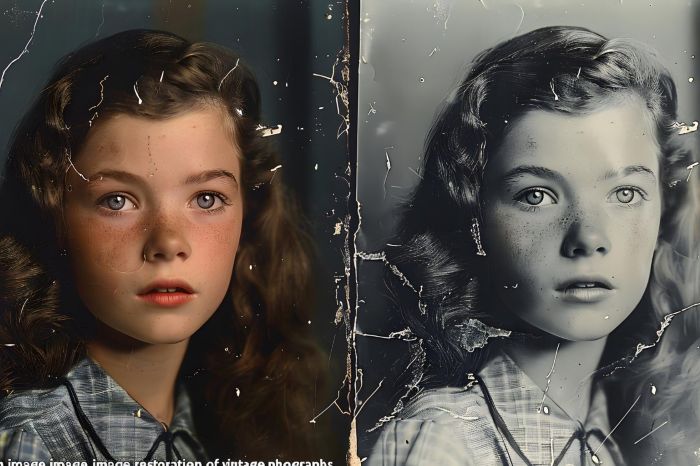
Old photographs are like memories that can get damaged over time. They can get hurt by being handled or by being stored in a bad place. This can cause them to fade get dirty get scratched or even lose some of the details. Old photo restoration with digital tools can fix these photographs. It makes them look better by getting rid of the damage while keeping the picture.
To fix photographs people usually scan them really closely and then use a computer program to make them look better. They can make the colors look right make the picture brighter or darker get rid of noise and even fix the parts that are broken. Sometimes they have to use techniques like working with layers or using other pictures to help fix the really bad parts.
Now anyone can fix photographs, not just experts. If you have the computer program and know the basics you can do a great job. In this guide we will show you everything you need to know to get started with photo restoration. We will walk you through the process of photo restoration so you can fix your old photographs.
Key Takeaways
- Digital photo restoration fixes damaged photographs by enhancing colors and removing scratches.
- Beginners can use accessible tools like Adobe Photoshop Elements, PhotoGlory, and Remini to restore photos easily.
- The basic restoration process includes scanning, cropping, fixing damage, adjusting tones, and refining the image.
- Common mistakes include over-editing, using low-resolution scans, and rushing the restoration process.
- Restoring old photos is a rewarding skill that preserves family history and promotes creativity.
Table of contents
What Is Photo Restoration?
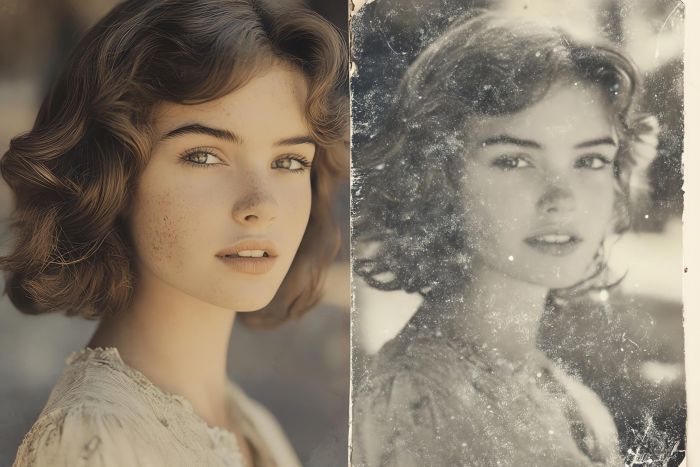
Photo restoration is when we fix damaged photos using computer tools. We can make the scratches go away fix the tears and make the colors look nice again. We can even make the photo look clearer and more nice to look at.
The main thing we want to do with photo restoration is keep the photo looking like it did but make it easier to see and nicer to look at. We do not want to change the photo much that it does not look like the same photo anymore..
What Kind of Damage Can Be Fixed?
Modern tools can help you fix lots of problems with your pictures. These problems include:
- Scratches and dust marks
- Missing sections
- Colors that have faded or washed out
- Pictures that have turned yellow or changed color
- Water stains and spots
- Noise and grain
- Pictures that are a little blurry or soft
Modern tools can really help you with these kinds of issues. For example you can use them to fix scratches and dust marks on your pictures. You can also use them to fix tears and missing sections. Modern tools are also great at fixing faded or washed-out colors. They can even help with yellowing and discoloration. Water stains and spots are no problem, for tools either. They can also help reduce noise and grain. If your pictures are a little blurry or soft modern tools can help with that too.
Photos that are really messed up may need help but a lot of ordinary problems, with photos can be made to look a lot better even by people who are just starting out with fixing damaged photos.
What Tools Do You Need to Start?
There are several software options available, each suited to different skill levels:
Adobe Photoshop Elements
A simplified solution for beginners is Adobe Photoshop Elements, which provides guided edits and automated tools for common restoration tasks such as scratch removal, color correction, and basic retouching.
Use case: entry-level users who need a balance between automation and control.
Limitations: fewer advanced features compared to full Photoshop.
PhotoGlory
This program is made for people who want to restore photos. It is easy to use even if you are new to this. The program can automatically fix damaged parts of the photo, add color to white pictures and make the picture look better.
Pros: The program is really easy to use
You get to see the results quickly
It is specifically made for restoring old photos
Cons: It does not give you as options as the programs that professional editors use
If you’re just getting started, beginner-friendly tools like PhotoGlory can help you achieve great results quickly without a steep learning curve.
Remini
This is an application that helps make pictures look better. It uses computer programs to fix faces and make pictures sharper and clearer.
Use case: you can use this to make pictures look nice quickly you do not have to do much it is especially good, for pictures of people.
Limitations: you can not control everything and the results can be different depending on the picture you start with. It does not always work perfectly for image enhancement and restoration.
The Basic Restoration Process
Although every photo is unique, most restoration projects follow a similar workflow:
- Scan the photo
Use a high resolution (300–600 DPI) to capture as much detail as possible. - Crop and straighten
Remove borders and align the image properly. - Fix damage
Use healing or cloning tools to remove scratches, dust, and tears. - Adjust tones and contrast
Improve brightness, contrast, and overall clarity. - Restore or enhance colors
Correct fading or add color to black-and-white photos. - Apply final refinements
Sharpen details and export the finished image.
Common Problems and Simple Solutions
Scratches and dust: You can use healing or clone tools to fix damaged areas, so they blend in smoothly.
Faded colors: Try adjusting the saturation, levels and color balance to make the colors more vibrant again.
Yellowing: Fix the balance and get rid of any color casts to correct it.
Blurry details: When sharpening be careful not to add noise or weird artifacts.
Common Mistakes Beginners Make
Over-editing the image: You can lose the look and feel of the photo if you try to make it look perfect.
Over-sharpening: This makes the image look unnatural and adds noise.
Using low-resolution scans: If the scan is not good you cannot do much to improve the image.
Ignoring -destructive editing: It is better to work with layers, so you do not change the original image.
Rushing the process: Restoring an image takes time. You must pay attention to details.
Conclusion
Photo restoration is a skill that needs practice. It is also a creative thing. At first it looks really hard. Now we have tools that make it easy for anyone to do. Even people who are just starting out.
You should start with something try out different tools and get better at it slowly. If you want to keep your family history or if you want to try something fixing old photos is a really good thing to do and it means a lot.