On the ERP data screen, the shipment is ready. The order is confirmed, stock is available, and the carrier has a pickup window. At the loading dock, however, the practical work is only beginning.
Will every pallet fit? Which items should go in first? Can fragile cartons be stacked? What happens when the customer changes the order after the loading plan has been printed?
The ERP describes what should be shipped, but the warehouse team still has to decide how the shipment will work in the physical world. For B2B companies handling regular truck or container movements, this gap can cause delays, wasted cargo space, and repeated data entry.
Key Takeaways
- ERP systems don’t provide comprehensive loading plans, leading to inefficiencies and manual workarounds.
- Manual handoffs incur costs in time and increase the risk of inconsistencies between systems.
- Integration should enhance decision-making by converting shipment data into actionable outputs for the warehouse.
- Clearly define which system owns data fields and how to handle order changes for effective ERP integration.
- Warehouse instructions must be clear and actionable, while feedback from staff should integrate into the operational workflow.
Table of contents
ERP Data Is Not a Loading Plan
ERP platforms coordinate sales, purchasing, inventory, finance, and distribution. They are valuable systems of record, but they do not answer every spatial question that appears at the dock.
A shipment record may contain quantities, dimensions, weights, and destinations. It may not explain whether one pallet can support another, whether a crate can be rotated, or which goods must remain accessible for the first delivery stop.
That is where local workarounds appear. A planner exports the order to a spreadsheet, adds notes, emails the file, and calls the warehouse supervisor to explain an exception. The process works until somebody opens an older version or misses a late order change.
Employees are not necessarily being careless. They are compensating for a missing operational layer between enterprise data and physical execution.
The Cost of Manual Handoffs
Manual work between systems consists of small actions: exporting, copying, renaming, emailing, printing, and explaining.
Suppose a planner spends eight minutes preparing each loading plan. At 25 shipments per day, that adds up to more than three working hours. The figure is illustrative, but it shows how quickly minor administrative tasks accumulate.
The greater risk is inconsistency. A customer changes an order after the spreadsheet has been sent. The ERP now shows 18 packages, while the warehouse file still shows 16. ERP data dimensions may be stored in millimeters in one system and expected in centimeters in another. A “do not stack” instruction may disappear during export.
This is why logistics software integration should not be judged only by whether data moves successfully. The important question is whether its meaning, current status, and operational context survive the transfer.
Integration Should Support Decisions
A technically successful interface can still produce a poor warehouse process. Records may arrive without errors, while employees still have to interpret the information before they can act.
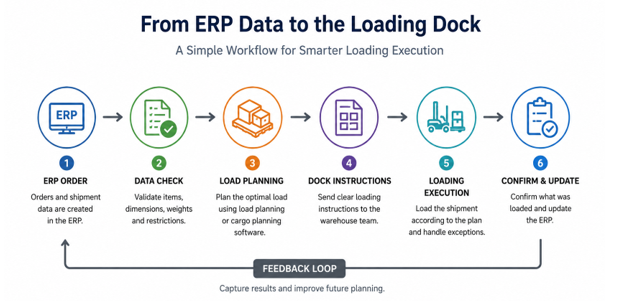
A useful workflow converts shipment data into decision-ready output. This may mean sending order details into load planning software, applying physical constraints, and producing a visual arrangement, loading sequence, or warning about weight and handling restrictions.
Practical tip: See how a visual loading workflow can turn shipment data into practical instructions for the dock team.
System roles should remain clear. The ERP owns core order and business data. Cargo planning software handles the physical arrangement of a particular load. Warehouse systems may manage picking and staging, while transport systems handle routes and carriers.
Trying to force every decision into one application often creates more complexity. A better approach is to define which system owns each decision and connect the applications through a controlled workflow.
Questions to Resolve Before ERP Data Integration
An ERP integration project often begins with APIs and field mapping. Operational rules should come first.
| Question | Why it matters |
| Which system owns each field? | Conflicting dimensions or weights need one authoritative source. |
| What happens after an order change? | The team must know whether the plan updates automatically. |
| How are exceptions recorded? | Missing pallets and vehicle changes need a traceable process. |
| What returns after loading? | Systems should reflect what was dispatched, not only what was planned. |
Data ownership is particularly important. If a planner corrects an inaccurate product dimension, should the change update the product master, create a review task, or apply only to the current shipment?
Late changes also require clear rules. Automatic synchronization sounds efficient, but an update arriving after loading has begun may invalidate an approved plan. Some changes should therefore trigger human review.
Effective ERP data integration does not remove accountability. It shows who must act when reality differs from the original plan.
Instructions Must Work on the Warehouse Floor
A detailed planning screen may work in an office but fail beside a vehicle. Warehouse staff need clear instructions they can absorb while handling goods, equipment, and time pressure.
The output should show which item comes next, where it belongs, how it should be oriented, and what must not be stacked. It should also make recent changes immediately visible.
Visual instructions are useful because spatial arrangements are difficult to communicate through item codes alone. Still, the output must remain readable rather than becoming a crowded diagram.
Warehouse employees also need a way to report damaged packaging, unstable pallets, or differences between the actual vehicle and its recorded specification. Their feedback is part of the workflow, not an obstacle to digitization.
Closing the ERP Data Loop
A connected process should record what actually happened during loading.
Were all items loaded? Was a pallet replaced? Did the crew change the arrangement because the original placement was unsafe?
Returning this information to the wider system helps correct master data, improve future plans, and investigate recurring exceptions. Without that feedback loop, the ERP continues to show intention rather than reality.
The goal is not to automate every judgement call. It is to remove avoidable rework and give employees one reliable operational truth. When the truck arrives, the loading team should receive a current, workable plan rather than reconstructing it from spreadsheets, emails, and phone calls.