


The clacky keyboard is no longer just a hobbyist’s obsession. The debate over mechanical vs membrane keyboards has moved from enthusiast forums to ordinary desks, and more people are asking whether it’s time to switch. The answer depends on what you value, what you’re willing to spend and who sits near you while you type.
Engadget recently laid out the main trade-offs, as first reported in its guide to the topic. Here’s a practical take on mechanical vs membrane keyboards, with some added context for anyone buying for themselves or for a team.
Key Takeaways
- Mechanical vs membrane keyboards differ mainly in keystroke registration: mechanical uses individual switches while membrane relies on a flexible layer.
- Membrane keyboards are cheaper and quieter, making them suitable for shared spaces, but they lack durability and customizability.
- Mechanical keyboards last longer, offer better performance and tactile feedback, but tend to be bulkier and noisier.
- When choosing between mechanical vs membrane keyboards, consider your typing style, usage environment, and total cost over time.
- Ultimately, the decision hinges on personal preference regarding noise, ergonomics, and customization options.
Table of contents
How mechanical vs membrane keyboards actually work
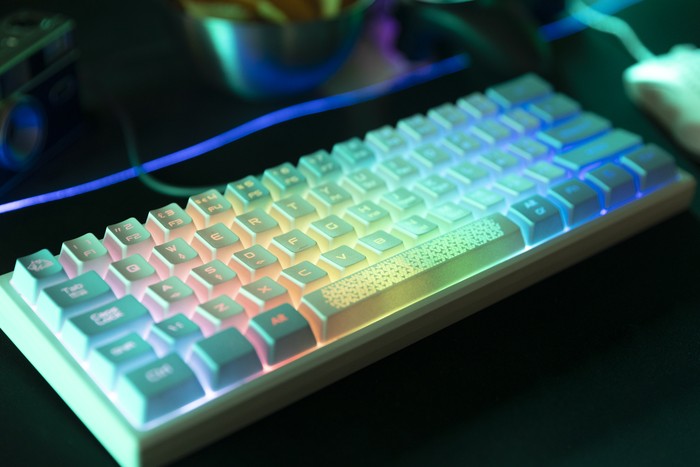
The core difference is how a keypress reaches the circuit board. A membrane keyboard uses a flexible layer of plastic and rubber. When you push a key, it presses the membrane against a conductive surface underneath, and that contact registers the keystroke.
A mechanical keyboard gives every key its own switch. The keystroke registers at a particular point in that switch’s travel. That one design choice explains almost everything else in the mechanical vs membrane keyboards debate, from lifespan to noise to price.
Chances are you’ve used a membrane board at school or in an office. Mechanical models are still uncommon in those places, even though their popularity keeps growing.
Where membrane keyboards still win
Price is the obvious advantage. You can find a basic membrane keyboard at most online and physical retailers for under $20. Cheap mechanical options are more plentiful than they used to be, so the gap has narrowed. Still, in any mechanical vs membrane keyboards price comparison, a budget membrane board remains the least expensive way to get a keyboard that simply works.
Noise is the other big point in their favor. Membrane keyboards are close to silent, which is why they suit shared offices. Nobody beside you will have to listen to your typing.
For a business buying in volume, those two traits carry weight when comparing mechanical vs membrane keyboards. If employees only need to answer email and fill in spreadsheets, a quiet, inexpensive board is a defensible choice.
The drawbacks add up
The weaknesses show up over time. Membrane keyboards tend to be far less durable, and the membrane wears out much faster than a set of mechanical switches does. They’re typically rated for up to 10 million keystrokes.
Repair is another problem. If one key fails, you’ll probably have to replace the whole keyboard. Customization is limited too, so you take whatever the manufacturer ships.
What mechanical keyboards offer in return
Durability is where mechanical models pull ahead. They can last 100 million keystrokes or more, ten times the typical membrane rating. When it comes to lifespan, the gap between mechanical vs membrane keyboards is wide. Keycaps are easy to clean or swap, and so are the switches on many modern boards. Hot-swap designs let you replace a damaged switch without any soldering.
Performance is a second draw. Mechanical boards usually have better key rollover, meaning they can detect more simultaneous inputs. That helps fast typists and gamers avoid dropped keystrokes, and it’s one reason many of the best gaming keyboards are mechanical.
Feedback matters as well. Most mechanical switches give you something to feel or hear, either an audible click or a tactile bump. They also come with different actuation points, which set how far you have to press before a key registers. Many users say the right combination makes typing easier and more consistent.
The downsides of going mechanical
Size is the first catch. Mechanical keyboards are usually larger and bulkier than membrane ones. They also tend to sit taller, which can lead to fatigue or pain in the arms and hands if your wrists aren’t properly elevated. The same advice applies to membrane boards, but the extra height makes it more pressing.
They’re also awkward to carry. Between the size and the weight, a mechanical board isn’t something you’ll want to toss in a bag every day.
Then there’s taste, which shapes the mechanical vs membrane keyboards choice more than any spec sheet. Some people love the sound and feel. Others find the noise distracting, and so will their coworkers. Customization works the same way: choosing your own case, keys and switches is fun for some buyers and a needless chore for others.
Read Next
A few related pieces worth your time:
- WhatsApp Travel eSIM Lets Users Buy Data Inside the App
- Nvidia Chip Smuggling Report Ties Alice Huang to Chinese Firms
- FCC Approves SpaceX Plan for up to 1 Million Space Data Centers
How to decide between mechanical vs membrane keyboards
Start with where you’ll use it. In a shared office or a quiet home, noise may settle the question for you. If you travel with your keyboard, a lighter and flatter board probably wins.
Next, look at how much you type. Heavy typists and gamers are the people most likely to benefit from better rollover, longer life and switches tuned to their preferences. Light users may never notice the difference between mechanical vs membrane keyboards.
Finally, think about total cost rather than sticker price. A cheap membrane board that you replace every few years isn’t necessarily a bargain next to a mechanical model that can be repaired, cleaned and kept going. That’s reasoning rather than a guarantee, since actual lifespan depends on use and build quality, but the keystroke ratings point in that direction.
A few questions to ask before you buy
- Will the noise bother anyone nearby?
- Do I need a compact board I can carry?
- Do I want to swap switches or keycaps later?
- Is my budget closer to $20 or well above it?
The more mechanical boards sell, the easier it gets to find one that matches your budget and habits. That said, the choice between mechanical vs membrane keyboards is personal. If feedback and customization appeal to you, a mechanical model is worth a look. If you want something cheap, quiet and basic, membrane still does the job.
Source: Engadget – Technology News & Expert Reviews