The NicView login page is at www.nicview.net, and the username and password come from your hospital after you sign a consent form. There is no public sign-up, and no way to create an account yourself.
If you are reading this at three in the morning with a printed slip of paper in your hand, that first paragraph is probably all you needed. The rest of this page covers what happens after you get in: why the picture sometimes disappears, what the camera does and does not capture, who else can see it, and what to do when the login will not work.
Key Takeaways
- The login page is www.nicview.net. Credentials come from your hospital.
- There is no self-registration. Consent form first, then credentials.
- The camera streams live video only, with no audio and no recording.
- An offline screen usually means staff are caring for your baby.
- You can share your login with family, which means anyone who has it can watch.
How the NicView Login Works
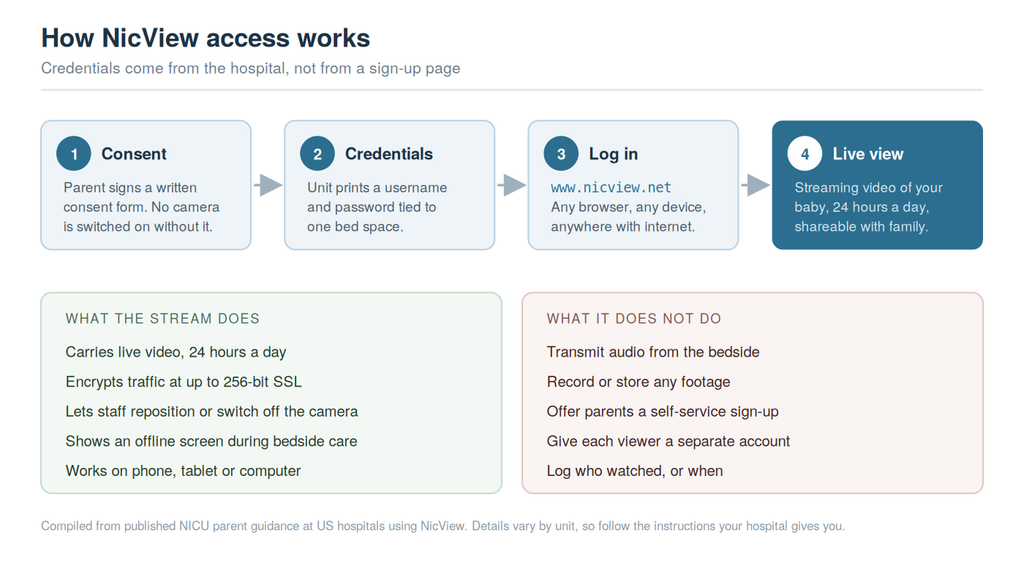
Access starts with a consent form. Hospitals do not switch a camera on without a parent’s written permission, and the credentials are issued only after that form is signed.
Once you consent, the unit gives you a printed slip with a username and password unique to your baby’s bed space. You take that to www.nicview.net and sign in. Any device with a browser and an internet connection works, so a phone, tablet or laptop all behave the same way.
A few things reliably go wrong at this stage.
You do not have credentials yet. Ask your bedside nurse or the unit clerk. If the consent form is signed but nothing was printed, that is a common gap and they can usually resolve it in minutes. If your baby was moved to a different bed space, the camera has to be reassigned, and until it is, an old login may show the wrong feed or nothing at all. Tell staff immediately if you see a baby who is not yours.
The address is not loading. The correct address is www.nicview.net. Typing it with an extra slash, a stray period, or as nicu.net will fail, and those variations are common enough that they show up constantly in search data. If the page still will not load, try a different browser or switch from hospital wifi to mobile data before assuming the account is the problem.
The password does not work. Only the hospital can reset it. NicView’s manufacturer supports the hospital, not individual families, so there is no customer service line for parents to call. Your unit can reissue credentials.
Why the Camera Shows an Offline Screen
This is the question that causes the most alarm, so it is worth answering plainly.
An offline image almost always means a nurse or doctor is at the bedside. Staff can switch cameras off, and they routinely do during care activities, procedures, examinations and cleaning. Some hospitals display a “baby away” message instead of a blank screen. The camera also goes dark when your baby leaves the bed space, including for something as ordinary as being held by the other parent.
Units are direct about this in their own parent guidance: if your baby needs a lot of hands-on care, the camera may be offline frequently, and frequent offline periods are a sign of attention rather than a reason to worry.
If the feed stays down for a long stretch and you are anxious, call the unit. Nurses expect these calls and would rather take one than have a parent sitting with a dark screen.
What the Camera Captures, and Who Can See It
NicView is deliberately limited, and the limits are the point.
The stream carries video only. There is no audio, so nothing said at the bedside is transmitted. Nothing is recorded or stored, which means there is no archive to scroll back through and no footage to be requested, leaked or subpoenaed later. The connection is encrypted to the same web standard used by online banking, at up to 256-bit SSL.
Staff retain control of the hardware. Cameras can be repositioned, switched off, or put into privacy mode, and hospitals run written procedures covering how cameras are assigned to beds and reassigned when a baby moves. Cleveland Clinic, for example, built a standard operating procedure specifically to cover camera assignment, positioning and discharge.
The one genuinely soft spot is credential sharing. Hospitals intend for parents to pass the login to grandparents, siblings and friends, and most parent guidance says so explicitly. That flexibility is what lets a grandparent three states away watch a newborn they have not met. It also means access is controlled by a single shared password with no individual accounts, so there is no record of who watched or when, and no way to revoke one relative’s access without changing the credentials for everyone. If a family situation makes that a concern, raise it with the unit rather than working around it.
For a publication that covers remote patient monitoring, this is an unusually clean design. The system collects almost nothing, stores nothing, and hands control to clinical staff rather than to software. Most connected health tools take the opposite approach.
Who Actually Builds NicView
Bedside cameras became standard NICU equipment because the units filled up and stayed full. Roughly 1 in 10 US babies are born preterm, close to 380,000 births a year, a rate that has not moved since 2022 (Source: March of Dimes 2025 Report Card). Hospitals needed a way to keep families connected to babies they could not stay beside around the clock, and a camera was the cheapest answer.
NicView began as an independent company in Louisville, Kentucky. Natus Medical Incorporated acquired it in January 2015 and has sold and supported it since, currently as NicView 2 under the Natus Sensory brand.
That matters for one practical reason: when something breaks, the repair path runs from your unit to Natus, not from you to anyone. Parents have no direct support relationship with the manufacturer.
It also explains why the system looks the way it does. NicView was built by a medical device company for hospital procurement, not by a consumer app team. The interface is plain, the feature set is narrow, and it has stayed that way for a decade.
If Your Hospital Uses a Different System
Not every NICU camera is NicView, and the names are easy to confuse.
The main alternative is AngelEye Health, a Nashville company whose CameraSystem does a similar job with a broader family engagement platform around it, including messaging from the care team and discharge planning tools. AngelEye has been actively converting hospitals from NicView to its own system, so the camera above your baby may not be the one that unit used last year.
If your login is not working and the address does not look familiar, check the paperwork your hospital gave you rather than assuming the system is NicView. Different vendor, different portal, different credentials. Your unit can tell you which one you are on.
The Short Version
Go to www.nicview.net, use the credentials your hospital printed for you, and call the unit for anything that goes wrong, because they are the only people who can fix it. An offline screen usually means someone is taking care of your baby. Nothing is being recorded.
And if you have not looked in a while, that is fine too. Every NICU nurse will tell you the same thing: the camera is there to make the distance easier, not to add one more thing to check.
Read Next
More coverage on connected care and hospital technology:
- Remote Patient Monitoring: Benefits, Blind Spots, and the Data in Between
- Hospital Admission Risk Program: Reducing Readmissions with Virtual Wards
- Health Tech coverage on Coruzant
FAQs
The NicView login page is www.nicview.net. You sign in with a username and password issued by your hospital’s NICU after you sign a consent form. There is no public registration page and no way to create your own account.
Your NicView camera is offline most often because staff have switched it off while caring for your baby. It also goes offline if your baby is out of the bed space or the camera has been repositioned. Frequent offline periods usually mean your baby is getting hands-on attention.
No. NicView streams live video only. It does not transmit audio and it does not record or store footage, so there is nothing to play back later. The stream is encrypted at up to 256-bit SSL.
Yes. Hospitals expect parents to share credentials with family and friends at their own discretion. Because access is a single shared username and password, anyone you give it to can watch until the credentials are changed, and there is no log of who viewed the stream.
NicView is owned by Natus Medical Incorporated, which acquired the company in January 2015. It is sold as NicView 2 under the Natus Sensory brand. Natus supports the hospital directly rather than individual families.
You do not sign up for NicView yourself. Your hospital enrolls you: you sign a consent form for the camera at your baby’s bed space, and the unit then gives you printed credentials. If your baby is in a NICU that uses NicView and you have not been offered a form, ask your bedside nurse.