


Before signing off on more AI capacity, the CIO and CFO need the same workload picture. Here are the assumptions to settle first.
Updated on: 2026-11-22
AI capacity planning now runs through finance: nearly 80% of North American CFOs say finance holds a formal role in AI decisions, yet only 20% use advanced AI-specific cost controls such as per-token or per-workload attribution (Source: Deloitte CFO Signals Survey, 3Q 2026). That gap between authority and visibility is exactly where a capacity request gets approved on the wrong assumptions.
A request for more AI capacity usually arrives as a number. Add provisioned throughput here, raise the token budget there, approve another GPU reservation. The CFO sees a spend line. The CIO sees a service that needs to keep up. The problem is that both can approve the same dollar figure while picturing completely different workloads.
That gap is where the argument should happen. Not over the total, but over the assumptions that produced it. If Finance is looking at a token estimate and Technology is planning a production service with retries, peak traffic, and a quality bar, the two aren’t reviewing the same thing. The question this review answers: which workload assumptions should a CIO and CFO agree on before approving more AI capacity?
A quick note on terms. By “AI capacity” we mean the usable supply needed to serve a defined workload, not just tokens, GPUs, or a budget line. For a hosted model that might be available request throughput at an acceptable service level. For a self-hosted model it can also include accelerators, memory, storage, networking, and orchestration. We covered that usable-versus-owned distinction in our AI infrastructure readiness review, which is worth reading alongside this if the request involves self-hosting.
This is a joint decision process, not an industry-standard named method. Treat the questions below as a decision aid, not an externally validated framework.
Key Takeaways
- Agree on the workload and success definition before anyone prices capacity.
- Size to peak demand and service level, never a monthly average.
- Define “utilization” precisely; idle provisioned capacity still bills hourly.
- Track cost per successful outcome, including retries and failed runs.
- Label every assumption as observed, calculated, or judgmental.
Why AI capacity planning has become a joint decision
Spending is moving to the part of AI that never stops running. Gartner projects inference spending on AI-optimized infrastructure as a service will reach $23.3 billion in 2026, overtaking training at $19 billion, with inference-driven AI infrastructure spending growing 55% this year (Gartner, August 2026). Training is a project with an end date. Inference is a utility bill that grows with every user, every agent step, and every retry.
That shift changes who has to be in the room. A training run can be approved once. An inference workload gets re-approved every time adoption moves, which is why capacity requests now land on the CFO’s desk as often as the CIO’s.
The controls haven’t caught up. In Deloitte’s third-quarter 2026 CFO Signals Survey of 200 North American CFOs, 56% rely only on basic AI-specific controls and 24% use only general controls. When an overrun happens, 74% say their organizations typically pause or shut down the related usage within several business days to several weeks. Only 19% respond the same business day.
Read those numbers together. Finance has the approval right, but most teams can’t attribute cost to a specific workload, and they find out about overruns days late. A shared set of workload assumptions, agreed before the money moves, is the cheapest control available.
Agree on the workload before you estimate the capacity
The first thing to settle is what you’re actually serving. Not the model. The business process: the feature or workflow, who uses it, what triggers a request, and what counts as a completed outcome.
The FinOps Foundation recommends allocating AI spend at the level where the business measures value, such as a product, team, feature, or business transaction. That matters here because it forces both executives to name the same unit before anyone prices it.
Four kinds of assumptions tend to hide inside a single capacity request:
- Adoption: which users or transactions are eligible, expected take-up, and how fast use might expand past a pilot.
- Work per use: request frequency, prompt and context size, response length, retries, tool calls, and any multi-step agent activity. Our own FinOps coverage notes these details move spend, and that a provider invoice alone may not explain why costs changed.
- Service: the latency, throughput, and quality the use case has to meet. An estimate that counts requests but ignores performance or output quality is incomplete. Microsoft’s provisioned-throughput sizing guidance treats request shape and the input/output mix as sizing factors for exactly this reason.
- Scope: which components belong to the workload. Model calls, orchestration, retrieval or data stores, monitoring, shared platform services. FinOps guidance calls this the “harness” and recommends counting it, not just the token charges.
The decision question for the meeting: are both executives approving the same workload and the same definition of success, or is one costing an API call while the other is funding a production system?
Agree on demand shape, not a monthly average
A monthly average hides the conditions that decide whether capacity holds. A workload that runs steady all day and one that spikes for three hours can share an average and need very different buying decisions.
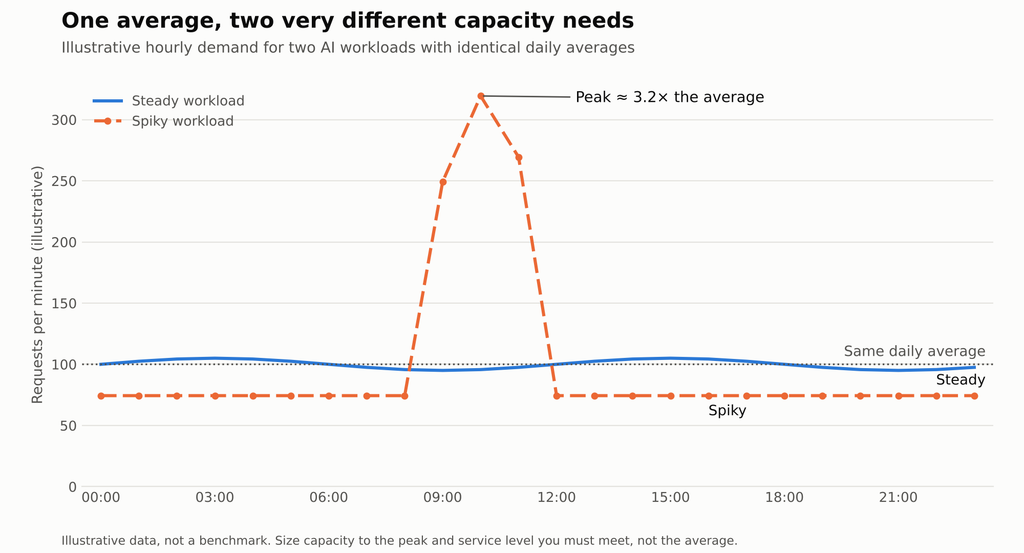
Ask the team to state the baseline, the busy periods, how much demand varies, and what growth they expect. Then ask which of those numbers are measured and which are forecast. For infrastructure workloads, our infrastructure readiness coverage points to historical utilization, load testing, and monitoring of latency, throughput, errors, and accelerator use as ways to pressure-test a plan, with the caveat that no test guarantees production behavior.
Keep these distinctions explicit in the review:
- Steady versus spiky. A predictable recurring workflow and a bursty experimental app can justify different buying and deployment choices.
- Average versus peak. Ask what peak or service-level condition the estimate is meant to cover, and how that peak was established. Don’t accept an unlabeled “headroom” figure as a fact.
- Pilot versus production. Pilot usage may not reflect wider adoption, real retries, or production service expectations. FinOps guidance recommends establishing a baseline before setting budgets and forecasting more often because AI costs vary. Its 30-to-60-day measurement windows and sample buffers are guidance, not a universal benchmark.
- Demand versus realizable supply. Requested capacity, reserved capacity, and capacity you can actually get when you need it are three different states. Agree on which one the number represents.
No source here supports a single utilization target, growth multiplier, or headroom percentage that applies to every AI workload. If someone offers one, ask where it came from.
Pin down what “utilization” means
“Utilization” means nothing until someone says what is being utilized and how it’s measured. It could mean accelerator use, a reserved service’s throughput, provisioned tokens, available seats, or the share of demand handled inside service targets. These are not interchangeable, so don’t let them get compared as if they were.
For self-hosted infrastructure, FinOps materials define resource utilization efficiency as used versus provisioned capacity. But a high hardware number on its own says nothing about whether the workload met its latency, quality, or reliability needs.
For provisioned model capacity, Microsoft’s documentation states that charges are based on deployed capacity per hour regardless of tokens consumed, which means unused reserved capacity still costs money. The same docs flag request shape, output-to-input ratio, and cache rate as sizing considerations.
The questions worth asking together:
- What capacity are we paying for or reserving, and what share is actually used?
- Is the spare capacity intentional resilience, or avoidable idle spend?
- Did the workload hit required latency and throughput when it was busy?
- Are retries, failed runs, and rejected outputs counted in cost per successful result?
That last one changes the picture more than people expect. FinOps guidance recommends including failed and discarded runs when measuring cost per successful outcome, because leaving them out makes the unit cost look lower than it is.
Compare buying models without assuming one wins
Different delivery and billing models move risk between variable usage and committed capacity. None is cheaper by default. The right one depends on the demand pattern, the service need, the actual rates, and what costs you include.
| Buying model | Best fit | What you commit to | Watch for |
|---|---|---|---|
| Pay per use | Variable or uncertain demand | Spend follows actual usage | Needs active monitoring; cost moves with traffic |
| Provisioned throughput | Consistent, high-scale, latency-sensitive work | Fixed capacity billed hourly | Billed even when idle; reserved waste is real |
| Batch processing | Work that doesn’t need immediate results | Async completion windows | Discounts and availability are provider- and model-specific |
| Self-hosted / open-weight | Predictable, repetitive workloads | Infrastructure and operational ownership | Full operational cost must beat the usage-based alternative |
Microsoft describes standard deployments as pay-per-token and suited to unpredictable traffic, and provisioned throughput as a fit for mission-critical workloads needing predictable throughput and latency. Its current guidance is blunt about the boundary: standard deployments remain the better fit for development, testing, low-volume usage, or traffic too variable to size in advance.
Batch is listed as asynchronous and discounted, while OpenAI’s pricing page describes its own batch terms. Treat those as current product terms for specific providers, not a promise that batch is always available or always cheaper.
On self-hosting, our report on AI token budgeting becoming a CFO responsibility covers Dell CFO David Kennedy’s view that predictable, repetitive workloads may be candidates for on-premises open-weight models. That’s Kennedy’s recommendation, reported via SiliconANGLE, and Dell has a commercial interest in AI infrastructure. It isn’t independent proof of a break-even point, and the report supplies no break-even calculation. Don’t let anyone invent a utilization threshold where provisioned or on-prem “always” beats on-demand. Compare the same workload, quality bar, service level, usage pattern, and full cost boundary, or the comparison isn’t real.
Agree on a unit that links cost to value
Tokens explain consumption. They aren’t a business outcome. A review that only tracks token spend can show falling costs while the service quietly misses its service targets.
FinOps Foundation guidance recommends tracking use-case economics such as cost per inference, cost per user, and cost per successful outcome, and reporting variable AI costs as distributions or ranges rather than a single average.
For a CIO–CFO review, pick a small number of workload-specific units and hold the service level next to them:
- cost per completed transaction, resolved case, or other agreed business outcome;
- cost per successful AI-assisted task, with a stated quality threshold;
- service performance reported alongside cost, so a lower bill can’t hide a missed requirement.
These are measurement choices, not ready-made benchmarks. The business defines what counts as successful and owns the outcome boundary. FinOps notes that AI cost forecasting and unit-economics benchmarking stay difficult, with mixed pricing models and limited external comparisons, so expect to build your own reference rather than borrow one.
Treat the budget number as a result, not the decision
A budget figure is the output of assumptions. If the review can’t reproduce it, it can’t challenge it. A useful decision record lists the workload scope, expected usage, demand variability, performance requirements, billing model, included cost components, and the evidence behind each line. The FinOps Foundation advises making AI usage visible before optimizing it, including full costs, and building unit economics.
One habit that makes the review honest: label every assumption by how much you actually know.
- Observed: measured from a live workload, trial, or representative test.
- Calculated: derived from an explicit rate and a usage estimate.
- Judgmental: forecast adoption or future demand that hasn’t been demonstrated yet.
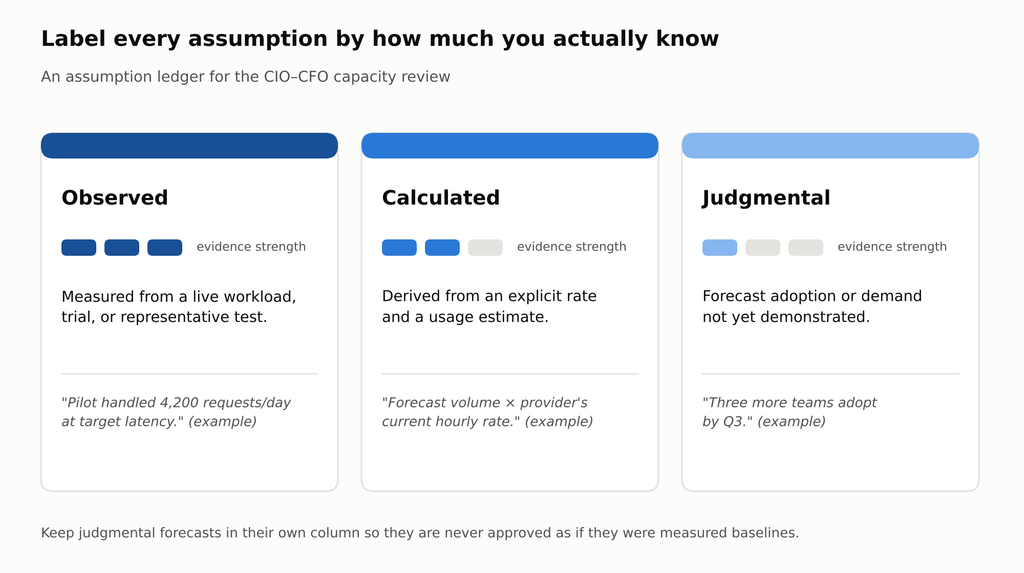
That split is our editorial recommendation for a transparent review, not a prescribed classification system. It does one thing well: it stops a judgmental growth forecast from sitting in the same column as a measured baseline, which is how optimistic numbers get approved without anyone noticing.
If you’re also setting the broader technology budget this cycle, our coverage of CIO and CFO priorities for the information technology budget handles the annual view. This review sits one level down, at the workload.
Split ownership of each assumption
Joint sign-off doesn’t mean both executives own every line. Each assumption needs one accountable owner and one challenger, or nobody updates it when reality shifts.
| Assumption | Accountable owner | Challenger | Evidence to bring |
|---|---|---|---|
| Workload scope and success definition | Business sponsor | CIO and CFO | One-paragraph workload statement |
| Adoption and growth | Business sponsor | CFO | Pilot data, labeled as observed or judgmental |
| Work per use and demand shape | CIO | CFO | Request logs, load tests, peak windows |
| Service level and quality bar | CIO | Business sponsor | Latency, throughput, and quality thresholds |
| Billing model and rates | CFO | CIO | Current first-party pricing, commitment terms |
| Cost boundary (the harness) | CFO | CIO | List of included and excluded components |
This mapping is an editorial suggestion, not a standard. Adjust it to your org chart. The point is that a CFO challenging a latency requirement, or a CIO challenging a commitment term, is the review working as intended.
A one-hour agenda for the review
You don’t need a new committee. You need one meeting with the right order of questions.
- Ten minutes: read the workload paragraph aloud. If the CIO’s version and the CFO’s version differ, stop and rewrite it together.
- Fifteen minutes: walk the demand shape. Baseline, peak window, pilot versus production. Mark each number observed, calculated, or judgmental.
- Ten minutes: define utilization for this workload. Agree on what is measured, and what idle capacity costs under the proposed billing model.
- Fifteen minutes: compare at least two buying models on the same workload, quality bar, and cost boundary.
- Ten minutes: set the unit metric and the trigger. Pick the cost-per-outcome measure, the service level beside it, and the threshold that reopens the decision.
That last step matters more than it looks. Given how slowly most organizations react to overruns, a pre-agreed trigger means nobody has to call a new meeting to act.
What I would do first
Before approving anything, get both executives to write down the workload in one paragraph: who uses it, what triggers a request, what a completed outcome is, and what service level it must meet. If the CIO’s paragraph and the CFO’s paragraph don’t match, stop there. Everything else in the review depends on that agreement, and no amount of precise token math fixes a disagreement about what you’re building.
For more on where this sits in enterprise planning, Coruzant publishes ongoing coverage in enterprise technology trends and conversations with operators on The Digital Executive, which we publish. If AI capacity decisions are landing on your desk this year, that’s a useful place to hear how other teams are framing them.
Conclusion
Good AI capacity planning is less about the total and more about whether both signatures sit under the same picture. Agree on the workload, size to the peak and the service level, define utilization precisely, and price buying models on identical terms. Then tie spend to a unit that the business actually cares about.
Do that and the budget number stops being the argument. It becomes the arithmetic at the end of a set of assumptions you can both defend, revisit, and correct when the workload changes. That is a decision you can approve with confidence, and reopen without a fight.
Read Next
For deeper context on infrastructure, token budgets, and annual planning, start here:
- AI Infrastructure Readiness Review
- AI Token Budgeting Is Becoming the CFO’s Job
- CIO and CFO Priorities in the 2026 Information Technology Budget
FAQ
AI capacity planning is the process of estimating the usable supply a defined AI workload needs to meet its demand and service level. It covers adoption, work per request, peak demand, quality targets, billing model, and the full cost boundary, not just tokens or GPUs.
The annual budget sets the envelope. A capacity review works at the level of a single workload and asks what demand and service assumptions justify buying, reserving, or extending capacity for it. It’s narrower, and it tends to run whenever a team asks for more, not once a year.
Usually scope. Finance costs the model calls. Technology is funding the whole service, including orchestration, retrieval, monitoring, retries, and the quality bar. Same dollar figure, different thing. Agreeing on the workload boundary first removes most of the later argument.
Not inherently. Provisioned capacity is billed for what’s deployed, so idle reserved capacity still costs money, while pay-per-use tracks actual traffic and needs monitoring. Which one costs less depends on your demand pattern, service needs, actual rates, and the full cost boundary. Compare the identical workload or the comparison is meaningless.
Yes. FinOps guidance recommends counting retries, failed runs, and rejected outputs when measuring cost per successful outcome. Leave them out and the unit cost looks artificially low, which distorts every buying decision that follows.
No source reviewed here establishes one. There’s no single recognized utilization level, headroom percentage, or forecasting window that applies to every AI workload. Set targets against your own baseline and service requirements rather than importing a number that sounds authoritative.