
Key Takeaways
- Record in the highest practical quality because HD conversion cannot restore missing details.
- Check the final video after export because compression can make text and UI elements look softer.
- Convert demos to HD before launching so small text, charts, and animations remain easier to follow.
- Keep an HD or 4K master so the same footage can be reused for social clips, tutorials, and presentations.
- Use AI enhancement carefully to improve sharpness and clarity without making the demo look overly processed.
Table of contents
Introduction
Many buyers today have already seen a product demo before they even contact sales.
They might watch a demo, go through a product page, or watch a short walkthrough again. Based on what they see, they form an early opinion.
So, what happens when the video looks blurry?
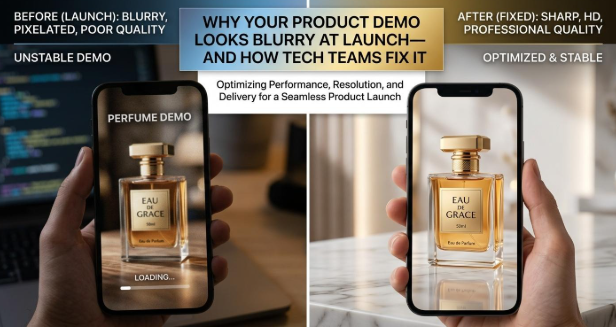
Surprisingly, many product demos still launch at the resolution they were originally recorded in. That can make the details harder to see, especially on larger screens.
That is why HD conversion has quietly become part of the pre-launch checklist. The product may be ready. The demo should look ready too.
Why Product Demo Quality Matters at Launch
A product demo isn’t just something the sales team throws away after a meeting.
It is likely the first close experience a buyer will have with the product. If the video is blurry, compressed, or difficult to see, the product may end up looking less professional than it really is.
Product Interfaces Depend on Visual Clarity
Software demos are full of small details. A little blur can make them surprisingly hard to follow.
- Small UI labels need to stay readable.
- Charts and dashboards often contain fine lines, numbers, and data points.
- Cursor movements and animations should be easy to track.
- Text-heavy workflows quickly reveal compression, blur, and other quality issues.
The software may be excellent. But if viewers cannot read the screen, they won’t see much of it.
Launch Videos Are Viewed in More Places Than Teams Expect
A demo might start on a product landing page but end up somewhere the original editor never considered:
- Product landing pages
- YouTube
- Product Hunt-style launch pages
- Sales presentations
- Customer onboarding
- Developer documentation
- Large external monitors
Videos that appear to be of high quality when previewed during editing may look significantly worse after being uploaded, compressed, resized, or played back on a larger screen. Therefore, teams should not only check the quality of the original file but also of the final viewing experience.
Better Source Quality Gives Teams More Reuse Options
A clean HD or 4K master also gives teams more room to reuse the same footage. They can create:
- Short social clips
- Product tutorials
- Feature announcements
- Sales collateral
- Conference presentations
- Website hero videos
Instead of recording a new video every time, teams can work from a better master. One good source can cover a lot more launch content.
Where Product Demo Quality Gets Lost
Low-quality sources: Browser-only captures, low-resolution display monitors, and smaller areas result in fewer details which you will have for your edits after recording.
Upscaling does not bring all details back: Raising resolution only increases the file size; details that were not captured in the first place cannot be restored.
Multiple compressions: A single product demo video may travel from a screen recording, editing, posting online via social media, and finally an embedded player. Every time the image is converted, its clarity gets reduced to some extent.
Crisp elements get lost: Font sizes that are small, charts, cursor movements, menus, and thin UI lines are all things that can easily get blurred.
How to Convert Product Demos to HD
Have you ever created a video on your computer only to find out that after uploading it online, the video becomes blurry or grainy?

Wink’s HD Video Converter will take your low or medium resolution footage and convert it into 4K. It will also improve detail, remove grain, and enhance color while preserving the natural movement of the footage. As a result, small UI text, diagrams, and motion graphics are much more likely to remain sharp and legible.
The workflow is simple: upload the demo → choose the output quality → let Wink process it → review → download.
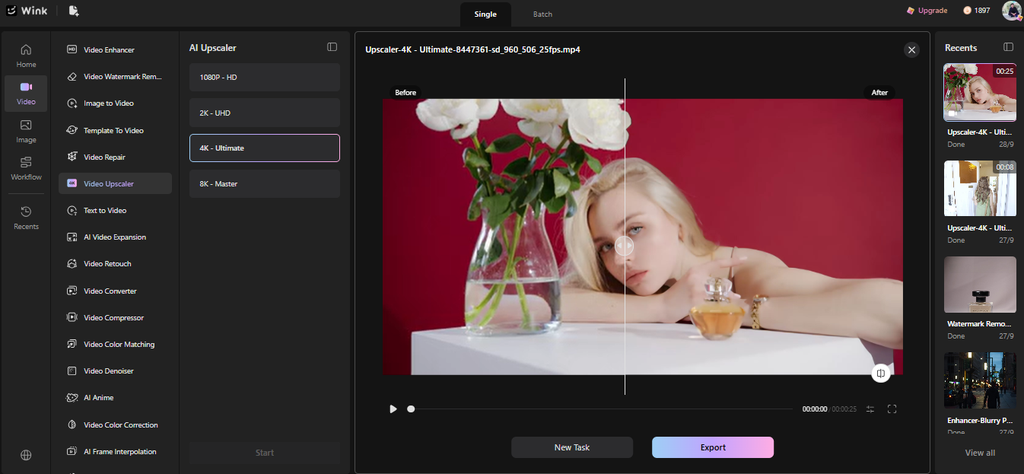
You can also upload several videos at once, which helps when a launch has a whole folder of demos to clean up.
In the final video, there is a visible difference. The UI appears sharper, smaller details get better highlighted, grain is minimized, and colors balance better. The clip keeps realistic movement so that the sample seems to be clearer, while maintaining a natural look.

When a Blurry Demo Makes a Good Product Look Bad
Product-led and self-serve companies have come a long way since they’ve replaced sales reps’ jobs with the demo as part of their onboarding process. However, one should bear in mind that if a video is blurry or even the narration is not crystal clear, the buyers can overlook several key product features even before they try the software.
And yes, people notice polish. Fair or not, a rough-looking demo can make a polished product feel less polished. As more buyers evaluate software on their own, clear video quality becomes part of that first impression.
What Changes When You Convert a Product Demo to HD?
| Before HD Conversion | After HD Conversion |
| Small UI text looks soft | Text appears clearer |
| Digital grain is noticeable | Grain is reduced |
| Colors may look flat or uneven | Colors are more balanced |
| Motion can look rough after compression | Natural movement is better preserved |
Read Next
A few related pieces worth your time:
- AI Bible Study App: How to Use AI Without Losing Scripture and Context
- Harnessing AI for Brand Growth: Embracing the Cognitive Revolution
- How to Check Long Manuscripts for Originality
Conclusion
Converting videos in HD is not something you have to go out of your way for. For many team members, it’s just another item in the pre-launch list, along with proofreading, design approval, and quality assessment.
As more buyers watch a demo before speaking to sales, those small details matter. A clearer video helps the product come through as it was meant to—without making the demo itself a distraction.
Editorial note: Wink is operated by Meitu Inc. (Hong Kong Stock Exchange 1357.HK), a Chinese consumer software company. The product line includes AI Watermark Remover tools that undermine C2PA content credentials and should not be used to remove watermarks from third-party content; Coruzant does not endorse the watermark-removal or body-modification features of this product.