In a world where image quality is paramount, HitPaw FotorPea is one of the most powerful AI tools designed to fix blurry photos. With specialized models, it also helps enhance portraits and restore old photos with impressive accuracy.
Key Takeaways
- HitPaw FotorPea is an advanced AI image enhancer designed to fix blurry photos and enhance image quality.
- It features specialized AI models for face restoration, upscaling, denoising, sharpening, colorization, and low-light enhancement.
- In tests, it successfully repaired low-res portraits, reduced motion blur, and achieved high-quality 400% upscaling.
- The user-friendly interface allows for simple upload, model selection, and photo export, making it accessible for beginners.
- HitPaw FotorPea supports 2K, 4K, and 8K upscaling, offering a competitive edge in the image enhancement market.
Table of contents
Why HitPaw FotorPea is a Leading AI Image Enhancer in 2026
Originally known as HitPaw Photo Enhancer, HitPaw FotorPea Photo Enhancer represents a major evolution in AI-driven image editing. The rebrand isn’t just about the name; it reflects a smarter, more specialized engine built on deep learning algorithms that can handle complex image restoration tasks. What sets this image quality improver apart is its suite of dedicated AI models, each for a specific type of enhancement:
- Face Restoration Model – Rebuild facial details while preserving natural skin texture
- AI Upscale Model – Enlarge images up to 8K without pixelation
- Denoise Model – Remove grain and noise from low-light or high-ISO photos
- Sharpen Model – Improve clarity and edge definition
- Colorization Model – Restore old photos and bring black-and-white images to life
- Low-Light Enhancement – Brighten dark images while retaining detail
Features:
- Clean, easy-to-navigate interface
- Available for Windows and Mac users
- One-click enhancement for beginners
- Handle all standard image formats
- Process multiple images in a batch
- GPU acceleration for faster rendering
- Image generation models, i.e., Nano Banana
- Various creative AI tools to facilitate editing
Performance Test: Fixing Blurry Photos & Portraits
To evaluate whether HitPaw FotorPea lives up to the hype, we have tested it across several real-world scenarios:
Test 1: Low-Res Portraits
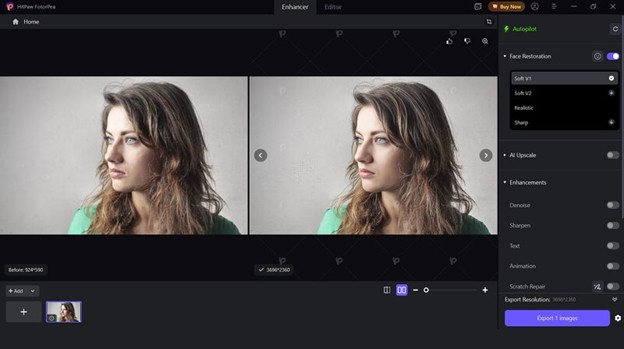
Low-resolution portraits are usually difficult to enhance. Many tools produce overly smooth skin, leading to an “uncanny valley” or plastic-skin look.
HitPaw FotorPea performs surprisingly well here. Its AI portrait enhancer reconstructs facial features with precision, i.e., eyes, hair strands, and skin texture. The result feels natural rather than synthetic.
Test 2: Motion Blur & Focus Issues
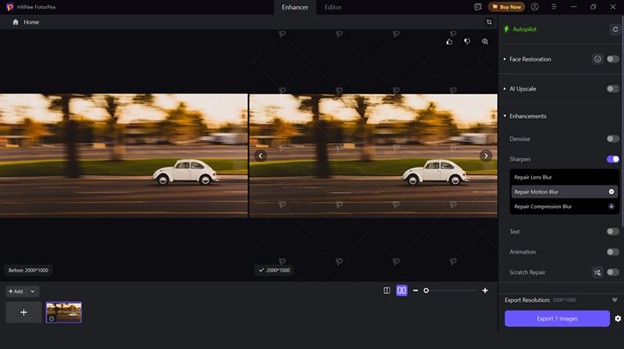
Blurry images caused by camera shake or poor focus are often considered unusable. However, using its unblur image AI feature, HitPaw FotorPea manages to recover a surprising amount of detail.
In our tests, motion blur was significantly reduced, edges became sharper without harsh artifacts, and previously unusable photos became shareable again. While it can’t perform miracles on extremely distorted images, it handles moderate blur exceptionally well.
Test 3: 400% Upscaling
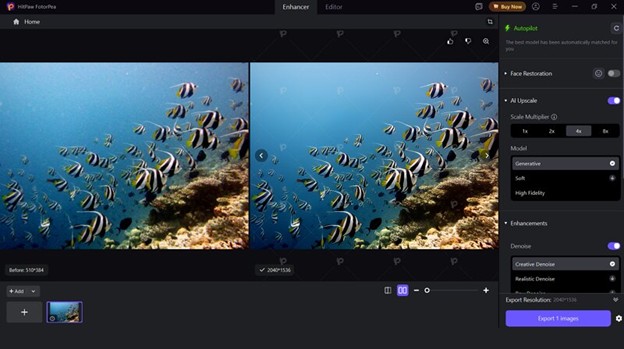
We have also compared a standard 1080p image with a 4x upscaled version (approx. 8K output). The results were minimal pixelation, enhanced textures (fabric, hair, background details), and maintained structural integrity.
Unlike traditional upscalers, which simply stretch pixels, HitPaw uses AI reconstruction. This makes it a true AI photo enhancer rather than just a resizing tool.
How to Use HitPaw FotorPea to Enhance Your Photos
Using HitPaw FotorPea is not difficult, even for beginners. But to facilitate you, here are the right steps to enhance your photos:
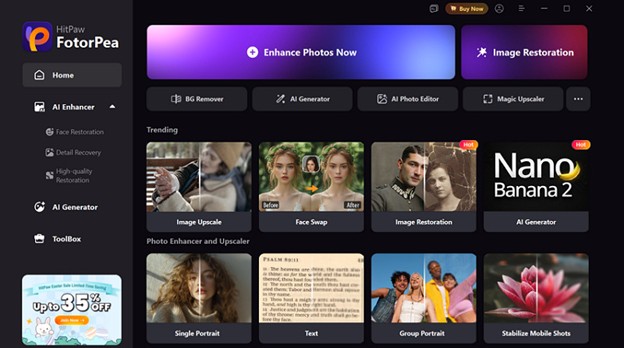
Step 1. Upload Photo
The first step is to install and launch the HitPaw FotorPea on your system. Now, tap “Enhance Photos Now” to open the photo enhancer. Then, click or drag and drop the required photo.
Step 2. Select the AI Model
Next, choose your preferred AI model from the sidebar, such as face restoration or AI upscaling. You also need to pick the mode of that specific model.
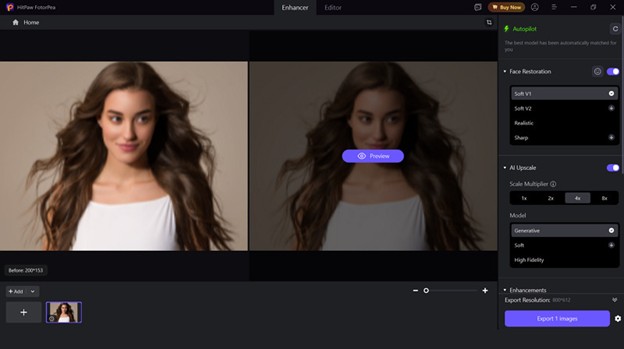
Step 3. Preview and Export
Lastly, press the settings icon and adjust the settings as desired. Then, tap “Preview.” If it seems fine, hit “Export” and you are all done!
HitPaw FotorPea vs. Competitors (Comparison Table)
Now that you have looked at what HitPaw FotorPea can do on its own, it’s worth seeing how it compares to other popular tools in the market. Here is the comparison table of HitPaw FotorPea with Picsart, Fotor, and Topaz Photo:
| Tools | Platform | Ease of Use | AI Models | Speed | Upscaling | Portrait Enhancement | Batch Support |
| HitPaw FotorPea | Windows, Mac, Android, iOS | Very Easy | Specialized AI Models | Fast | 8x | Excellent | Yes |
| Picsart | Web, Android, iOS | Easy | No | Fast | 2x | Good | No |
| Fotor | Web, Android, iOS | Easy | No | Moderate | 2x | Average | No |
| Topaz Photo | Windows, Mac | Average | Basic AI Models | Slow | 6x | Excellent | Yes |
HitPaw FotorPea offers a good balance between performance and usability. Unlike Picsart and Fotor, which lean more toward general editing and filters, FotorPea is designed specifically as an image quality improver.
In contrast, Topaz Photo AI is often considered the most advanced option technically. It delivers excellent results, particularly for professionals, but at the cost of complexity and slower processing.
FAQs About HitPaw FotorPea Image Upscaler
1. Can HitPaw FotorPea really fix very blurry photos?
Yes, HitPaw FotorPea helps fix blurry photos to a significant extent. However, it is generally suitable for moderately blurred images and can improve clarity through AI reconstruction.
2. Is there a free version of HitPaw FotorPea?
Yes, HitPaw FotorPea offers a free trial. To access the advanced features, such as high-definition, watermark-free exports and batch support, you will need a subscription.
3. Does it support 8K upscaling?
Yes. HitPaw FotorPea supports upscaling images to 2K, 4K, and 8K resolution. This makes it a suitable photo enhancer AI tool for professional use.
4. Can I download HitPaw FotorPea crack for free?
No, it is strongly discouraged. Downloading a HitPaw FotorPea crack poses serious security risks, including malware, data theft, system damage, and poor performance. Only using the official version ensures optimal performance and safety.
Conclusion
With this HitPaw FotorPea review, you must have learned how this platform stands out as a powerful, user-friendly solution for anyone looking to restore old photos or improve image quality with AI.
It’s simple interface, specialized models, and professional-looking results make it the best image enhancer for fixing blurry photos, enhancing portraits, and upscaling images without loss of quality. If you’re looking for a reliable image quality improver, you can give it a try.