Building information modeling (BIM) is a process for creating and managing a building’s information in a shared, data-rich digital model, now used on 53% of European architects’ projects, up from 10% in 2009 (Source: USP Marketing Consultancy, European Architectural Barometer). It’s no longer a drawing tool but a way large projects share information.
You’ll hear BIM described as 3D modeling, as a software product, and as a government requirement. Each description is partly right. Below, you get how building information modeling works on a real project, what the “dimensions” and maturity levels mean, which standards and mandates apply, and where to start if your firm is new to it.
Key Takeaways
- BIM is a process for managing building information, not a single software product.
- Model elements carry data such as materials, costs, and maintenance schedules.
- ISO 19650 sets the information management rules, while IFC handles open data exchange.
- Clash detection catches design conflicts before they reach the site.
- Start small: one pilot project, one shared data environment, clear roles.
Table of contents
- Key Takeaways
- What Is BIM?
- How BIM Works on a Real Project
- The Dimensions of BIM: 3D to 7D
- BIM vs. CAD vs. Digital Twin
- Benefits of BIM
- Challenges and Limitations
- BIM Standards, Levels, and Mandates
- Where BIM Is Heading: AI and Automation
- How to Get Started With BIM
- Conclusion
- Read Next
- Frequently Asked Questions
What Is BIM?
BIM stands for building information modeling. It’s a process for creating and managing information about a building or piece of infrastructure across its whole life, from early design through construction, operation, and eventual demolition.
At the center of that process sits a digital model. The difference from an ordinary 3D model is what the model contains. A wall in a BIM model is not a pair of lines or a gray box. It is an object that knows it is a wall, what it is made of, how thick it is, what fire rating it has, which room it bounds, and sometimes what it costs and who supplied it.
That shift, from drawing shapes to managing data, is the whole idea. Change the wall once and every plan, section, schedule, and quantity takeoff that references it updates with it.
The industry’s own definition has moved in the same direction. In the NBS Digital Construction Report 2025, only 15% of construction professionals described BIM as “3D models with data,” down from a quarter in 2023. About one in three now define it as working to the ISO 19650 information management standards. Roughly seven in ten said they use BIM, a share that has held steady since 2018.
How BIM Works on a Real Project
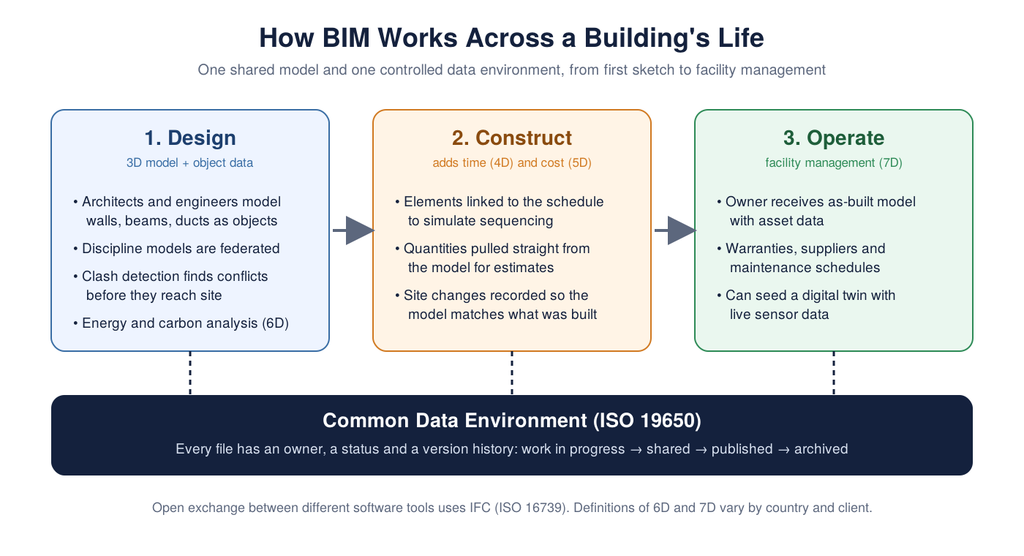
Picture a mid-size hospital. An architect, a structural engineer, a mechanical engineer, an electrical engineer, a general contractor, and a dozen subcontractors all need the same information, and all of them change it.
Objects, not lines
Each discipline builds its part of the project as intelligent objects. The structural engineer models beams and columns with sizes and load data. The mechanical engineer models ducts, pipes, and air handlers with flow rates. Software such as Autodesk Revit, Graphisoft Archicad, Tekla Structures, and Bentley’s design tools all work this way, though each has its own strengths by discipline.
The common data environment
Every BIM project needs one home for its models. ISO 19650 calls it a common data environment, or CDE: a shared, controlled repository where every file has a status, an owner, and a version history.
Work moves from “work in progress” to “shared” to “published,” so a contractor never prices off a drawing the architect has already replaced.
Federated models and clash detection
The discipline models are combined into a federated model. Software then checks that combined model for clashes, the places where two things try to occupy the same space. A duct running through a steel beam. A sprinkler pipe hitting a cable tray.
On paper, those conflicts usually surface on site, when a crew is standing in front of the problem. In a federated model, a coordinator can find them weeks earlier and resolve them in a meeting. Fixing a line on a screen costs far less than cutting steel.
Open data exchange
Not everyone uses the same software, so models are exchanged in IFC, an open, vendor-neutral format covered in the standards section below.
The Dimensions of BIM: 3D to 7D
BIM is often described in “dimensions.” Each one adds a type of information to the geometry. The definitions of 6D and 7D vary between countries and organizations, so check what a client means before you sign up for one.
| Dimension | What it adds | Typical use |
|---|---|---|
| 3D | Geometry and object data | Design coordination, clash detection, visualization |
| 4D | Time | Linking model elements to the construction schedule to simulate sequencing |
| 5D | Cost | Automated quantity takeoffs and cost estimates that update with design changes |
| 6D | Sustainability or energy (definitions vary) | Energy analysis, carbon and lifecycle assessment |
| 7D | Facility management (definitions vary) | Asset data, warranties, and maintenance schedules for the building owner |
4D matters because construction schedules rarely sit still. Nitin Bhandari, co-founder and CEO of construction scheduling company Planera, described the problem on The Digital Executive podcast: “They all have tons of dependencies. They all need resources… And to make things worse, as soon as the construction starts, things change every week.” Tying the schedule to model elements lets a team see what each of those weekly changes does to the build sequence.
BIM vs. CAD vs. Digital Twin
These three terms get mixed up constantly. Here is how they differ.
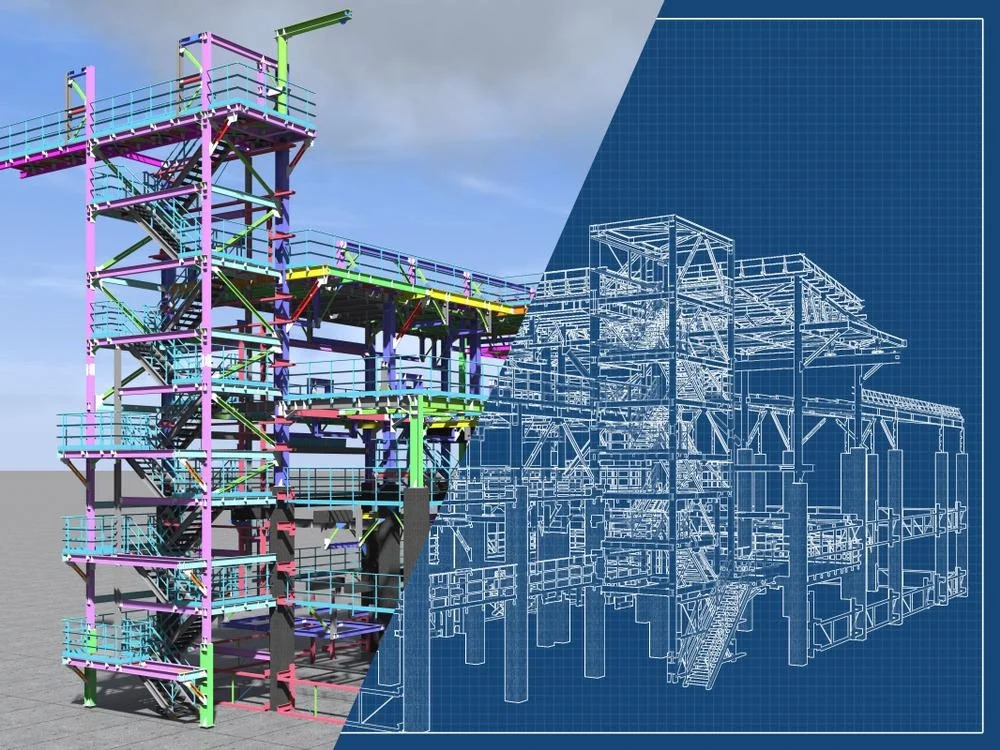
CAD (computer-aided design) produces drawings. Lines, arcs, and text on a digital sheet. A CAD floor plan does not know that a rectangle is a door. If you move a wall, you redraw every view yourself.
BIM produces a data-rich model that drives the drawings. Views, schedules, and quantities come from the same source and stay consistent.
A digital twin is a model connected to the real, operating building, typically through sensors and live data feeds. BIM is often the starting point for a twin, supplying the geometry and asset data. The twin then adds what’s happening right now: occupancy, temperatures, equipment performance. Reality capture is often the bridge between the two, and 3D scanning feeds digital twins with the as-built geometry they need.
Benefits of BIM
The benefits show up at different stages, for different people.
Designers get coordination: fewer clashes, fewer requests for information during construction, and drawings that agree with each other.
Contractors get better estimates and planning. Quantities come straight from the model, and 4D sequencing helps spot logistics problems, such as a crane that cannot reach a lift zone, before mobilization.
Owners get the asset data. A well-structured handover model tells a facilities team what’s installed, where, and how to maintain it, instead of leaving that information in boxes of paper manuals.
Everyone gets a single source of truth: you know which version is current, who changed it, and when.
Challenges and Limitations
BIM is not free, and it does not fix a badly run project.
- Software and hardware. Professional BIM tools carry substantial subscription fees, and large federated models need capable workstations.
- Training and process change. The software is the easy part. Agreeing on naming conventions, model ownership, and approval workflows takes longer.
- Interoperability gaps. IFC helps, but exchanges between tools still lose data at times.
- Uneven adoption. If a key subcontractor works in 2D, someone has to bridge the gap.
- Contracts and liability. Who owns the model, and who is responsible for errors in it, needs answering in the contract, not after a dispute.
Adoption also varies widely by country. USP’s European Architectural Barometer found 93% of Swedish architecture companies using BIM, with Denmark and the Netherlands at 78%. In the UK, only about 37% of projects use BIM workflows, despite a public sector mandate dating back to 2016.
BIM Standards, Levels, and Mandates
ISO 19650 and IFC
ISO 19650 is the international series for managing information over the life of a built asset using BIM. It defines the roles, the CDE, the information requirements a client should set, and how information is exchanged and approved. Part 1 sets out the concepts and principles of ISO 19650, and a second edition is currently in development.
IFC (ISO 16739), short for Industry Foundation Classes, is the open data format maintained by buildingSMART International that lets different software exchange models. IFC 4.3 was formally published as an ISO standard in April 2024 and extended the format to roads, railways, ports, and bridges.
BIM maturity levels 0 to 3
UK projects long described BIM in maturity levels:
- Level 0: Unmanaged CAD, mostly 2D, shared on paper or as PDFs.
- Level 1: A mix of 2D and 3D, with a common data environment for sharing files.
- Level 2: Collaborative BIM. Each discipline keeps its own model, and the models are federated and exchanged through a CDE.
- Level 3: A fully integrated, open-standard model that all parties work on together. It has remained largely aspirational.
The levels still appear in job ads and tenders, but the UK has moved away from them. Its industry bodies now describe the same practice as information management under ISO 19650, and the UK BIM Framework proposes replacing the “BIM Level 2” label with an “IMI Framework” based on that series.
Level of development (LOD)
LOD describes how complete and reliable a model element is at a given stage. In the BIMForum convention, which is common in the US:
| LOD | What the element represents |
|---|---|
| 100 | A symbol or generic placeholder |
| 200 | A generic system with approximate size, shape, and location |
| 300 | A specific element with defined size, shape, and location |
| 350 | LOD 300 plus the interfaces with other building systems |
| 400 | Detailed enough for fabrication and installation |
| 500 | Field-verified, as-built representation (not part of the BIMForum specification) |
Agreeing on LOD by project stage prevents arguments about what “the model” was supposed to contain.
Government mandates
Governments have used public procurement to push adoption. The UK mandated Level 2 BIM on centrally procured public projects from 4 April 2016. The EU’s public procurement directive, Directive 2014/24/EU, Article 22(4), allows member states to require BIM tools on public works contracts. Germany’s Masterplan BIM for federal highways makes BIM the standard process for federal trunk road projects from 2026.
Is BIM mandatory in the US?
No. The US has no national BIM mandate, because no single agency controls all public construction the way the UK government does. Individual agencies set their own rules instead. The General Services Administration launched its National 3D-4D-BIM Program in 2003 and now requires native and IFC BIM deliverables at all project milestones. The US Army Corps of Engineers and several states also have their own requirements. If you bid on public work anywhere, check the client’s information requirements early.
Where BIM Is Heading: AI and Automation
The next shift is automation layered on top of BIM data. A model full of structured, classified objects is exactly the kind of input that machine learning tools can use.
- Automated clash triage. Software that groups hundreds of clashes and flags the few that matter.
- Generative design. Tools that propose layout options against set constraints, such as daylight, structure, and cost.
- Model checking. Automated reviews of a model against building codes or client standards.
- Schedule generation. Linking model data to planning tools to draft construction sequences.
Many of these depend on site data flowing back into the model, a trend covered in how AI is changing construction site operations. In the NBS survey, architects ranked BIM and AI as the technologies with the most potential to change the built environment over the next five years.
How to Get Started With BIM
If your firm is new to BIM, resist the urge to transform everything at once.
- Pick one pilot project. Choose something real but not your highest-risk job.
- Define what you need from the model. Agree on the information requirements: what data, at what LOD, delivered at which stage.
- Set up a common data environment. Decide where files live, how they are named, and how they move from work in progress to published.
- Assign roles. Name a BIM coordinator or information manager to own the federated model and run clash reviews.
- Train the people, then the process. Software courses are quick. Changing how teams share and approve work takes repetition.
- Measure and review. Track RFIs, clashes found before construction, and rework. Use the numbers to decide what to scale.
Conclusion
BIM is the practice of managing a building’s information in a shared, structured model, not just drawing it in 3D. The model’s objects carry data, the common data environment controls who changes what, and clash detection catches costly conflicts long before they reach the site.
If you’re starting out, focus on process over software. Set clear information requirements, run one disciplined pilot, and build on what you learn. You’ll get the most from BIM when your teams agree on how information moves.
Read Next
If you want to go further into digital construction, these are a good next step:
- 10 Best AI Construction Software Tools That Learn From Your Project Data
- The Sprint Just Changed for Digital Construction Tech in 2025
- Advanced Modelling Techniques in Structural Design
Frequently Asked Questions
BIM, or building information modeling, is a way of designing and managing a building using a shared digital model full of data. Each element in the model, such as a wall or a pump, carries information like materials, size, and cost. Everyone on the project works from that same source.
BIM is a process, not a single software product. Tools such as Revit, Archicad, and Tekla are used to create BIM models, while other software handles coordination and data management. The process is defined by standards like ISO 19650, which apply regardless of which tools you use.
The difference between BIM and CAD is the data. CAD produces drawings made of lines and shapes, while BIM produces a model of intelligent objects that drive the drawings. When you change a BIM object, every related view and schedule updates automatically.
The dimensions of BIM describe types of information added to a 3D model. 4D adds time, 5D adds cost, and 6D and 7D usually cover sustainability and facility management, though definitions vary. Each dimension lets the model answer a new question about the project.
BIM modeling is used for design coordination, clash detection, cost estimating, construction scheduling, and handing over asset data to building owners. On complex projects, it reduces rework by finding conflicts before construction starts. Owners also use the model data to plan maintenance for decades after handover.