Exploratory Data Analysis (EDA) is a foundational part of most machine learning and data science projects. Before training predictive models or engineering features, data professionals must thoroughly understand their raw data. Traditionally, detecting outliers, checking distributions, and handling missing values required endlessly tweaking Pandas, Matplotlib, or Seaborn code.
Generative AI reduces this repetitive coding, but the standard approach—asking an external chatbot for Python snippets and pasting them into a notebook—creates severe workflow friction. By using a state-aware, notebook-native agent like RunCell, analysts working in JupyterLab can keep AI assistance rooted in the exact environment where their data actually lives.
The Pain of Context-Switching: Why Tab-Hopping Kills EDA
Most data scientists use AI assistants to speed up coding, but they do so in a separate browser tab. The daily workflow is painfully familiar: describe the dataset to a chat interface, copy the generated cleaning function, paste it into a notebook cell, and run it. When a shape mismatch inevitably occurs, you must copy the traceback error, return to the chat tab, explain the missing context, and start over.
Worse, when you return to a complex multi-week project after the weekend, an external chatbot has completely forgotten your dataset, forcing you to re-explain your entire analysis history from scratch.
The Context Transfer Trap: Why External AI Fails Your EDA
Every manual copy-paste step is a place where vital context evaporates. During EDA, your dataset’s state changes constantly. If you ask an external AI to “plot customer age distributions,” it lacks visibility into the live memory state.
- External AI Prompt: “I have a pandas DataFrame named df with columns customer_age and revenue. The revenue column has currency symbols and was imported as an object. customer_age has 20% missing values. Write Python code to clean the currency symbols, convert it to a float, and plot the distribution of ages.”
- Notebook-Native AI Prompt: “Fix the dtype error from the previous cell’s output, then plot the age distribution.”
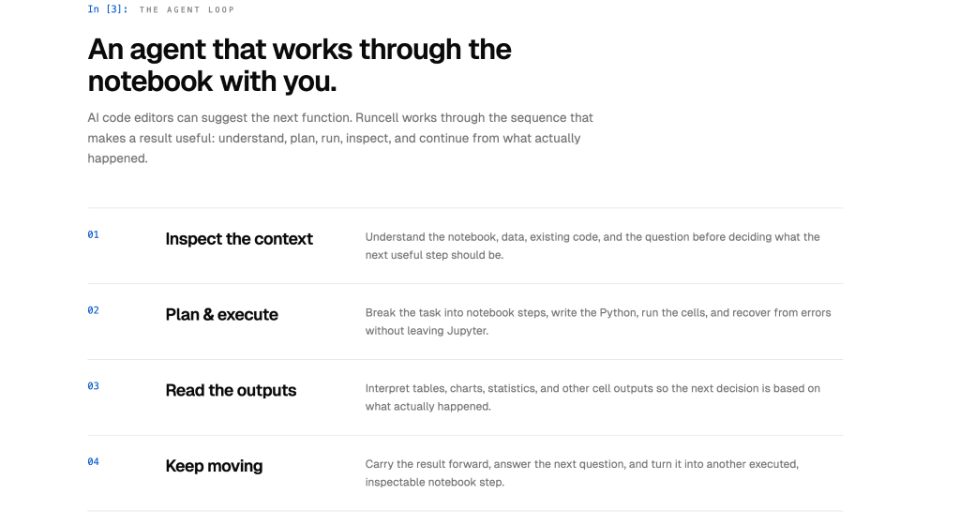
Because native AI reads the traceback, dataframe schema, and even the generated visualizations autonomously, you stop acting as a context-relay mechanism and return to actually analyzing data.
External Chatbots vs. In-Editor AI: Winning the Jupyter Workflow
| Feature / Capability | Standard AI Chatbots (External) | Notebook-Native AI (In-Editor) |
| Context Awareness | Limited to text or files manually uploaded by the user. | Autonomously reads live variables, dataframes, and kernel state. |
| Execution Loop | Manual: Generate → Copy → Paste → Run → Switch tabs. | Automated: Write code → Execute cell → Read Output → Iterate. |
| Output Interpretation | Requires manual pasting of execution results. | Autonomously interprets charts, tables, images, and metrics inside the notebook. |
| Project Memory | Resets every session; requires constant re-prompting. | Cross-session memory; remembers dataset decisions days later. |
| Setup & Access | Often requires paid subscriptions or API keys. | Built-in models (GPT, Claude, Gemini); no API key required. |
4 Stages of Frictionless EDA: A Native-AI Workflow Guide
To maximize efficiency, avoid asking AI to “analyze the whole dataset” at once. Keep the process iterative.
1. Automate Data Profiling & Structure Mapping
EDA begins with understanding dataset size, data types, and basic structures. A notebook-aware AI reads the exact terminal outputs of df.info() to instantly suggest the regex or conversion functions needed to fix anomalies, such as extracting numerical values from corrupted text columns.
2. Execute Context-Aware Cleaning & Imputation
Handling missing data requires analytical judgment. Instead of writing boilerplate imputation code, prompt the AI to plot the distribution of missing vs. non-missing rows. The AI generates the checks, reads the resulting visual evidence, and proposes the cleaning cells for your review.
3. Generate Dynamic Visualizations via Plain Text
Describe your visual goals in plain text: “Compare monthly revenue across our three main regions, highlight Q3 drops, and smooth the trendlines with a 7-day rolling average.” The agent pulls the correct live column names, renders the chart, and visually verifies the plot output.
4. Uncover Relationships & Engineer Features Faster
AI rapidly generates correlation heatmaps and pair plots to expose variable relationships. It also accelerates feature engineering—extracting day-of-week or seasonality flags from a datetime column instantly, without you writing a single line of parsing logic.
The Human Edge: Why AI Won’t Replace Your Analytical Judgment
While AI drastically accelerates the mechanical execution of EDA, a successful Python run does not guarantee a statistically sound analysis. Human oversight remains the critical safeguard:
- Preventing Data Leakage: AI tools optimizing for quick results might inadvertently pull target variables into feature engineering pipelines. Human review ensures strict separation.
- Controlling Feature Explosion: Left unchecked, an AI might execute violent feature crosses, leading to severe downstream overfitting. You must apply business intuition to dictate which features actually matter.
- Interpreting Causation: If advertising spend and revenue scale together, AI will highlight the correlation. Only a human analyst knows the domain context to answer the true question: Did the ads drive the sales, or did the seasonal sales spike dictate the marketing budget?
Conclusion
Ultimately, the goal of integrating AI into data science was never to replace the analyst, but to eliminate the mechanical friction of getting answers. External chatbots solved the problem of writing code from scratch but introduced the new burden of context management.
A genuine Jupyter-native agent closes this gap by working exactly where your data lives—executing, observing, debugging, and adjusting in real-time. Let the AI handle the repetitive syntax, traceback errors, and visualization scaffolding so you can focus entirely on driving business value through data.
Ready to transform your workflow? RunCell integrates directly into your existing .ipynb files with a simple pip install runcell. Get started with the free Hobby plan today—no OpenAI or Anthropic API keys required—and experience state-aware, frictionless EDA for yourself.