Many businesses need promotional brand commercials for product launches, seasonal campaigns, or social media advertising, but producing them in-house isn’t always realistic. Hiring a video production team can be costly, while learning professional editing software takes time that small teams often don’t have. For businesses that need to publish content regularly, AI video generation offers a faster way to turn ideas or product images into polished marketing videos.
Luma Dream Machine on Pollo AI is one option for creating cinematic commercial videos without a traditional production workflow. This guide explains what it is, why businesses may choose to use it through Pollo AI, and how to create more effective brand commercials step by step.
Key Takeaways
- Many businesses require promotional videos, yet producing them in-house can be unrealistic.
- Luma Dream Machine on Pollo AI generates videos from text or images, offering high-quality marketing content efficiently.
- Users can create various media formats within one platform, making it easier to manage multiple projects.
- The process involves preparing assets, writing detailed prompts, adjusting settings, and refining the output for best results.
- Luma Dream Machine is not a complete replacement for traditional production but significantly aids in creating everyday marketing materials.
Table of contents
What is Luma Dream Machine on Pollo AI
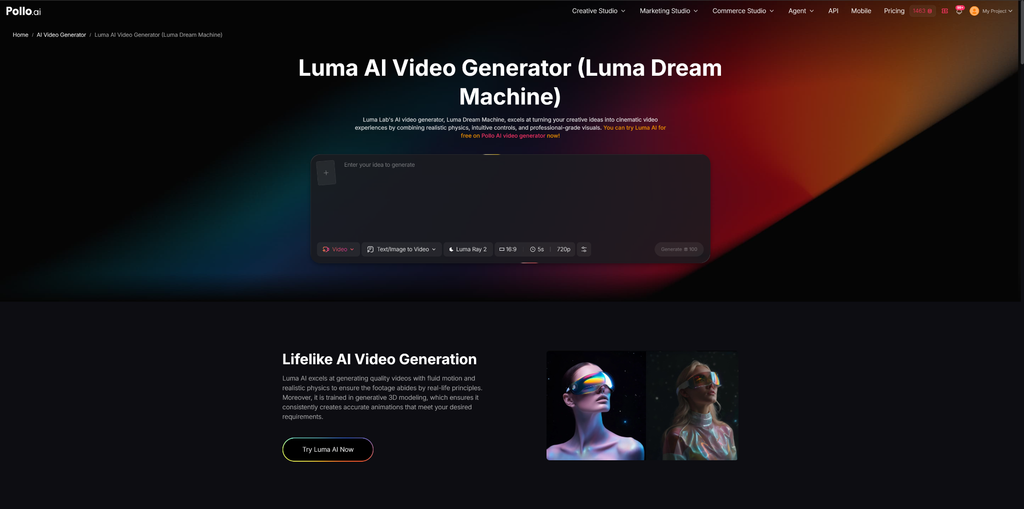
Luma Dream Machine is an AI video generation model developed by Luma AI. It generates videos from either text prompts or images while focusing on realistic motion, smooth camera movement, and cinematic visuals. It can be used for a wide range of projects, including product showcases, promotional videos, storytelling, and social media content.
Luma Dream Machine on Pollo AI makes this model available within Pollo AI’s AI creation platform.
Rather than offering only one video model, Pollo AI provides access to multiple AI image and video models in the same workspace. Users can create images, generate videos, compare results across different models, and switch to another model when a project requires a different visual style. For businesses producing content regularly, this integrated workflow is often more convenient than managing several separate AI tools.
Why do Businesses Need Luma Dream Machine on Pollo AI for Brand Commercials
For most businesses, speed matters as much as quality. Marketing teams, ecommerce stores, and local businesses often need fresh content every week, but hiring designers or video editors for every campaign isn’t realistic.
Using Luma Dream Machine on Pollo AI as an AI marketing video generator makes that workflow more efficient. Rather than relying on a single video model, users can test different AI models on the same platform and choose the one that best fits a campaign. Since Pollo AI also includes image generation and other creative tools, it’s easier to move from product visuals to finished promotional videos without switching between multiple services.
That said, it isn’t a replacement for professional production. It’s best suited to short commercials, product demonstrations, and social media campaigns. Complex brand films or television advertisements will still benefit from traditional editing software and manual post-production. Like most AI video tools, it may also take several prompt revisions before achieving the desired result.
How to Create Cinematic Brand Commercials with Luma Dream Machine on Pollo AI
Step 1. Prepare Your Commercial Assets
Before generating a video, decide what the commercial should accomplish. Some businesses may want to introduce a new product, while others may be promoting a seasonal sale or explaining a service.
If using image-to-video generation, start with high-quality product photos or brand images. Since AI generally preserves the details it receives, clearer source images usually produce more consistent results. It’s also worth deciding on the overall style in advance, whether that’s minimalist, luxury, lifestyle, or something more cinematic. Having a clear creative direction makes writing prompts much easier later.
Step 2. Open Luma Dream Machine on Pollo AI
Open Luma Dream Machine on Pollo AI and choose whether to generate a video from text or from an existing image.
For most product commercials, image-to-video is often the better option because it keeps the product appearance more consistent while adding realistic movement and cinematic camera motion. Text-to-video may be more suitable for concept videos or brand storytelling where there isn’t an existing product image.
Step 3. Write a Detailed Prompt for Brand Commercials
The quality of the prompt has a direct impact on the final video. A short description like “make a product commercial” usually produces generic results.
Instead, describe the scene as if giving instructions to a videographer. Include the subject, environment, lighting, camera movement, mood, and visual style.
For example:
A premium coffee machine displayed in a modern kitchen with warm morning sunlight. Slow cinematic camera movement, shallow depth of field, realistic reflections, elegant commercial style, luxury lifestyle atmosphere.
If the first result isn’t quite right, avoid rewriting the entire prompt. Changing one or two elements—such as the lighting, camera movement, or environment—makes it easier to understand which adjustments actually improve the video.
Step 4. Configure the Video Settings
Before generating the video, adjust the settings according to where the commercial will be published. A vertical aspect ratio is usually the better choice for TikTok, Instagram Reels, or YouTube Shorts, while a landscape format is more appropriate for websites and standard YouTube videos. If the generated movement appears too subtle or too dramatic, adjusting the motion settings can create a more balanced result.
These settings don’t need to be perfect on the first attempt. In many cases, creating two versions with different aspect ratios or motion styles is faster than trying to make one version work across every platform.
Step 5. Generate and Review the Brand Commercials
Once everything is ready, generate the first version of the commercial. Rather than exporting it immediately, spend a few minutes reviewing it carefully.
Watch the video from beginning to end and check whether the product remains visually consistent throughout the sequence. Pay attention to whether the lighting supports the intended brand image and whether the camera movement enhances the commercial instead of becoming distracting. It’s also worth checking that the product stays as the visual focus rather than being overwhelmed by unnecessary effects.
If something doesn’t look right, revise only one or two parts of the prompt before generating another version. Making too many changes at once makes it difficult to identify which adjustment improved the result. In practice, it’s common to generate several variations before choosing the strongest version for publication.
Step 6. Export and Publish the Final Video
Once satisfied with the result, export the finished commercial.
The completed video can be used on ecommerce product pages, social media platforms, digital advertising campaigns, email marketing, landing pages, or presentation materials. If the campaign will run across multiple channels, it’s often helpful to create several versions with different aspect ratios or visual styles rather than relying on a single edit for every platform.
Read Next
A few related pieces worth your time:
- AI-Powered Search Is Changing the Way Customers Discover Brands
- How AI-Powered Home Search Fixes the Biggest Buyer Pain Points in Canada
- Tech Against Turbulence: Smart ISA Reviews Benefits of AI Trading
Conclusion
For businesses that need to produce marketing videos regularly, Luma Dream Machine on Pollo AI offers a practical way to shorten production time while maintaining a professional visual style. It won’t replace a full production team for every project, but it can handle many everyday marketing tasks, including product launches, promotional campaigns, and social media advertising.
The best results usually come from treating the first generation as a draft rather than a finished commercial. Starting with quality source images, writing clear prompts, and refining the output over several iterations typically produces stronger videos than expecting a perfect result on the first attempt. Like any creative tool, it works best when combined with thoughtful planning and realistic expectations.