
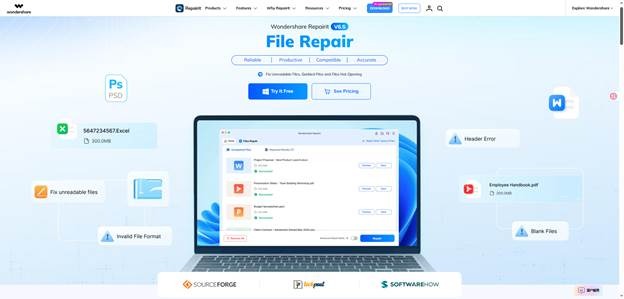
Most digital teams have dealt with the same frustrating moment: a client video will not open, a product photo looks damaged, or a document breaks right before it is needed. In those cases, an AI file repair tool can be the difference between recreating work and getting the original file usable again. Wondershare Repairit is an advanced, AI-powered data repair tool built for damaged videos, photos, files, audio, and emails, and Repairit has also launched a convenient online version for quick browser-based fixes.
Key Takeaways
- Digital teams often face issues with corrupted files that can hinder workflows.
- An AI file repair tool like Wondershare Repairit helps quickly restore damaged files such as videos, photos, and documents.
- Repairit can work both as a desktop application and an online tool, catering to different repair needs.
- Users can follow a four-step process to repair files: add the damaged file, start the repair, preview the result, and save the restored file.
- Incorporating AI-powered file repair into workflows increases efficiency and reduces disruptions during critical work moments.
Table of contents
Why Digital Teams Need an AI Repair Tool
An AI file repair tool is becoming more useful because modern work depends on files moving across cameras, cloud drives, messaging apps, shared folders, and editing software. Every transfer creates another point where a file can become incomplete, unreadable, or structurally damaged. For a creative team, that might mean a corrupted video export. For an operations team, it might mean a damaged spreadsheet or presentation.
A natural file repair workflow gives teams a practical first response. Instead of assuming the file is lost, users can run AI-powered file repair, preview the result, and decide whether the repaired version is good enough to continue work. That makes an AI repair tool useful not only for emergencies but also for reducing everyday workflow friction.
What an AI-Powered File Repair Actually Repairs
A file repair tool is not the same as a backup system. Backup recovery looks for another copy of a missing file. File repair works on the damaged file itself. An AI file repair tool analyzes the file structure, identifies corruption patterns, and attempts to rebuild the content so it can open, play, or display correctly again.
This is especially relevant for mixed digital teams. One team may need video repair for damaged MP4 or MOV clips, photo repair for corrupted images, and document repair for Word, Excel, PowerPoint, or PDF files. A broader AI-powered file repair platform keeps those needs in one workflow instead of forcing users to search for a different repair tool every time a file type changes.
How Wondershare Repairit Fits the File Repair Workflow
Wondershare Repairit fits this workflow by combining desktop repair features with online repair options. The desktop version is better for larger files, batch repair, and repeated repair tasks. Repairit Online is more convenient when a user needs a fast fix from a browser or wants to test whether a damaged file can be repaired without installing software.
For guest contributors, reviewers, and technology readers, the important point is that Repairit should not be positioned as a magic recovery promise. It is better described as an AI-powered file repair solution that helps users respond quickly when valuable files become corrupted, damaged, or unopenable.
When to Use Desktop Repair vs. Repairit Online
Use the desktop version when the damaged files are large, private, repeated, or part of a serious production workflow. Use the online version when the task is lighter, urgent, or browser-first. This split makes the AI file repair tool easier to fit into real working habits, because not every damaged file requires the same repair path.
How to Use the AI-Powered File Repair in 4 Steps
The steps below follow the official Repairit desktop guide for file repair. The same logic also helps readers understand when Repairit Online may be enough for a quick file repair task.
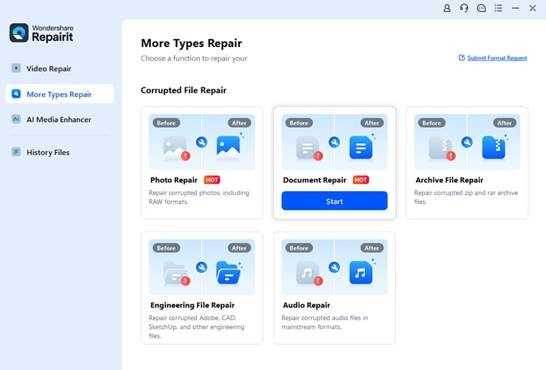
Step 1: Choose File Repair and Add the Damaged File
Open Repairit, choose File Repair, and add the corrupted document or file. This step sets the repair type before the AI file repair tool starts analyzing the damaged content.
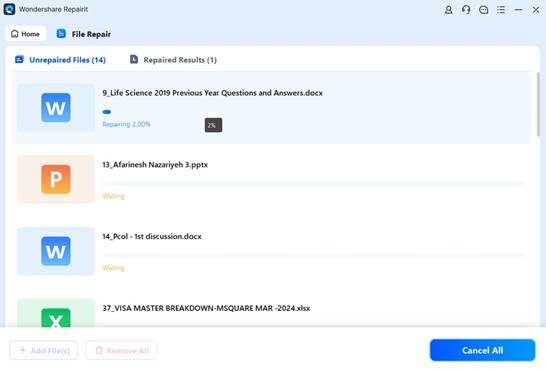
Step 2: Start the AI-Powered File Repair Process
After the file is added, start the repair process. Repairit checks the damaged structure and begins rebuilding the file so the content can become readable again.
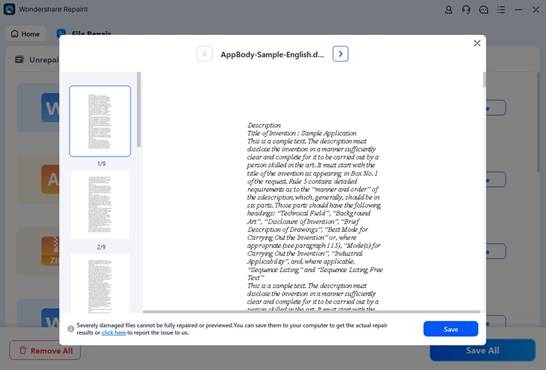
Step 3: Preview the Repaired File
A good AI file repair workflow should include previewing. Before saving anything, preview the repaired result to confirm whether the document opens correctly and whether the important content is still usable.
Step 4: Save the Restored File Safely
Once the repaired file looks right, save it to a secure folder. For team workflows, it is smart to keep the original damaged file, the repaired copy, and a backed-up version in separate locations.
Why File Repair Belongs in a Modern Digital Workflow
The value of an AI file repair tool is not limited to one crisis. It gives teams a repeatable process for damaged videos, broken images, and corrupted office files. That matters because file damage usually appears at inconvenient times: during a deadline, after a shoot, before a presentation, or while moving assets between platforms.
For smaller and urgent cases, Repairit Online File Repair keeps that process lightweight. Users can try online file repair from a browser, while still having the desktop AI file repair software available for heavier repair tasks. This combination makes the repair workflow more flexible for hybrid teams and individual creators.
Final Thoughts on AI-Powered File Repair
An AI file repair tool should help users act quickly without turning the process into a technical project. Repairit does that by giving teams a structured way to repair corrupted files, preview the result, and save a usable copy. For digital teams that depend on videos, photos, and documents every day, AI-powered file repair is a practical layer of protection alongside backups, cloud storage, and careful file management.