Picture a typical Monday morning at the office. You sit down at your desk, unlock your computer, and you are immediately staring at a chaotic sea of open tabs and applications. You have one app for writing emails, a different website to brainstorm ideas, another subscription for creating images, and your standard software for putting together slide decks. AI workspaces are changing the game.
For many teams today, the promise of artificial intelligence was supposed to make work easier. Instead, it has often just added more clutter to our daily routines.
If you are leading a team or running a company, you have probably noticed this frustration. People do not want more tools to learn; they just want to get their work done smoothly so they can go home on time.
This is exactly why the conversation around AI for executives is changing. Smart leaders are stepping back from buying dozens of different apps and are instead looking for one calm, connected space where all work happens together.
Key Takeaways
- Many teams face app overload, which complicates their workflows instead of simplifying them.
- Leaders must shift from purchasing isolated tools to adopting a unified AI platform for seamless collaboration.
- An all-in-one AI platform enhances productivity by maintaining context and efficiently handling various tasks.
- To encourage adoption, demonstrate the platform’s benefits through practical, relatable examples.
- Start small by trialing the platform with a team before rolling it out company-wide for greater acceptance.
Table of contents
Common Misunderstandings of the Leadership Team Regarding AI Workspaces
When business leaders first hear about AI, it is easy to misunderstand what it is meant to do. The most common mistake at the leadership level is viewing AI as just a really fast typewriter or a basic search engine. Because they see it as a simple utility, they buy small, single-purpose apps to fix tiny problems.
But think about the actual human cost of this approach. Imagine your marketing manager, Anne. She uses an AI tool to write a campaign summary. Then she has to copy that text, log into a completely different design app to create a matching graphic, download that graphic, and finally paste everything into a presentation tool.
Every time Sarah switches between these apps, she loses her train of thought. She wastes time formatting and adjusting things manually. The technology is supposed to be helping her, but the disconnected process is actually draining her energy.
Leaders are realizing that buying random, disconnected tools does not help their teams. The real magic happens when you connect the steps.
The Real Value of End-to-End AI Workspaces
To save time and make people’s work lives better, we must look at how a whole project gets done from start to finish. Let’s think about what happens when you bring everything under one roof.
Imagine you need to put together a major market update for your board of directors. In the old, messy way of working, you would spend hours hunting down information, copying it into a document, and then spending even more hours fighting with slide layouts.
Now, imagine doing all of that inside an all-in-one AI platform. You start by asking the system to pull together the research you need. Once the information is gathered right there on your screen, you simply ask the same system to turn those notes into a visual presentation. You never have to open a new tab. You never copy and paste.
This smooth, connected experience is the heart of Oreate AI. It is designed to remove the headaches of jumping from app to app. When your workspace handles reading, writing, and visual design all in one place, it remembers the context of what you are doing. The system knows exactly what your research is about, so the presentation it builds matches your goals perfectly. It feels less like using software and more like working with a highly capable assistant.
Framework for Evaluating AI Workspaces
With so many companies selling new software, how do you know what is actually worth your money? Good AI workspace leadership means ignoring flashy ads and looking at how a tool fits into a real human’s workday.
When you are looking to bring a new system into your company, ask yourself these three simple questions:
- Does it handle different types of work? People do not just write all day. They look at charts, share pictures, and present slides. You want a platform that handles words, images, and presentations equally well.
- Does it maintain context between tasks? If you upload a complex document, can the system use that same information to generate a video or a slide deck without needing to be retaught? A good platform shares memory across all its features.
- Can it handle the heavy lifting? Writing a quick email is easy. Reading and summarizing a dense financial report is hard. You need a system that can do deep, accurate thinking, not just one that gives you brief, surface-level summaries.
By keeping these practical questions in mind, leaders can confidently pick an AI workspace for professionals that actually makes their team’s day-to-day life better.
How Leaders Can Drive Team Adoption
It is one thing to buy a great software platform; it is a completely different challenge getting your team to actually use it. People naturally resist change, especially if they feel they have to learn a complicated new system.
The best way to help your team adapt is to show them how much easier their day is about to become. Walk them through a real situation they face all the time. Here is an easy, step-by-step example you can share with your team to show them how to turn hours of tedious work into a quick process using Oreate AI.
Step 1: Gathering the Data with Deep Research:
When starting a big project, the hardest part is usually gathering facts. Instead of spending your morning doing web searches and reading long articles, let the platform do the heavy lifting.
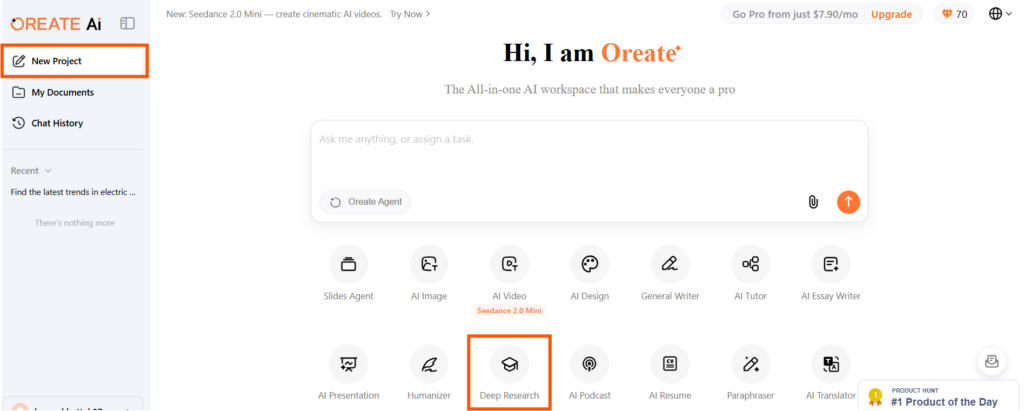
- Open up your workspace and start a new project.
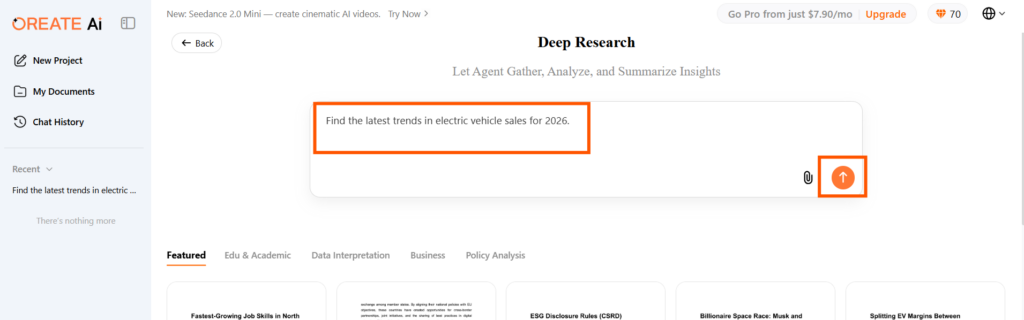
- Use the Deep Research feature. Type in exactly what you need to know in plain English; for example, “Find the latest trends in electric vehicle sales for 2026.” The system will read massive amounts of data and give you an accurate summary with real facts you can trust.
Step 2: Processing the Information with AI Chat and Document Analysis:
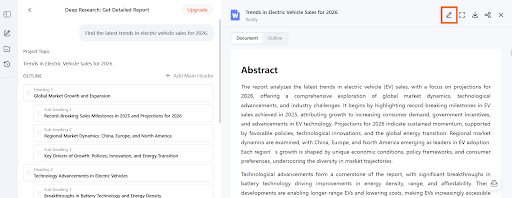
Now you have a lot of good, researched information, but it might be too detailed to share with your boss right away.
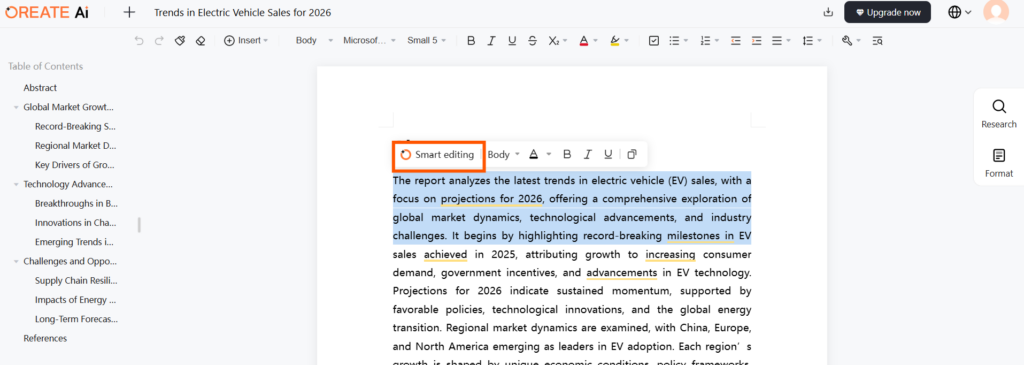
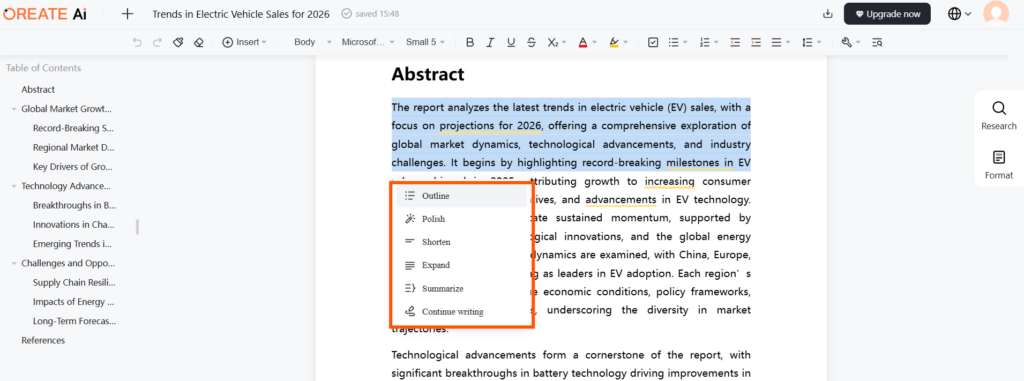
- Instead of manually rewriting the text, use Oreate’s built-in AI Chat or Document Analysis tools.
- Ask the chat assistant to summarize, polish, expand, etc, for the most important takeaways for an executive meeting. Once the chat has perfected the wording and editing of the notes, you download the finished text document.
Step 3: Creating the Final Deck with Slides Agent:
This is the part everyone usually dreads: making the slides. But the transition from a finished document to a presentation is incredibly straightforward.
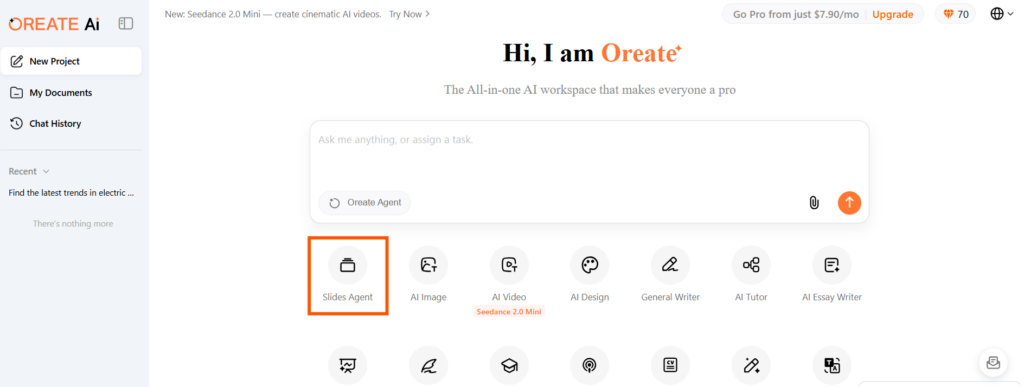
- Navigate to the Slides Agent within the platform.
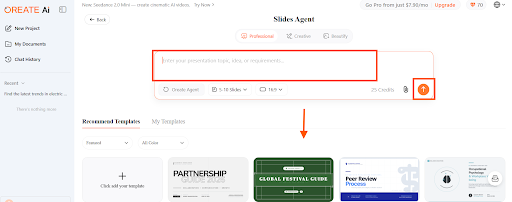
- You can provide a prompt, or you can upload the text document you just downloaded in the previous step. You can then select a professional template that fits your brand or the topic, and you can also upload one that you like the most.
- The Slides Agent will process your uploaded document and automatically generate a polished, 10-slide presentation, formatting the text onto the correct slides based on your chosen template.
- When your team sees this; when they realize they can go from research to a finished presentation in minutes without fighting with formatting, they will want to use the platform immediately.
Governance, Risk & Quality
When we talk about bringing AI into a business, it is completely natural to worry about safety and quality. No executive wants their team relying on software that makes up facts or accidentally shares private company secrets.
This is another reason why moving to one unified, professional workspace makes so much sense. When you have one central system, it is much easier to keep things secure. You know exactly where your company’s information is, rather than having it scattered across ten different free apps your employees found online.
Furthermore, good professional platforms are built with a focus on trust. When you use tools designed for deep, factual work, they are programmed to give you accurate information that you can actually trace back to the source. This means your team can feel confident that the reports and presentations they are building are rooted in reality.
Practical Next Steps
You do not need to change how your entire company works overnight. If you want to bring this kind of helpful technology to your team, start small.
Pick one group of people who are always overloaded with reading and creating presentations; maybe your marketing team or your researchers. Let them test-drive the platform for a few weeks on a real project.
Ask them how it feels. Did it save them time? Did they feel less stressed out by app fatigue? Once that small group sees the benefits and feels comfortable, you can use their success story to gently introduce the platform to the rest of the company.
Conclusion
We have moved past the days when AI was just a fun gimmick. Today, it is about making human work feel more human again. For leaders, the goal should be incredibly simple: remove the clutter of too many apps, and give your people a quiet, connected space where they can think, research, and create without frustration. By focusing on practical, easy-to-use tools that handle the whole job from start to finish, you can help your team work faster, stress less, and actually enjoy the creative process again.