Remote and hybrid work has created a fundamental communication challenge that most organizations have not solved: how do you replicate the impact of a live presentation when your audience is distributed across time zones, schedules, and attention spans?
The default answer — sharing the PowerPoint deck over email or Slack — has proven inadequate. A slide deck without its presenter is like a screenplay without actors: the structure is there, but the performance that brings it to life is missing. Recipients click through slides, absorb fragments of the intended message, and move on to the next item in their inbox.
The better answer, which a growing number of remote-first organizations are adopting, is converting PowerPoint presentations into narrated video with AI-generated presenters. This approach preserves the full communication intent of the original presentation while making it consumable on any schedule, in any time zone.
Key Takeaways
- Remote and hybrid work complicates communication, making traditional slide decks insufficient.
- Converting PowerPoint presentations into narrated video enhances engagement and preserves the intended message.
- AI-generated video presentations are asynchronous, contextual, consistent, and trackable, meeting the needs of remote teams.
- Optimizing videos for async viewing requires adding context, clear transitions, and keeping the total length reasonable.
- Building a video-first communication culture starts with leadership and involves establishing templates and measuring engagement.
Table of contents
The Async Communication Challenge
In a co-located office, communication happens in context. A strategy update is presented in a meeting where the presenter can read the room, emphasize key points, answer questions in real time, and ensure the message lands. In a remote environment, that same strategy update becomes a slide deck attached to a calendar invite for a video call that half the team cannot attend because of time zone conflicts.
What Remote Teams Actually Need
Remote teams need communication that is asynchronous (consumable at any time), contextual (includes explanation, not just data), consistent (every viewer receives the same message with the same emphasis), and trackable (leadership knows who engaged with the content).
Video checks all four boxes. A narrated presentation with an AI presenter delivers the full message regardless of when or where the viewer watches. The narration provides context that slides alone cannot convey. The AI presenter delivers consistently every time. And video platforms provide viewing analytics that confirm engagement.
How to Convert Presentations for Remote Consumption
The Conversion Process
The workflow is straightforward. Upload your PowerPoint to video conversion platform of choice. The AI will analyze each slide — reading text elements, interpreting visual layouts, and incorporating speaker notes if available. It then generates a narration script for each slide, adds an AI presenter who delivers the content with natural expression, and produces a finished video that can be shared via link, embedded in a wiki, or distributed through your internal communication channels.
The entire process takes minutes, not the hours or days that traditional video production would require. This speed is critical for remote teams where communication needs to move quickly — a strategy pivot announced on Monday morning needs to reach the entire global team by Monday evening, not next Thursday after the video editing is complete.
Optimizing for Async Viewing
Presentations designed for live delivery need some adaptation for async video consumption. Here are the key adjustments. Add more context to each slide. In a live presentation, you can say things like “as I mentioned earlier” or “building on the previous point.” In async video, each section should be more self-contained since viewers may not watch in a single sitting. Include clear transitions between topics. In a live meeting, transitions happen naturally through conversation. In video, explicit transition phrases help viewers track where they are in the overall structure. Keep the total length reasonable. Meeting presentations can run 30-60 minutes because there is social pressure to stay in the room. Async video viewers will drop off after 10-15 minutes unless the content is exceptionally engaging.
Use Cases for Remote Teams
All-Hands and Town Halls
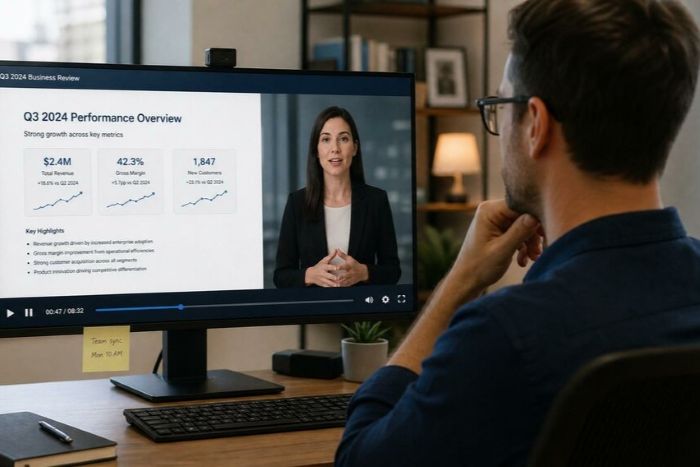
Monthly or quarterly all-hands presentations are a staple of organizational communication but scheduling a time when everyone across global offices can attend live is often impossible. Traversing time zones cause frustrating communication challenges. Converting the all-hands deck to video ensures that every employee receives the complete message — leadership updates, strategic priorities, company metrics, and cultural messaging — regardless of their time zone or schedule.
Project Status Updates
Cross-functional projects require regular status communication across teams. A narrated video version of the weekly status deck is more engaging than a shared document and more efficient than a synchronous meeting where half the attendees are passive listeners. Team members can watch the update at their convenience, and the video format ensures they absorb the visual data alongside verbal commentary.
Sales Proposals and Client Presentations
Sales teams increasingly need to deliver proposals to buying committees that cannot meet synchronously. Converting a sales deck to narrated video creates a self-contained presentation that walks the prospect through the value proposition, pricing, and implementation plan without requiring a live call. The video can be shared via link and watched by all stakeholders on the buying committee, ensuring consistent messaging.
Onboarding and Training
New hire onboarding in remote organizations relies heavily on self-directed learning. Converting onboarding presentations to video creates a more engaging and effective learning experience than sharing slide decks. The new hire can watch presentations at their own pace, revisiting complex sections as needed, while the onboarding team tracks progress through viewing analytics.
Building a Video-First Communication Culture
Start with Leadership
The most effective way to establish video as a standard communication format is for leadership to adopt it first. When the CEO’s quarterly update arrives as a narrated video rather than a slide deck, it signals that the organization values effective asynchronous communication and is willing to invest in the tools to support it, while minimizing communication challenges.
Establish Templates and Standards
Create branded video templates that teams across the organization can use for their presentations. Consistent visual styling and presentation format create a professional, unified communication experience that reinforces organizational identity.
Measure Engagement, Not Just Distribution
Track video viewing analytics — completion rates, rewatch patterns, viewer counts — alongside traditional communication metrics. This data reveals whether your messages are actually reaching and engaging your distributed workforce, not just sitting unread in email inboxes.
The Bottom Line
For remote and hybrid organizations, converting presentations to video is not a nice-to-have — it is becoming a core capability that eliminates communication challenges. The organizations that communicate most effectively across distance and time zones are those that have recognized that a slide deck is not a complete communication unit. Adding narration, visual engagement, and a human presence through AI-powered video conversion transforms presentations from partial messages into complete, self-contained communications that work for every audience member, regardless of when or where they engage.