
For a long time, Excel felt like enough to create data dashboards. It handled the monthly reports, the budget trackers, and the performance summaries that got copy-pasted into PowerPoint slides and emailed to managers who spent approximately ninety seconds looking at them before moving on. The work got done. The numbers were correct. Nobody complained.
What is harder to notice, from inside that workflow, is how much of the process is friction – manual, repetitive, and quietly time-consuming in ways that only become visible once a better alternative exists. The realization tends to arrive the same way for most people who have been through it: not as a sudden epiphany, but as a creeping awareness that the tools being used are not quite the right size for the problems they are being asked to solve.
The journey from Excel-only to genuine data dashboards is one that a growing number of professionals are making – and the distance between the starting point and the destination turns out to be considerably shorter than most people expect before they begin.
Key Takeaways
- Excel works well for basic tasks but creates friction in workflows due to manual processes and version control issues.
- Transitioning to dashboards improves efficiency; they allow users to explore data independently without tedious assembly.
- The learning curve for using tools like Tableau or Power BI is shorter than expected for Excel users, but cleaner data inputs are necessary.
- Dashboards replace reports, saving time and enhancing strategic analysis, while building a compelling portfolio for job opportunities.
- SQL and dashboard tools foster a more active relationship with data, encouraging deeper analytical instincts and better questions.
Table of contents
What Excel Does Well – and Where It Stops
To be clear: Excel is a serious tool. It is versatile, widely understood, and capable of handling analytical tasks that many people underestimate. The problem is not Excel itself but the workflow it tends to produce at scale – the cascade of linked files, the manual refresh cycles, the version-control challenges that accumulate quietly until something breaks at a moment that matters.
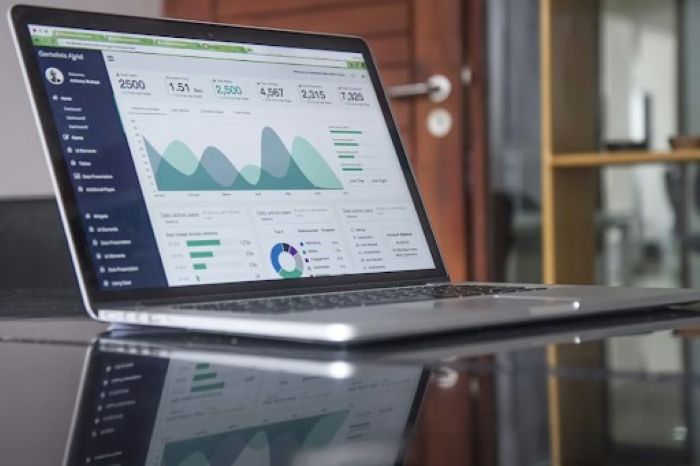
More significantly, Excel is a tool for calculating and tabulating. It is not, by design, a tool for communicating. The charts it produces are functional but rarely compelling. The experience of interacting with a static spreadsheet is fundamentally different from the experience of exploring a live, interactive dashboard – where filters respond in real time, where the relationship between variables becomes visible through exploration, where a non-analytical stakeholder can find the answer to their specific question without needing to ask someone else to run the numbers.
That last point is the one that tends to shift how professionals think about the value of the upgrade. A dashboard that a senior leader can navigate independently – that reduces the back-and-forth of “can you cut this by region” and “what does it look like if we exclude last quarter” – changes the nature of how analytical work flows through an organization. It moves the analyst from data processor to analytical partner, which is a different and considerably more interesting professional position.
The Learning Curve That Is Smaller Than Expected
The assumption that stops many Excel-fluent professionals from making the move is that building real dashboards requires technical skills they do not have. It is an understandable assumption – dashboards look sophisticated, and the tools associated with them carry an air of specialist capability.
The reality is that the distance between Excel competence and basic Tableau or Power BI fluency is shorter than most people anticipate. Someone who already understands data in tabular form, who is comfortable with the logic of filters and aggregations, who has spent time thinking about how to present numbers clearly – that person has a significant head start. They are not learning data from scratch. They are learning a new interface for working with data they already understand.
What does take time is the shift in how the data needs to be prepared before it reaches the visualization tool. Excel can accommodate messy, inconsistently structured data because the person working with it is doing a lot of the interpretation manually. Tableau and Power BI prefer cleaner inputs – which is where SQL becomes the natural companion. Learning to query a database and produce a clean, structured output that feeds directly into a visualization tool is where the real workflow upgrade happens, and it is also where the analytical thinking becomes more rigorous.
The combination of SQL and a visualization tool like Tableau is the point at which the full picture comes into focus. SQL handles the data – where it comes from, how it is shaped, what gets included, and excluded. Tableau handles what the data looks like and how it communicates. Each makes the other more meaningful, and together they produce something qualitatively different from anything that Excel alone can create.
The Moment the Data Dashboard Replaces the Report
There is a specific moment in the transition from spreadsheets to data dashboards that most people who have been through it remember clearly. It is the first time a piece of work that previously took several hours to assemble – pulling numbers, building charts, formatting slides, writing the narrative summary – is replaced by a dashboard that updates automatically and answers the same questions without any of the manual assembly.
That moment tends to reframe the value of the investment in learning. The hours spent on SQL queries and Tableau layouts feel abstract until they translate into concrete time recovered – hours that were previously spent on mechanical work and are now available for the actual analysis: asking better questions, investigating unexpected patterns, building the kind of contextual understanding that transforms a number into a decision.
The professional who builds that capability is not just more efficient. They are more valuable in a way that is directly visible to the people around them. The quality of the work changes. The turnaround time changes. The nature of the conversations they can participate in changes. What was previously a reporting function starts to look more like a strategic one.
The Portfolio That Opens Doors
For professionals making this transition with an eye toward a new role or a formal move into data analytics, the data dashboard itself becomes one of the most persuasive artefacts available.
A completed, well-designed dashboard that tells a clear analytical story – built from real data, answering a genuine question, navigable by someone who did not build it – is the closest thing available to a live demonstration of analytical capability. It shows technical competence with the tools. It shows design judgment. It shows the ability to translate a question into a data structure and then render the answer in a form that communicates clearly.
This is considerably more compelling, in a hiring conversation, than a certificate of completion or a list of tools on a CV. The certificate says someone finished a course. The dashboard says someone can do the work.
Building toward that kind of portfolio artefact is one of the reasons that structured programs which emphasize project-based learning tend to produce more job-ready graduates than those which emphasize theoretical knowledge or tool familiarity alone. Heicoders Academy structures its data analytics program around applied projects from the outset – ensuring that learners are building real, demonstrable outputs throughout the curriculum rather than assembling a portfolio as an afterthought at the end. For professionals making the move from Excel-based workflows into genuine analytics capability, that design philosophy produces a learning experience that is more immediately applicable and more credibly demonstrable.
What Changes After the Transition to Data Dashboards
The professionals who have made this particular journey – from spreadsheet-centric work to SQL-and-dashboard fluency – tend to describe the change in similar terms. Less time spent on mechanical assembly. More time spent on interpretation and insight. A broader set of problems they are invited to engage with. A different quality of conversation with the people who use their work.
There is also a subtler shift that takes longer to articulate but that practitioners mention consistently: a change in how they relate to data itself. Working with SQL and interactive dashboards builds a more active, interrogative relationship with data than Excel typically produces. The analyst who can query a database directly – who does not have to wait for someone else to extract the data before they can begin – develops a different kind of analytical instinct. They ask more questions. They test more hypotheses. They follow more threads, because the cost of following a thread is lower when the tools respond quickly and flexibly.
That instinct is not something that any course teaches explicitly. It develops through use, through the accumulation of small analytical decisions made across real projects. But the conditions that allow it to develop are created by the tools, and the tools are considerably more accessible than most Excel-fluent professionals have been led to believe.
The distance between the spreadsheet and the data dashboard is shorter than it looks. The question is simply when to start walking it.