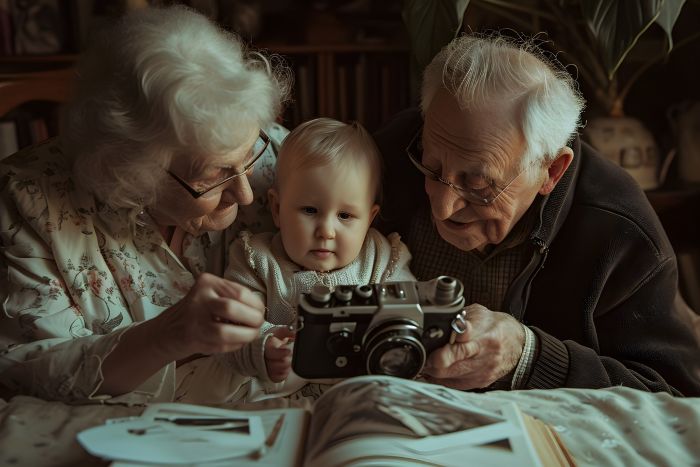
We all have that one dusty shoebox tucked away in the back of a closet. You know the one. It’s stuffed with curled, faded, and scratched black-and-white photographs of your grandparents or great-grandparents and other old family photos. Looking at them is always a mix of deep nostalgia and mild frustration. You are holding your family’s actual history, but it feels trapped behind a thick layer of blurry grain and physical decay.
For decades, saving these physical memories meant paying a professional photo restorer hundreds of dollars to meticulously paint over the cracks, or just accepting that the faces of your ancestors would eventually fade away completely.
But we aren’t limited by physical decay anymore. The same tech we use every day to edit our social media feeds has a much more profound and emotional application. We can actually pull these faces out of the past and make them feel real again. It is no longer just about fixing a crease on a piece of paper; it is about looking into the eyes of a relative you never got to meet and seeing them look right back at you.
Key Takeaways
- Restoring old photographs using AI can revive family history in a meaningful way.
- Start by properly digitizing photos with a flatbed scanner for the best results.
- Use tools like Cutout.pro for AI restoration and colorization to enhance portraits.
- Keep animations subtle to maintain emotional authenticity and avoid the uncanny valley.
- Transforming old photos into video memories makes for impactful gifts at family gatherings.
Table of contents
Adding a Heartbeat to History
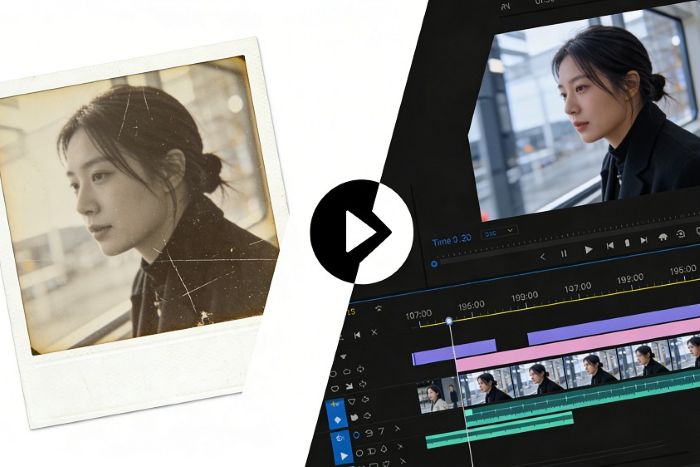
There is a massive emotional difference between looking at a static piece of paper and watching someone’s face actually move. We are wired to respond to human expressions. When you take a flat, motionless portrait of your grandfather and apply an image to video transformation, you completely change the dynamic of that memory. Suddenly, it’s not just a historical document; it’s a person.
The technology behind these maps the facial features of the original subject—the eyes, the nose, the curve of the mouth—and applies a sequence of natural micro-expressions. You can watch a stoic, unsmiling relative from 1920s old family photos blink, softly shift their gaze, and break into a gentle smile. When you show this kind of animated result to an older family member who hasn’t seen their parent’s face in fifty years, the reaction is almost always tears. It bridges the gap between generations in a way that a static photo simply cannot.
Fixing the Foundation: Restoration and Color
However, you can’t just throw a heavily damaged, scratched photo straight into an animation engine and expect a miracle. If the AI cannot clearly “see” the eyes or the mouth because of a massive crease across the paper, the resulting motion will look distorted or glitchy. You have to repair the foundation first.
This is where a comprehensive tool platform like Cutout.pro becomes your personal restoration lab. Before adding any motion, you run the raw scan through their AI Photo Restorer and Upscaler. This feature is specifically trained to target the physical degradation of old film. It automatically smooths out severe creases, removes random dust specs, and critically, sharpens the facial features that have bled out over time to bring the resolution up to modern standards.
Once the photo is crisp and clean, you move to the next step: the AI Colorizer. Black-and-white photos inherently feel distant. By letting the algorithm analyze the lighting and subjects to apply historically accurate, natural skin tones and clothing colors, you remove that layer of historical distance. The platform does this in a matter of seconds, giving you a vibrant, high-definition portrait that looks like it was shot yesterday.
How to Prep Your Old Family Photos for the Best AI Results
If you want to spend a weekend digitizing and restoring your family archive, you need a solid workflow. The AI is incredibly smart, but garbage in equals garbage out. Here is how you ensure you get breathtaking results instead of a blurry mess:
- Stop Using Your Phone Camera: The biggest mistake people make is laying a glossy photo on a table and snapping a picture of it with their phone. You will capture overhead glare, shadows from your hands, and lens distortion. Use a proper flatbed scanner. If you must use a phone, use a dedicated scanning app like Google PhotoScan that stitches multiple angles together to eliminate glare.
- Focus on Portraits: For the animation and colorization features to work their absolute best, choose photos where the subject’s face is clearly visible and facing forward. A wide shot of a family picnic from fifty feet away won’t give the AI enough facial data to generate a realistic smile.
- Scan at a High DPI: When scanning the physical photos, set your scanner to at least 600 DPI (Dots Per Inch). Even if the original photo is tiny, scanning at a high resolution gives the AI Upscaler much more pixel data to work with when it rebuilds the missing details.
Avoiding the “Uncanny Valley”
A quick word of advice on adding motion to old photos: less is more. The goal is to create a touching, realistic memory, not a novelty gag.
When you use the Photo Animer features on a platform like Cutout.pro, stick to the subtle, natural templates. A soft blink and a slight turn of the head feel incredibly lifelike and respectful to the subject. If you try to force a historical portrait to sing a modern pop song or make wildly exaggerated expressions, it immediately crosses into the “uncanny valley” and loses all of its emotional weight. Keep it tasteful, keep it simple, and let the restored clarity of the face do the heavy lifting.
The Ultimate Gift for the Next Family Reunion
We spend so much time obsessing over capturing new memories on our phones that we often neglect the fragile history sitting right in our closets. Digitizing these photos isn’t just a fun weekend tech project; it is an act of preservation.
Think about the next family reunion, holiday dinner, or a grandparent’s milestone birthday. Instead of buying a generic gift, imagine handing them a tablet and showing them a crisp, full-color video of their own mother smiling back at them. You are giving them a piece of their past back from on old family photos.
The barrier to entry for this kind of restoration used to be thousands of dollars and weeks of waiting. Now, with the right AI infrastructure, it takes about three clicks and less than five minutes. Pull that shoebox out of the closet this weekend. Your family’s history deserves to be seen clearly.