
Simplifying Invoices and Customer Data Across Teams
Sales teams work in Salesforce. Finance teams work in Xero. These invoice management tools are powerful, but things become slow when they are not connected. Teams switch between systems, copy the same information, and try to keep everything accurate manually. Small errors appear, numbers do not match, and simple tasks take much longer than they should.
Did you know that, according to the report from Ardent Partners, the average time to process a single invoice is 9.2 days, and the average cost is $9.40? Finance teams that adopted automation brought that number down to $2.78 per invoice, which shows how much efficiency is possible when systems work together.
A Salesforce Xero integration fixes this because the information moves on its own. You no longer copy data, search for missing details, or wait for updates. Both systems stay aligned, and your teams work with confidence.
This guide covers why the Xero integration with Salesforce matters, what you can automate, how it works in real situations, and what to check before you start. The goal is to help you build a billing process that is faster, cleaner, and easier for your teams.
Key Takeaways
- Integrating Salesforce and Xero streamlines invoice management, reducing manual tasks and improving data accuracy.
- Automation decreases processing costs and speeds up invoice creation, significantly enhancing efficiency.
- Common integration options include API connections, iPaaS tools, and native apps like Breadwinner for quick setup.
- Benefits ranged from cleaner data for finance teams to better visibility for sales teams, improving overall operations.
- Best practices include keeping data clean, testing changes before going live, and documenting processes for effective teamwork.
Table of contents
- Simplifying Invoices and Customer Data Across Teams
- Why Companies Connect Salesforce and Xero
- How the Integration Works
- What You Can Automate with the Integration
- Benefits for Sales Teams, Finance Teams, and Managers
- Challenges to Watch Before You Start
- Scenarios Where the Integration Helps
- Best Practices for a Successful Integration
- Conclusion on Automating Invoice Management
Why Companies Connect Salesforce and Xero
Xero Salesforce integration helps teams work faster, avoid repeating tasks, and keep information correct across the business. Companies often do this because it makes everyday work easier and faster. Some of the main reasons include:
- Stop entering the same information in two places, saving time and avoiding mistakes, as manual data entry has an average error rate of 1.6% per invoice.
- Keep customer and invoice data accurate so everyone works from the same information.
- Let sales teams see which invoices have been paid and which are still open without asking finance.
- Allow finance teams to focus on important work instead of fixing errors caused by manual entry.
- Give managers a clear view of sales, invoices, and payments all in one place.
- Create invoices faster, helping the business get paid sooner.
- Make it easier for sales and finance teams to collaborate and stay on the same page.
- Reduce the chance of overdue invoices or missed payments, improving cash flow.
How the Integration Works
There are different ways to connect Salesforce and Xero, each with its own strengths. Choosing the right option depends on your team’s needs, technical skills, and how quickly you want to start.
Some common integration options include:
- API connection: A custom API connection allows developers to build a direct link between Salesforce and Xero. It is very flexible and can be tailored to your exact workflows. However, it requires technical knowledge, takes more time to set up, and needs ongoing maintenance.
- iPaaS tools: Provide prebuilt workflows to connect the systems. They are faster to implement than custom APIs and support multiple integrations at once. The downside is that they may have subscription costs and still need some technical setup.
- Connectors and native apps: Tools from AppExchange offer ready-made solutions that require little or no coding. They are quick to set up, usually come with support, and are ideal if you want to start syncing data quickly.
To show how it works in practice, we looked at available tools on AppExchange, the Salesforce marketplace for ready solutions, and found Breadwinner for Xero.

Xero Integration on AppExchange
It is a fast and easy-to-configure tool with a trial period. Breadwinner syncs invoices, contacts, payments, and more, allowing Salesforce to show real-time financial data and digital assets access from Xero. Once the connection is set up, changes in Salesforce automatically update Xero, and updates in Xero flow back into Salesforce. During setup, you can choose what to sync, starting simple and adding more objects as needed.
Setting Up the Integration for Invoice Management
Setting up a native connector, like Breadwinner, is usually straightforward, and most AppExchange tools follow a similar process. Here’s how it typically works:
- Install the app: Find the solution on Salesforce AppExchange and install it in your org.
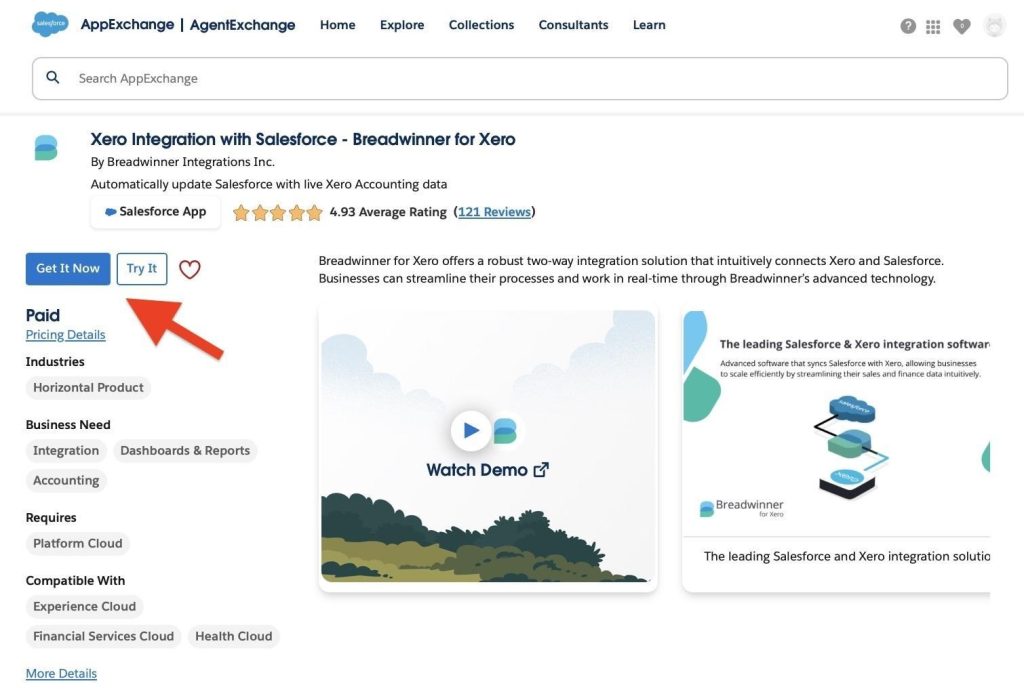
Breadwinner on AppExchange
- Connect your Xero account: Log in and grant permission for the app to share data between Salesforce and Xero.
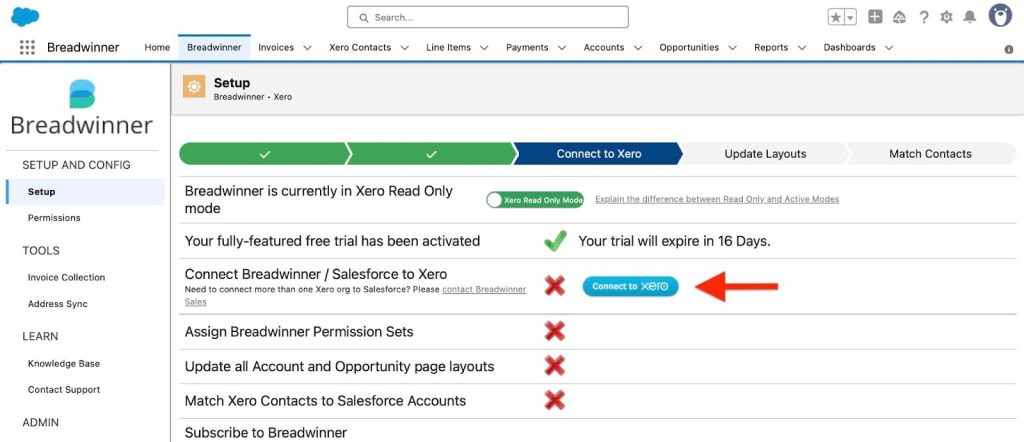
Connect to Xero
- Choose what to sync: Decide which records to sync first, such as invoices, payments, customers, products, or tax details.
- Test the connection: Run a test to ensure updates flow correctly between the two systems.
- Go live: Once everything works, the app is ready to use.
After setup, invoices in Xero can be created directly from Salesforce whenever needed, using the app’s integration features. Updates from Xero, such as payment status, also appear in Salesforce automatically. Most teams can have this running in a few hours, making daily work smoother with less manual copying and fewer errors.
What You Can Automate with the Integration
The strength of this integration is automation. Instead of typing information twice, both systems update each other. Below are the most common tasks companies automate.
Create an Invoice in Salesforce
Once an Opportunity is marked as won, you can generate an invoice in Xero directly from Salesforce. Without the integration, someone would need to manually copy all the details into Xero. With the integration, the app transfers the information for you, including the customer name, address, product list, taxes, and total amount. This saves time and reduces the chance of errors.
Create Xero Invoice from Salesforce
Sync Customer and Contact Information
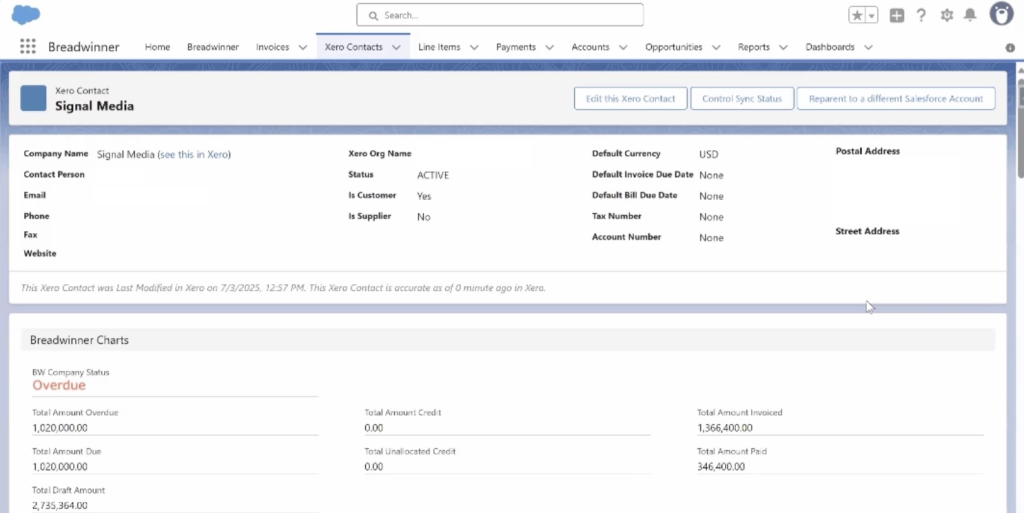
When a customer changes their company name or address, both systems need to have the same details. If you update the account or contact in Salesforce, the changes move into Xero. This means finance always works with clean data.
Xero Contacts in Salesforce
Update Invoice Status in Salesforce
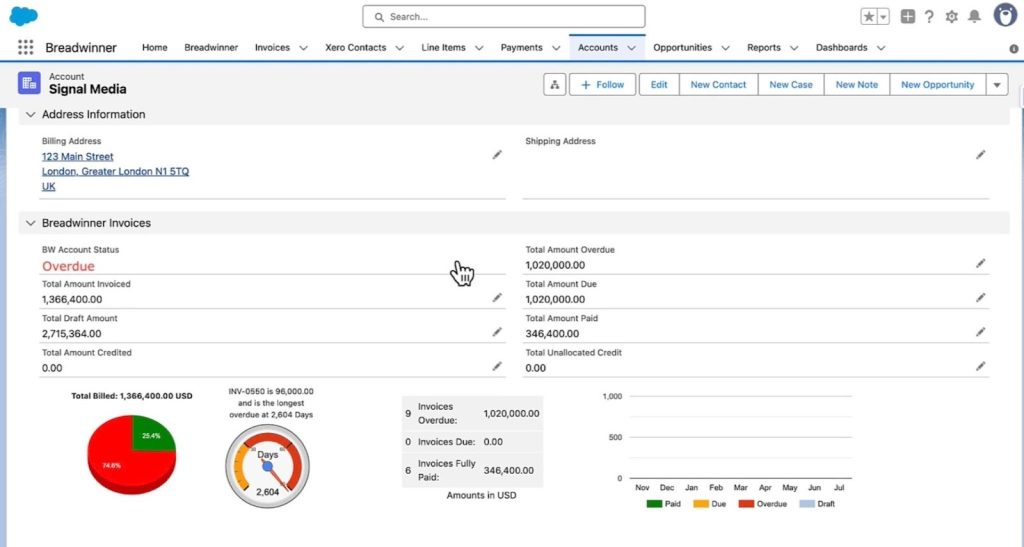
Sales teams often need to know if a customer paid their invoice. They use this information to plan follow-ups, set tasks, and prepare for renewals. With the integration, Xero sends payment updates back to Salesforce. A sales rep can open an account and see which invoices are paid, unpaid, or overdue.
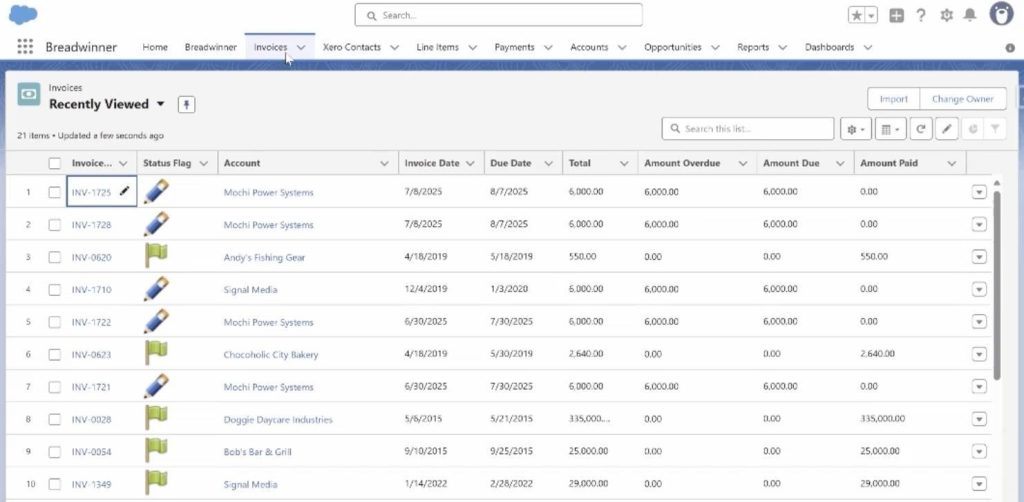
Invoices in Salesforce
Track Payments Across Both Systems
Payment information from Xero flows back into Salesforce, which supports both the sales team and your Salesforce invoice management process. Leaders can see real revenue numbers without waiting for a finance report.
Track Salesforce Invoice payment
Benefits for Sales Teams, Finance Teams, and Managers
The integration helps everyone in the organization by making information clear, accurate, and easy to access. Let’s take a closer look at how it benefits different teams and roles:
1. For Sales teams
Sales reps no longer wait for payment updates. They see everything in one place. They can prepare for renewals, speak with customers confidently, and track unpaid invoices without leaving Salesforce. This improves their daily work and gives them more time to focus on selling.
2. For Finance teams
The finance team gets clean data from Salesforce. They no longer fix names, check addresses, or search for missing details. They receive accurate information and focus on important tasks like payment collection and reporting. This reduces the overall workload.
3. For Managers and leadership
Managers see a complete picture of sales and revenue. They can check which deals are paid, which customers owe money, and how fast payments arrive. This supports better planning and helps leaders make decisions based on real numbers.
4. For Company-wide improvements
Most companies see improvements such as faster billing, fewer errors, better communication, and more accurate reports. Teams feel more confident because they rely on real-time data.
Challenges to Watch Before You Start
Every integration needs planning to avoid surprises once it’s live. Before you begin, think about these common points and how they apply to your system. Dedicated tools help handle some of these challenges, but good preparation still matters.
- Multi-currency planning. If your org uses multiple currencies, plan how they should behave in Salesforce and Xero. For example, Breadwinner supports multi-currency and syncs exchange rates, but testing in a sandbox first helps avoid surprises.
- Tax and pricing alignment. Check that tax rates and product prices match in both systems. Misalignment can cause inaccurate invoices or extra corrections later.
- Clean products and price books. Review products in Salesforce, remove outdated items, and verify pricing. This ensures invoices created from Salesforce are correct in Xero.
- Decide what to sync. Some teams start with invoices and payments, others include customers, products, tax, or credit notes. Previously mentioned Breadwinner allows you to select what to sync first and expand later as needed.
- Validation rules and custom automation. Required fields, validation rules, or triggers in Salesforce can prevent syncing. Review these rules to ensure records can be created and updated without errors.
- Assign an owner. One person should manage the integration, monitor sync logs, handle errors, and update settings to ensure everything works correctly.
- Train your teams. Even with automation, sales and finance teams need to understand how data flows between systems. Training helps everyone work confidently and reduces questions after launch.
Scenarios Where the Integration Helps
Integrating Salesforce with Xero and custom MVP software can benefit different types of businesses by reducing manual work and keeping data accurate. The native integration solutions make it easier to connect records and track financial information, so teams can focus on their core tasks.
1. Subscription Businesses
Companies that handle recurring invoices, such as subscription services, often spend hours generating and tracking each cycle manually. With a Salesforce invoice data merge solution, the relevant information from Salesforce can be sent to Xero, and invoices are created with the correct customer, product, tax, and total. Payment status from Xero is visible in Salesforce, helping sales and finance teams track revenue without manually updating records.
2. Agencies and Service Companies
Project-based teams, such as marketing or consulting agencies, need to invoice clients when a project or milestone is complete. Using the integration, Salesforce records like closed Opportunities or completed projects can support Salesforce invoice processing to create invoices in Xero quickly. Teams can also see the payment status for each invoice in Salesforce, allowing them to plan the next phase of work.
3. Retail and Distribution
Retailers and distributors often need to send updated invoices to customers or adjust orders for changes in products or pricing. The integration ensures customer details, product information, and pricing remain consistent between Salesforce and Xero. This reduces errors like wrong prices, missing items, or outdated customer information, while also making it easier to reconcile payments and manage stock.
Best Practices for a Successful Integration
To get the most from your Salesforce Xero connection, it helps to follow a few key practices. These steps ensure your integration works correctly, reduces issues over time, and supports teams who want to automate contract invoice workflows for faster, more accurate billing.
1. Keep your Salesforce data clean.
Make sure customer records, products, prices, and contacts are accurate before syncing. Clean data prevents errors and ensures invoices and payments are transferred correctly.
2. Test every change before going live.
Use a sandbox or test environment to check new sync settings, product updates, or workflow changes. This prevents mistakes from affecting live data.
3. Review sync logs regularly.
Check logs at least once a week to catch any errors, missing records, or unexpected updates. Early detection keeps the integration reliable.
4. Start with simple sync rules and expand later.
Begin by syncing key items like invoices and payments. Once everything works, gradually include customers, products, taxes, and other data to avoid overloading the system.
5. Document your process.
Write down how the integration is set up, which objects sync, and how teams should use it. Clear documentation helps new team members understand the workflow and keeps everyone on the same page.
Conclusion on Automating Invoice Management
Throughout this article, we looked at how integrations work, the options available, key preparation steps, real examples from different industries, and how a native Salesforce Xero connector can handle common challenges. Together, these pieces show how automation creates a faster, clearer, and more reliable billing process.
If you want to see how integrating Salesforce and Xero can benefit your organization, some solutions, such as Breadwinner, offer a free trial.
This article answers the common question of whether you can invoice through Salesforce. Automating invoice management is one of the most effective ways to reduce manual work and keep financial data accurate across both Salesforce and Xero.