The need for sharp-looking visuals in the modern digital world means businesses and developers are experimenting with new technologies to simplify content production. The old ways of generating an image are often costly, whether it’s a time-consuming design process, expensive software, or the need for an in-house design team. Kie.ai’s Z Image API offers a more efficient alternative by leveraging AI image generation to automate and accelerate visual content creation.
The shift toward AI-driven workflows is growing fast across the development world. According to recent industry data, 76% of developers are using or planning to use AI tools in their development process this year, up from 70% last year. This trend shows how essential AI-powered APIs have become in modern software environments, helping teams optimize workflows, reduce manual work, and scale content output effectively.
The Z Image API allows developers to integrate it into their systems to generate photorealistic images in seconds. Built on a foundation of advanced AI models, this API supports a range of features, including bilingual text rendering (English and Chinese), flexible resolution options, and the ability to scale image production without compromising quality. This guide will walk through the technical capabilities of Z Image API, highlighting how it can be integrated into existing platforms and workflows.
Table of Contents
Exploring the Core Capabilities of Z Image API for Developers
Precision Bilingual Text Rendering in Images
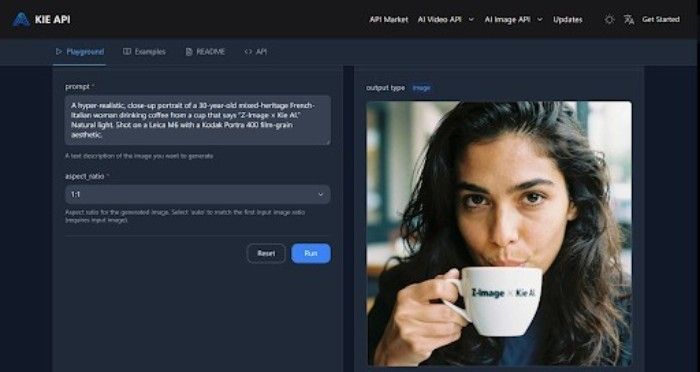
Z-Image-Turbo API: Clear and precise two-language text (English & Chinese) rendering in image form is a nice choice , as it doesn’t use Flash. This is especially useful for international applications, where the content should be readily available in different languages. Whether designing posters, advertising graphics, or social media images, Z Image API can ensure that text is read clearly and correctly formatted, so it is both quickly visually appealing and culturally appropriate.
Rich World Knowledge for Accurate and Diverse Image Generation
Z Image API is superior because it includes strong and enriched world knowledge of cultural topics. This means that the API can create very detailed images of a range of subjects, from well-known celebrities and public figures to animals and objects, to any chosen settlement, location, or landmark. Whether you want pictures of ancient landmarks, world-renowned people or culturally symbolic locations, Z Image API makes sure the images are in context and look real.
Enhanced Semantic Understanding with Advanced Prompt Engineering
By utilizing a Powerful Prompt Enhancer (PE), Z Image API applies deep semantic understanding to interpret complex instructions. This AI model can handle tasks that require logical reasoning or cultural context, such as visualizing complex problems or recreating ancient poetry. The use of structured reasoning chains allows Z Image API to not only understand the text prompt but also generate images that align with intricate requests and abstract concepts, offering a level of creativity and accuracy not seen in many competing models.
Advanced Command Execution and Creative Editing Capabilities
The Z-Image-Edit feature of Z Image enables complex commands and artistic editing of the generated image. For example, you can replace or enliven the background, make text in some areas different, and have textual images harmonise with basic changes in visualisation. The feature is ideal for projects that demand precision and innovation, such as marketing collateral, product visuals, and interactive content.
Efficient and High-Quality Image Generation with Low Resource Requirements
With only 6 billion parameters, the Z Image API can generate photorealistic images comparable to those from Big models. Setting it apart is its ability to run efficiently on consumer GPUs that have as little as 16GB of VRAM, bringing advanced image generation capabilities within reach of developers and enterprises who can’t afford expensive, enterprise-grade hardware. This „resource efficiency” enables even more beneficiaries to benefit from the technology of the AI image generator, without sacrificing quality.
Why Choose Kie.ai for Integrating Z Image API
Competitive and Flexible Z Image API Pricing
One of the key reasons to choose Kie.ai for integrating Z Image API is its affordable pricing model. With Z Image API, you only pay for the images you generate, starting at just $0.004 per image. This pay-per-use structure ensures that businesses of all sizes, from small startups to large enterprises, can scale their usage as needed without the burden of hefty subscription fees. It’s an ideal solution for developers looking to minimize costs while maximizing functionality.
Free Trial for New Users
Kie.ai offers new users a free trial, allowing you to experience the full capabilities of Z Image API without any initial investment. This trial provides an excellent opportunity to test the API’s performance, explore its features, and assess its integration with your platform before making any financial commitment. This makes it easy for businesses to evaluate if Z Image API aligns with their needs without any risk.
Easy Integration with Simple Steps
It’s easy to add Z Image API Integration to your platform. Kie. AI’s integration is developer-friendly, making it easy for you to set up and start creating beautiful images with minimal overhead. You need to get the API Key, configure your environment, and call the APIs. As the Z Image API has well-documented procedures, developers can easily integrate it into their current systems.
Stay Updated with API Changes and Enhancements
With Kie.ai, you’ll always stay informed about the latest updates and improvements to Z Image API. The platform provides API updates, making it easy for developers to track any new features, fixes, or changes. This ensures that you are always working with the most up-to-date version of the API, enabling you to leverage new capabilities and maintain the best performance for your image generation tasks.
How to Integrate Z Image API into Platform
Step 1: Get Z Image API Key and Set Up Authentication
How to get started. Now, to play with the Z Image API, the first step is to create an account on Kie. ai and generate your own API key. This is your Z Image API key, used to authenticate all of your API requests to the Z Image API. You’ll use this key to access all of Z Image API’s features, such as creating images or checking the status of a task.
Step 2: Create an Image Generation Task
Advertising. Once you have your API key, you will submit a new generation task by posting to the previous URLs. In this request, you’ll define what model to use, and include the required input options (toForm) such as image-text prompt, aspect-ratio constraint, possibly a list of additional desired objects in the scene, etc., with an optional callback URL. This way, the Z Image API can create images tailored to your needs, such as product images, social media graphics, or custom art.
Step 3: Monitor Task Status and Retrieve Results
Once you have submitted your task, you may check its status by issuing a GET request. You will need to supply the task ID given when you made the first request to see how the generation is progressing. Once the job is completed, you will be directed to a link to your image URL, which is ready for use on your platform. If the action fails, the response will include error information for debugging.
Step 4: Handle Task Completion and Updates
Once the image generation task is completed, the Z Image API can notify your system via the callback URL (if provided). This ensures that you receive timely updates on task completion, including success or failure notifications. By regularly checking API updates and monitoring task results, you can ensure smooth integration and handle any potential issues promptly.
Key Considerations When Integrating Z Image API into Platform
Ensure Proper API Key Management
When integrating the Z Image API, keep your Z Image API key secure. Do not put the key in public repos or in client-side code. Instead, we recommend keeping it safe somewhere (e.g., in a server-side configuration or a secure vault). This helps protect your API key from unauthorized use and abuse, thereby maintaining the integrity of your image generation tasks.
Monitor API Usage to Optimize Costs
Z Image API operates on a pay-per-use model, so it’s essential to monitor your API usage regularly. Keep track of the number of requests you make, especially when dealing with high-volume image generation. By setting usage limits or implementing rate limiting, you can avoid unnecessary costs and ensure you use the API efficiently, especially as you scale your platform.
Handle Error Responses and Timeouts Gracefully
Despite the efficiency of a service like the Z Image API, errors and timeouts can occur, especially when its servers are under heavy load or there are network issues. Ensure your platform processes error responses correctly. Introduce retry logic for transient issues and provide powerful user feedback when an image-rendering task fails. Good error handling results in a better user experience and quicker problem resolution.
Take Advantage of Callback Notifications for Real-Time Updates
To stay informed about the status of your image generation tasks, use the callback URL feature. When a task completes, Z Image API can send notifications to your system, providing real-time updates about the task’s success or failure. This feature can help you automate the next steps in your workflow, such as displaying the generated image or triggering additional processes based on the task’s outcome.
Test and Optimize for Performance Before Full Deployment
Before fully integrating Z Image API into a production environment, conduct thorough testing to ensure that it meets your performance requirements. Test image generation speed, API response times, and resource usage to ensure the integration runs smoothly under typical load conditions. Optimizing API calls and ensuring your system can handle expected traffic will help ensure a seamless user experience.
Understand API Rate Limits and Ensure Scalability
It’s essential to familiarize yourself with Z Image API’s rate limits to prevent your system from being throttled or blocked. Depending on your use case, you may need to implement backoff strategies or batch image-generation tasks to stay within rate limits. Additionally, as your platform grows, consider how Z Image API can scale with your increased demand, ensuring you can continue to generate high-quality images efficiently.
Achieving Efficient Image Generation with Z Image API Integration
Integrating the Z Image API into the platform enables developers to automate the creation of high-quality images seamlessly. With its fast, efficient AI image generation, Z Image API helps businesses scale content production without compromising on quality. The flexibility of bilingual text rendering, advanced semantic understanding, and resource efficiency make it an API for a diverse range of use cases.
By following the straightforward integration process outlined in this guide, developers can easily incorporate Z Image API into their existing workflows, reducing both time and cost for generating photorealistic visuals. Its combination of performance, scalability, and ease of use makes the Z Image API a solid choice for businesses seeking to streamline content creation.