Most people use the internet every day without thinking about what actually happens behind the scenes. You type a URL, hit Enter, and the page loads. Simple. Or at least it seems that way. But in reality, your request doesn’t always go straight to the website. Sometimes there’s an extra stop along the way — and that’s exactly where understanding what is proxy server becomes useful.
If you’ve ever tried to figure out what does proxy mean, the easiest way to think about it is this: it’s a middle layer between you and the site you’re trying to reach. Instead of connecting directly, you go through something that acts on your behalf.
This is why proxy servers are widely used today — not only by companies, but also by regular users who want more control over their connection. Some people even choose to buy fresh proxy server solutions to avoid blocks, manage multiple accounts, or simply keep their browsing a bit more private.
Before getting into all the use cases, let’s break it down in plain terms.
Table of contents
- What Does Proxy Mean? A Simple Explanation
- What Is Proxy Server and How It Works
- Key Types of Proxies Explained
- Main Advantages and Disadvantages
- Proxy Server vs VPN: What’s the Difference?
- Real-World Use Cases of Proxy Servers
- Are Proxy Servers Safe? Risks You Should Know
- Conclusion: Do You Really Need a Proxy Server?
- FAQ
What Does Proxy Mean? A Simple Explanation
The word “proxy” itself isn’t technical at all. It simply means someone (or something) acting instead of you.
Imagine you ask a friend to pick up a package for you. They show up, give your name, and take the parcel. In that moment, they’re your proxy. Online, the idea works the same way — just without the human part.
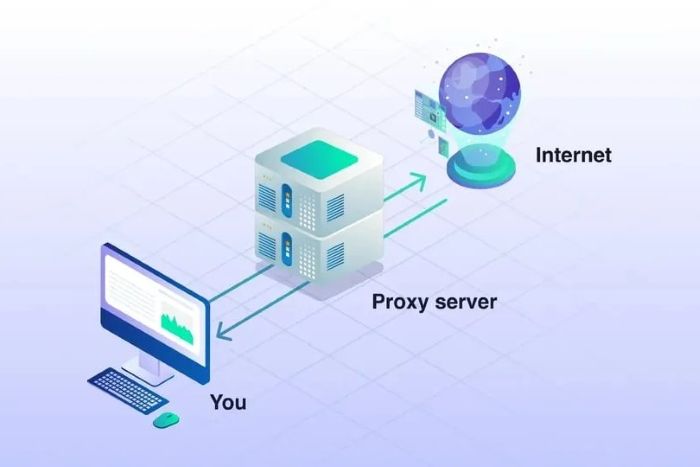
When you use a proxy, your request doesn’t go straight to a website. It goes through another server first. That server sends the request further, receives the response, and returns it back to you.
If we simplify it as much as possible, the flow looks like this:
- You send a request
- The proxy forwards it
- The website responds to the proxy
- The proxy sends the data back to you
Because of this setup, the website often sees the proxy instead of you. That’s why the term proxyserver is often associated with hiding identity or changing location.
A good everyday comparison would be a front desk at a hotel. You don’t walk into staff-only areas — you go through someone who manages communication. A proxy plays a similar role, just in a digital environment.
What Is Proxy Server and How It Works
Now let’s answer the core question more directly: what is proxy server in practical terms?
A proxy server is a system that stands between your device and the internet, handling requests on your behalf. It’s not just a pass-through — it can actually decide how requests are processed, what gets through, and what doesn’t.
Here’s how it usually works in real life:
- You try to open a website
- Instead of going there directly, your request hits the proxy first
- The proxy may check, filter, or slightly modify the request
- It then sends that request to the website
- The website responds back to the proxy
- The proxy delivers the result to you
From your perspective, nothing changes — the page still loads. But technically, your connection is no longer direct.
This setup gives the proxy a few important roles:
- It can hide your real IP address
- It can block certain websites or content
- It can store copies of data to speed things up later
- It can act as a buffer between you and potentially unsafe resources
In corporate networks, this is often used for control and monitoring. For regular users, it’s more about flexibility — accessing content, managing identities, or simply not exposing your real connection details every time.
Key Types of Proxies Explained
Not all proxies are built the same, and this is where things can get confusing if you’re new to the topic. Different types exist for different tasks, and each comes with its own trade-offs.
Here are the main ones you’ll run into:
- Forward proxy
This is what most people mean when they talk about proxies. It sits between you and the internet and handles outgoing traffic. - Reverse proxy
Instead of working for the user, this one works for the server. It helps websites manage incoming traffic, improve speed, and distribute load. - Anonymous proxy
It hides your IP, but still lets websites know that a proxy is being used. - Transparent proxy
Doesn’t try to hide anything. Often used in offices, schools, or public networks to monitor or filter traffic. - Residential proxy
Uses real IP addresses from actual internet providers. These are harder to detect and are often used when authenticity matters. - Datacenter proxy
Faster and cheaper, but not tied to real users. Because of that, they’re easier for websites to recognize and sometimes block.
There’s no universal “best” option here. It really depends on what you’re trying to do — whether it’s simple browsing, automation, or something more specific.
Main Advantages and Disadvantages
Like most tools on the internet, proxy servers are neither “good” nor “bad” by default. Everything depends on how and why you use them. In practice, they can solve real problems — but they also come with limitations that are easy to overlook at first.
Let’s start with the benefits people actually care about:
- More privacy in everyday browsing
A proxy can hide your real IP address, which means websites don’t immediately see where you’re connecting from. It’s not total invisibility, but it adds a useful layer. - Access to restricted content
If a site or service is blocked in your region, a proxy can help route your request through another location and make it accessible. - Better control over traffic
In business environments, proxies are often used to filter content, block certain platforms, or track usage patterns. - Faster repeated requests
Some proxies store copies of frequently accessed data. The next time you visit the same page, it can load quicker because part of the content is already cached.
At the same time, there are downsides that shouldn’t be ignored:
- Limited anonymity
Not all proxies hide your identity fully. Some still pass along parts of your data, depending on configuration. - Security risks with unreliable services
Free or poorly maintained proxies can log your activity or expose your data instead of protecting it. - Possible speed issues
Since your traffic goes through an extra server, connection speed can sometimes drop, especially with overloaded or low-quality proxies. - Compatibility problems
Certain websites or apps may block proxy traffic entirely, which can break functionality.
In short, proxies are useful — but only when chosen and used carefully.
Proxy Server vs VPN: What’s the Difference?
People often mix up proxies and VPNs, and it’s easy to see why. Both can hide your IP and help you access restricted content. But under the hood, they work quite differently.
The key distinction is encryption. A VPN secures your entire connection, while a proxy usually works on a more basic level, often handling only specific traffic (like a browser or app).
Here’s a simple comparison:
| Feature | Proxy Server | VPN |
| IP masking | Yes | Yes |
| Encryption | Usually limited or none | Strong, full encryption |
| Coverage | App or browser level | Entire device connection |
| Speed | Often faster | Slightly slower due to encryption |
| Typical use | Browsing, automation, scraping | Privacy, security, public Wi-Fi |
So when should you use one over the other?
- A proxy makes sense when you need speed, flexibility, or multiple IPs for specific tasks
- A VPN is better when your priority is security and protecting all your traffic
They’re not competitors so much as different tools for different situations.
Real-World Use Cases of Proxy Servers
Proxy servers aren’t just a technical concept — they’re actively used in many areas, often without people even realizing it.
In business, proxies help companies manage employee access, protect internal systems, and balance traffic across servers. In marketing, they’re used for tasks like checking ads in different regions or collecting publicly available data.
For individual users, the reasons are usually simpler:
- Accessing content that isn’t available locally
- Managing multiple accounts without linking them together
- Testing websites from different geographic locations
In cybersecurity, proxies also play a role in isolating systems and reducing direct exposure to external threats.
As Eric Lawrence, Program Manager at Microsoft and creator of Fiddler, once explained:
“Proxies are a critical debugging and security tool because they let you see and control exactly what’s happening between a client and server.”
Source: Telerik Blog / Fiddler documentation
That idea — visibility and control — is really at the heart of why proxies remain relevant.
Are Proxy Servers Safe? Risks You Should Know
The short answer: they can be safe, but they’re not automatically safe.
A reliable proxy service can add a layer of protection between you and the internet. But the wrong choice can do the opposite — exposing your data instead of protecting it.
Here are a few things to keep in mind:
- Free proxies are often risky
If you’re not paying for the service, there’s a chance your data is the product. Some providers log activity or inject ads. - No built-in encryption in many cases
Unlike VPNs, most proxies don’t encrypt traffic. That means your data could still be intercepted, especially on public networks. - Trust matters more than technology
Even a technically solid proxy is only as safe as the company running it.
A good rule of thumb is simple: if you’re using a proxy for anything even slightly sensitive, make sure you understand who operates it and how your data is handled.
Conclusion: Do You Really Need a Proxy Server?
Proxy servers aren’t essential for everyone, but they solve very specific problems extremely well.
If you just browse casually and don’t deal with restrictions or privacy concerns, you might never need one. But if you work with multiple accounts, access region-locked content, or want more control over how your traffic behaves, a proxy can be a practical tool.
The key is not to see it as a magic solution, but as one option among many — useful in the right context, unnecessary in others.
FAQ
What is proxy server used for?
A proxy server is used to act as an intermediary between a user and the internet. It can help hide your IP address, manage traffic, access restricted content, and improve performance through caching. Businesses also use proxies to monitor and control network activity.
What does proxy mean in simple terms?
In simple terms, a proxy means something acting on your behalf. Online, it’s a server that sends requests for you instead of connecting directly. This changes how websites see your connection and can affect privacy, access, and control.
Is using a proxy server legal?
In most countries, using a proxy server is completely legal. However, what you do through that proxy matters. Activities that are illegal without a proxy remain illegal even when one is used, so legality depends on usage, not the tool itself.
Can proxy servers fully hide your identity?
Not entirely. While proxies can mask your IP address, they don’t always provide full anonymity. Some still pass identifying data, and without encryption, your activity can potentially be tracked by other means.
What is the difference between proxy and firewall?
A proxy server handles requests between a user and the internet, often modifying or filtering traffic. A firewall, on the other hand, is designed to block or allow traffic based on security rules. They can work together but serve different purposes.
Are free proxy servers safe to use?
Free proxies can be risky because their business model is often unclear. Some may log your activity, inject ads, or even expose your data. For anything beyond casual use, it’s generally safer to use a trusted, paid provider.