
Real-time avatars: what they are, how they work, and how the creation platforms measure up
AI chatbots are well-known to everybody. Fewer still have gone to the next level: a live in-person conversation with an AI avatar, streamed video of a person’s face controlled by computer code.
Conversational AI video platforms enable you to build AIs that respond in real time as talking, expressive digital humans. Instead of canned clips or the same animations repeated, these systems listen to or read the user’s query, create a prompt on the spot, speak it aloud, and animate a face in sync. The result is that, as if you are on a live video call, digital interactions feel more natural, immersive, and lifelike.
This shift is not just about novelty. According to market research, AI avatars can reduce production costs by up to 80%, and 95% of virtual meeting participants report using them to enhance engagement. These findings highlight both the economic and experiential advantages of adding visual intelligence to conversational systems.
The common pipeline looks like this:
- Input: voice or text from the user (often voice or speech-to-text).
- Reasoning: an LLM generates a response, sometimes grounded in a knowledge base (implementing Retrieval Augmented Generation, or RAG) and connected to tools (CRM lookup, ticket creation, scheduling, etc.).
- Voice: text-to-speech generates audio.
- Video: the avatar renders facial motion (lip-sync + expressiveness) and streams back in real-time.
Table of contents
- Real-time avatars: what they are, how they work, and how the creation platforms measure up
- How Real-Time AI Avatars Are Transforming Customer Engagement
- Real-World Applications of Real-Time Conversational AI Video Platforms
- 1) D-ID
- 2) Beyond Presence
- 3) Tavus
- 4) Simli
- 5) HeyGen (Live / Streaming)
- 6) Anam
- 7) Lemon Slice
- 8) bitHuman
- 9) Hedra (Realtime Avatar)
- Conclusion: How to choose a real-time avatar platform
How Real-Time AI Avatars Are Transforming Customer Engagement
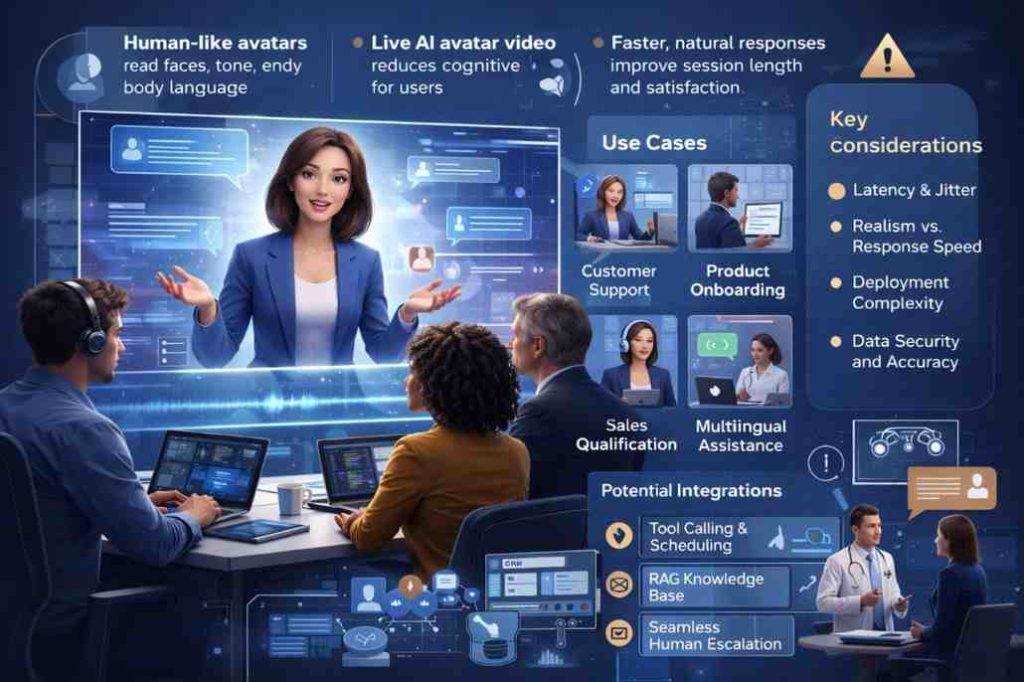
This matters because humans are wired to read faces. Communication depends not only on words, but also on timing, tone, and facial expressions: a pause that signals “I’m thinking,” a smile that softens bad news, or an expression of concern that builds trust. Real-time conversational AI video platforms restore these visual and auditory cues, making digital interactions feel more human by adding expressive video layers on top of a traditional chatbot stack.
Video avatars in customer engagement may have a stronger impact because the face helps relieve cognitive load. People process complex explanations more quickly when a presenter anchors comprehension and guides the pace, especially during onboarding or training. The same goes for customer support: a visual AI can transform even the most scripted workflows into a conversation-like experience. When you want to guide someone through a series of steps, diagnose a problem, or explain policies, this is especially valuable.
Latency is the single most important make-or-break factor for real-time conversational AI video platforms. If the response time is too slow, interacting with them feels unnatural or buggy, regardless of how realistic your avatar looks. The best systems minimize end-to-end latency (including network jitter and buffering) so that turn-taking feels fluid and human-like. Teams often report higher engagement, longer session times, and increased task completion rates when they deliver experiences effectively.
Real-World Applications of Real-Time Conversational AI Video Platforms
Applications for real-time conversational AI video platforms are growing rapidly. Common use cases include customer support and ticket deflection, product onboarding, sales qualification, coaching and training, patient navigation services in healthcare, internal IT help desks, and multilingual first-line support, where message consistency and translation accuracy are key. Many approaches now also integrate visual agents with tool calling (e.g., CRM updates, order tracking), along with a retain-an-action learnt interactive grounded generation (RAG)- style knowledge base to reduce hallucination and ground responses in verified information.
In simplest terms, conversational AI video platforms are super-charged AI engines bundled in a socially-storied interface. They’re there for organizations to clarify, guide, reassure, and, when needed, effortlessly escalate engagements into the hands of human agents.
The list below highlights nine vendors in the real-time conversational AI video platforms market. It includes both full-stack agent platforms and modular video-avatar layers that you can integrate with existing AI systems. For each platform, the overview emphasizes key strengths, integration requirements, and trade-offs such as latency versus realism, responsiveness, and deployment flexibility beyond demo environments.
1) D-ID
D-ID pairs a robust real-time streaming foundation with a practical product layer to build and deploy visual agents. A standout differentiator is its breadth of deployment options: you can quickly prototype in a product experience and integrate deeply via an SDK for production-grade, real-time streaming, ideal for teams that need both speed and technical flexibility.
What stands out
- End-to-end path from prototype to production: start with ready-to-use tools, then scale into custom builds without switching vendors.
- Agents SDK (WebRTC streaming) for real-time interactive experiences, with a clear streaming workflow.
- Strong fit for multiple business deployments: support, onboarding, training, sales, and more.
Watch-outs
- If you want a fully opinionated “one-click agent brain,” you can still handle some orchestration/integration on your side (which also gives D-ID flexibility).
2) Beyond Presence
Teams often choose Beyond Presence when they need to ship quickly, balancing API flexibility with more packaged paths to production. Many consider it for customer-facing deployments where reliability matters as much as visuals.
What stands out
- Clear split between Managed Agents and Speech-to-Video offerings (plan and credit structure documented).
- Strong integration story via LiveKit’s ecosystem.
- Docs explicitly guide developers toward LiveKit/Pipecat patterns for real-time sessions.
Watch-outs
- “Managed” modes can limit the extent of customization you can make to the orchestration compared with a fully DIY stack.
3) Tavus
Tavus often appears in “digital twin” conversations, avatars designed to feel consistent, recognizable, and relationship-like over time. It’s a frequent shortlist platform when the goal is a persistent persona (coach, advisor, expert, brand rep).
What stands out
- The landscape review highlights an Agent API-style model (KB and webhooks are noted as common patterns).
- Can be deployed via the LiveKit avatar plugin ecosystem, a popular builder option.
Watch-outs
- Pricing and packaging across this category can shift quickly; validate current limits and SLAs early.
4) Simli
Simli is often evaluated primarily for latency. If the interaction feels slow, the illusion breaks. Simli’s pitch resonates with teams trying to create quick, back-and-forth “live” conversations.
What stands out
- Clear positioning: “add faces to real-time AI agents.”
- LiveKit plugin support makes it easier to slot into existing real-time voice stacks.
Watch-outs
- As always: test realism/fidelity at your target bitrate and on weaker connections, latency and quality trade off.
5) HeyGen (Live / Streaming)
HeyGen is widely known for AI video, and its real-time offering now targets developers and teams building interactive experiences. Many teams consider it a strong “video face layer” within a broader AI agent stack.
What stands out
- Audio-to-Video WebSocket API positioning for real-time pipelines (good fit with modern voice-agent frameworks).
- Docs include patterns for running through your own LiveKit instance for more control.
Watch-outs
- The ecosystem is powerful, but it can feel like a “choose-your-own-adventure” for builders, with more decisions for non-technical teams.
6) Anam
Anam’s framing leans toward “presence” avatars that feel attentive and natural in live conversation. It’s often evaluated for coaching/companion/guide experiences where tone and rapport are central.
What stands out
- Persona API positioning with docs describing establishing a WebRTC stream + realtime voice flow.
- LiveKit plugin support for faster integration.
Watch-outs
- If your use case targets enterprise environments with complex compliance and long procurement cycles, validate the security posture and deployment support early in the process.
7) Lemon Slice
Lemon Slice often appeals to teams building more creative, character-driven experiences where “stylized” can actually be better than ultra-real for approachability and brand fit. It’s also used for fast prototyping via widget-style experiences.
What stands out
- Public docs cover both widget and API routes.
- Real-time positioning is discussed in the context of low-latency video interactions.
Watch-outs
- Their documentation notes the phase-out of older endpoints, so keep your integration updated and prepare for changes.
8) bitHuman
bitHuman stands out for teams that want flexibility around where the avatar runs, useful for privacy-sensitive environments, on-prem preferences, or tightly controlled demo installs.
What stands out
- SDK emphasizes responsive, real-time avatars; LiveKit notes that bitHuman can run locally or in the cloud.
Watch-outs
- “Local/edge” power comes with operational responsibility; your team is responsible for more deployment, performance, and maintenance.
9) Hedra (Realtime Avatar)
Builders often evaluate Hedra’s real-time avatar offering when they want to prototype quickly, test user reactions, and iterate. The platform supports product experiments and lightweight deployments effectively.
What stands out
- Hedra’s docs position Realtime Avatar for live, interactive conversations and provide get-started guidance.
- LiveKit integration path exists, which is commonly used in real-time agent pipelines.
Watch-outs
- Newer-feeling surface areas can change quickly; plan for API evolution and monitor versioning.
Conclusion: How to choose a real-time avatar platform
If you’re picking a real-time avatar platform, then first split the experience you want from the stack that you are prepared to own:
Are you buying an end-to-end agent platform (agent setup, knowledge, tools, analytics), or a video/face layer that you will bolt onto your existing LLM + speech pipeline?
What do you care most about in your use case: latency (feel of turn-taking), expressivity (emotional range), integration options (SDKs, webhooks, APIs), or hosted deployment (faster TTP with less surface area)?
From there, run a small pilot and measure some practical things: the end-to-end latency, stability on average networks, as well as how easy it is to customize what the agent says and what it looks like, not to mention if the tool fits your deployment reality (embedded web experience, contact centre workflow, kiosk, mobile).
You will see that different platforms win on different trade-offs. Some are optimized for speed and developer composability, others for realism or a managed agent experience. D-ID is often evaluated for the best trade-off between avatar quality and real-time SDK support, which matters to some teams in their production environments. In other words, when it comes to a polished visual experience and smart integration paths, those strengths are easy to see in a hands-on test and often explain why teams choose one platform over another.