
Managing cryptocurrency inside Telegram means storing, sending, swapping, and checking digital assets without leaving the messenger. The wallet logic lives inside a bot or a mini app that runs on top of a regular chat, so the user interacts with funds the same way they would with any other contact: open the chat, type or tap, and confirm. There is no second client to install and, in most cases, no seed phrase to copy down by hand.
The category started as a curiosity in 2023 and is now mainstream. For users who previously had to choose between a confusing self-custody wallet and a heavy exchange interface, the in-messenger model is the first crypto experience that feels lightweight. This article walks through what these wallets actually are, how to pick and set one up without losing money to a stupid mistake, what you can and can’t do today, and when the form factor is worth using.
Table of contents
- What an in-Telegram wallet actually is
- A practical setup, in five steps
- Day-to-day operations that work well today
- What is still hard
- How fees and routing work
- Cross-chain transfers without bridge anxiety
- A short worked example
- Common mistakes, ranked by how often they actually happen
- When this model is the right choice
- The honest take
- Questions readers actually ask
What an in-Telegram wallet actually is
Under the hood, the wallet is a service reached through the Telegram Bot API or the Mini App framework. Functionally, it behaves like a hosted account, with the important caveat that “hosted” can mean three very different things depending on where the private keys live.
| Custody model | Where keys live | Recovery if you lose the phone | Typical security trade-off |
| Custodial | On the provider’s server | Email/SMS reset by the provider | You trust the provider with the funds; they can freeze the account |
| Non-custodial (Mini App) | In encrypted storage on the device | Recovery phrase you wrote down once | You’re the only point of failure; lose the phrase, lose the money |
| MPC / threshold | Split between device, provider, and (sometimes) cloud backup | Multi-step recovery using two of three shares | More resilient, less mature; few providers offer it |
Knowing which type you are using matters more than the marketing label on top purpose-built services, such as Crypto Office state the custody model on the first screen, while generic bots often hide it under a privacy-policy link.
A side note: the wallet is not the same as the Telegram account. Losing access to the Telegram account doesn’t necessarily mean losing access to the wallet, and recovering a Telegram account doesn’t restore wallet keys. Treat them as two separate things.
A practical setup, in five steps
- Open the bot or Mini App from a verified link on the provider’s own website. Searching in Telegram for a generic name and tapping the first result is how users end up on impersonator bots.
- Read the first screen. It should state the custody model and the network(s) supported. If it doesn’t, close it.
- Enable a second factor passcode, biometric lock, or a cloud-backup phrase. A wallet with no second factor is a wallet that anyone who picks up an unlocked phone can drain.
- Run a small test transfer in and out. Verify the receive address on a block explorer; verify the outbound transaction lands at the destination.
- Write down whatever recovery material the wallet produces. For custodial wallets, that’s usually an email + a backup code. For non-custodial, it’s a phrase you must never re-enter on a website.
The whole sequence takes ten minutes. Skipping any step is the source of almost every “I lost my wallet” story you’ll read on a support forum.
Day-to-day operations that work well today
Sending and receiving transfers, both to wallet addresses and to Telegram usernames where the recipient has opted in. Swapping between assets, with the crypto bot picking a route and quoting the destination amount before confirmation. Instant push notifications when an inbound transaction is mined. Bulk payouts to a CSV-sized list of recipients in one command. Pre-broadcast address risk checks that flag a destination associated with sanctioned activity or known scams.
For an everyday flow getting paid in stablecoins, swapping a portion into a local-currency-pegged stablecoin, and paying a freelancer the entire round-trip happens inside the messenger without ever opening a second app.
What is still hard
Withdrawal to a local bank account is the most common gap. Some wallets integrate an off-ramp partner inside the chat; most don’t, which means the user still ends up in a second product to cash out. Multi-signature setups are rare in the Telegram form factor; teams that need genuine multi-sig usually run a desktop wallet and use Telegram for notifications only. Hardware-wallet pairing exists for a small number of Mini Apps but is not standard. Tax reports are basic: expect a CSV export and a separate tool to digest it.
None of these gaps blocks individual use. They do block treasury-grade workflows, and an honest provider says so up front.
How fees and routing work
In a chat-based wallet, the user typically sees one all-in number instead of a network fee, a swap fee, and a spread quoted separately. That’s more convenient, and also more dangerous a widespread is hard to notice when it’s hidden inside a single big number.
What’s a fair fee for a Telegram-wallet swap? For stablecoin-to-stablecoin swaps on majors, expect under 0.5% all-in, including the network fee. For minor pairs or cross-chain routes, 1–1.5% is normal. Anything above 2% on a liquid pair is a sign the provider is monetizing aggressively, or that you’re using a price-poor route.
A healthy wallet quotes the destination amount before confirmation, shows the chosen route in a “details” view, and refreshes the quote on a fixed cadence (15–30 seconds) so a slow-moving user has to re-confirm before broadcast.
When evaluating a wallet, run the same swap on a public DEX aggregator and compare the output amount. A spread under 0.5% on majors and under 1% on minor pairs is the expected range. The same check applies to outbound transfer fees. A wallet built for secure cryptocurrency management shows the network fee as its own line item, not buried inside the displayed total.
Cross-chain transfers without bridge anxiety
Cross-chain routing is the operation users most often get wrong on their own and most appreciate when a wallet does it for them. The user wants the asset to arrive. The user does not want to learn which network the recipient is on, whether a bridge sits in the middle, what the bridge charges, or how long it will take.
A modern in-Telegram wallet abstracts those decisions: pick the asset, pick the recipient, and the wallet selects a route that may hop across networks transparently. One fee, one estimated time, one confirmation.
One thing the wallet should never do silently is swap the asset itself in transit, converting one stablecoin into another in the middle of a transfer without telling the user. That creates an unbooked liability for whoever holds the funds afterwards, and the user finds out only when the receiving balance is denominated in something they didn’t ask for. If your wallet behaves that way, switch.
A short worked example
A small remote agency based in Lisbon pays nine contractors across Europe, Latin America, and Southeast Asia at the start of every month. Before this category existed, the finance partner spent half a day on it: a spreadsheet of bank details, three different transfer providers, a fee per recipient, two contractors waiting four extra days for slow correspondent banking.
Today, the same payout runs from a single chat command. The wallet reads the CSV, splits the batch across the cheapest viable routes per recipient, and posts a confirmation message to each contractor’s Telegram with the transaction hash. Total elapsed time: under five minutes. Cost: roughly a third of the previous setup, most of it network fees rather than provider margin. The finance partner reads the success messages between meetings and moves on.
The takeaway isn’t that any single tool is the answer. It’s that the workflow itself, multi-recipient, multi-currency, multi-network payroll for very small teams is now solvable inside a messenger, which it wasn’t three years ago.
Common mistakes, ranked by how often they actually happen
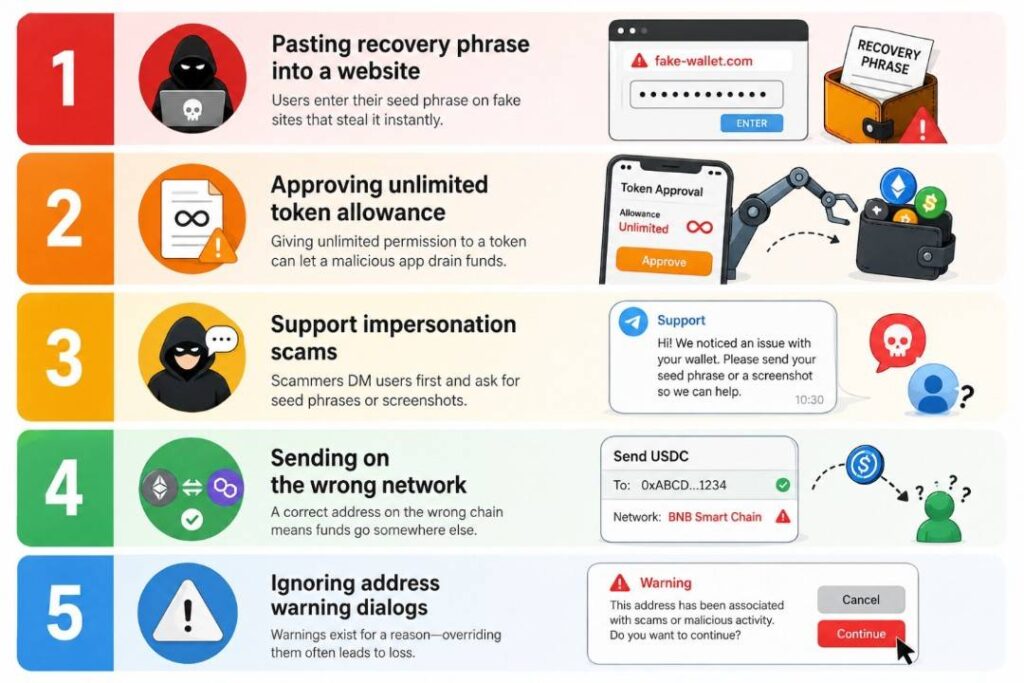
The single most common cause of a drained wallet in this category is not a clever exploit. It’s a user pasting a recovery phrase into a website that asked nicely. Second most common: approving an unlimited token allowance when a Mini App prompted for one. Third: a bot that DM’d the user first, pretended to be support, and asked for a screenshot of “your seed phrase”.
Two more, less obvious:
- Sending a test transaction on the wrong network. An address that looks right can sit on a different chain entirely; the test “succeeds” because something arrived somewhere, just not where the user thought.
- Tapping through the address-warning dialog. Wallets that show a “this destination has been associated with X” banner show it for a reason; almost every override is regretted later.
Most loss events here aren’t exploits. They’re users being rushed into skipping one of the checks they already know about.
When this model is the right choice
A chat-based wallet fits when the user values convenience over fine-grained control, when sums are small to medium, and when the workflow already lives inside a messenger community, such as payments, freelance invoicing, cross-border remittances, and club dues. At that scale, the in-Telegram form factor removes more friction than any other interface and is usually safer than the older alternative of leaving funds sitting in a centralized trading account between operations.
It is not the right choice for cold storage, for treasury operations above a five-figure float, or for anything that requires multi-signature approvals. Use the in-Telegram wallet as an everyday checking account; keep the vault somewhere else.
The honest take
Managing crypto inside Telegram is no longer a novelty; it’s the most practical way to handle small-to-medium transfers, payouts and swaps for anyone who doesn’t want a separate app for it. The category isn’t perfect, and the gaps around bank off-ramps, hardware integration and multi-sig are real, but for the everyday use cases it covers, the friction reduction is genuine. Before you put any meaningful amount through one, walk through the five-step setup, run a test transfer, and confirm the custody model. After that, treat it the way you treat a checking account.
Questions readers actually ask
Is it safe to keep money in a Telegram wallet long term?
For day-to-day balances, yes provided you’ve enabled a passcode or biometric lock and you know whether the wallet is custodial or non-custodial. For amounts you wouldn’t want to lose, the answer is no: any chat-based interface optimizes for speed, which is the wrong trade-off for cold storage. Move long-term holdings to a dedicated wallet you only open when needed.
How long does an in-Telegram transfer usually take?
Same-network transfers settle as fast as the underlying chain confirms seconds on faster networks, a few minutes on slower ones. Cross-network transfers go through a routing step and typically take 30 seconds to 3 minutes end-to-end, including the bridge or aggregator hop. If a transfer is still pending after 15 minutes, something is wrong with the route, not with your wallet.
What happens to my funds if Telegram bans the bot you’re using?
If the wallet is non-custodial, the keys live on your device, and you can import them into another compatible wallet using the recovery phrase. If the wallet is custodial, your access goes with the bot, which is one of the strongest arguments for picking a non-custodial option or one with an exportable backup. Check the provider’s recovery story before you fund the account, not after.