
The product photo looks very good until it fails to convert. You post clean, high-quality static pictures, but the clicks are just not coming. Engagement feels flat. Ads get ignored. For brands trying to improve results, AI product video ads are becoming a smarter way to turn static content into something people actually notice.
The problem is not your product but the format.
Currently, the only way that static images can compete is in feeds with motion. Individuals scroll very quickly- and it is only the video that makes them slow down.
This is where image-to-video AI transforms the game. Rather than hiring editors or using complicated software, you can now easily transform simple product pictures into scroll-stopping video advertisements with just a few clicks. Tools such as Media.io can streamline this process to be fast, simple, and easy enough to be done by a novice, with no knowledge of editing needed.
Let’s get deeper into this!
Key Takeaways
- Static images struggle to compete with videos in terms of engagement and conversion rates.
- Image-to-video AI allows users to easily convert product photos into engaging video ads, making use of tools like Media.io.
- Video ads capture attention faster, create emotional connections, and enhance brand trust compared to static images.
- The process to create professional ads is straightforward, requiring no editing skills, making it accessible for beginners.
- Using short, clear videos (7-15 seconds) with strong hooks and direct CTAs significantly improves ad performance.
Table of contents
Why Video Ads Outperform Static Product Images
If you scroll through your feed for a few seconds and your eyes stop on movement, right? This is why video advertisements work better in comparison to simple product pictures. Video ads consistently deliver better engagement, higher conversions, and stronger brand recall.
Here’s why video ads outperform static images in modern marketing.
- Captures attention faster
- Better product dimensions
- Higher engagement rates
- Stronger emotional connection
- Improved conversion rates
- Videos build brand trust
- Better performance across various platforms
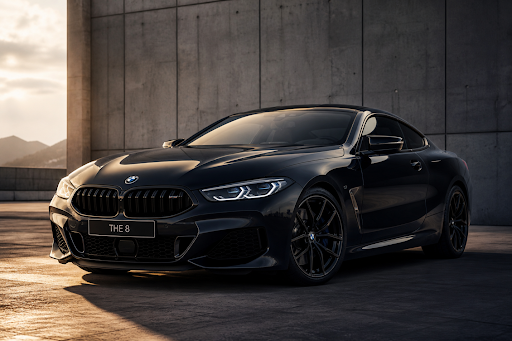
Short-form content is dominating the market, so with tools like Media.io, you can turn your existing product images into video ads in minutes. The AI handles motion, transitions, and visual flow—you just focus on testing creatives and scaling campaigns instead of getting stuck in production. This is exactly why more marketers are investing in AI product video ads instead of relying only on still photography.
What Is Image to Video AI and Why It’s a Game-Changer for Ads
Image-to-video AI transforms static images into interactive videos. It adds realistic motion (zoom, pan, floating effect), applies smooth transitions, and enhances visuals with cinematic lighting.
Video ads are more effective on Instagram, TikTok, and YouTube, making it a game-changer for advertising. They can produce professional ads quickly, save production costs, and test different ad creatives easily. By leveraging image-to-video AI, businesses can create attention-grabbing videos that boost engagement, enhance conversion rates, and make marketing more effective through scalable AI product video ads.
And the best part? You don’t need editing skills, and there are no technical skills required.
How to Create Professional AI Product Video Ads with Media.io
If you want to create professional product ads, then Media.io is an all-in-one creative platform designed for content creators. It helps beginners to create videos, images, and audio using AI-powered solutions. The best is that its interface is simple and beginner-friendly, so you will find ease of use, speed, and how it simplifies ad creation without any need for technical skills.
Now, let’s go step-by-step and understand how to turn an image to video with AI.
Step 1: Launch Media.io Site
Go to Google and search for Media.io, then open the official website. Once you’re on the homepage, you’ll find all the AI tools clearly organized. Here you choose an image to video.
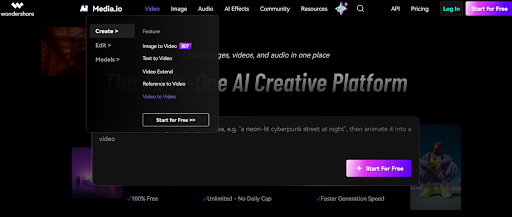
Step 2: Choose an AI Model
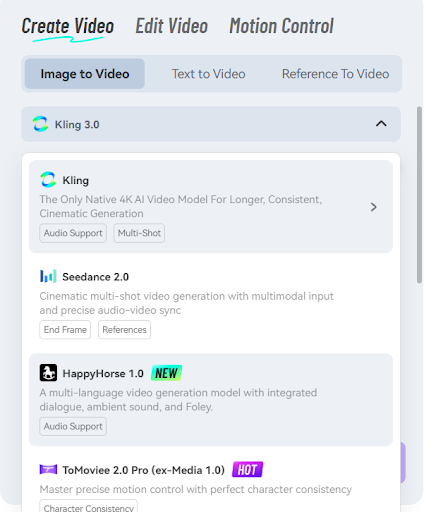
Next, choose the AI model from the following options:
- Kling 3.0
- Happy horse 1.0
- Too movie 2.o pro
- Seedance 2.0
Step 3: Upload Images
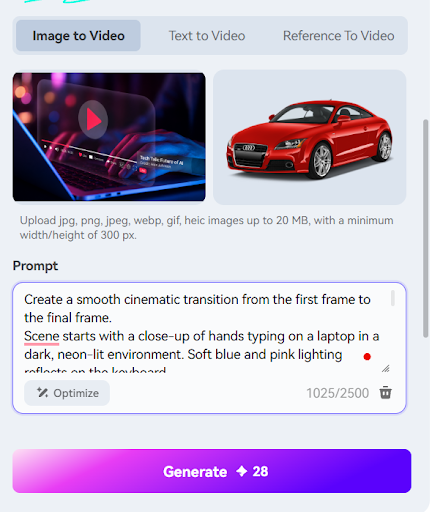
Next in the image to video AI dashboard, you’ll see the upload images section with two key options: “First Frame” and “End Frame.”
- In the first frame, upload the image where you want your video to begin.
- In End Frame, add the image that should appear at the end of the video.
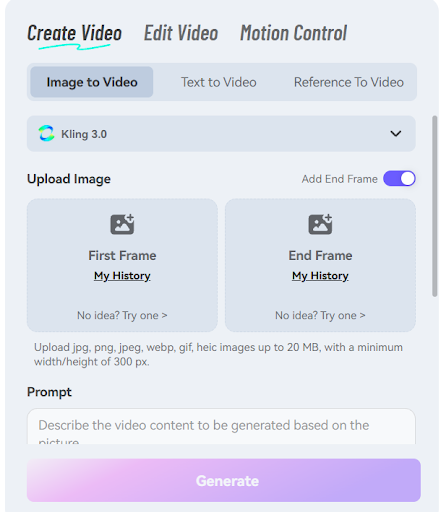
This helps the AI understand the visual flow, so it smoothly transitions from the starting scene to the final frame.
Note: Don’t have images on hand? Click on the “No idea? Try now” option to create images using a prompt. If you have images, then upload the images in both the first and end frames.
Step 4: Add Prompt
Once your images are uploaded, add a simple prompt describing what you want the video to show.
Keep it short and clear, just explain the idea behind your video, the style you want, and what the product is about. This helps the AI understand your intent and generate a more accurate, engaging result.
Step 5: Choose Style & Customize Settings
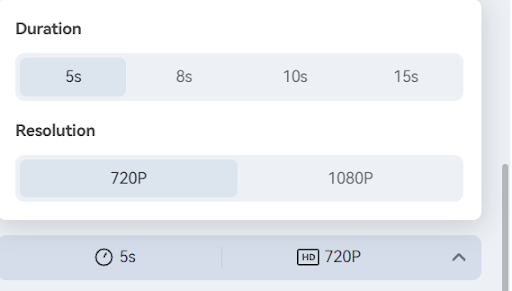
In the next step, customize the settings:
- Duration (up to 15s)
- Resolution (up to 2K)
Step 6: Click on the Generate Button
Before you click Generate, Media.io gives you a few final options to refine your output.
You’ll see settings for audio generation and public visibility, enabling both if you want a complete, ready-to-use video with sound and easy access. It will also ask you to choose a generation mode (zone). Pick the one that fits your needs—in this case, selecting Nano Banana Pro works well for smooth and high-quality results.
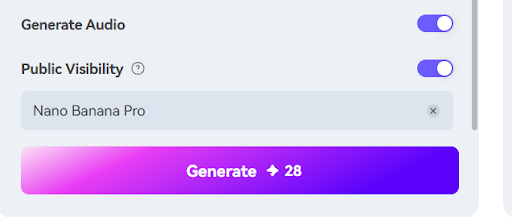
Once everything is set, click the Generate button.
Within a few minutes, Media.io will process your inputs and turn your images into polished, engaging AI product video ads complete with motion, transitions, and effects, ready to use for your ads or social content.
Step 7: Preview & Export
Check the Preview inside the dashboard. If you want to make quick edits, do it and export an ad-ready video
E-commerce Case Study
Let’s make this real with a simple e-Commerce example.
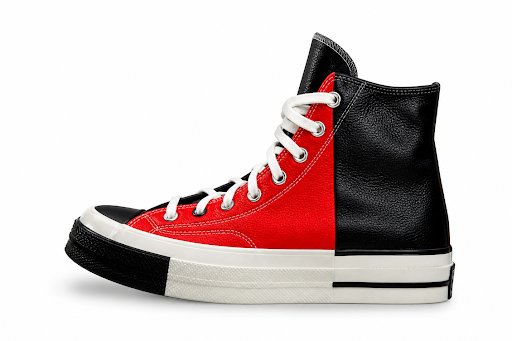
In the below section, you see a typical product image—clean, white background, nicely placed. It looks professional, but here’s the truth: it doesn’t stop the scroll.
There’s no movement, no story, no reason for the viewer to pause. That’s why these images often lead to low engagement and fewer clicks.
Now compare that with what happens after turning the same product into a video using Media.io:
- Product appears “floating”
- Cinematic lighting
- Dynamic transitions
- Text overlays + CTA
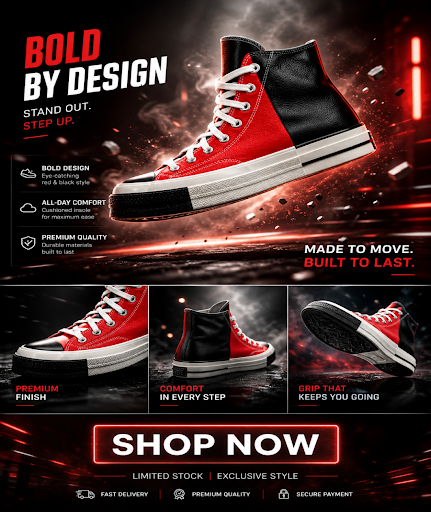
Suddenly, the same product feels alive. It grabs attention, builds curiosity, and gives the viewer a reason to engage.
Now tell me: Which one would you stop and watch—the plain static image or the dynamic video version?
That difference is exactly what drives better performance in modern e-Commerce ads.
5 High-Converting Video Ad Formats You Can Create
You don’t need to overthink formats. Start with what already works.
- 1. Product Showcase: Show multiple angles smoothly—AI handles transitions automatically.
- 2. Problem-Solution: Highlight a pain point, then show how your product solves it.
- 3. Before/After Transformation: Perfect for beauty, fitness, or home improvement products.
- 4. Testimonial-Style Ads: Use text overlays to simulate real user feedback.
- 5. Limited-Time Offers: Add urgency with countdown-style visuals and CTAs.
Key Elements That Make a Video Ad Convert
Not all videos perform well. The difference comes down to a few things:
- Strong hook (first 2 seconds)
- Clear and simple message
- Clean visuals (no clutter)
- Direct CTA
- Short duration (7–15 seconds works best)
Simple, focused ads almost always outperform complex ones.
Common Mistakes That Kill Your Ad Performance
Even with AI, mistakes can hurt performance.
- 1. Too Much Text: Overloading information confuses viewers.
- 2. Long Videos: People don’t wait. Keep it short.
- 3. Weak Hook: If the first 2 seconds fail, the ad fails.
- 4. No Clear CTA: Don’t assume users know what to do—tell them.
How to Fix It
Media.io helps solve these with:
- Motion intensity control (avoid over/under animation)
- Custom style selection (better visual tone)
- Format optimization tools (platform-ready videos)
Conclusion
Static images are no longer sufficient to have merely a few pictures; instead, they are seen, and they are not necessarily noticed. Video advertising is a solution to that. They are more attention-grabbing, people are more engaged, and ultimately, clicks and conversions are better.
The best part? You do not need a large budget or a video production team. Image-to-video AI removes the typical barriers of time, cost, and complexity.
If you are serious about better ad performance and faster creative scaling, now is the time to upgrade your workflow with AI product video ads and turn product images into higher-converting content in just minutes.
Try it yourself with Media.io and transform your product images into high-converting video ads.
FAQs
1. Can I create video ads from product images without editing skills?
Yes, AI tools automate the process by adding motion, transitions, and effects, making it easy for beginners to create video ads.
2. What type of product images work best for video ads?
High-quality, well-lit images with clear angles and minimal clutter perform best when converted into video ads.
3. How long should a video ad be for better conversions?
Short videos between 7 and 15 seconds usually perform best, as they capture attention quickly and keep viewers engaged.