If you are thinking of starting a new business, investing, or working in North Carolina (NC), you should make sure it is legitimate first. The NC SOS Business Search is a best aid for locating official records of LLCs, corporations, and other entities registered in the state. Through this assistance, you can perform a quick background check on a company, see who owns what, the legal position, and other information before making a business deal with it.
Whether you’re searching for the availability of a business name or researching corporate records, the NC SOS business search provides quick, easy access to that data. In this guide, we’ll show you how to quickly navigate the SOS NC gov business search, enabling you to use the details provided to make knowledgeable business decisions.
Key Takeaways
- The NC SOS business search helps you verify the legitimacy of businesses in North Carolina.
- You can access business records, LLC statuses, and filing histories for informed decision-making.
- The search tool allows you to easily check business name availability and UCC filings.
- Follow a step-by-step guide to navigate the NC SOS business search without needing to register.
- This guide provides access to credible data, enhancing confidence in business dealings.
Table of Contents
- What are NC SOS Business Records?
- Why Use NC SOS Business Record?
- Types of NC SOS Business Entity Search you can perform
- How to Use the NC SOS Business Entity Search
- Step 1: Access the Official Portal of the Secretary of State
- Step 2: Complete the Search Requirements
- Step 3: Check the North Carolina Search Results Table
- Step 4: Inspect the Results
- Step 5: Explore the Business’s Filing History
- Step 6: Conduct Additional Searches if Needed
- Step 7: Take Action Based on the Results
- Accessing Other NC SOS Business Search Online Services
- Conclusion
- FAQs
What are NC SOS Business Records?
NC SOS business records provide access to the North Carolina Secretary of State’s public records for businesses. They contain data about businesses, their legal status, registration information, owners, and so on. The online database is free to access and is a good source of data for business owners, investors, attorneys, and any individual who wants to verify or research a business in North Carolina.
With the help of the NC business SOS search tool, you can find if a company is active, view its filing history, and determine if it is in good standing with the state.
Why Use NC SOS Business Record?
The NC SOS business record lets you search for business information on LLCs, Corporations, Limited Partnerships, and other entities filed in North Carolina. You can use the NC SOS Business Search tool to:
- Verify the status of a business entity.
- Search for business names and check availability.
- Lookup corporate records and business licenses.
- Confirm the legitimacy of a business.
- Check UCC filings and more.
The NC Secretary of State business search is a great tool for anyone looking to find a business in this state. If you are a business owner, an investor, or even a consumer, you can save time and gain more confidence in business decisions by knowing how and when to use the NC SOS Business Search tool.
Types of NC SOS Business Entity Search you can perform
The NC state SOS business search has the following search options to help you navigate and conduct a thorough business search NC SOS with ease:
- NC SOS business name search: Through this tool, you can check the availability of a business name for registration. It is necessary to have one to start your business.
- LLC and Corporation Lookup: The NC SOS LLC search will help you confirm the status of LLCs, and the NC Secretary of State LLC lookup will help you find detailed information about corporations, partnerships, and other organizations.
- Registered Business Information: The business registration information NC tool gives you a company’s status, date of registration, and registered agent details.
- UCC Filings: You can use the NC SOS UCC business search to search Uniform Commercial Code (UCC) filings to identify liens, loans, and other financial hurdles against a business.
- Business Entity Records: The NC SOS business entity search lets you to access records, including articles of incorporation, annual reports, and other corporate documents.
How to Use the NC SOS Business Entity Search
Here’s the step-by-step guide for North Carolina business entity search records, including how to check an LLC status:
Step 1: Access the Official Portal of the Secretary of State
Begin by visiting the North Carolina Secretary of State’s official website at www.sosnc.gov. Go to “Online Services,” then select “Business Registration” and tap on “Search.” This will bring you to the main search page for the NC SOS business entity search. When following a direct URL, it’s usually https://www.sosnc.gov/online_services/search/by_title/_Business_Registration. You don’t have to register to do a basic business name search in North Carolina.
Step 2: Complete the Search Requirements
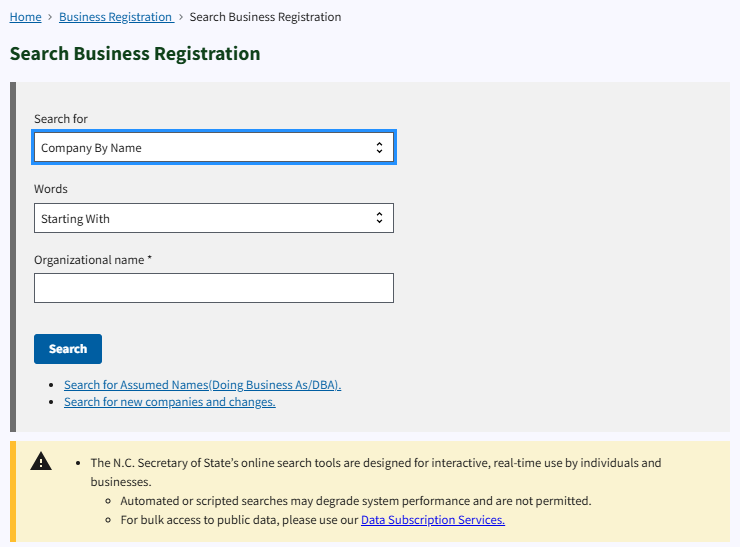
Before you begin your NC SOS Business Search, it can be helpful to set standards. There are two main parts to set up:
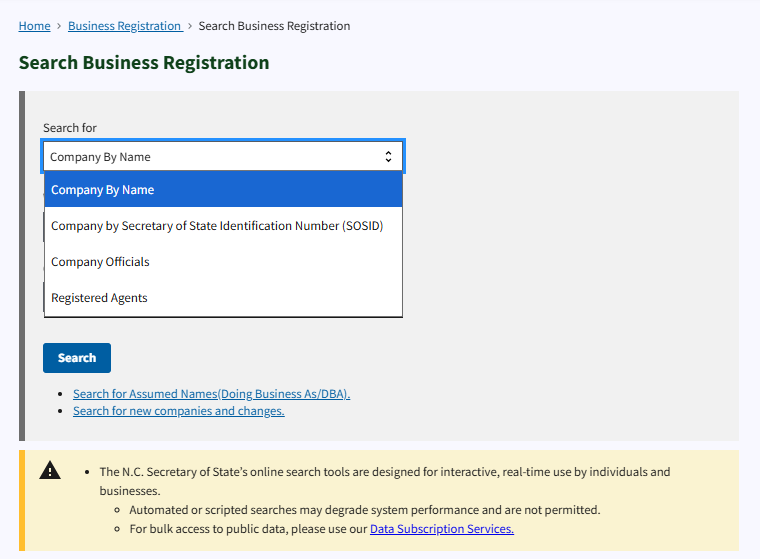
1. Select Search For: In the first drop-down menu, you can select from the following:
- Company Secretary of State ID Number (SOSID): This is the unique number assigned to an entity by the SOS.
- Company Officers: Locate the company’s officials (Directors, Officers, Members).
- Registered Agents: Search for the registered agent associated with a business.
For the general search, you can choose either Company Secretary of State ID Number (SOSID) or the option that best suits your needs.
2. Select Words: In the second dropdown menu, choose one of the following:
- All: This will return results with all the words in your query.
- Any: This will find results that include any of the words that you have typed.
- Exact Match: Show results that are a perfect match to your query.
3. Enter the Business Name: Enter the business name or keyword you’re looking for in the Organisation Name field. Note: if you’re looking up a company’s assumed name or any amendments to a company, you’ll have to use a different tool on the site.
4. Start the Search: After you have entered all the required information, press the Search button to start the query.
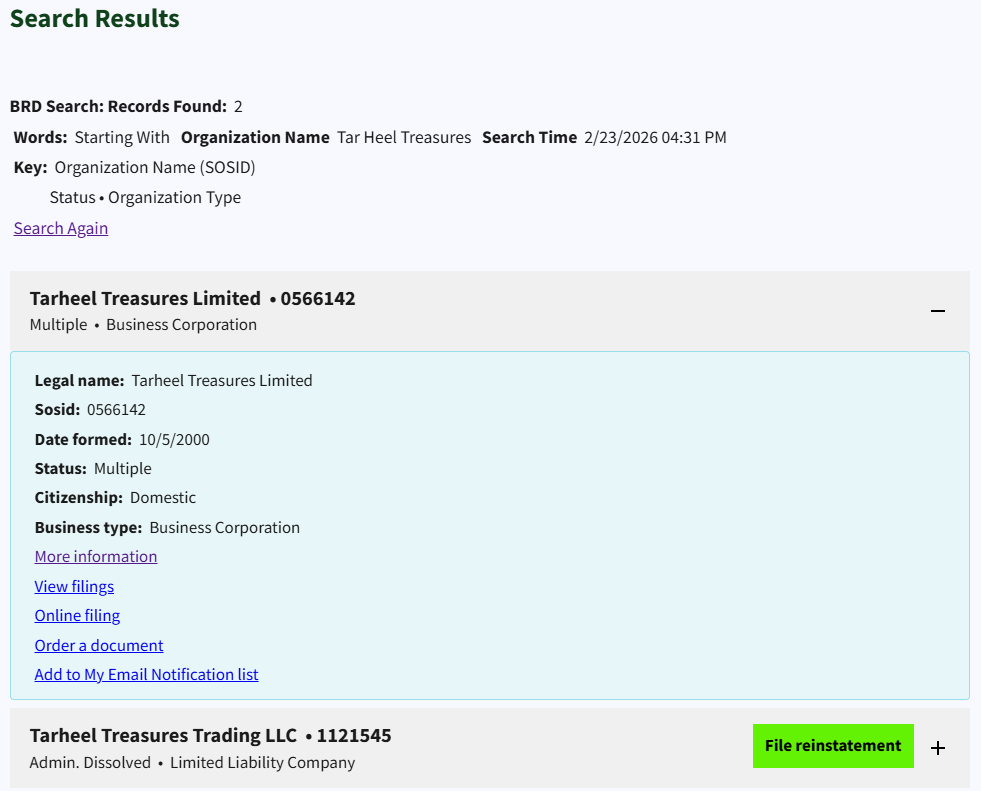
Step 3: Check the North Carolina Search Results Table
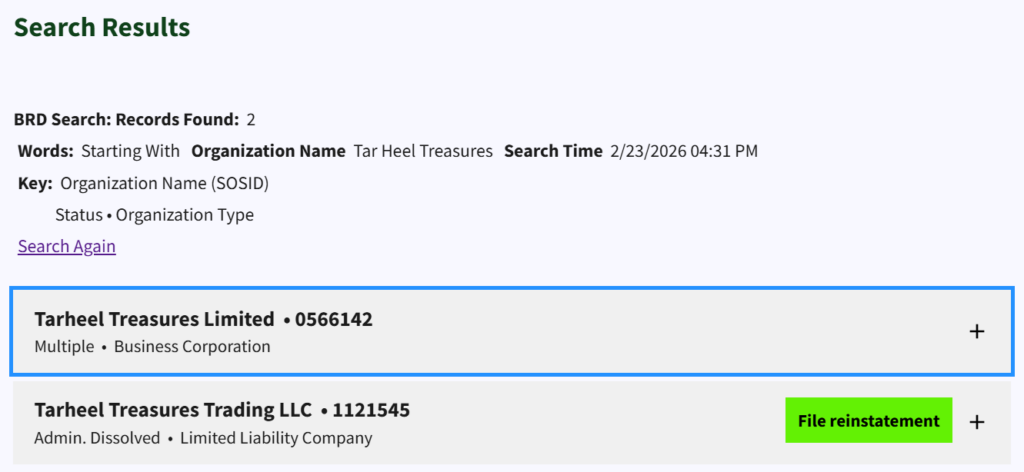
Once you have entered the search, you will get a table containing a list of companies that match your query options. This table will contain the NC SOS Business Entity Database, which comprises useful information such as:
- Name: The legal name of the business.
- ID Number: The business’s unique SOSID number.
- Business Type: The type of business entity (LLC, Corporation, etc.).
Select the Entity
In the table, each entry has a “+” sign next to it. Click the + next to the row to expand and view more information about the company entity, including:
Step 4: Inspect the Results
Clicking the + sign expands the table to provide more information about the entity. It will display the following information:
- Name: The name of the business entity.
- SOSID: The Secretary of State Identification Number.
- Date Formed: The date of the business being registered with the state.
- Status: Current business position (active, dissolved, etc.).
- Citizenship: The legal status of the business entity, e.g., domestic or foreign.
- Business Type: Type of business (LLC, Corporation, etc.).
If you want to verify the LLC status in North Carolina only, go to the Status section. It indicates whether the LLC is active or dissolved and whether it is in good standing.
Actions Available
From this page, you can access additional actions for the North Carolina company registration search. These include:
- More Information: Click this link to view more complete information about the business, including documents associated with filings and status.
- View Filings: View the entity’s history of filings with the Secretary of State.
- Online Filing: This option allows you to file new documents or amendments online.
- Order A Document: Request official records or documents related to the business.
- Add to My Email Notification List: Set up notifications to be alerted about changes to the business entity’s status.
Step 5: Explore the Business’s Filing History
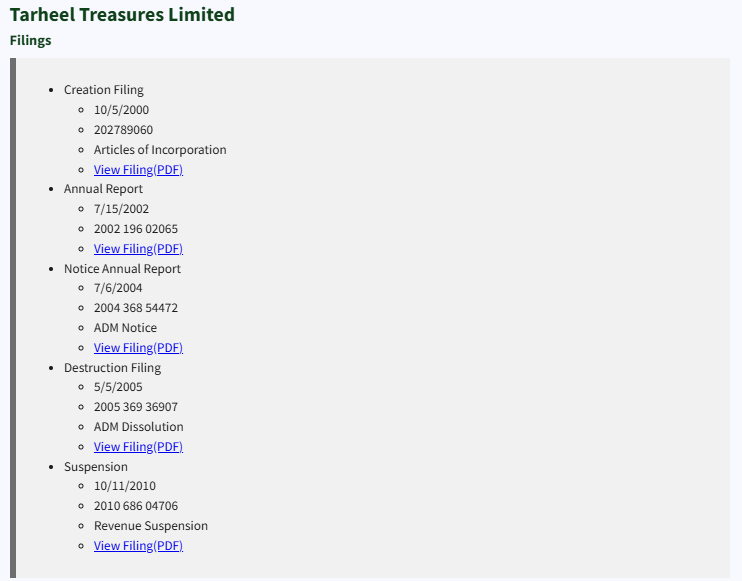
Clicking on the “View Filings” link will provide you with a list of filings submitted by the entity. These NC SOS corporate records searches may include important documents such as:
- Creation Filing: The original filing that established the business.
- Amendment Filings: Changes made to the business’s structure, name, or other elements.
- Destruction Filing: A filing to dissolve or terminate the business.
- Suspension: A filing indicating that the business’s registration has been suspended.
In the NC SOS business search, these documents are typically available in PDF format, which you can access by clicking the button View Filing (PDF) to download and read the entire filing.
Step 6: Conduct Additional Searches if Needed
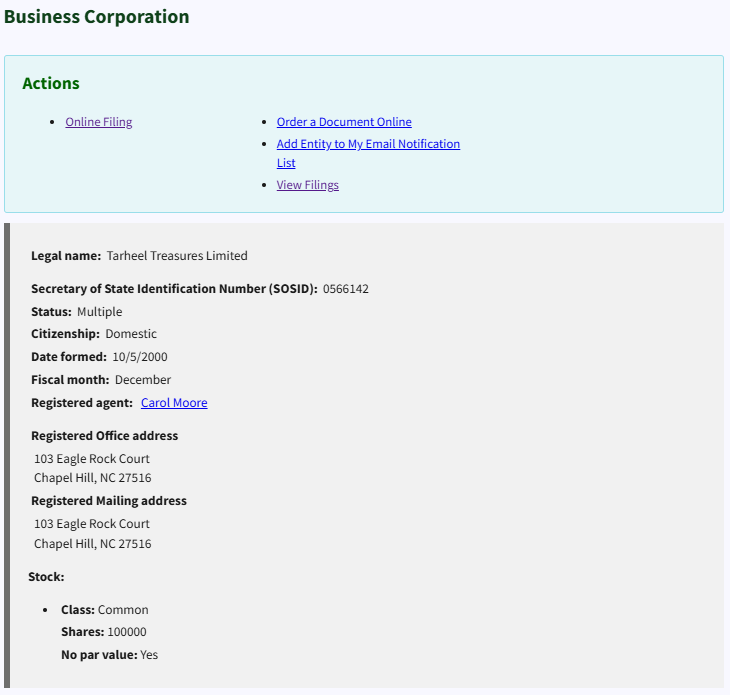
Occasionally, it may be necessary to conduct a follow-up search of Business SOS NC for more clarification, such as:
- Legal Name: See the full official business name registered with the state.
- Secretary of State Identification Number (SOSID): A number assigned to the business to track its registration.
- Status: Status of business entity (e.g., active, dissolved, etc.).
- Citizenship: Refers to whether the business is a foreign business (registered outside of North Carolina) or a domestic business (registered within the state).
- Date Formed: The date when the business was initially registered with the Secretary of State.
- Fiscal Month: This is the month in which the business ends its fiscal year.
- Registered Agent: An individual or an organisation that is designated to accept legal papers on behalf of the business.
- Mailing Address: The business entity has its official mailing address.
- Principal Office Address: The central office of the business.
- Registered Office Address: Address of reception of legal documents.
- Registered Mailing Address: The address on which to receive mail concerning the business.
- Officers (President, Vice President, etc.): The data about the most important officials of the business.
- Stock: Information on the stock in the business, including classes, shares, and par value.
Step 7: Take Action Based on the Results
Once you have finished the NC SOS business search, you may proceed with what you need to do with the information you obtained:
- Register a New Business: Once the NC business name availability check confirms that the business name you want is available and the entity is not disqualified, you can move on with the process of starting a new business.
- File Documents: If you are a business owner looking to update or amend your business information, you can file the necessary documents with the Secretary of State’s office.
- Report Issues: If you find registered businesses in North Carolina that seem to be in violation of state regulations, you can report them to the relevant state authorities.
Accessing Other NC SOS Business Search Online Services
Besides the business search SOS NC, the North Carolina Secretary of State online services come with other features, which include:
- NC Business Registration Lookup: This tool allows you to find registered businesses and check if they’ve completed the registration process.
- NC Secretary of State LLC Lookup: Specifically for LLCs, this option helps you verify their registration status.
- North Carolina Business License Search: Check if a company is licensed to do business in North Carolina.
Conclusion
The NC SOS Business database is beneficial for anyone conducting research for businesses located in North Carolina. Whether you are seeking to verify a business in North Carolina, checking LLC status, or conducting a North Carolina business license search, the online database makes it easy and effective. With this guide, you can easily access to credible information about registered businesses in the state.
Thus, when you have to search for a business in NC, it is good to know that the NC SOS Business Entity Database can be used to get the information you require, making decisions that are well-founded. Whether it is to confirm a business’s registration or to verify your own, it is an easy mechanism that lets you be sure you are viewing the right, up-to-date information about the business.
FAQs
In North Carolina, to verify the LLC status, access the NC SOS business search and type the business name or SOSID. The status will indicate whether the LLC is active, dissolved, or in any other status.
To get the corporate records for an LLC, go to the business search results, then click “View Filings” for that business. You’ll have access to filings such as articles of incorporation, amendments, and status reports.
To find the registered agent for an LLC in North Carolina, use the NC SOS business entity search and look for the registered agent information in the business details. This will be listed alongside other company details.
Yes, you can verify the availability of an NC business name for your LLC using the NC SOS business search tool. It will show if your desired business name is available or already taken in North Carolina.
Yes, you can view the filing history of an LLC by using the SOS NC business entity search. It provides access to documents such as the creation filing, amendments, and dissolution filings.