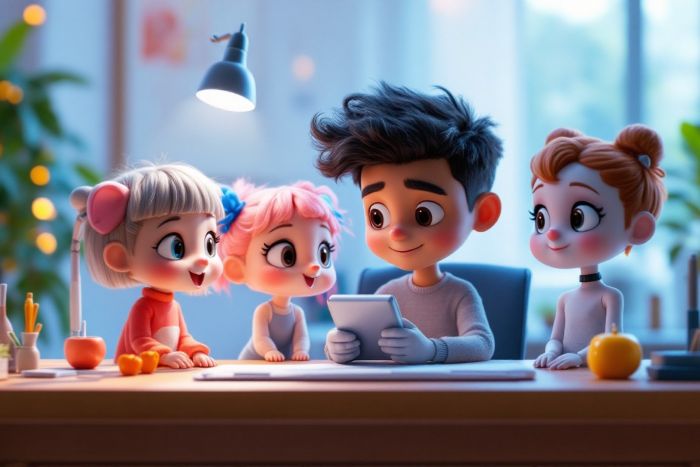
Disney Pixar-style characters have a charm that’s impossible to resist—big expressive eyes, rounded 3D features, and a warm, animated personality that jumps right off the screen. Traditionally, creating characters in this style required serious drawing skills or digital painting expertise.
But now, thanks to artificial intelligence, anyone can generate Pixar-inspired characters instantly—whether you want to create one from a text prompt or transform a real photo into a Pixar-style portrait.
In this guide, you’ll learn how to use Vheer AI to create adorable, fully animated-looking characters—without any art experience.
Key Takeaways
- Vheer AI allows anyone to create Pixar-style characters quickly from text or real photos without drawing skills.
- A Pixar-style character features expressive eyes, rounded shapes, and a warm personality, reminiscent of characters from popular animated films.
- Using Vheer’s Text to Image Generator, you can describe your character, and the AI generates a detailed Pixar-style image.
- For transforming photos, simply upload your image, select the Pixar Style, and Vheer will create an animated version of it.
- Vheer’s tools are free, user-friendly, and enable high-quality Pixar-style creations for social media or personal projects.
Table of contents
What Is a Pixar-Style Character?
A Pixar-style character is instantly recognizable for its warm, cinematic charm. These characters often have big, expressive eyes, soft and rounded 3D features, and bright, polished colors that resemble the look of modern animated films. Their emotions are exaggerated in a playful, heartwarming way, blending cartoon-like shapes with realistic depth and lighting. Think of the familiar characters from Toy Story, Up, Inside Out, or Turning Red—they feel alive, full of personality and storytelling energy.
How to Create a Pixar-Style Character from Text
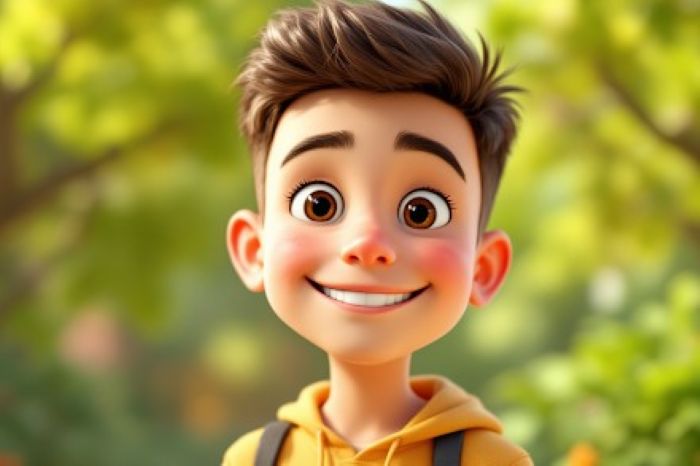
Creating a Pixar-inspired character using Vheer’s Text to Image Generator is incredibly easy. You don’t need drawing experience, design tools, or technical skills—just your imagination. Vheer turns simple descriptions into fully rendered, Pixar-style illustrations in seconds.
A Brief Intro to Vheer’s Text to Image Generator
Vheer’s Text to Image Generator is a free, browser-based AI tool that converts your ideas into high-quality images instantly. Simply describe the character you want—appearance, personality, outfit, background, lighting—and the AI brings it to life in a style reminiscent of Pixar films.
Whether you want a cute animated kid, an emotional elderly character, a funny sidekick, or a magical creature, Vheer makes it fast and effortless.
Step-by-Step Guide to Create Pixar-Style Characters from Text
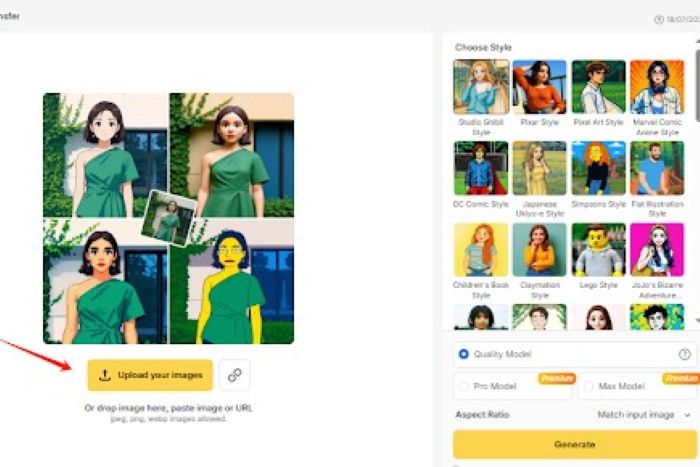
Step 1: Upload Your Photo
Choose a clear photo of yourself or your subject. Open Vheer’s AI Style Transfer and upload the image. The tool will automatically detect the face and prepare it for Pixar-style transformation.
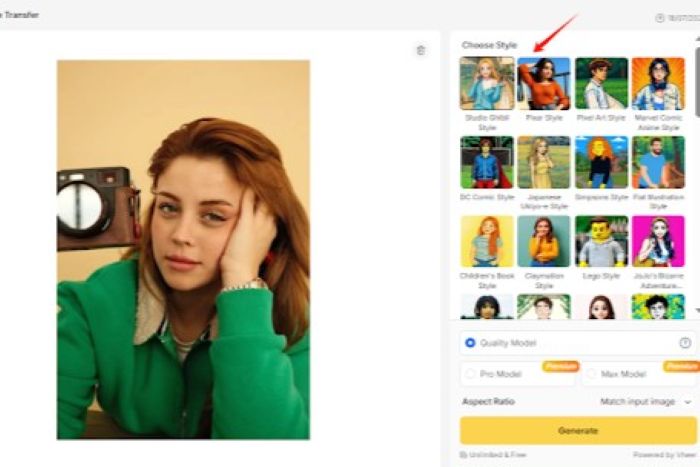
Step 2: Select the Pixar Style
In the style options, choose “Pixar Character.” This tells the AI to generate soft lighting, round shapes, big expressive eyes, and the signature Pixar animation look.
Step 3: Adjust the Settings (Optional)
You can switch the aspect ratio, increase details, or keep everything on default. The system automatically maintains proportion and composition, so even if you change settings, the final result stays clean and natural.
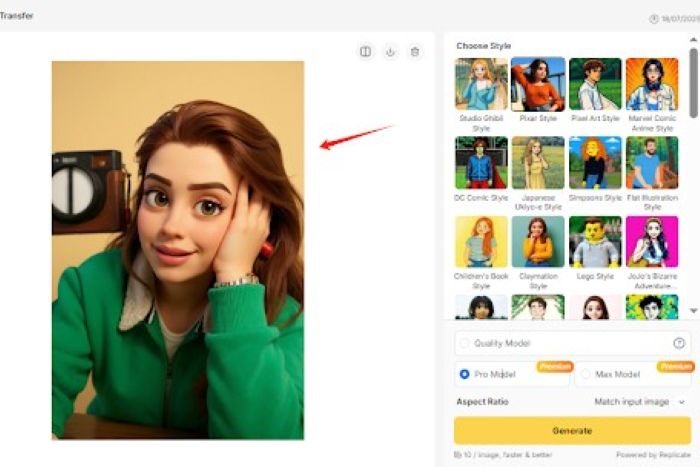
Step 4: Generate Your Pixar Character
Click “Generate,” and Vheer will instantly turn your photo into a Pixar-inspired character. If you want a different look, regenerate as many times as you want until you’re happy with the style.
Tips to Write Better Prompts for Pixar-Style Characters
Creating a charming Pixar-style character starts with writing the right prompt. Pixar characters are expressive, warm, and full of personality, so your prompt should guide the AI toward those qualities. Here are some simple but highly effective tips to help you get the best results every time.
Describe key features clearly
Mention simple details like hairstyle, clothing, or face shape so the AI understands the character’s basic look.
Add an emotion or mood
Include one feeling—happy, shy, excited, curious—to make the character more expressive.
Include a small scene or action (optional)
A short note about the setting or pose can make the result feel more cinematic.
Use clear Pixar-style keywords
Add phrases like “Pixar-style,” “Pixar-inspired,” or “3D animated look” to guide the AI toward the right style.
Keep your prompt short and focused
Avoid long or complicated descriptions. Simple prompts give cleaner Pixar results.
Regenerate until you find the perfect look
If the first image doesn’t match your vision, regenerate a few times—small variations often lead to the best result.
Examples of Pixar-Style Character Creations
Below are some sample prompts to help spark your imagination. Each example follows the structure you requested.
Example #1:
Prompt Used: A joyful Pixar-style boy with brown curly hair, a red hoodie, big expressive eyes, and a bright smile, standing in front of an elementary school.
Example #2:
Prompt Used: A cute Pixar-inspired girl with round glasses, short black hair, soft 3D features, and a playful expression, sitting at a desk with books and colorful stationery.
Example #3:
Prompt Used: A friendly elderly Pixar-style man with a bow tie, gentle eyes, soft wrinkles, and warm lighting, sitting in a cozy living room with vintage decorations.
Transform a Real Photo into a Pixar-Style Character
Vheer doesn’t just let you generate Pixar-style characters from text—it also allows you to transform real photos into animated, Pixar-inspired portraits using its AI Style Transfer feature. Whether it’s a selfie, a friend’s photo, or even a pet, Vheer can instantly apply a Pixar animation style, giving your image a warm, expressive, and playful look—all without any drawing skills.
How to Use AI Style Transfer to Create Pixar-Style Portraits
Step 1: Upload Your Photo
Go to Vheer’s AI Style Transfer tool and upload a clear photo. For the best result, choose an image with a visible, centered subject.
Step 2: Select “Pixar Style”
Choose the “Pixar Style” preset. The AI will automatically convert your photo, adding rounded shapes, expressive eyes, soft lighting, and the signature Pixar animation feel.
Step 3: Adjust Settings (Optional)
You can tweak the aspect ratio or other settings, but the default options usually give excellent results. The AI preserves the original structure while applying the new style.
Step 4: Generate and Preview
Click Generate to transform your photo. If the result isn’t perfect, you can regenerate as many times as needed to refine expressions, colors, or details.
Step 5: Download Your Pixar-Style Image
Once satisfied, download your high-resolution, watermark-free Pixar-style portrait. It’s ready for social media, personal projects, avatars, or creative gifts.
Why Use Vheer’s AI Style Transfer?
Vheer’s image style transfer is perfect for anyone who wants high-quality, animated-style portraits quickly. It maintains the original photo’s proportions, so the subject still looks like you, while transforming the image into a playful Pixar-style character. The tool is intuitive, free to use, unlimited, and delivers HD results suitable for social media, personal projects, or creative gifts.
FAQ
Q1: Can I really create Pixar-style characters without any art skills?
Absolutely! Vheer turns simple text prompts or photos into fully rendered Pixar-inspired characters—no drawing experience required.
Q2: Do I need to register or log in to use Vheer?
No login or signup is needed. Both the Text to Image Generator and AI Style Transfer work instantly in your browser.
Q3: Can I use my Pixar-style creations for social media or personal projects?
Yes! You can download and share your characters freely for personal projects, social media, or storytelling.
Q4: Will my photo still look like me after the style transformation?
Yes. Vheer preserves your photo’s proportions and key features while adding the playful, exaggerated Pixar animation style.
Q5: How can I improve the AI-generated Pixar-style characters?
You can refine your results by adjusting your text prompt or regenerating images multiple times. Even small changes in the description can give very different, creative results.
Conclusion
Vheer AI makes it effortless to create Pixar-style characters, whether from text or real photos, without any drawing skills. You can design expressive, heartwarming characters—from playful kids and whimsical sidekicks to elderly figures and pets—in minutes. With free unlimited AI image generator and AI Style Transfer, your next animated masterpiece is just a few clicks away. Whether for storytelling, social media, personal projects, or fun, Vheer brings your Pixar-style imagination to life instantly.