The modern internet is filled with distractions. Pop-up ads interrupt your browsing, autoplay banners slow down pages, and hidden trackers follow your every move online. What should be a smooth and enjoyable browsing experience often turns into frustration. Beyond annoyance, these ads and trackers can also pose serious privacy risks. They collect data about your habits, preferences, and even sensitive information. This is why more users are turning to smarter browser protection tools to regain control of their online experience.
One effective solution is IObit Malware Fighter 13 Free, which includes advanced browser protection features. With IObit Malware Fighter, users can block unwanted ads, prevent tracking, and browse more securely using a reliable free antimalware tool.
Let’s explore how this works and how you can set it up step by step.
Key Takeaways
- The internet is full of distractions like ads and trackers that compromise user experience and privacy.
- IObit Malware Fighter 13 Free offers advanced browser protection, effectively blocking unwanted ads and preventing tracking.
- Users can easily activate browser protection and anti-tracking features by following simple setup steps.
- Blocking ads and trackers improves browsing speed, enhances privacy, and offers a better user experience.
- IObit Malware Fighter combines malware protection, browser security, and anti-tracking features in one user-friendly tool.
Table of contents
Why Ads and Online Tracking Are a Problem
While ads help support many free websites, not all ads are harmless. Some can be intrusive, misleading, or even dangerous.
Common Issues with Online Ads:
- Pop-ups that disrupt browsing
- Auto-playing videos that consume bandwidth
- Fake ads leading to malicious websites
- Slower page loading times
The Hidden Danger of Tracking:
Many websites use tracking scripts to monitor user behavior. These trackers collect data such as:
- Browsing history
- Search activity
- Location data
- Device information
This information is often used for targeted advertising, but it can also raise serious privacy concerns.
How IObit Malware Fighter Helps
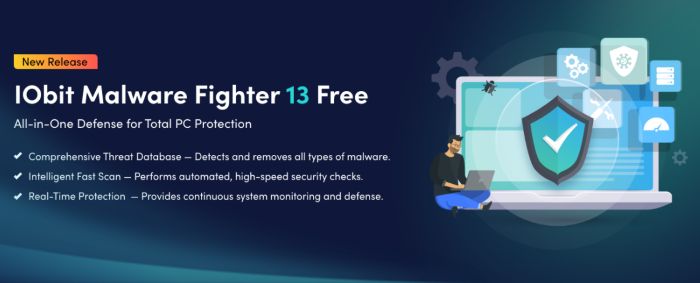
IObit Malware Fighter goes beyond basic virus protection. It includes browser protection features designed to block harmful content and prevent unauthorized tracking.
As a free antimalware solution, it offers:
- Real-time protection against threats
- Blocking of malicious websites
- Anti-tracking features
- Safer browsing environment
Instead of relying on multiple browser extensions, you can manage protection through one powerful tool.
Step-by-Step: How to Block Ads and Trackers
Follow these steps to activate browser protection and enjoy a cleaner, safer browsing experience.
Step 1: Install IObit Malware Fighter 13 Free
Start by downloading and installing the program:
- Visit the official website.
- Download this free antimalware software for PC.
- Run the setup file and follow instructions
Once installed, launch the software to access its dashboard.
Step 2: Enable Browser Protection
After opening the program:
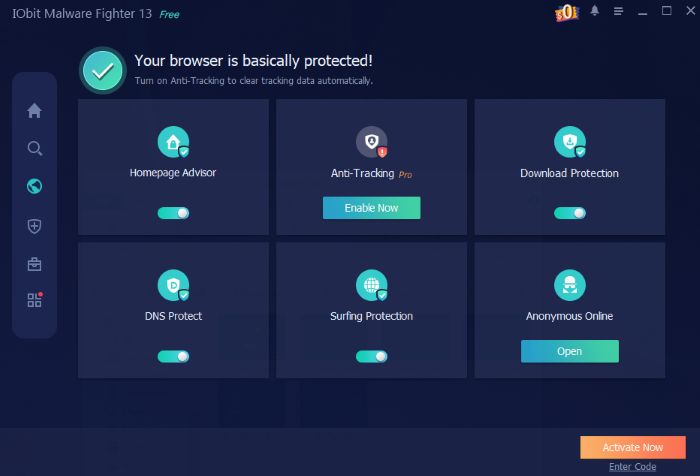
- Navigate to the Protection section
- Locate Browser Protection
- Turn it ON
This feature works in the background to monitor browsing activity and block harmful elements automatically.
Step 3: Activate Anti-Tracking Features
To stop online tracking:
- Enable Anti-Tracking or similar privacy features
- Allow the tool to block tracking scripts and cookies
This prevents websites from collecting unnecessary data about your behavior.
Step 4: Block Malicious and Intrusive Ads
While IObit Malware Fighter is primarily an antimalware tool, it also helps reduce harmful ads by:
- Blocking suspicious ad networks
- Preventing redirects to unsafe sites
- Stopping pop-ups linked to malware
This results in a cleaner browsing experience with fewer interruptions.
Step 5: Keep the Program Updated
Cyber threats evolve constantly, so keeping your protection up to date is essential.
- Check for updates regularly
- Enable automatic updates if available
Updated definitions ensure the tool can detect the latest threats and tracking methods.
Benefits of Blocking Ads and Trackers
Using browser protection offers several advantages beyond just convenience.
1. Faster Browsing Speed
Fewer ads mean faster page loading times.
2. Improved Privacy
Blocking trackers reduces the amount of data collected about you.
3. Enhanced Security
Malicious ads and unsafe links are stopped before they can cause harm.
4. Better User Experience
No more constant interruptions while browsing.
Additional Tips for Safer Browsing
While using a free antimalware tool like IObit Malware Fighter provides strong protection, combining it with good habits makes your browsing even safer.
Avoid Clicking Suspicious Links
If an ad looks too good to be true, it probably is.
Use Trusted Websites
Stick to reputable platforms whenever possible.
Clear Browser Data Regularly
Remove cookies and cached files to reduce tracking.
Update Your Browser
Security updates fix vulnerabilities that attackers may exploit.
Limitations to Consider
Although IObit Malware Fighter improves browsing safety, it may not block every single advertisement, especially harmless ones used by legitimate websites. For complete ad-free browsing, some users combine browser protection tools with additional ad-blocking extensions. However, for general security and privacy, the built-in protection is more than sufficient.
Why Choose IObit Malware Fighter?
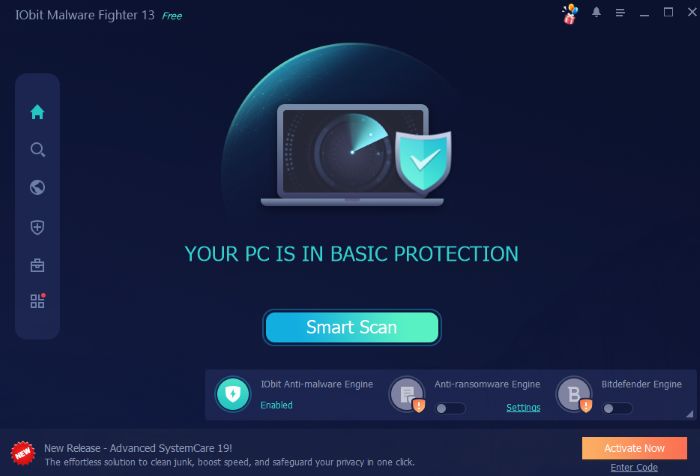
There are many security tools available, but IObit Malware Fighter stands out because it combines:
- Malware protection
- Browser security
- Anti-tracking features
- User-friendly interface
As a free antimalware solution, it offers strong protection without requiring a subscription, making it accessible to a wide range of users.
Final Thoughts
Online ads and tracking scripts have become unavoidable parts of the internet, but that doesn’t mean you have to tolerate them. With the right tools, you can take back control of your browsing experience.
By using IObit Malware Fighter, you can block harmful ads, reduce tracking, and enjoy a safer and smoother online environment. Its browser protection features provide a simple yet effective way to enhance privacy without complicating your workflow.
If frequent interruptions frustrate you and you care about your online privacy, turning on browser protection is a wise and essential move in today’s internet environment.