In a move that marks the end of an era for many Samsung Galaxy owners, RIP Samsung Messages. The company has officially confirmed that its long time native messaging app will shut down for good in July 2026. If you still rely on the Samsung Messages app that came pre installed on your Galaxy phone, tablet, or watch, now is the time to prepare. Samsung is urging everyone to switch to Google Messages as the default app to keep sending and receiving texts without interruption.
This change has been coming for a while. Samsung started phasing out its own messaging app on newer flagships a couple of years ago, making Google Messages the default instead. Now the company is taking the final step and ending support entirely for Android 12 and higher devices. Phones running Android 11 or older will not be affected, but most current Galaxy users will need to make the move soon.
Key Takeaways
- Samsung Messages will officially shut down in July 2026, urging users to transition to Google Messages.
- The shift to Google Messages aims to unify the messaging experience across Galaxy devices, offering modern features like RCS and AI tools.
- Users can easily switch by downloading Google Messages and setting it as the default SMS app on their devices.
- Switching early allows for a smoother experience, ensuring conversations transfer and minimizing service disruption.
- After July 2026, Samsung Messages will cease functionality, while Google Messages will continue to receive updates and support.
Table of contents
- Understanding the Samsung Messages Discontinuation
- Why Samsung Is Making This Change Now
- What This Means for Galaxy Phone Owners
- Benefits of Switching to Google Messages
- How to Switch from Samsung Messages to Google Messages
- Preparing for the Transition: Tips for a Smooth Experience
- What Happens After July 2026
- The Future of Messaging on Samsung Devices
Understanding the Samsung Messages Discontinuation
Samsung Messages launched years ago as the go to texting solution for Galaxy devices. It offered a clean interface, customizable themes, and reliable SMS and MMS support. Over time, however, the Android ecosystem moved toward richer features like RCS messaging, which allows high quality media sharing, typing indicators, and read receipts much like iMessage.
Samsung posted a clear End of Service Announcement on its US website. The notice states that the Samsung Messages application will be discontinued in July 2026. Users can check inside the app itself for the exact cutoff date on their specific device. After that date, the app will stop working for regular messaging except in limited cases such as emergency services.
Tech outlets quickly picked up on the news. Sites like Android Authority and SamMobile reported the details and noted that Samsung has been steering users toward Google Messages for some time. The goal appears to be a more unified Android experience across all Galaxy models.
Why Samsung Is Making This Change Now
The decision makes sense from a business and user experience standpoint. Maintaining two separate messaging apps creates confusion and extra development work. By fully committing to Google Messages, Samsung can focus on deeper integration with its One UI software, Galaxy Watch series, and tablets.
Google Messages brings modern perks that Samsung Messages never fully matched. These include built in AI tools for smart replies, photo remixing through Gemini, advanced spam and scam protection, and seamless RCS chats. Plus, the app works consistently whether you are on a Galaxy S series phone, a budget A series model, or even a foldable device.
For users who enjoy chatting across multiple devices, Google Messages supports multi device connectivity on newer Galaxy Watches and tablets. Older Tizen based watches may lose some conversation history after the switch, but basic texting will still function.
What This Means for Galaxy Phone Owners
Most Galaxy users will notice little day to day difference once they switch. Your existing conversations can transfer over, and SMS and MMS will continue working normally. However, some pre 2022 devices might see a brief disruption in ongoing RCS group chats until everyone involved has also moved to Google Messages.
Newer phones, including the Galaxy S26 series and beyond, will not even let you download Samsung Messages from the Galaxy Store anymore. The app will simply vanish from availability after the July deadline.
Many owners have mixed feelings. Some long time users appreciated the simple, no frills design of Samsung Messages and worry about losing familiar features. Others are excited about the upgraded capabilities Google offers. Forums and Reddit threads show a mix of acceptance and mild frustration, but the consensus is that the transition is inevitable and best handled sooner rather than later.
Benefits of Switching to Google Messages
Google Messages has become the standard for Android texting for good reason. It delivers end to end encryption options in supported chats, expressive reactions, and high resolution media sharing. The app also includes powerful spam filters that learn from your behavior and AI powered tools that help draft replies or detect suspicious links.
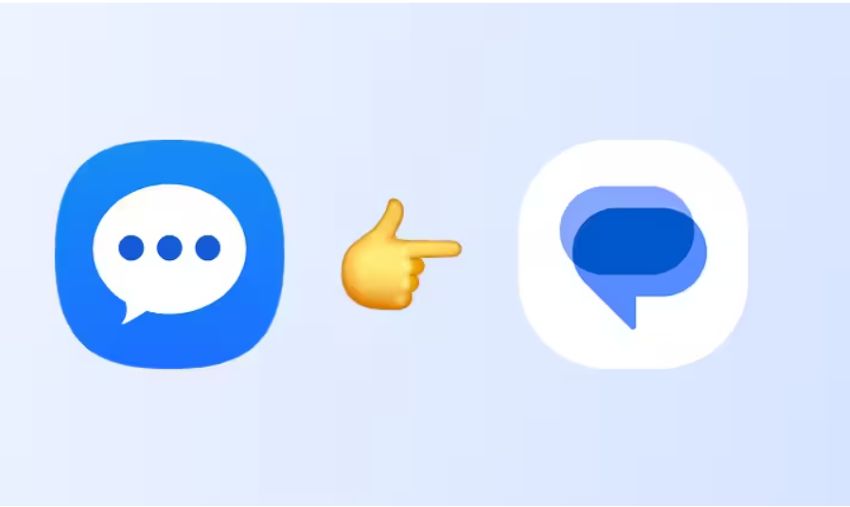
On Galaxy devices, Google Messages integrates smoothly with Samsung’s ecosystem. You can reply directly from your lock screen, use the app on your connected watch, and enjoy features like message scheduling or pinned conversations. The white icon with the blue speech bubble is now the one you will see in your app drawer and home screen dock after the switch.
Switching also future proofs your phone. As Android continues to evolve with more AI integration and better cross platform messaging, Google Messages will receive those updates directly. Samsung can focus its resources on hardware and One UI improvements instead of maintaining a second messaging platform.
How to Switch from Samsung Messages to Google Messages
Samsung made the transition straightforward, and the company provides clear steps on its support page. Here is exactly what you need to do to avoid any service interruption.
First, open the Google Play Store on your Galaxy device and search for Google Messages. Download and install the app if it is not already present. It is free and developed by Google, so you can trust the source.
Next, open the Google Messages app. It will usually detect that you are coming from another SMS app and prompt you to set it as the default. Tap the option that says Set default SMS app or a similar button.
If the prompt does not appear, go into your phone’s Settings. Navigate to Apps, then choose Default apps, and select SMS app or Messaging app. Choose Google Messages from the list. The icon is a white circle with a blue conversation bubble.
Once set as default, your conversations should begin importing automatically. Give it a few minutes for everything to sync. Test by sending a text to a friend or family member to confirm it works.
For users on Android 12 or 13, you may also need to manually update your home screen. Remove the old Samsung Messages icon from the dock if it is there, then drag the new Google Messages icon into place. This keeps your muscle memory intact when you unlock your phone. Some UI/UX tips for both on the developer and user end of smartphone apps.
If you use a Galaxy Watch or tablet, open Google Messages on those devices too and sign in with the same Google account. Most newer wearables will connect automatically.
Samsung recommends completing this switch well before July 2026. The earlier you move, the more time you have to resolve any small glitches and get comfortable with the new interface. Back up your old conversations through the Samsung Messages app settings if the option is available, though Google Messages usually handles the transfer on its own.
Preparing for the Transition: Tips for a Smooth Experience
Take a few extra steps to make the change painless. Update your phone to the latest One UI version for the best compatibility. Review your blocked contacts and spam settings in the new app so nothing slips through.
If you share your phone with family members, walk them through the process together. Group chats with iPhone users will improve once RCS is active on both sides, especially after Apple added support in iOS 18.
Keep an eye on your data usage for the first week after switching. RCS chats can send larger files, but the app is efficient overall.
What Happens After July 2026
Once the deadline hits, Samsung Messages will no longer send or receive regular texts. Emergency calls and messages to certain services might still route through, but everyday communication will fail. The app may disappear from your app drawer or become unusable.
By switching early, you avoid any last minute panic and enjoy uninterrupted service. Google Messages will remain the official messaging solution moving forward, with ongoing updates from both Google and Samsung.
The Future of Messaging on Samsung Devices
This shift reflects a broader trend in the Android world toward unified, cloud connected apps. Samsung continues to lead in hardware innovation, and pairing that with Google’s messaging expertise creates a stronger overall experience for users.
Whether you are a power user who sends dozens of texts daily or someone who just checks messages occasionally, the change ultimately benefits you. You will gain modern features without losing the reliability you expect from a Galaxy phone.
RIP Samsung Messages served Galaxy owners well for many years, but the time has come to embrace the next chapter. Make the switch to Google Messages today, and you will be ready long before July 2026 arrives. Your conversations will flow smoothly, and you will discover handy new tools along the way. Samsung has made the path clear. Now it is up to us as users to take that simple step and keep our Galaxy experience seamless for years to come.
Samsung has announced that the Samsung Messages app will be discontinued in July 2026. Check directly inside the Samsung Messages app on your Galaxy device for the precise end-of-service date that applies to your phone. After that date, you will no longer be able to send or receive regular text messages through the app, though emergency service numbers and designated emergency contacts may still work in limited cases. Older devices running Android 11 or below are not affected.
It is highly recommended to switch as soon as possible rather than waiting until the last minute. Switching early gives you time to get comfortable with the new app, ensure all your conversations transfer properly, and resolve any minor issues. Samsung encourages users to make Google Messages the default messaging app today to avoid any disruption when the deadline arrives.
The process is simple. First, download or open Google Messages from the Google Play Store. When you launch it, the app will usually prompt you to set it as the default. Tap “Set default SMS app” and select Google Messages. If the prompt does not appear, go to Settings > Apps > Choose default apps > SMS app, then choose Google Messages (the white icon with the blue chat bubble). Your conversations should start importing automatically after the change.
In most cases, yes. Google Messages typically imports your existing SMS and MMS conversations automatically once it becomes the default app. For extra peace of mind, especially with older or very large message histories, you can use a free app like SMS Backup & Restore from the Play Store to create a manual backup before switching. After the switch, open Google Messages and give it a few minutes to finish syncing.
Newer Galaxy Watches and tablets that support Google Messages will continue to work normally once you sign in with the same Google account. You may need to open Google Messages on those devices and complete a quick setup. Some older Tizen-based watches might lose conversation history, but basic sending and receiving of texts should still function. Test a message after switching to confirm everything connects smoothly.
You will actually gain several modern features, including better RCS messaging (with high-quality photos, typing indicators, and read receipts), stronger spam protection, AI-powered smart replies, and seamless integration across your Galaxy devices. While the interface looks slightly different, most users find Google Messages faster and more reliable. If you had custom themes in Samsung Messages, you can personalize Google Messages with its own themes and settings to match your style.