Shopify merchant. The wrong stack empowers cost to spin out of control, erects operational blind spots, and means you have only an increasingly fraught understanding of whether your store is ever profitable. The right stack saves time and reduces fee leakage, but the biggest value is the visibility it provides into what you actually retain after every expense. What apps do you need to launch, grow, and profit from a Shopify business in 2026? In this guide, we’ll focus on the essential apps you need, organized by what job they do in your operation.
Table of contents
What Is a Shopify Business, and What Does the Market Look Like in 2026
Shopify is a hosted ecommerce platform that lets you build and operate an online store without managing servers or custom code. You select a business model, configure your storefront, connect to payment processing, and sell. Shopify handles the technical infrastructure. You handle product selection, marketing, and customer experience. According to Gartner Insights, Shopify maintains a high overall rating of around 4.5–4.6 out of 5 across hundreds of verified enterprise reviews, reflecting strong customer satisfaction and enterprise trust in the platform.
Most new merchants in 2026 start with one of four models:
- Dropshipping: sell products without holding inventory; your supplier fulfills and ships directly to the customer. Lower upfront capital, but higher operational variability and margin pressure from fees.
- Print-on-demand: products are created and fulfilled at the point of purchase. Low inventory risk and niche-driven demand, with limited margin upside compared to stocked inventory models.
- Private label or stocked inventory: you buy, brand, and hold stock. Higher upfront cost but more control over quality, fulfillment speed, and unit economics.
- Digital products: high margin and zero fulfillment cost, but require a trust signal or existing audience to convert consistently.
There is no one best model for all. The choice ultimately depends on how much capital you have available, your tolerance for operational complexity, and the timing of when you need to start generating revenue. What all four models have in common is that profitability does not come automatically-it takes margin discipline up front, because the things that eat into profit are agnostic to which model you run.
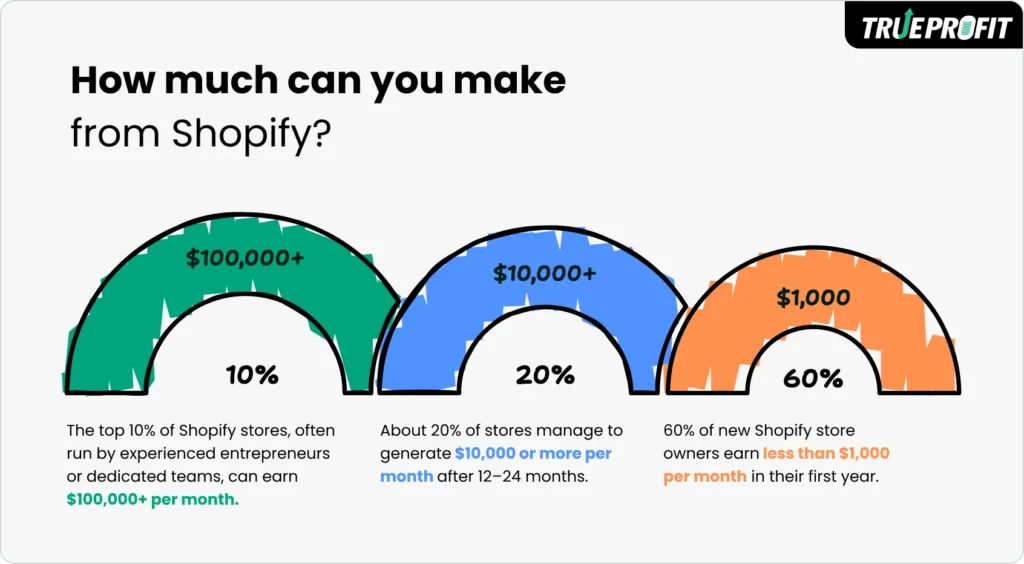
Ecommerce is still booming in 2026, with the competitive landscape having evolved. Customer acquisition costs on Meta and TikTok have ballooned. Delivery expectations have tightened. And the Shopify fee structure has become more complex, with assorted charges sneaking in places that are easy to miss when you’re looking at revenue. In TrueProfit’s breakdown of new store setups, according to them, 60% of Shopify stores bring in net income under $1,000/month (not because the platform isn’t workable, but due to poor cost visibility and scaling decisions being made ahead of unit economics getting confirmed).
Understanding the full cost structure before you build your app stack is the filter that separates tools worth paying for from noise. Every app you add is a fixed monthly cost that spreads across every order. The right question before installing anything: Will this save money, make money, or give me clarity on whether I am making money? For a detailed breakdown of every fee category Shopify charges and how they compound at different revenue levels, see Shopify fees explained from TrueProfit.
Your income potential scales with how deeply you can maintain that cost discipline. As can be seen in TrueProfit’s store data, the split from beginners at $0-$1,000/month to even skilled operators at $10,000-$100,000+/month is no longer dictated by ad budget as much as whether or not a merchant knows exactly what Shopify takes on every sale and tracks actual net profit accordingly. If you want a more focused breakdown on how per-transaction fees work by plan and payment method, check out another TrueProfit article titled “How Much Does Shopify Take Per Sale? (2026 Updated)”
Essential apps for starting a Shopify Business in 2026
Store Setup & Theme Apps
Your store is your storefront, checkout, and first impression. In 2026, the bar for a credible store is higher-customers expect fast load times, clear policies, and product pages that set honest expectations. Start with what earns trust quickly, not what looks impressive.
1. Shopify (Built-in)
Shopify is the infrastructure that everything else lives on. With one-click checkout, payment processing integrations, and a huge app ecosystem, it quickly became the default platform for new and scaling merchants. Since the plan you select directly translates into your per-transaction fee rate, making the correct decision on tier at the front end is a part of your unit economics decision, not just a platform preference.
Best for: All Shopify merchants-the plan tier should be chosen based on your projected volume and which payment fee rate makes sense at that volume
Pricing: From $39/month (Basic). The Advanced plan at $299/month lowers processing fees to 2.4%+$0.30, which can be worth it at high volume.
2. Debutify / Dawn (Free Theme)
Shopify’s free themes, particularly Dawn, are well-optimized for conversion and load speed. Paid themes can add useful features, but they are a fixed upfront cost and a recurring maintenance consideration. For most new stores, a free theme configured well outperforms an expensive theme configured poorly. Invest in theme upgrades only after the store has demonstrated demand.
Best for: New stores where the priority is proving product-market fit before committing to design spend
Pricing: Free (Dawn and other built-in themes). Paid themes from $180-$380 one-time.
Product Sourcing & Inventory Apps
Sourcing is where your margin is either protected or lost before a single sale is made. Reliable fulfillment is not just a logistics issue-it is a profit issue. Inconsistent delivery drives refunds and chargebacks that quietly erode net margin. Prioritize suppliers whose pricing and lead times are predictable, not just cheap.
3. DSers
DSers is the official AliExpress dropshipping partner, handling bulk order processing, supplier mapping, and order tracking inside Shopify. For merchants sourcing from Chinese suppliers, it streamlines the gap between customer payment and fulfillment, and supports switching between suppliers on a per-product basis when pricing or reliability changes.
Best for: Shopify merchants sourcing from AliExpress who need bulk ordering and supplier flexibility
Pricing: Free plan available. Paid plans from $19.90/month.
4. Spocket
Spocket focuses on US and EU suppliers, which means shorter shipping windows and lower refund rates from delivery-related complaints. Products cost more than AliExpress equivalents, but faster fulfillment often improves conversion and reduces support overhead enough to justify the higher COGS, especially for stores selling to North American and European customers.
Best for: Merchants selling to US and EU customers who need faster, more predictable fulfillment
Pricing: From $39.99/month.
5. Stocky by Shopify
Stocky is Shopify’s built-in inventory management tool for merchants holding physical stock. It handles purchase order creation, stock level tracking, and demand forecasting. For stocked inventory models, accurate inventory data is what prevents both stockouts (lost revenue) and overstock (tied-up capital).
Best for: Private label and stocked inventory merchants on Shopify who need purchase order and inventory tracking built into the platform
Pricing: Free for Shopify merchants.
Marketing & Traffic Apps
Marketing is where most of your variable spend will go. The goal is not high ROAS-it is profitable growth. A campaign can report strong ROAS and still be unprofitable once you layer in product cost, Shopify fees, shipping, and refunds. The tools below help drive traffic and, when connected to real profit data, tell you which channels are actually working.
6. Meta Ads (Facebook/Instagram)
Meta Ads remain the dominant paid channel for Shopify merchants in 2026. Visual ad formats work well for demonstrating physical products, and the platform’s targeting depth is difficult to match. According to Forbes, Meta’s auction-based advertising system prices ads based on a combination of bid, engagement, and quality, meaning that as competition increases and efficiency declines, acquisition costs naturally rise over time. As a result, CPAs have increased across most niches, so having a margin buffer in your pricing is more important than ever before committing to scale.
Best for: Visual products with broad consumer appeal; stores with enough margin buffer to absorb CPM fluctuations
Pricing: Variable ad spend. Budget at least $500-1,000/month for meaningful test data.
7. TikTok Ads
TikTok Ads continue to offer lower CPMs than Meta in many niches, particularly for younger audiences and trend-driven products. Native-format video content consistently outperforms polished creative on this platform. Like Meta, campaigns need a real profit layer underneath ROAS to be worth scaling.
Best for: Trend-driven products and stores comfortable producing short-form video creative
Pricing: Variable ad spend. TikTok recommends a minimum of $50/day per ad group for testing.
8. Klaviyo
Klaviyo handles the retention side of Shopify marketing: abandoned cart recovery, post-purchase flows, win-back sequences, and segmented campaigns that build repeat purchase behavior. Retention revenue is the highest-margin revenue a Shopify store can generate-it carries no acquisition cost and compounds over time.
Best for: Stores with meaningful traffic volume ready to build a retention revenue stream alongside paid acquisition
Pricing: Free up to 250 contacts. Scales with list size from approximately $20/month.
9. Plug in SEO / Tapita SEO
Organic search is a long-term acquisition channel that costs nothing per click once established. SEO apps help identify missing meta tags, broken links, structured data issues, and content opportunities. For Shopify stores targeting informational or product keywords, SEO can reduce long-run customer acquisition costs significantly compared to purely paid channels.
Best for: Stores investing in long-term organic growth alongside or instead of paid acquisition
Pricing: Free plans available. Paid from $9.99/month.
Conversion & Trust Apps
Traffic without conversion is just ad spend with no return. In ecommerce, trust is the primary conversion lever. Customers cannot inspect the product before purchasing, so your store has to do the work of building confidence through proof, clarity, and structure.
10. Loox
Loox collects and displays photo and video reviews from verified buyers. Visual reviews are the highest-trust form of social proof for physical products because they show the product in real-world use rather than a controlled product shot. Automated review request emails run the collection process without manual follow-up.
Best for: Any Shopify store selling physical products where buyer hesitation before purchase is high
Pricing: From $9.99/month.
11. GemPages
Shopify’s default product pages are functional but limited for paid traffic campaigns. GemPages lets you build dedicated landing pages with benefit-led layouts, comparison sections, and stronger calls to action-without needing a developer. Stores running paid ads consistently see higher conversion rates from purpose-built landing pages than from default product pages.
Best for: Merchants running paid traffic campaigns who want higher conversion rates from existing ad spend
Pricing: From $29/month.
12. ReConvert
ReConvert adds post-purchase upsell offers and thank-you page customization to Shopify’s checkout flow. A single well-placed upsell on the confirmation page can increase average order value without any additional acquisition cost, which directly improves the economics of every paid campaign you run.
Best for: Stores with complementary products that make natural upsell pairings
Pricing: Free plan available. Paid from $4.99/month based on order volume.
Operations & Customer Service Apps
Operational costs are where profit leaks quietly and consistently. Refunds, chargebacks, and unresolved support tickets all have a direct cost-even if they never appear in your ads dashboard. Reducing these is often more efficient than increasing ad spend.
13. Gorgias
Gorgias centralizes customer support across email, live chat, and social channels into one dashboard, with Shopify order data surfaced alongside every ticket. Faster resolution reduces chargeback risk and repeat contact rates-both of which carry real direct costs for Shopify merchants in the form of non-recovered processing fees and support time.
Best for: Stores with growing support volume or a pattern of chargebacks and repeat contact from unresolved issues
Pricing: From $10/month (Starter). Scales with ticket volume.
14. AfterShip
AfterShip sends automated shipping status updates to customers, significantly reducing inbound ‘Where is my order?’ support tickets. For Shopify stores with longer fulfillment timelines, particularly those using overseas suppliers, proactive tracking communication reduces refund requests caused by buyer anxiety rather than actual delivery failure.
Best for: All Shopify stores, especially those with fulfillment timelines longer than 5-7 days
Pricing: Free plan for basic tracking. Paid from $11/month.
Profit Tracking & Fee Management Apps
This is the category that most invests well (underinvestment) in, and probably the only one that matters if growth is real or illusory. Revenue is displayed clearly on Shopify’s native dashboard. It does not tell you how much money you have after credit-card processing fees, transaction fees, foreign exchange rates, seo app subscriptions, shipping multiples, refunds and returns, ad spend, and taxes. Without one system capturing all of these pieces in one place, your profit number is at best an estimate and at worst a dangerous overestimate.
15. TrueProfit
TrueProfit is a net profit analytics tool designed for Shopify merchants, dropshippers, print-on-demand businesses, and stocked inventory stores who desire a profitability-first perspective of their business. So rather than stitching together data from Shopify reports, ad platforms, and spreadsheets, TrueProfit offers a real-time profit view that incorporates all the cost categories the Shopify dashboard leaves out.
Core capabilities:
- Real-time profit dashboard product, ad channel, and store level in one view, updating as orders come in
- Complete Shopify fee tracking, payment processing fees, transaction fees, currency conversion, app subscription costs, refund cost impact, and custom cost categories are all captured at the order level
- Ad spend sync ad costs pulled directly from Meta, TikTok, Google, and other platforms and attributed in the same profit view; POAS (Profit on Ad Spend) visible per campaign rather than estimated
- Accurate COGS tracking per variant and bundle costs defined at the variant level, so bundled products and multi-supplier orders are costed correctly, not averaged
- P&L reporting by day, week, or month, a clean income statement view with every cost category broken out, replacing the manual monthly P&L assembly from multiple data sources
- Customer lifetime value and acquisition cost insights, LTV and CAC trends at the cohort level, so scaling decisions account for repeat purchase behavior, not just first-order economics
- Mobile monitoring and multi-store view a mobile app and unified dashboard for operators managing more than one Shopify store, giving consolidated profit visibility from a single screen
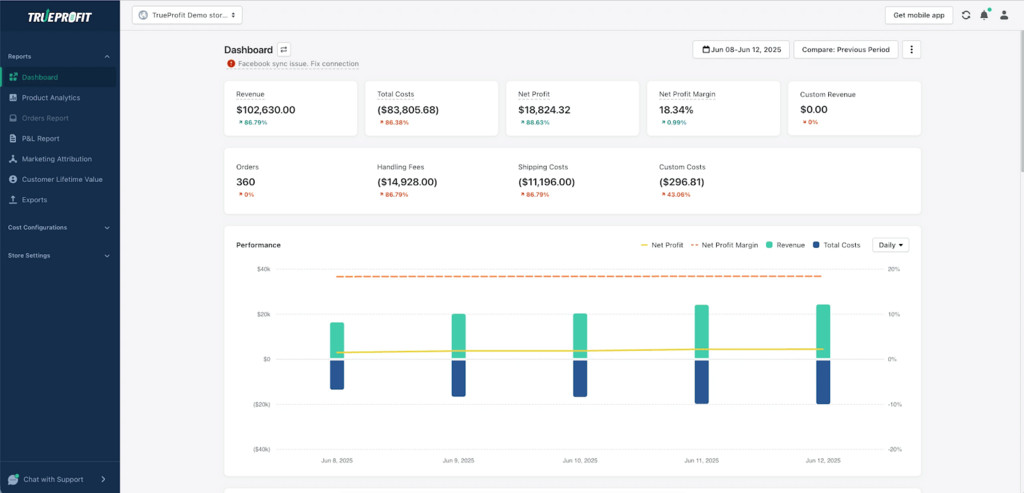
Shopify’s built-in reports do not capture ad spend, most fee categories, or the full cost picture needed to calculate real net profit. Spreadsheets break at scale. TrueProfit fills that gap so every decision-which product to push, which ad channel to increase budget on, which cost to cut-is based on what you actually keep.
Best for: Shopify stores with stable revenue, or those who want to track all expenses from day one before scaling
Pricing: From $35/month with a free trial available
Quick Reference: Essential Shopify Apps in 2026
| Category | App | Starting Price |
| Store Platform | Shopify | $39/mo |
| Storefront Theme | Dawn (Free Theme) | Free |
| Supplier Integration | DSers | Free / $19.90+ |
| Supplier Marketplace | Spocket | $39.99/mo |
| Inventory Management | Stocky by Shopify | Free |
| Paid Acquisition | Meta Ads | Variable |
| Paid Acquisition | TikTok Ads | Variable |
| Email / SMS | Klaviyo | Free / ~$20+ |
| SEO | Plug in SEO / Tapita | Free / $9.99+ |
| Social Proof | Loox | $9.99/mo |
| Landing Pages | GemPages | $29/mo |
| Post-Purchase Upsell | ReConvert | Free / $4.99+ |
| Customer Support | Gorgias | $10/mo |
| Order Tracking | AfterShip | Free / $11+ |
| Profit Analytics | TrueProfit | $35/mo (free trial) |
How to Think About Your App Stack
Not every app on this page is a must-have from day one. It doesn’t matter what order you prioritize things in, and adding a lot of tools too early on is itself a profit leak.
Always start from the bottom: the platform, a supplier integration whenever necessary (like for inflows), and any profit tracker. All three of these things tell you whether the business is going to be viable before you spend real money on anything else.
Include when you get traffic: tools for conversion, flows for email, and builders for landing pages only become relevant if there is volume to optimize. Until then, they are overhead and returning nothing.
Add at scale: customer support platforms and sophisticated SEO tools pay for themselves when the order volume and size of customers are present to require them.
Very few of the Shopify stores that fail do so because they picked the wrong ad platform or the wrong theme. Then they scale something that was losing money, and they never knew it because they had no visibility of their true profit. Add clarity first to the stack. Revenue is easy to see. Net profit is what you actually take home.