
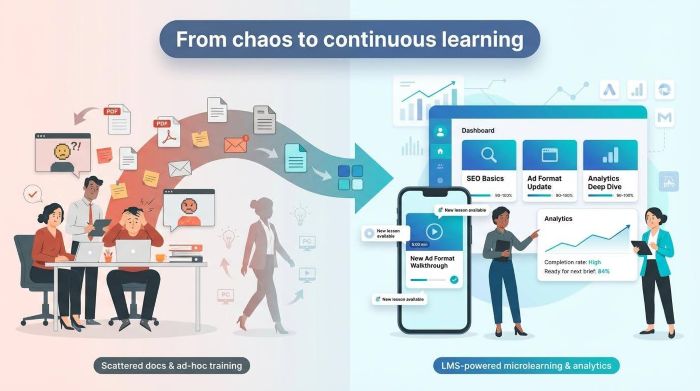
Turnover bleeds expertise from marketing teams—agencies lose one-third of their people each year, and every exit stalls campaigns. Meanwhile, channels mutate weekly and the martech stack tops 15,000 tools, forcing managers to reteach basics instead of steering strategy. A modern LMS for digital marketing flips the script: onboard in days, push micro-refreshers before tactics expire, and prove ROI in real time.
In this 2026 buyer’s guide you’ll discover:
- How we benchmarked platforms against marketing realities—rapid change, high churn, and tool overload.
- The ten LMS for digital marketing options that dominated for microlearning, integrations, and engagement.
- A comparison grid plus a step-by-step roadmap for purchase and rollout.
By the end, you’ll know which platform fits your budget, tech stack, and culture—and exactly how to launch it so people actually use it. Choosing the right LMS for digital marketing ensures your team stays ahead of change and maximizes campaign ROI.
Ready to swap chaos for continuous growth? Let’s dive in.
Table of contents
- Why an LMS for Digital Marketing is the Modern Fix
- How We Picked the LMS for Digital Marketing Platforms
- 1. GoSkills – Small-Team Powerhouse
- 2. SAP Litmos – Enterprise Content Giant
- 3. TalentLMS – Budget-Smart And Launch Ready
- 4. Docebo – Ai-Powered Personalization Engine
- 5. Absorb LMS – Polished Power with White-Glove Support
- 6. 360Learning – Crowd-Sourced Know-How on Tap
- 7. LearnUpon – One Hub for Staff, Clients, and Partners
- 8. EdApp – Microlearning That Fits Between Meetings
- 9. Lessonly by Seismic – Onboarding Meets Practice Reps
- 10. Adobe Learning Manager – Multimedia Masterclass
- LMS for Digital Marketing Comparison at a Glance
- Conclusion and Next Steps
Why an LMS for Digital Marketing is the Modern Fix
Marketing has always chased change, but today the pace is blistering. With over 15,000 martech tools, and more emerging weekly; AI, algorithms, and regulations constantly reset the field. New platforms demand new skills, yet turnover leaves teams in a perpetual deficit. A modern LMS solves this by delivering up-to-date micro-courses fast. When platforms change, training follows instantly, and real-time completion data shows who’s ready and who needs support.
Platforms like GoSkills show what “rapid” really means; its AI-powered “Genie” assistant can spin up a full lesson—outline, content, and quizzes—after just a few prompts, so the first micro-course is ready in minutes.
In short, an LMS turns relentless change from liability into advantage.
How We Picked the LMS for Digital Marketing Platforms
You deserve more than a random top-ten from a quick search, so we did the legwork.
First, we reviewed fifteen recent “best LMS” roundups, scanned G2 grids, Reddit r/marketing threads, and agency Slack channels. We noted which platforms appeared most, which earned praise, and which features marketers kept requesting.
Next, we scored each serious contender against six criteria that matter when campaigns move at sprint pace:
- Microlearning muscle: Can you build a five-minute lesson in minutes, not days?
- Marketing-stack integrations: HubSpot, Slack, Salesforce. If it does not connect, it was cut.
- Analytics that prove ROI: Dashboards must link learning to performance, not just completions.
- Scalability and user management: Seats you can swap as employees churn and portals you can clone for clients.
- Engagement hooks: Badges, leaderboards, mobile apps—the carrot that keeps busy creatives returning.
- Vendor support and content extras: Most teams lack a full-time instructional designer, so quality help counts.
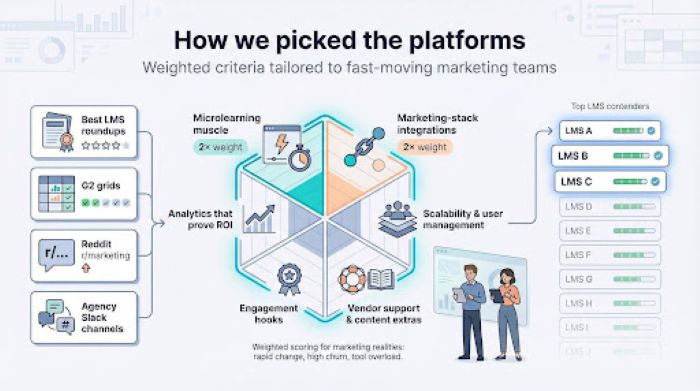
We weighted microlearning and integrations double because they slash ramp-up time and weave learning into daily workflows, the twin cures for turnover and skill decay.
Only ten platforms met the bar. They follow next.
1. GoSkills – Small-Team Powerhouse
If you run a lean marketing shop, GoSkills feels like hiring an extra trainer on day one. Before you even commit, GoSkills offers a quiz-style comparison that scores leading LMS software on price, features, and marketing-stack compatibility. Once you’re ready, the platform pairs a clean LMS with a ready-to-use library covering SEO, Google Ads, analytics, and Excel shortcuts that keep budgets tidy.
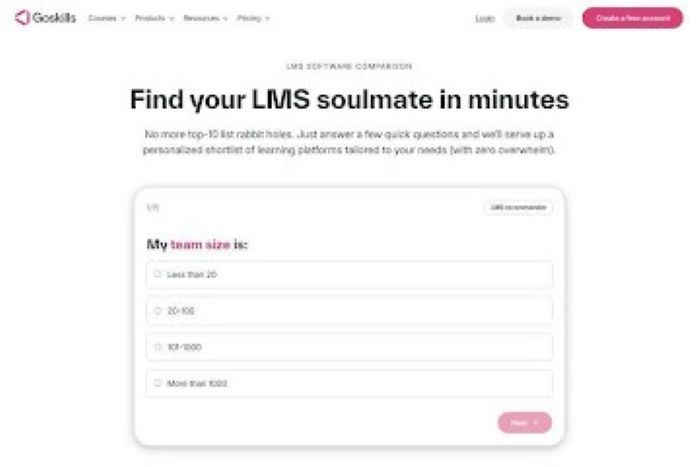
GoSkills LMS quiz-style comparison and marketing course catalog
Setup is fast: upload a slide deck and GoSkills turns it into bite-size lessons with quizzes in minutes. Edit and push updates instantly. A flat monthly fee gives all users full catalog access, avoiding costly add-ons. HR integrations and gamification are basic, but small teams rarely mind.
New hires onboard faster, veterans refresh easily. Bottom line: strong upskilling with minimal admin for growing marketing teams.
2. SAP Litmos – Enterprise Content Giant
When managing a global marketing team, scale matters. SAP Litmos provides it through an award-winning LMS and 2,000+ ready-made marketing courses covering social, analytics, and CX from day one. It integrates with 7,000+ apps, including Salesforce and Slack, syncing new hires automatically and embedding training data into campaign workflows and daily chat reminders.
Gamification; points, badges, leaderboards, keeps completion rates high. Implementation takes planning and higher budgets, but for multilingual, distributed teams, Litmos delivers consistent, compliant training at enterprise scale.
3. TalentLMS – Budget-Smart And Launch Ready
Startups and small agencies rarely have time for complex setup. TalentLMS lets you launch a branded learning space in an afternoon, upload a lesson, and invite your team fast. Its generous free plan includes five users and ten courses, while paid tiers scale affordably with headcount.
It’s easy to use, supports Zoom, quick quizzes, and AI lesson suggestions. Reporting is lighter, but for teams under 100, it offers strong value with minimal admin.
4. Docebo – Ai-Powered Personalization Engine
Docebo curates learning like Netflix curates shows. Its AI tags uploaded content and recommended the right training at the right time, advancing employees as they progress. Automation enrolls users into tailored paths and triggers refreshers when performance dips, while managers monitor gaps through clear dashboards.
Highly configurable with multiple portals and open APIs, Docebo requires thoughtful setup. Pricing sits in the upper-mid tier, but teams gain personalized, data-driven development with less manual follow-up.
5. Absorb LMS – Polished Power with White-Glove Support
Absorb combines power with ease of use. Learners get a sleek interface that supports any content type, while admins benefit from clear dashboards and smart search. Its onboarding team helps structure, brand, and optimize reporting, driving high early adoption.
With Absorb Analyze, teams can segment data by role, region, or campaign to spot gaps early. Offline access and external-user licensing expand reach. Mid-range pricing delivers strong usability, insights, and support.
6. 360Learning – Crowd-Sourced Know-How on Tap
Marketing tactics change fast, and 360Learning keeps courses current by empowering internal experts to create them. Teammates can record short videos, add quizzes, and publish micro-lessons quickly. Peers comment and suggest edits inside the course, so content evolves without bottlenecks.
A social feed and leaderboards foster community, while paths and analytics support managers. Participation drives success, but for sharing cultures, it becomes a living, continuously growing knowledge base.
7. LearnUpon – One Hub for Staff, Clients, and Partners
Agencies often train internal teams, freelancers, and clients at once. LearnUpon manages all three through separate branded portals, ensuring each audience sees only relevant courses. You can quickly launch a client academy while keeping internal training private.
Webinars integrate natively, reports sync with Salesforce, and automation sends invites and reminders. Though pricier than entry-level tools, LearnUpon streamlines onboarding, reduces support requests, and strengthens your value proposition by teaching clients, not just serving them.
8. EdApp – Microlearning That Fits Between Meetings
Some lessons take 30 seconds, not 30 slides, and EdApp is built for that. Users swipe through quick flashcards, answer a quiz, earn stars, and finish before the next meeting. Course creation is just as fast with interactive templates and push notifications that drive instant application.
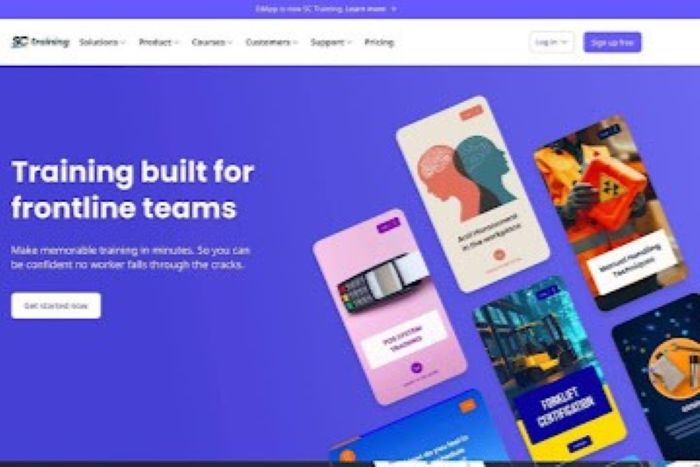
EdApp mobile microlearning interface for bite-sized lessons
Core features are free for unlimited users, ideal for startups and freelancers. It’s not suited for long modules, but excels at mobile-first microlearning.
9. Lessonly by Seismic – Onboarding Meets Practice Reps
When a new campaign launches, teams need practice, not just knowledge. Lessonly builds rehearsal into every course, letting learners record a short 60-second video delivering key messages. Managers provide time-stamped feedback and approve only when the pitch is sharp, giving marketing and sales the same performance edge.
The drag-and-drop authoring tool is simple and integrates with Slack for engagement. It skips complex features but delivers focused practice and alignment for fast-growing SaaS teams.
10. Adobe Learning Manager – Multimedia Masterclass
Creative teams depend on visuals, and Adobe Learning Manager supports nearly every format, from interactive Captivate simulations to video with inline quizzes and refreshed PowerPoint files. Skill tags and badges create visible progress paths, while leaders track competency heat maps across teams and regions.
The admin console is complex and pricing exceeds SMB tools, but for Creative Cloud users, it delivers seamless media playback and executive dashboards as polished as your campaigns.
LMS for Digital Marketing Comparison at a Glance
Choosing software often comes down to side-by-side facts. Scan the grid below, then circle the two or three LMS for digital marketing platforms that best match your size, budget, and integration needs.
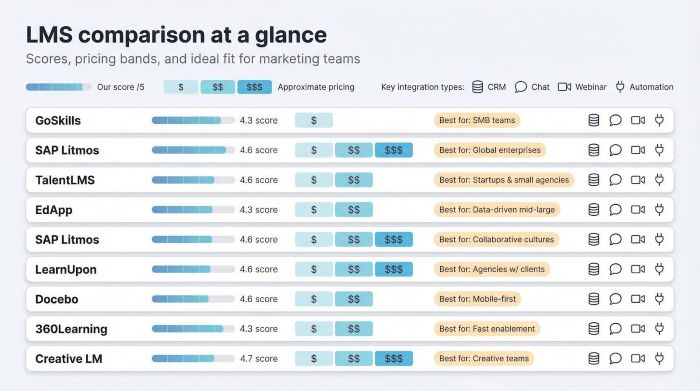
| Platform | Best for | Stand-out strength | 2026 pricing snapshot* | Key marketing integrations | Our score /5 |
| GoSkills | SMB teams that need turnkey content | Built-in marketing library, ultra-simple authoring | ≈ $29 user / month | Slack, Google Workspace, Zapier | 4.3 |
| SAP Litmos | Global enterprises | 2,000+ marketing courses, 7,000+ app integrations | Quote (≈ $5 user / month at scale) | Salesforce, Marketo, Teams | 4.6 |
| TalentLMS | Start-ups & small agencies | Freemium tier, launch in a day | Free → from $69 month (40 users) | Zoom, Slack, Zapier | 4.0 |
| Docebo | Data-driven mid-large teams | AI tagging and recommendations, deep customization | Quote (≈ $12 user / month) | Salesforce, Zoom, HRIS APIs | 4.5 |
| Absorb | Mid-market orgs wanting polish | Intuitive UI, premium support, advanced analytics add-on | Quote (≈ $9 user / month) | Salesforce, ADP, Teams | 4.2 |
| 360Learning | Collaborative cultures | Peer-built micro-courses with social feedback | ≈ $8 user / month (Team plan) | Slack, BambooHR, API | 4.0 |
| LearnUpon | Agencies with external training | Multi-portal client academies, webinar sync | From $699 month (≈ 100 users) | Zoom, Salesforce, HubSpot | 4.1 |
| EdApp | Mobile, on-the-go learning | Free for unlimited users, strong gamification | Core free; Premium ≈ $3 user / month | Zapier, Teams, Canva | 4.0 |
| Lessonly | Fast enablement & practice | Video pitch reviews, Slack nudges | ≈ $200 user / year | Slack, Seismic, HRIS | 4.1 |
| Adobe Learning Manager | Creative, content-rich teams | Best multimedia playback, badge-driven skill tracking | Quote (≈ $4 user / month at volume) | Adobe CC, Workday, SSO | 4.2 |
*Pricing reflects typical publicly available ranges; vendors adjust by user count and contract length.
1. Start With Your Real-World Use Cases
Before price tags, demos, or wish lists for LMS for digital marketing, lock in the why.
Ask two questions: What business outcome are we chasing, and who must change their behavior to reach it? You might want new hires billable in two weeks instead of four. Maybe client marketers need a crash course so campaigns launch without constant support. Perhaps senior analysts crave deeper data skills to lift ROI.
Write those goals in plain English, then map them to audiences—interns, freelancers, clients, regional managers. Each audience points to the LMS traits that matter most. Internal onboarding leans on micro-courses and quiz tracking. Client education requires multi-portal branding and easy self-registration.
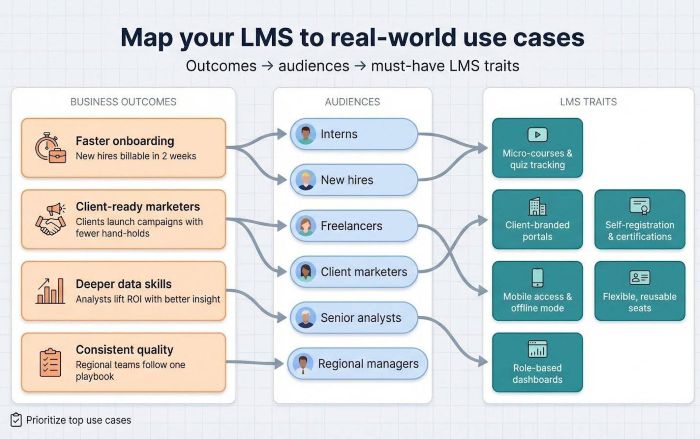
When your list feels solid, rank it. The top one or two needs guide every decision that follows. Vendors will pitch a buffet of features, but a short, ranked list keeps you steering the conversation and ensures you choose a platform that solves real problems, not hypothetical ones.
2. Zero In on Must-Have Features
With goals set, translate them into capabilities you cannot live without. Keep the list tight—five bullets max—so vendor demos stay laser focused.
- Rapid content updates. Weekly experiments demand a built-in editor that lets a power user swap a screenshot and publish in minutes. Delay kills relevance.
- Plug-and-play integrations. Learning sticks when it lives in tools your team already opens. Seek native or Zapier links to HubSpot, Slack, and Salesforce. Auto-enrolment and chat nudges save hours of admin.
- Mobile microlearning. Deskless field marketers and globe-trotting execs need lessons that load fast on a phone, work offline, and finish in under ten minutes.
- Role-based analytics. Managers need dashboards that tie learning to performance. They should spot gaps and assign follow-ups without exporting CSVs.
- Flexible licensing. High turnover and contractor surges call for seats you can reuse rather than pay for indefinitely. Confirm whether pricing is named user or active user before you sign.
Rank these features against your goal list. Anything below the line is a nice-to-have, not a deal breaker. That discipline prevents scope creep and keeps negotiations simple.
3. Stress-Test Scalability and Licensing Early
Your pilot may start with ten users. Success means dozens—or hundreds—more. Make sure the platform grows without inflating costs or admin tasks.
Ask vendors to model two scenarios: steady 10 percent annual head-count growth and a sudden 40-user spike for a product launch. Clarify what each jump does to the invoice. Some vendors sell named seats you own all year, even if employees leave. Others price by active users per month, ideal when contractors ebb and flow. Match the model to your churn reality.
Review user-management tools. Can you bulk import a CSV of freelancers, auto-expire their access at contract close, and recycle those seats next quarter? Are role permissions granular enough for a social lead to update only the Social Academy while the analytics manager sees her own reports?
Finally, confirm performance at volume. Ask for reference customers near your projected size. If their learners stream videos buffer-free on launch day, you likely will too.
4. Unmask Total Cost of Ownership
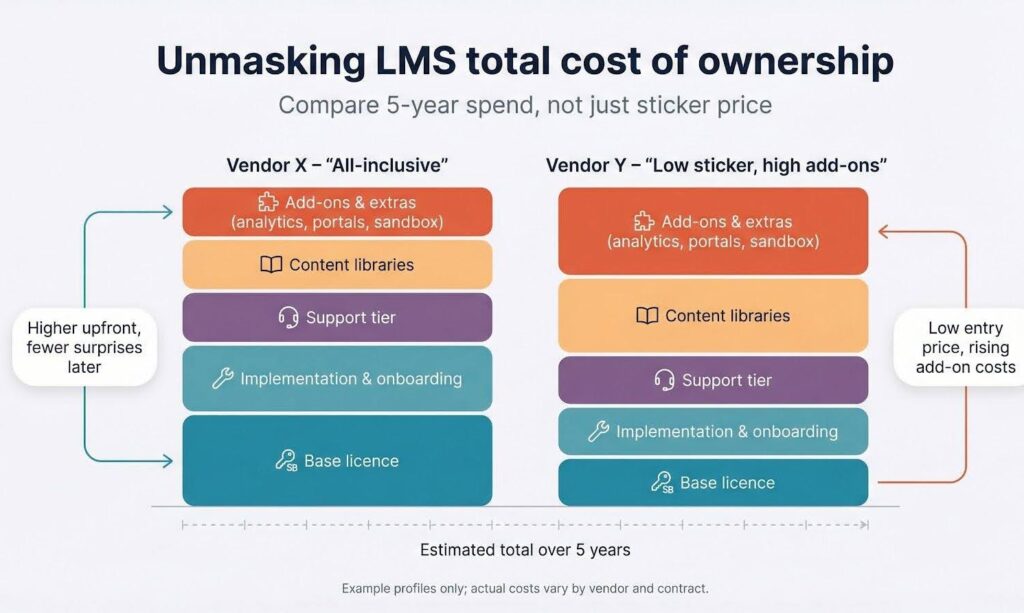
Sticker prices rarely reflect total LMS cost, so review quotes carefully.
Start with onboarding fees. Some vendors include setup and admin training; others charge a separate implementation package. Get pricing and timelines in writing. Next, examine support tiers. Basic email support may be free, but dedicated success managers or 24/7 help often cost extra, which is worth it if you lack a full-time admin.
Content libraries vary. Some platforms include courses, others charge separately or rely on partners. Estimate how many external courses you’ll need and factor that into year-one costs.
Finally, identify add-ons like advanced analytics, extra portals, or sandbox environments, which can raise fees 10–20 percent. Map included versus optional features and compare five-year totals side by side.
Conclusion and Next Steps
Turnover is costly, but stagnant skills cost even more. The right LMS for digital marketing turns that risk into opportunity. Instead of watching expertise walk out the door, you capture it, scale it, and hand it to the next hire on day one.
Choose well and you gain two wins at once: sharper campaigns and happier people. LinkedIn’s Workplace Learning Report notes that 94 percent of employees say they stay longer when their company invests in learning. The math is simple—up-skilling fuels retention, and retention protects performance.
Here is the game plan:
- Revisit the use-case list you drafted earlier.
- Shortlist three vendors that best match those needs.
- Run a 30-day pilot with real content and real users.
- Measure onboarding speed, course completion, and any uplift in campaign KPIs.
- Present the data, secure budget, and roll out company-wide.
Follow these steps and the next time a platform update or team departure threatens momentum, you will have a five-minute lesson—and a ready learner—keeping results on track. Your future team will thank you.