
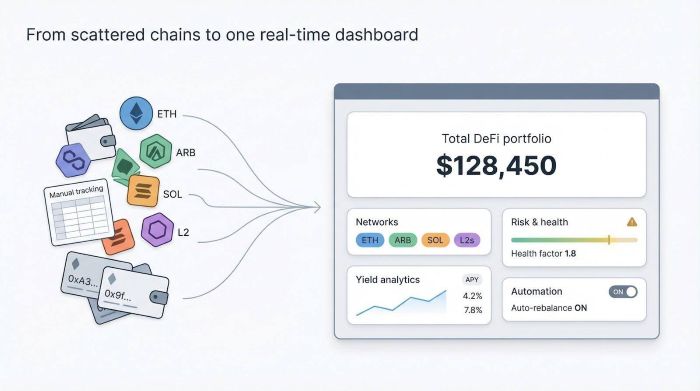
Tracking crypto feels like herding cats. One wallet lives on Ethereum, another on Arbitrum, while a Solana farm shifts rewards before you blink. Spreadsheets can’t keep up, so profits leak as prices and APYs sprint past, as highlighted in a 2024 overview of crypto portfolio trackers. DeFi dashboards fix the mess. They read every chain, refresh balances instantly, and flag risks before gas fees sting. This guide compares nine contenders—from veterans Zapper and Zerion to newcomer Orokai—to find the cockpit that calms a scattered portfolio.
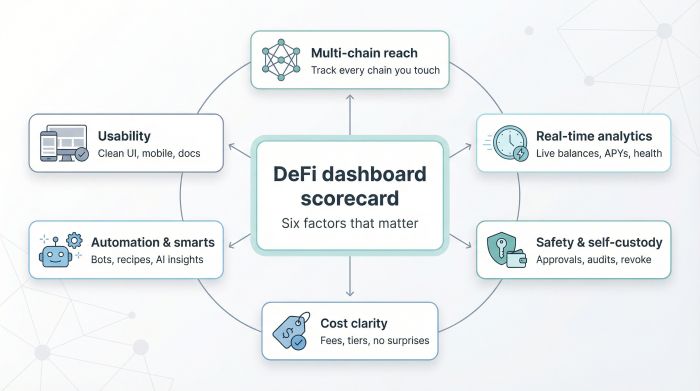
We graded each tool on six factors: multi-chain reach, live yield analytics, self-custody, cost clarity, automation, and everyday usability.
Table of contents
- How We Ranked Each Defi Dashboard
- Quick Look: Nine Defi Dashboards Side by Side
- 1. Orokai – Self-Custodial Defi, Minus the Guesswork
- 2. Zapper – The Power-User’s Command Center
- 3. Zerion – Design-First Defi Wallet
- 4. Debank – Tracking Everything, Talking to Everyone
- 5. Nansen Portfolio – Data-Driven Insight at A Glance
- 6. Instadapp – One-Click Control for Complex Strategies
- 7. Defi Saver – Automation That Never Blinks
- 8. Coinstats – Cefi and Defi on the Same Canvas
- 9. Frontier – Cross-Chain Control in Your Pocket
- Conclusion
How We Ranked Each Defi Dashboard
Before we walk through the nine picks, we defined the yardstick. A flashy interface means nothing if it hides stale numbers or skimps on security, so we built a six-point scorecard that mirrors the pain points we face in the trenches.
First, breadth matters. A modern dashboard must read wallets across every chain you touch—mainnet, L2, and the occasional Cosmos zone—so you never lose an asset in the cracks.
Second, speed. Balances, APYs, and liquidation ratios need to refresh in real time. Waiting even five minutes can cost serious yield when markets sprint.
Third, safety. All tools here keep custody with you, but we favor platforms that spotlight risky approvals, surface audit details, and make permissions easy to revoke.
Fourth, money. Most dashboards are free to open, yet some hide subscription walls. We flag every cost so there are no surprises.
Fifth, smarts. Automation, AI guidance, or one-click “recipes” score extra because they save gas and brainpower.
Finally, usability. Clean design, mobile support, and helpful docs turn complex DeFi into a workflow you’ll enjoy.
Quick Look: Nine Defi Dashboards Side by Side
Before we unpack each platform in detail, it helps to see the field in one sweep. Think of the grid below as a cheat sheet: what chains you can track, why each tool stands out, and whether you’ll hit a paywall.
| Platform | Chain coverage | Stand-out edge | Cost model | Best suited for |
| Orokai | Growing list of major EVM networks | AI-guided yield suggestions + verified protocol list | Free (beta) | Newcomers craving simplicity and safety |
| Zapper | 50+ blockchains and L2s | Deep analytics plus one-click “Zaps” for complex moves | Free | Power users juggling many protocols |
| Zerion | 10+ EVM chains | Polished wallet + built-in DEX & bridge | Free | Everyday investors and NFT collectors |
| DeBank | 30+ chains | Clean UI with social feed and approval revoker | Free | Multi-chain trackers who value community intel |
| Nansen Portfolio | 40+ chains (EVM and select non-EVM) | On-chain “smart money” insights | Free | Data geeks and cross-chain explorers |
| Instadapp | Core EVM & L2s | Smart-wallet recipes for debt and advanced positions | Free (gas only) | Strategy tinkerers, DeFi borrowers |
| DeFi Saver | Ethereum, Arbitrum, Optimism, Base | Automated stop-loss and boosted-position bots | Free; tiny automation fee on execution | Yield farmers needing autopilot safety |
| CoinStats | Exchange APIs + DeFi wallets worldwide | CeFi + DeFi in one timeline | Freemium (Pro unlocks unlimited accounts) | Portfolio generalists balancing on- and off-chain |
| Frontier | 20+ chains, incl. Solana & Cosmos | Mobile-first dashboard with in-app staking | Free | Users managing crypto on the go |
Glance through the columns, spot the trait that clicks with your workflow, and keep it in mind as we tour each defi dashboard one by one.
1. Orokai – Self-Custodial Defi, Minus the Guesswork
Orokai feels like a friend who trims a three-page recipe into one line. Connect your wallet through the Orokai’s homepage, where a verified allow-list limits interactions to high-TVL protocols, and the platform instantly filters the DeFi universe into a concise slate of audited pools. No more scrolling through questionable contracts.

Orokai DeFi dashboard with curated audited pools and AI co-pilot
The dashboard stays read-only until you act, so your keys never leave your control. Orokai even published third-party research noting that “aggregation can lower complexity while leaving asset custody fully with users,” according to Investing.com. Safety comes first, yield second.
A real-time tracker shows rewards accruing in dollar terms. The system auto-converts those rewards to USDT, sparing you daily claims and gas costs. Need a nudge? An AI assistant flags higher-APY pools and market shifts, acting more like a co-pilot than a chatbot.
Orokai supports six core EVM chains today and plans to add more as audits finish. A fiat ramp and debit card sit on the roadmap, so moving winnings into daily spending should take two clicks.
Ideal fit? Anyone who wants DeFi returns without the DeFi headache. Busy professionals and newcomers get curated opportunities, plain-English guidance, and zero custody risk in under five minutes.
2. Zapper – The Power-User’s Command Center
Open Zapper and notice a dashboard that shows everything. Token balances, yield positions, NFT floors, and debt health all load the moment your wallet connects. Coverage spans more than 50 networks—Ethereum mainnet, Base, Linea, and dozens of others—inside one real-time view.
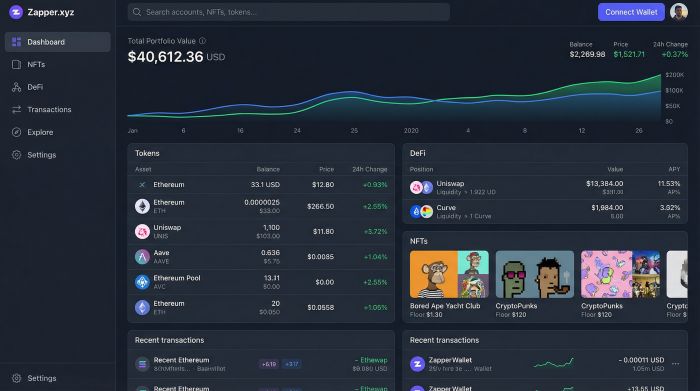
Zapper DeFi dashboard showing multi-chain portfolio and Zap actions
That reach matters when you hunt for yield across chains. Instead of bouncing between explorers, you watch rewards tick upward in a single feed. Need to act? The “Zap” button bundles any swap, bridge, or stake into one confirmation. A task that once needed four tabs now takes one click and less gas.
The interface is detailed yet tidy. Hover over a pool to see impermanent loss, historical P/L, and pending rewards. Switch to the NFT tab and floor prices update live. Data stays contextual; action icons appear only where decisions exist.
Security follows the same approach. Zapper remains read-only until you trigger a Zap, and each transaction routes through your wallet for final approval. No keys surrendered, no blind permissions.
For seasoned investors juggling LPs on ten protocols, Zapper turns complexity into clarity and profit.
3. Zerion – Design-First Defi Wallet
Zerion greets you with the polish of a fintech app and the muscle of a multi-chain wallet. Balances appear within seconds, and the interface skips jargon. Tokens, NFTs, and pending rewards read like plain English, so you focus on decisions, not decoding.
Need to swap, bridge, or stake? Zerion calculates the best route behind the curtain and serves one clear confirmation. No tab marathon, no hidden settings. The same flow works on mobile, which feels closer to texting a friend than fighting a dApp. Push alerts ping you when a followed wallet lands an airdrop or when gas prices drop, giving real-time cues to act fast.
A social layer adds a twist. You can share a masked profile, browse others’ on-chain activity, and collect ideas without scrolling endless Discord threads. Privacy toggles keep control in your hands, so you decide what the crowd sees.
If you juggle tokens across ten chains yet crave a calm, visually clean cockpit, Zerion hits the mark by turning complex DeFi workflows into a swipe and a tap.
4. Debank – Tracking Everything, Talking to Everyone
DeBank works like a tidy control panel for DeFi. Connect a wallet and a single dashboard surfaces token balances, liquidity stakes, lending positions, and farming rewards, often faster than the protocol’s own site. Thirty-plus chains flow into one scrollable list, so “forgotten wallet” leaves your vocabulary.
Clarity is only half the charm. DeBank wraps a social feed around your portfolio view, letting you follow high-performing wallets, leave comments, and discover new pools the moment whales move in. It feels like crypto Twitter without the noise.
Security reminders appear where you need them. The Approval tab highlights stale token allowances and offers a one-click revoke button, a small safeguard that has saved users from surprise rug pulls.
DeBank skips built-in swaps to stay lean—trade links hand you off to the protocol best suited for the job. The result is a minimalist cockpit that shows numbers you trust, shields you from silent risks, and sparks ideas through a community lens.
If you crave clean data, light social discovery, and zero clutter, DeBank fits neatly into a daily check-in routine.
5. Nansen Portfolio – Data-Driven Insight at A Glance
Nansen built its name labeling wallets and tracking smart-money flows. Nansen Portfolio lets you aim the same lens at your own holdings. The moment you connect, a multichain dashboard lights up: Ethereum next to Solana, Layer 2 balances beside Polygon yields, all ranked by size, P/L, and exposure across more than 40 networks.
Context bubbles sprinkle the page. Hover on a token and you see how many funds, whales, or insiders also hold it. That snapshot turns abstract numbers into market signals, helping you decide whether to add or trim a position.
Weekly email digests land in your inbox summarizing gains, losses, and news tied to assets you own. It feels like a personal analyst packed into a spreadsheet—dense yet digestible.
Nansen keeps interactions simple: track, analyze, then click out to a DEX when you want to trade. No bloat, no extra risk surface. If you treat data like oxygen, Nansen Portfolio breathes insight into every line item.
6. Instadapp – One-Click Control for Complex Strategies
Instadapp treats DeFi like chess, planning several moves ahead and wrapping them into one command. The key is its DeFi Smart Account, a wallet-within-a-wallet that bundles assets so a single transaction can refinance debt, swap collateral, and restake rewards in the same block.

Instadapp unified DeFi Smart Account dashboard with health metrics
Open the dashboard and every Maker, Aave, or Compound position sits on one timeline. A health meter tracks collateral ratios in large, color-coded blocks, while preview cards show how much interest you save by shifting protocols. Select “Refinance,” and Instadapp strings the actions together, sparing half a dozen approvals and a noticeable slice of gas.
Power reaches beyond buttons. You can script rules: keep a vault above 180 percent collateral, repay if ETH drops ten percent, or increase position size when variable rates fall. Keeper bots watch the chain and fire only when your rule triggers, providing a safety net with on-chain transparency.
Instadapp assumes you understand the difference between variable and stable debt. If that describes you, it turns DeFi management from night-long Discord debates into a single, confident click. For beginners, the learning curve is real, yet the reward is a cockpit that makes advanced yield engineering feel almost casual.
7. Defi Saver – Automation That Never Blinks
Picture a Solidity-based guardian. DeFi Saver watches your loans and liquidity pools around the clock and acts the second markets misbehave. You set boundaries—“liquidate if the health factor dips below 1.30” or “take profit when APY falls under six percent.” Keeper bots handle the rest, no caffeine required.
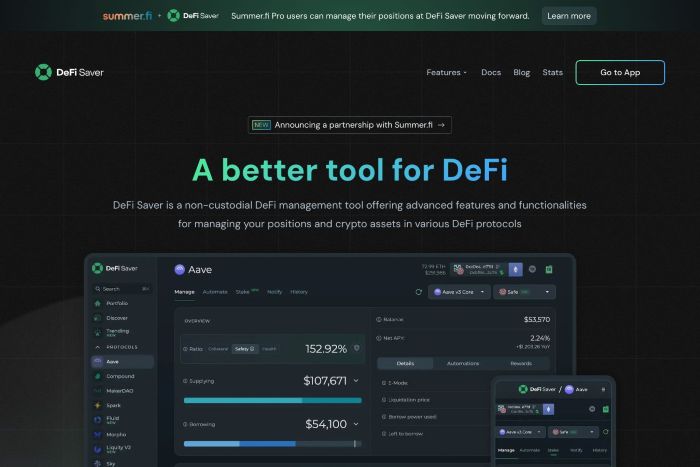
DeFi Saver automation dashboard with vault health bars and rules
The dashboard lays out vault health bars, position sliders, and a timeline of upcoming automated actions. A simulation mode lets you test a strategy with test gas, so rookie errors never touch real funds.
When volatility hits, the bots can repay debt, add collateral, or unwind positions in a burst of bundled transactions. Users who set these rules cruised through the last major dip while manual traders scrambled.
All logic lives in audited smart contracts, and you keep the keys. DeFi Saver moves assets only within your predefined rules, then logs every step for full transparency.
If liquidation emails keep you up at night, this tool offers sleep-easy automation, clarity, and no-surprise execution.
8. Coinstats – Cefi and Defi on the Same Canvas
Most dashboards track only on-chain activity. CoinStats bridges the gap by pulling 70-plus exchange APIs, hardware wallets, and more than 30 blockchain addresses into one running tally. Open the mobile app and you see Binance trades stacked next to an Aave loan, one portfolio, zero spreadsheets.
The timeline charts deposits, swaps, and staking rewards like a personal newsfeed. Toggle profit and loss, and the graph rewinds months of performance, showing whether that quick flip beat simply holding Bitcoin. During tax season, the export button turns data into CSVs your accountant can use without edits.
A built-in buy screen lets you top up with a debit card, while a swap widget finds the best route across DEX aggregators. The experience feels closer to a crypto bank app than a niche DeFi tool, perfect for investors who still keep some assets on exchanges and want the whole picture at a glance.
Cost is the lone caveat. The free tier covers two wallets and two exchanges; heavy users can upgrade to CoinStats Pro for unlimited connections. If you pay for convenience, you gain a clear view of every satoshi you own, whether on-chain or off.
9. Frontier – Cross-Chain Control in Your Pocket
Frontier turns your phone into mission control. Open the app and tokens from Ethereum, Solana, Cosmos, and more than 20 other chains cascade into a single, scroll-friendly feed. No browser extensions, no QR gymnastics, just Face ID and you’re live.
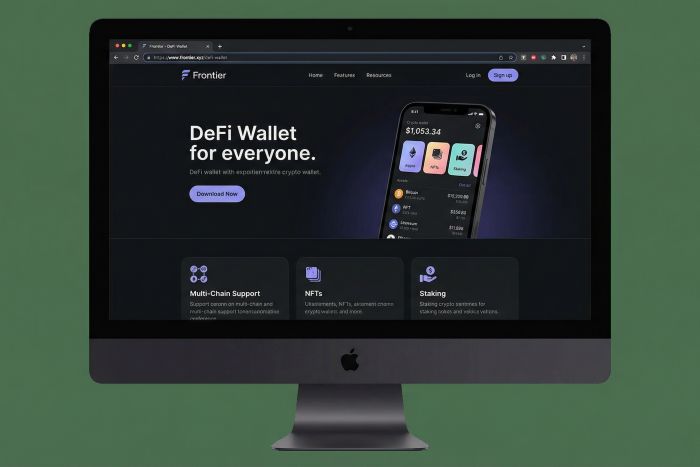
Frontier mobile DeFi wallet showing cross-chain token feed and quick actions
The magic sits in action shortcuts. Need to stake ATOM, borrow USDC on Arbitrum, or bridge AVAX to Polygon? Frontier lines up the best route and shows gas costs before you tap “Confirm.” It feels less like hopping chains and more like sending a quick text.
Push notifications keep you ahead of the curve. Price alerts, liquidation warnings, and gas-spike pings land instantly, so you never miss a pivot while away from the desk. An NFT tab adds a gallery view that loads images instead of cryptic token IDs.
Security stays non-custodial. Keys live in your device’s secure enclave or the external wallet you connect through WalletConnect. Frontier orchestrates the moves and records every step in an audit trail you can replay anytime.
For traders who live on mobile, this dashboard turns a coffee break into a DeFi maintenance window, no laptop required.
Conclusion
Each of these nine dashboards tackles the same problem—bringing scattered on-chain activity into one real-time view—yet they do so with different strengths. Match the traits that matter most to your portfolio, test a dashboard with a small wallet, and let the data (and saved gas) guide the final pick.