Image-to-video AI transforms static images into dynamic videos, enhancing storytelling and engagement for content creators. About 94% of marketers plan to use AI in their content creation processes (including blog articles) in 2026, highlighting just how rapidly AI-powered tools are becoming essential for modern marketing.
Here’s how these tools compare before we step into 2026, when a consistent benchmark across all will be extremely useful, especially given campaigns such as the viral “AI Art Revolution” that showcased AI-driven content to such an extent. With a variety of tools available on the market, finding the one that suits you is crucial for your success. This guide features a thorough, side-by-side comparison that gives you the power to make informed decisions quickly, so you’re always ahead in the ever-changing world of digital content creation.
Table of contents
- What Is Image to Video AI and How Does It Work?
- Why Does Image to Video AI Matter for Content Success in 2026?
- How Should Marketers and Creators Choose the Right Image for a Video AI Tool?
- Which Image-to-Video AI Tools Lead in 2026? (Comparison Table & Output Examples)
- How Do You Implement Image-to-Video AI in Your Content Workflow?
- What Trends Will Shape Image to Video AI in 2026 and Beyond?
- FAQ: Answering 2026’s Most-Asked Image-to-Video AI Questions
- Conclusion
What Is Image to Video AI and How Does It Work?
Image to video AI refers to technologies that transform still images into dynamic video content, enabling creators to produce engaging visuals quickly and efficiently. This innovative approach leverages artificial intelligence algorithms to analyze images and generate corresponding video sequences, making it an invaluable tool for content creators looking to enhance their storytelling.
Here’s a quick breakdown of the main types of image-to-video AI technologies available:
Prompt-Based AI
- Perks:
- Highly customizable outputs based on user input.
- Ideal for creative storytelling and unique visual styles.
Template-Driven AI
- Hybrid AI
- Perks:
- Combines both prompt and template approaches for flexibility.
- Suitable for users who want creative freedom with guided structures.
- Perks:
By understanding these core types, creators can better evaluate which solution aligns with their project needs, whether it’s for social media, advertising, or personal projects.
Why Does Image to Video AI Matter for Content Success in 2026?
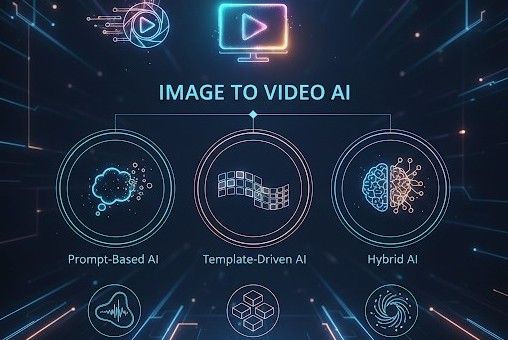
Image-to-video AI is no longer a fad this is a true provocateur for content marketing. AI tools can also condense the traditional production timeline (which often takes weeks) into hours or even minutes. In some cases, teams are seeing a 70–90% reduction in total production time. This dramatic shift highlights the urgent need for marketers and content creators to embrace this technology, as it directly correlates with audience interaction and brand visibility.
TL;DR: Top 3 Benefits of Image to Video AI
- Efficiency: Rapidly transform images into engaging videos, significantly reducing production time.
- Cost-Effectiveness: Lower production costs by minimizing the need for extensive video editing resources.
- Scalability: Easily produce large volumes of video content tailored for various platforms, enhancing reach and engagement.
Content creators can use image-to-video AI to quickly create visually engaging videos that matter to their audiences. This technology is creating a revolution in content generation, making it easier for brands to stay relevant in a fast-paced digital world. Additionally, the cost efficiency of AI-generated videos can free up capital for other strategic endeavors, improving overall returns.
As we enter 2026, content creation at scale will be important. Brands that embrace image-to-video AI can go beyond the growing demands for content and find ways to interact with users that images alone cannot. And the same goes for content marketing of the future embrace all those innovative
How Should Marketers and Creators Choose the Right Image for a Video AI Tool?

You should approach selecting an image-to-video AI tool with a clear decision framework that prioritizes your specific needs as a content creator or marketer. The right tool can significantly enhance your workflow, but with so many options available, it can be overwhelming. Here’s a streamlined approach to help you make a confident choice.
Key Selection Criteria
- Output Quality: The visual appeal and clarity of your videos are paramount. Look for tools that offer high-resolution outputs and customizable features to ensure your videos meet professional standards.
- Speed: Time is often of the essence in content creation. Choose an AI tool that can generate videos quickly without compromising quality, allowing you to maintain a fast-paced content calendar.
- Cost: Budget considerations are critical. Evaluate the pricing models of different tools; some may offer pay-per-use, while others have subscription plans. Determine what aligns best with your budget and expected usage.
- Integration: The AI tool’s ability to integrate seamlessly with your existing software stack (e.g., editing tools, social media platforms) can greatly enhance workflow efficiency. Check for compatibility with the tools you already use.
- Licensing and Usage Rights: Understand the licensing agreements of each tool. Ensure that the content you create can be used freely across your desired platforms without legal complications.
Decision Checklist
- What is your primary use case? (e.g., social media, marketing campaigns, educational content)
- What output quality do you require? (e.g., 1080p, 4K)
- How quickly do you need the videos? (e.g., real-time generation, batch processing)
- What is your budget? (e.g., free tools vs. premium subscriptions)
- Does the tool integrate with your current systems? (e.g., CMS, social media management tools)
- What are the licensing terms? (e.g., commercial use, attribution requirements)
Best For Tags
- Social Marketers: Tools like Luma or Sora that excel in rapid video creation and integration with social platforms.
- YouTubers: Consider tools with advanced editing features like Runway for high-quality content production.
- Agencies: Look for comprehensive tools that offer team collaboration features and robust output options.
Key Considerations
Using this framework, readers get an efficient way to hone in on specific characteristics and choose an image-to-video AI tool that specifically meets their needs, helping improve the potential of their content strategy. Don’t be hasty there take your time and test a few options if you can, as most have free trials or demos. This experience will help you see what best fits your creative spirit and operational needs.
Which Image-to-Video AI Tools Lead in 2026? (Comparison Table & Output Examples)
In 2026, several image-to-video AI tools stand out for their unique features, output quality, and integration capabilities. Below is a comprehensive comparison table that breaks down the key aspects of the leading tools, allowing you to make an informed choice quickly.
Comparison Table: Leading Image to Video AI Tools in 2026
| Tool | Input Methods | Output Quality/Resolution | Pricing (Monthly) | Integrations | Unique Features | Best For |
| Runway | Text prompts, images | Up to 4K | $29 | Adobe Suite, Slack | Real-time collaboration | Content Creators, Agencies |
| Sora | Image uploads, templates | 1080p to 4K | $19 | Canva, Google Drive | AI-driven scene transitions | Social Media Marketers |
| Luma | Text prompts, video clips | Up to 4K | $49 | YouTube, Vimeo | Customizable video templates | YouTubers, Influencers |
| Pictory | Image and text inputs | 720p to 1080p | Free tier available | WordPress, Mailchimp | Automatic captioning and subtitles | Bloggers, Educators |
| DeepBrain | Image sequences, videos | Up to 8K | $99 | Shopify, Zoom | Advanced AI character generation | E-commerce, Enterprises |
Output Examples
To provide a clearer picture of what each tool can achieve, here are some annotated output samples from each platform:
- Runway
A vibrant promotional video showcasing a new product line, demonstrating real-time collaboration features. - Sora
An engaging social media clip that uses AI-driven transitions to maintain viewer interest. - Luma
A polished YouTube video with dynamic templates that enhance storytelling. - Pictory
An educational video featuring automatic captions makes content accessible to a wider audience. - DeepBrain
An interactive e-commerce video showcasing products with AI-generated characters.
Summary
This comparison highlights the various strengths of each tool, catering to different needs and use cases. Whether you’re a content creator, social media marketer, or running an enterprise, there’s an image-to-video AI tool tailored for your specific requirements in 2026.
For a deeper dive into each tool’s capabilities, consider exploring its official website or trying a free trial, where available.
How Do You Implement Image-to-Video AI in Your Content Workflow?
Here’s how to get from source photo to published video with AI in 2026: a streamlined workflow that transforms your image assets into engaging videos. Whether you’re a content creator or a digital marketer, following these actionable steps will help you leverage image-to-video AI tools effectively.
Workflow Diagram:
- Image Sourcing: Start by gathering high-quality images relevant to your content. Use stock photo websites, your own archives, or user-generated content. Ensure the images align with your brand message and the video’s intended purpose.
- AI Setup: Choose an image-to-video AI tool that fits your needs. Popular options include tools like Runway and Sora. Sign up and familiarize yourself with the interface. Most platforms will allow you to upload images directly or connect with your cloud storage for seamless access.
- Pro Tip: Look for tools that offer templates tailored for your specific content type (e.g., social media, presentations) to save time and ensure professional results.
- Editing Tweaks: Once your images are uploaded, customize the video output. Adjust settings like duration, transitions, and text overlays. Most AI tools provide intuitive editing features, so experiment with different styles until you find the right fit.
- Pro Tip: Use A/B testing to compare different video styles and see which resonates more with your audience.
- Publishing: After finalizing your video, export it in the desired format and resolution. Check platform specifications (like YouTube or Instagram) to ensure compatibility. Then, publish your video across your chosen channels.
- Repurposing: Maximize your content by repurposing the video into shorter clips, GIFs, or stills for various platforms. This not only extends the reach of your original content but also engages different audience segments.
- Pro Tip: Create a schedule for repurposing content to maintain a consistent presence across platforms.
By following these steps, you can efficiently integrate image-to-video AI into your content workflow, enhancing your digital marketing strategy and engaging your audience like never before.
What Trends Will Shape Image to Video AI in 2026 and Beyond?
By 2026, image-to-video AI is set to redefine content creation, driving not just engagement but also establishing new SEO best practices. As the technology evolves, several key trends will emerge, shaping how agencies, marketers, and strategic creators approach video content.
1. Rapid Upscaling of Video Quality:
And thanks to rapid developments in AI algorithms, we will soon be able to upscale lower-resolution images into HD videos. It also opens the door for even mere images to be converted into stunning video output, lowering the barrier of entry for creators looking to create professional-looking content with minimal resources.
2. Zero-Shot Learning Models:
Zero-shot models will enable AI systems to generate videos without requiring large training datasets. This would allow marketers to immediately produce content tailored to whatever trend is hot at the time, in real-time, without the latency of traditional model training.
3. Deep Personalization:
The Databrat is going to be AI-powered, deep, personalized video marketing. Using user-related data, AI tools will be creating hyper-personalised video experiences that indeed connect with the specific audience, leading to better engagement and conversion.
4. Cross-Platform Automation:
As demand for content rises across platforms, these tools, which offer cross-platform automation, will be inevitable. This means investing in solutions engineered to drive content across the breadth of channels while optimizing each channel for its respective requirements.
Future-Proof Checklist
- Watch for: Tools that support rapid upscaling and high-quality output.
- Look for: Platforms integrating zero-shot learning capabilities for agile content creation.
- Prioritize: Solutions offering deep personalization features for tailored viewer experiences.
- Invest in: Cross-platform automation tools to streamline content distribution.
By focusing on these trends, agencies and creators can future-proof their strategies, ensuring they remain competitive in an ever-evolving digital landscape.
FAQ: Answering 2026’s Most-Asked Image-to-Video AI Questions
What is the best free image-to-video AI tool in 2026?
The best free image-to-video AI tool in 2026 is Sora, offering robust features without a cost. It allows users to create videos from images with ease. Pro tip: Leverage Sora’s templates to speed up your video creation process and enhance visual storytelling.
How do I use Sora to convert an image to a video?
To use Sora to convert images to video, upload your images, select a template, and customize the text or effects. Click “Generate” to create your video. Pro tip: Experiment with different templates to find the style that best fits your content or brand voice.
Which AI video generator is best for marketers?
Runway is the best AI video generator for marketers in 2026, thanks to its advanced editing features and integration capabilities. It supports various platforms, making it ideal for marketing campaigns. Pro tip: Utilize Runway’s analytics tools to track engagement metrics for your videos.
What are the main differences between Runway, Luma, and Sora?
Runway excels at advanced editing and real-time collaboration; Luma is best for quick edits and user-friendly interfaces; while Sora focuses on template-driven video creation. Pro tip: Choose based on your specific needs. Runway for detailed projects, Luma for speed, and Sora for ease of use.
How can I integrate image-to-video AI into my content workflow?
To integrate image-to-video AI into your content workflow, start by identifying image sources, choosing an AI tool, and establishing a consistent process for video creation and distribution. Pro tip: Create a checklist to streamline each step, from image selection to video publishing.
What trends are shaping image-to-video AI in 2026?
Key trends in 2026 include deeper personalization, cross-platform automation, and the rise of zero-shot models that require less training data. Pro tip: Stay updated on these trends to ensure your content strategy remains relevant and effective in a rapidly evolving landscape.
Can I create videos for social media using these tools?
Yes, all the mentioned tools (Runway, Sora, Luma) are designed to create videos suitable for social media platforms. Each tool offers templates optimized for various formats, such as Instagram Stories or TikTok. Pro tip: Tailor your videos to each platform’s specific requirements to maximize engagement.
What are the output quality options available with these tools?
Most image-to-video AI tools offer output-quality options ranging from 720p to 4K. Check each tool’s settings to adjust quality to your needs. Pro tip: Higher resolutions are ideal for platforms that support HD content, enhancing viewer experience.
Is there any support for multi-language video creation?
Yes, many AI tools like Runway and Luma offer multi-language support, allowing you to create videos in various languages. Pro tip: Use subtitles or voiceovers in different languages to reach a broader audience and increase engagement.
How do I ensure my videos are SEO-friendly?
To ensure your videos are SEO-friendly, use relevant keywords in titles, descriptions, and tags. Additionally, leverage transcripts and captions to improve accessibility. Pro tip: Share your videos across social media and embed them in blog posts to boost visibility and engagement.
Conclusion
In conclusion, we live in exciting times, and as image-to-video AI tools continue to emerge and shape the way we approach visual content creation, knowledge means little without action. So, what’s next?
And since you’re going to want to start deep-diving into this data, we’ve put together a selection of downloadable resources, including an interactive comparison matrix that lets you filter and sort the best tools for your unique needs. And our advanced tutorials help you implement these tools in real-life examples.
And subscribe to our newsletter for further trend coverage and updates. In this way, you can recalibrate your structures as this tech evolves. Utilizing these resources will help you harness the full power of image-to-video AI in your content creation and marketing endeavors.