
Traditional knowledge base search is built around keywords. But real support questions are not. Users might describe issues in full sentences, with steps missing, vague symptoms, or product terms that do not match article titles. It’s where static search starts to fail, and where an AI self-service chatbot can bridge the gap between user intent and accurate answers.
- For SaaS founders and product teams, the result shows up in activation and retention.
- For support leaders, customer success teams, and technical writers, it shows up in repeat tickets and content that is technically published but hard to use.
The pressure on self-service is also higher now. PwC found that nearly 80% of U.S. consumers value speed, convenience, and knowledgeable help in a customer experience. It raises a simple question: can your documentation just store answers, or can it actually help people find one when they need it? And that’s the gap AI-powered self-service is built to address.
Table of contents
- Meet Document360 Eddy AI Chatbot: An AI Self-Service Chatbot
- Train Your AI Chatbot Using Knowledge Base, Website, and Support Tickets
- How Eddy AI Chatbot Improves Customer Self-Service Experience
- Customizable AI Chatbot Design to Match Your Brand and UX
- Seamless Human Handoff with AI-Powered Ticket Escalation
- Conclusion
Meet Document360 Eddy AI Chatbot: An AI Self-Service Chatbot
Document360 is introducing Eddy AI Chatbot, a dedicated chatbot trained on your content. Here, the users input questions in plain, casual language and get answers from the knowledge your team already maintains. The addition of an AI self-service chatbot ensures that these interactions feel natural and responsive.
What makes it different is that it’s not always inside the usual knowledge base widget setup. Eddy AI Chatbot works as an independent product. It gives your teams more control over how the chatbot is configured, what sources it uses, and where it gets deployed.
Documentation-first teams will find it useful because your docs already have product details, workflows, and support answers. Eddy AI Chatbot makes that content a direct self-service channel.
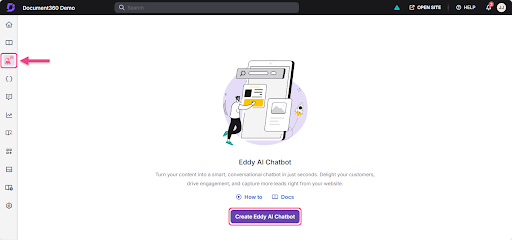
Simply put, it’s great for teams that need to:
- Guide users to answers without manually discovering the article
- Keep responses aligned with approved documentation
- Offer 24/7 assistance without expanding support headcount
- Reduce repetitive ticket volume with consistent support
Another exciting aspect here is that this knowledge base chatbot is also quick to roll out. You can connect sources, configure behavior, test responses in the playground, and deploy from a single interface.
Watch how Eddy AI Chatbot delivers accurate answers directly from your knowledge base in real time- https://youtu.be/bcMfIJ14xCI?si=CqsKeQxqSc_LdFrt.
Train Your AI Chatbot Using Knowledge Base, Website, and Support Tickets
You’ll rarely find support answers in one place. The product details would be in the docs, and edge cases in tickets. And the setup steps will be on the web pages. Eddy brings those sources together, so users get answers from the content you already maintain, powered by an AI self-service chatbot that connects these inputs seamlessly.
It learns from the sources your team already uses, to answer questions. You can train it through your knowledge base, website pages, FAQs, custom text entries, uploaded files such as PDF, DOCX, MD, and TXT, plus past support tickets from Zendesk and Freshdesk.
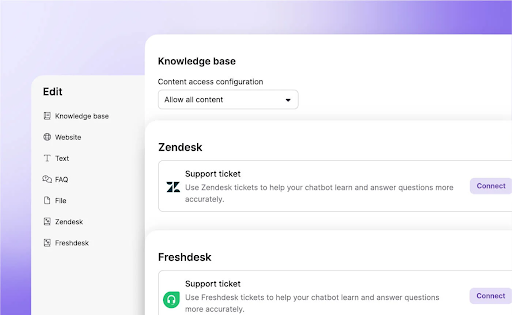
For customer support teams, this setup is especially useful to:
- Deflect 40 to 60% of repetitive tickets with self-service
- Give agents instant access to internal knowledge through private wikis
- Cut training time by 45% by grounding answers in existing support content
How Eddy AI Chatbot Improves Customer Self-Service Experience
Eddy AI Chatbot improves self-service by matching user intent to the right content. People don’t ask for help using the same words you used in your docs. A user types “Forgot password. What to do?”, not “Resetting an account password.”
Eddy reads the meaning behind the question and pulls the most relevant answer from your existing sources. That way, self-service is easier for customers and for your team to trust.
Here is what changes:
- Intent-based understanding helps users find answers without wondering what the right keyword is
- Citation-backed responses show the source behind each answer
- Documentation gaps become easier to spot when the chatbot cannot find a clear answer
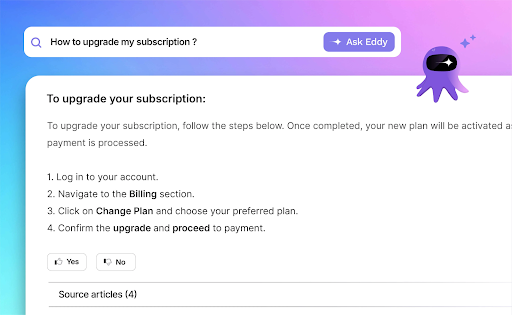
Citations are very important here. They help support teams see where the answer came from. Technical writers see which article supported the response. Product teams get a clearer view of where content is strong and where it needs fixing.
All these also keep your chatbot accountable. The response is visible, traceable, and tied to content your team can update. This level of transparency is what makes an AI self-service chatbot reliable in real-world support scenarios.
Customizable AI Chatbot Design to Match Your Brand and UX
Eddy AI Chatbot gives you control over how the chat experience looks and where it appears. This helps the chatbot feel like part of your product, not a separate layer added on top.
You can adjust four parts of the experience:
- Icon and theme: Choose the chatbot icon, colors, and visual style so it matches your product and support experience.
- Placement control: Decide where the chatbot appears on the page based on the journey you want to support, such as onboarding, billing, or help content.
- Welcome messages: Show a short message before users open the chatbot, so you can guide attention and set the right context.
- Custom CSS: Add custom code when your team needs more control over styling or specific front-end behavior.
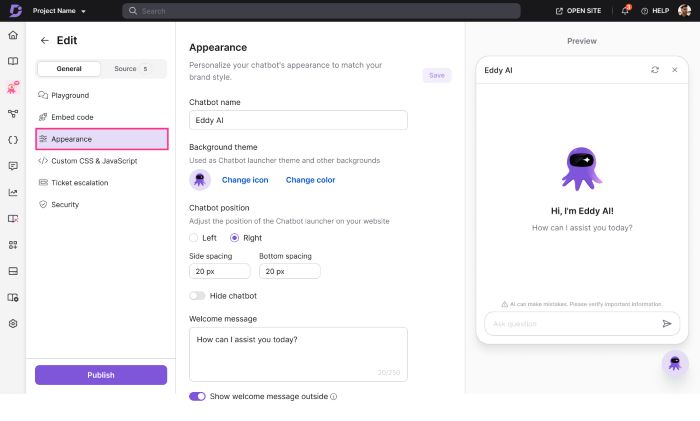
These settings are useful across different use cases. You might set up one chatbot for support, another for onboarding, and another for internal use, each with its own sources and design. You can also test changes in the playground before publishing, so your team reviews the experience before users see it live.
Seamless Human Handoff with AI-Powered Ticket Escalation
When Eddy AI Chatbot cannot resolve an issue, it hands the conversation to your support team without making the user start over. Users can raise a ticket inside the chat, which keeps the support flow moving.
This happens in three ways:
- Frustration detection: The chatbot prompts ticket creation when a user shows negative sentiment, marks a response as unhelpful, asks for support, or when no relevant answer is found.
- Context transfer: The support ticket includes the chat transcript, an AI-generated subject line, and an issue summary that the user can review before submitting. Your team gets the full context without asking the user to repeat the problem.
- Ticket ID confirmation: Once the ticket is created, the chatbot shares the ticket ID and details in the same chat, so the user knows the request went through.
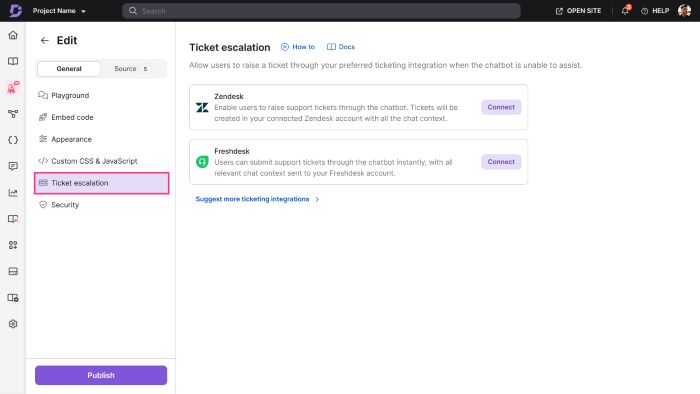
The setup works through Zendesk and Freshdesk integrations, so escalations move into the tools support teams already use.
Conclusion
Taken together, the value here is not only faster answers. Eddy AI Chatbot gives teams tighter control over how self-service is trained, tested, secured, and improved over time. You can test behavior in the playground before launch, disable live deployment without deleting the chatbot, and secure private or mixed projects with JWT authentication.
That makes Eddy a practical next step for teams who already invest in documentation and want that work to carry more weight in support. The best way to judge it is simple. Feed it your real content, test real questions, and see where it holds up and where your docs need work, with an AI self-service chatbot helping guide the entire experience.