
Every cloud scraping tool routes your data through someone else’s servers. Here’s what that means for your business, and what alternatives to an AI web scraper exist.
Key Takeaways
- Using an AI web scraper exposes your data to third-party servers, revealing your scraping patterns and strategies.
- Most cloud scraping tools also risk data breaches and may use your data for AI training.
- Local web scrapers eliminate third-party exposure, offering privacy but limiting features like cloud scheduling.
- Choose local tools for sensitive data scraping, while cloud solutions are better for non-sensitive public data.
- Consider your data’s safety and whether the tool processes it on your device when selecting a scraping solution.
Table of contents
The Privacy Question Nobody’s Asking
Say you’re running competitive pricing for an Amazon store. You paste a competitor’s product page URL into your AI scraping tool. Thirty seconds later, you’ve got a clean spreadsheet of prices, SKUs, and stock levels. Easy.
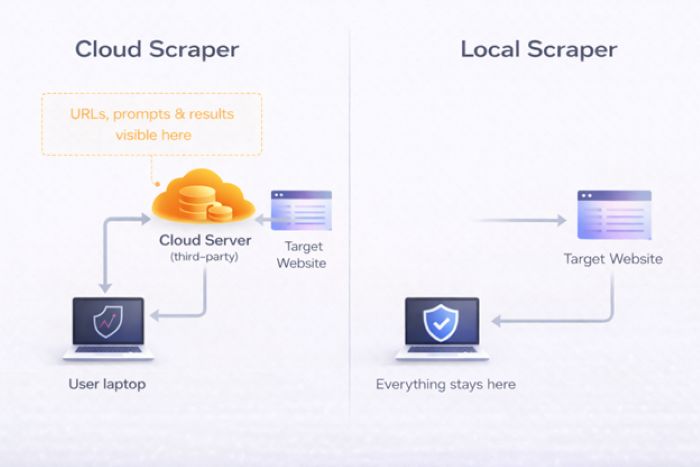
But here’s what also just happened: a third-party company now knows exactly which competitor you’re watching, which data points you care about, and how often you check. Your target URLs, your prompts, your results? All of it passed through servers you don’t control.
I started thinking about this when I was testing tools for competitive intelligence work. The data I was scraping wasn’t particularly secret. But the pattern of what I was scraping? That told a story. Which competitors I was worried about, which markets I was exploring, where I thought our gaps were. That metadata felt more sensitive than the data itself.
Most “best AI scraper” roundups compare tools on speed, ease of use, and price. I couldn’t find a single one that asked the most basic question: where does your data actually go?
So I dug in.
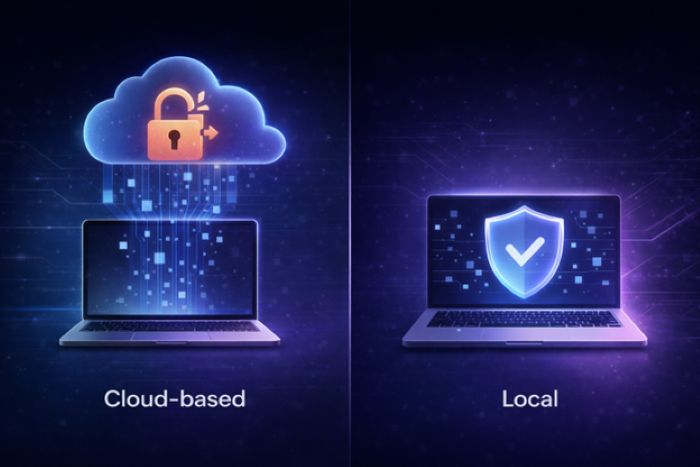
Three Ways Cloud Scrapers Expose Your Data
Cloud-based AI web scraper tools expose your data on three levels. Most people don’t think past the first one. Some don’t think about it at all.
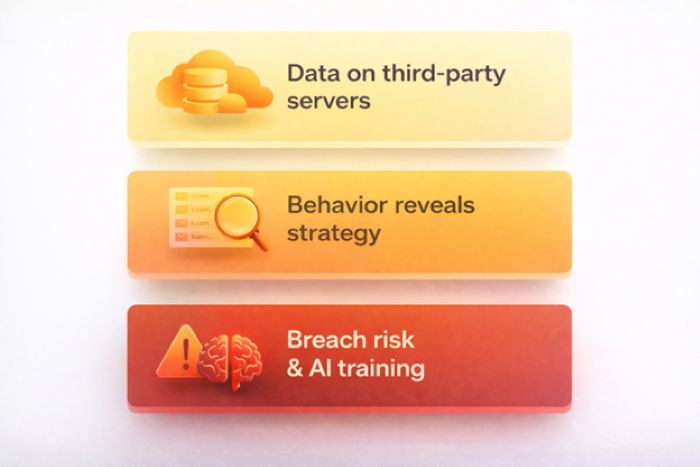
1. Your scraped data sits on someone else’s servers
When you use an AI web scraper tool, everything you extract gets processed on the provider’s infrastructure. Product prices, contact info, research data, all of it. Even with encryption promises, the data lives on servers outside your control. It can be logged, cached, backed up, and sometimes retained way longer than you’d expect.
2. Your scraping behavior reveals your strategy
This is the one most people miss. The URLs you target, how often you scrape, the fields you extract: put that together and you’ve got a detailed map of someone’s competitive strategy. A scraping provider can see you’re monitoring a specific competitor’s pricing every 6 hours, or that you’re suddenly researching a new market segment. Even without reading the actual scraped content, your query patterns alone are commercially sensitive.
3. Third-party servers get breached (or feed AI models)
Cloud providers are targets. The global average cost of a data breach hit $4.88 million in 2024, and scraping platforms that aggregate competitive intelligence from thousands of customers are attractive ones. Then there’s the other question: are these platforms using customer data to train their own AI? Some providers say no explicitly. Others are vague about it.
And there’s a regulatory angle too. Under GDPR and CCPA, if you’re scraping data that includes personal information (names, emails, job titles) and routing it through a third-party cloud tool, you’re handing data with compliance obligations to someone else. [1] If they mishandle it, the risk comes back to you.
Where Does Each Tool Send Your Data?
I looked at six popular AI scraping tools and traced where the data goes. For each one, I checked the architecture, read the privacy policy, and tried to figure out what risks actually remain. This is the kind of stuff that rarely shows up when you’re comparing the best web scraping services online.
Browse AI
Browse AI is fully cloud-based. Every scraping task runs on their servers. They advertise SOC 2 Type II certification (an independent audit that verifies a company’s data security processes), TLS 1.3 encryption (the latest standard for protecting data in transit), and GDPR/CCPA compliance (the EU and California privacy laws that regulate how personal data is handled), which is solid.
But here’s the thing: SOC 2 means they have good internal processes. It doesn’t change the fact that a third party can see what you’re scraping, when you’re scraping it, and what the results look like. For basic data collection, that’s probably fine. For competitive intelligence? I’d think twice. Your monitoring patterns are visible to their systems, however restricted the access might be.
Good for: Teams that want easy setup and monitoring and don’t mind cloud data residency.
Not ideal for: Sensitive competitive research.
Octoparse
Octoparse is hybrid. There’s a desktop client for local execution and cloud infrastructure for scheduling and high-volume work. The free tier is local-only, which is nice.
The catch: most paid users end up using cloud extraction for the scheduling and speed, and at that point, all your data flows through Octoparse’s cloud nodes. I also noticed their privacy policy mentions sharing data with “third-party marketing partners” for promotional purposes, which is worth reading carefully. [2] Independent reviewers have flagged their GDPR compliance documentation as unclear, which is another thing to keep in mind if you’re in a regulated industry. [3]
Good for: Users who stick strictly to local extraction mode.
Watch out: Cloud mode has the same third-party exposure as any other cloud tool.
Apify
Apify is fully cloud-based. All their scraping “Actors” run on Apify’s servers, and your data lives in their cloud datasets. They’ve got SOC 2 Type II, GDPR compliance, and US/EU data residency options, all legitimate.
What gave me pause is the marketplace model. When you use a third-party Actor from the Apify Store, you’re trusting both Apify and that Actor’s developer. The data processed by community-built Actors goes through the same cloud infrastructure, but the Actor code itself might have behaviors you haven’t audited. For sensitive workloads, that’s an extra layer of trust you’re taking on.
Good for: Developer teams who need scalability and aren’t handling sensitive data.
Keep in mind: The marketplace adds a trust layer on top of Apify itself.
Firecrawl
Firecrawl is API-based. You send URLs to their endpoints, their servers fetch and process the pages, and structured data comes back to you. It’s specifically built for feeding data into AI/LLM pipelines (RAG, fine-tuning, etc.).
I found their documentation heavy on output format and developer experience but light on privacy commitments. Because Firecrawl is specifically designed for AI data pipelines, I think it’s fair to ask whether the data they process informs their own product development. Their public docs don’t address that as clearly as some competitors do.
Good for: Developers building AI pipelines who need clean Markdown output.
Gap: Lack of transparency on data usage for a tool specifically built for AI training data.
ScraperAPI / Bright Data
These are both proxy-based architectures. ScraperAPI offers a simpler developer-focused API with built-in proxy rotation, while Bright Data runs the industry’s largest proxy network at 150M+ residential IPs with ISO 27001 and SOC 2 certifications.
Their compliance programs are arguably the strongest in the industry. But architecturally, this is the most “exposed” model: every request and response flows through their infrastructure. Bright Data’s entire business is built on intermediating web traffic, so they have deep visibility into scraping patterns across their customer base. If metadata leakage is your concern, this is worth understanding.
Good for: Enterprise-scale scraping where anti-bot evasion is the priority.
Trade-off: Maximum data exposure by architecture, despite strong compliance.
Chat4data
There’s a newer category of scraping tools that take a fundamentally different approach: running everything on your local machine. No cloud servers, no proxy networks, no third-party processors in the pipeline. One example is a browser-based AI scraper that processes data locally. Your URLs, extraction logic, scraped content, and conversation history never leave your device.
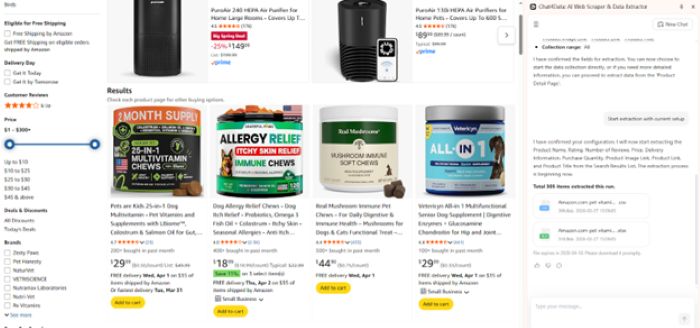
The trade-off is real: you’re limited by your local machine’s resources. No cloud scheduling, no proxy rotation for anti-bot evasion, no IP diversification. For high-volume scraping of heavily protected sites, a purely local tool will hit walls that cloud infrastructure handles easily. And “local” means you’re responsible for securing data on your device.
But for competitive intelligence, sensitive research, or regulated industries where data residency is non-negotiable, local-first tools are currently the only option that creates zero third-party data exposure.
Good for: Competitive intelligence, sensitive research, regulated industries, or anyone who doesn’t want a third party in the loop.
Trade-off: No cloud scheduling, no proxy rotation, limited by local machine resources.
When Does Local Matter?
Not every scraping job needs local execution. Here’s how I think about it:
Go local when:
- You’re scraping competitor pricing, strategy pages, or job postings, because your scraping pattern itself is a business secret
- You’re in a regulated industry (healthcare, finance, legal) where data residency matters
- You’re gathering data for internal AI training and don’t want it on third-party servers
- You’re doing government or public records research where the topics themselves are sensitive
- You just don’t want anyone else to know what you’re researching
Cloud is fine when:
- You’re collecting public commodity data (product catalogs, news, directories) with zero competitive sensitivity
- You need massive scale with anti-bot evasion and accept the data flow trade-offs
- You need scheduled scrapes running overnight and the data isn’t sensitive
- The scraped content is going to be published anyway, so secrecy doesn’t matter
Privacy Comparison at a Glance
| Feature | Browse AI | Octoparse | Apify | Firecrawl | Bright Data | Chat4Data |
| Data leaves device | Yes, always | Depends | Yes, always | Yes, always | Yes, always | No |
| Server location | Cloud (US) | Cloud + local | Cloud (US/EU) | Cloud | Cloud (Global) | Your machine |
| SOC 2 certified | Yes | No | Yes | No | Yes | Not needed (no server) |
| GDPR claimed | Yes | Yes | Yes | Unclear | Yes | Not needed (no data processing) |
| Data for AI training | Not stated | Not excluded | Not stated | Unclear | Not stated | Not possible |
| Sees your URLs | Yes | Yes (cloud) | Yes | Yes | Yes | No |
| Free tier | Limited | Local only | Limited | Limited | No | Yes |
Bottom Line
The AI scraping market in 2026 is mature, competitive, and overwhelmingly cloud-based. Browse AI, Apify, Bright Data: they’ve built powerful AI web scraping platforms with real enterprise value. The compliance certifications, anti-bot infrastructure, and developer ecosystems are genuinely impressive.
But none of them can answer “yes” to the most basic privacy question: does my data stay on my device?
If that question matters to you, whether you’re doing competitive research, working in a regulated industry, or just believe a scraping tool shouldn’t know more about your business than you tell it, it’s worth looking at tools that run entirely on your device as part of your toolkit. They won’t replace cloud solutions for every use case, but for the tasks where privacy is the priority, they fill a gap that no cloud tool currently can.
FAQs
Can AI scrape websites privately?
Yes, but it depends entirely on the tool’s architecture. Most AI web scrapers are cloud-based, meaning your requests and scraped data pass through third-party servers. However, a newer category of scrapers that keep everything on your machine runs everything on your own machine. The AI processing, the data extraction, and the storage all happen locally. With these tools, no third party ever sees what you’re scraping or what data you collect.
What’s the best web scraping service for sensitive data?
If you’re handling sensitive data like competitive intelligence, financial research, healthcare records, or legal documents, the most important factor isn’t speed or scale. It’s where your data gets processed. Cloud-based services like Browse AI, Apify, and Bright Data offer strong compliance certifications, but your data still passes through their servers. For truly sensitive workloads, tools that never send data off your machine are the safer choice, even if they trade off cloud features like scheduling and proxy rotation.
AI web scraper vs web crawler: does it matter for privacy?
A web crawler discovers and indexes pages across the internet (think Google’s search bot), while an AI web scraper extracts specific data from those pages. For privacy, the distinction matters less than the architecture. Both crawlers and scrapers can be cloud-based or local. The key question is the same either way: does the tool send your target URLs and extracted data through a third-party server, or does everything stay on your machine? A cloud-based crawler exposes your browsing patterns just like a cloud-based scraper does.
References
[1] IAPP, “Training AI on personal data scraped from the web”
[2] Octoparse Privacy Policy (octoparse.com/privacy-policy)
[3] Independent review, security and compliance limitations (autoposting.ai)
All sources last accessed March 26, 2026. Privacy policies and certifications may change; verify directly with each provider.