Managing global Discord communities often fails when members are spread across different time zones. Static text schedules like “7 PM EST” require manual calculations, which frequently result in missed meetings and constant confusion about local start times. Discord timestamps solve this by automatically adjusting to match each person’s local clock, ensuring that an announcement sent in New York is perfectly understood in London or Tokyo.
This guide explains how to generate these specialized codes to ensure consistent, professional scheduling. It covers various Unix-based formats, ranging from live countdowns to specific calendar dates. Implementing these simple syntax changes ensures your community stays perfectly synced without anyone needing to check a time zone map.
Key Takeaways
- Managing global Discord communities benefits from using Discord timestamps to eliminate confusion over local meeting times.
- Discord timestamps are dynamic codes that adjust to each user’s local clock, ensuring clarity in scheduling.
- You can generate Discord timestamps using methods like the native slash command, web-based generators, or professional Unix tools.
- Select the appropriate format for your Discord timestamp, either absolute for fixed events or relative for countdowns.
- Understanding common pitfalls, such as the 13-digit mistake, helps avoid errors when implementing Discord timestamps.
Table of Contents
- What Are Discord Timestamps?
- The Unix Epoch (Internet’s Universal Language)
- Three Ways to Generate Your Timestamp
- How to Create a Discord Timestamp (Step-by-Step)
- The Relative Time (:R) Flag as an Engagement Tool
- Discord Timestamp Format Options
- Advanced Formatting Tips
- Troubleshooting: Common Pitfalls & The “1969 Bug”
- Advanced Use Cases for Power Users & Admins
- Is Discord’s Native @time Feature Ready for You?
- Conclusion
- FAQs
What Are Discord Timestamps?
Discord Timestamps are dynamic snippets of code that act as a universal translator for time. Unlike standard text, which remains static, the timestamps Discord users see are generated from numerical strings that automatically adapt to each person’s specific location.
Discord avoids hardcoded text like “10:00 AM” because it is geographically limiting. Instead, the platform relies on your device’s local clock. When you post a local timestamp Discord code, the app detects the viewer’s system time zone and translates the hidden data into a readable format instantly.
This ensures that a Discord UTC timestamp sent by someone in California is seamlessly converted for a friend in Berlin without anyone performing manual math.
The Unix Epoch (Internet’s Universal Language)
To understand how these numbers work, you must look at the Discord Unix timestamp system:
- What is the “Epoch”? All digital time is measured from the “Unix Epoch”, midnight on January 1, 1970.
- The 10-Digit String: Every moment in history is represented by the number of seconds that have passed since that date.
- Universal Language: Because this number is the same everywhere in the world, it serves as a neutral “anchor.”
Discord simply takes this 10-digit number and asks the user’s phone or computer to calculate what that specific second looks like in their local time zone. By using these strings, you ensure your community stays perfectly synced through a single, invisible numerical language.

Three Ways to Generate Your Timestamp
In 2026, creating localized time is easier than ever. Depending on whether you need a quick chat reminder or a full-scale event schedule, you can choose from these three proven methods.
Method 1: The Native Slash Command
Discord now features built-in natural language processing. By typing a simple command, you can use time to convert Discord timestamps without leaving the app. Simply type /time followed by a phrase like “next Monday at 5 PM.” Discord’s UI will generate the code for you instantly, making it the fastest way to handle casual coordination.
Method 2: Web-Based Generators (The Pro Choice)
For community managers, a dedicated Timestamp Maker Discord tool is the gold standard. Sites like hammertime.cyou or Discord Timestamp Generator provide a visual calendar. These are ideal for:
- Visualizing how different “flags” (Relative vs. Full Date) look before posting.
- Scheduling events weeks in advance.
- Copying multiple formats for complex announcements.
Method 3: Professional Unix Tools
If you are handling bulk automation or bot development, a Timestamp Converter that Discord users rely on is Epoch Converter. This method is for precision users who need the raw 10-digit Unix string. It allows you to:
- Convert specific historical or future dates with down-to-the-second accuracy.
- Generate timestamps for use in webhooks or automated bot messages.
- Batch-process multiple dates for large tournament spreadsheets.
How to Create a Discord Timestamp (Step-by-Step)
Mastering how to timestamp Discord messages involves more than just copying numbers; it requires following a precise syntax to ensure the code “triggers” correctly. If you miss a single bracket or colon, the message will appear as broken text rather than a dynamic clock.
The Standard Formula
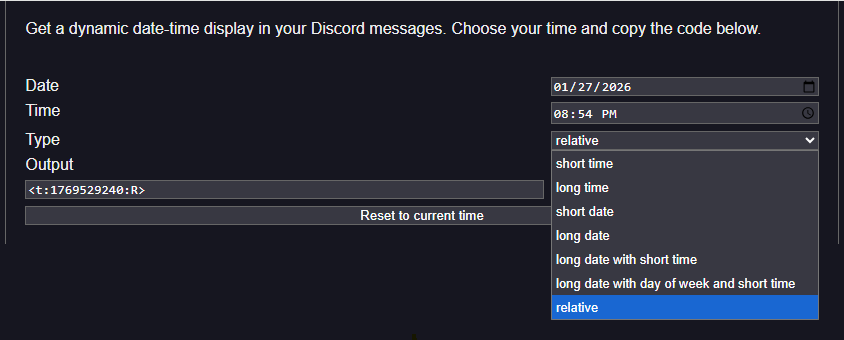
To create Discord timestamp magic, you must follow this exact template:
<t:UNIX_TIME:STYLE>
The Execution Process
- Step 1: Get the 10-Digit Integer: Visit a tool like Epoch Converter to turn your desired date and time into a 10-digit Unix string. This number is the “brain” of your timestamp.
- Step 2: Choose Your Display Flag: The “Style” or flag at the end determines how the data looks. You can make Discord timestamp outputs vary by using these seven flags: (t, T, d, D, f, F, R).
- Step 3: The Assembly: Combine your elements. For a timestamp for Discord to work, there must be no spaces inside the brackets. Avoid the “Plain Text” trap: if you put backticks (`) around the code, Discord will show the raw syntax instead of the live time.
- Step 4: The Verification: Always post your code in a private “Sandbox” channel or your DMs first. Verify that the time looks correct on both desktop and mobile, as some long date formats can wrap awkwardly on smaller phone screens.
By following these steps, you ensure your community never has to ask “what time is that for me?” again.
The Relative Time (:R) Flag as an Engagement Tool
The Discord Relative Timestamp is the most powerful tool for creating excitement and a “fear of missing out” (FOMO) within your community. A static date feels passive, but a live counter that says “in 12 minutes” generates immediate urgency.
This engagement is possible because the dynamic timestamp Discord feature refreshes every second within the user’s UI. This provides continuous live feedback.
Real Community Use Cases:
- Stream Countdowns: Announcing exactly when a live stream goes live.
- Sale Deadlines: Pushing final purchases before an in-game store item disappears.
- Tournament Starts: Ensuring hundreds of global players are present at the same virtual minute.
Discord Timestamp Format Options
The key to professional scheduling on Discord is selecting the correct visual style using the single-letter “flag” in the syntax formula. The Discord Timestamp Format offers seven distinct options, allowing you to choose whether your announcement appears as an absolute date (fixed time) or a dynamic countdown (relative time).
Absolute Time and Date Formats
These styles are used for formal announcements and historical records. They show a specific calendar day and hour, which remains fixed in time (though still localized to the viewer). These are ideal for event invites, patch notes, or announcements that do not need continuous updates.
Relative Time Formats (Dynamic Countdowns)
The “R” flag creates a live-updating countdown. This is perfect for driving urgency for an event deadline or stream start. It shifts from “in 5 minutes” to “2 minutes ago” automatically.
| Style | Format Description | Syntax Example | Result Example (Local Time) |
|---|---|---|---|
| t | Short Time | <t:1737912000:t> | 4:20 PM |
| T | Long Time | <t:1737912000:T> | 4:20:00 PM |
| d | Short Date | <t:1737912000:d> | 01/26/2026 |
| D | Long Date | <t:1737912000:D> | January 26, 2026 |
| f | Short Date/Time | <t:1737912000:f> | Jan 26, 2026 4:20 PM |
| F | Long Date/Time | <t:1737912000:F> | Monday, Jan 26, 2026 4:20 PM |
| R | Relative Time | <t:1737912000:R> | in 2 hours / 3 days ago |
Advanced Formatting Tips
Choosing between absolute dates and relative countdowns depends entirely on your community’s objective. To keep your server organized, consider these strategic approaches:
- Absolute vs. Relative: Use absolute formats (like :f or :F) for permanent records, such as archived logs or server rules. Use dynamic “time remaining” alerts for active events to create a real-time sense of urgency.
- Manual vs. Automated: While manual input is great for one-off announcements, automation is better for scalability.
- Developer Integration: If you are building a bot, you can programmatically generate these codes using a Discord.js timestamp utility. Using a Discord.js timestamp allows your bot to calculate events, like giveaway expirations or temporary mutes, and post them automatically without human error.
Whether you are coding or typing by hand, always ask if the viewer needs to know the exact hour or simply how soon the event begins.
Troubleshooting: Common Pitfalls & The “1969 Bug”
Even after you make Discord timestamp codes correctly, technical glitches can occur. Understanding these common errors ensures your community doesn’t see broken text or impossible dates.
- The 13-Digit Mistake: This is the most frequent error. Many websites provide Unix time in milliseconds (13 digits), but Discord only accepts seconds (10 digits). If your timestamp looks like a random string of text, trim the last three numbers to fix it.
- The “1969/1970” Error: If your render defaults to December 31, 1969, or January 1, 1970, your code has failed. This happens when the syntax is broken, or the number is invalid, causing Discord to revert to the absolute start of the Epoch.
- System Clock Desync: If users report a “1-hour offset,” it is usually a local issue. Encourage members to sync their Windows/Mac/Mobile clocks with internet time to resolve daylight savings discrepancies.
- Discord ID to Timestamp: Beginners often confuse a Discord ID to timestamp conversion (which extracts a user’s account creation date) with an event timestamp. These are different systems; ensure you are using the <t:number:style> syntax for scheduling.
- Mobile vs. Desktop: While you cannot hide timestamps Discord provides globally, ensure your format isn’t too long. Full date strings can sometimes wrap awkwardly or get cut off on smaller mobile screens.
Advanced Use Cases for Power Users & Admins
For server owners managing thousands of members, manual entry isn’t always sustainable. Professional server management in 2026 relies on moving toward automation to ensure your Timestamp Maker Discord strategy remains scalable.
- The Daylight Savings (DST) Trap: A common mistake is using a single Unix code for a recurring weekly meeting. Because Unix time represents a fixed point in history, it does not “shift” when clocks change. To avoid confusion during DST transitions, you must manually update your recurring event codes twice a year.
- Automation with Zapier or IFTTT: You can bridge Google Calendar and Discord Webhooks to post localized times automatically. By sending a calendar start time through a formatter, you can ensure every new event notification includes a perfectly translated timestamp.
- Professional Embedded Messages: For a high-end look, place your timestamps inside “Rich Embeds.” This keeps your announcement clean and ensures the live-updating countdown stands out against a professional, colored sidebar.
- Reaction Timestamp Discord Integration: Many event-management bots now include a reaction timestamp Discord feature. When a user reacts to a sign-up sheet, the bot can DM them with a confirmation containing the exact local minute they joined the roster, keeping everyone on the same page.
Implementing these advanced workflows ensures your community remains synchronized without requiring constant manual oversight from your moderation team.
Is Discord’s Native @time Feature Ready for You?
As we move through 2026, Discord has introduced a native @time feature that utilizes Natural Language Input to simplify scheduling. By typing @time tomorrow at 5 PM, you can skip third-party sites and generate codes directly in the chat box.
However, while this native tool is excellent for casual reminders, it has limitations. Unlike a YouTube timestamp that precisely marks a video frame, Discord’s native tool can struggle with complex dates months in advance.
- When to use Native: Perfect for quick chats and immediate reminders without leaving the app.
- When to use a Generator: Essential for professional community managers who need a visual calendar for long-term event planning.
For any high-stakes announcement, a dedicated Discord Timestamp generator remains the gold standard for reliability.
Conclusion
Mastering Discord timestamps is the ultimate way to professionalize your server and eliminate “time zone confusion” for your global members. Whether you are using the new native @time feature for quick reminders or a professional generator for large-scale event planning, these localized codes ensure that every announcement is perfectly understood in every corner of the world.
By following this guide, you can build a more inclusive and synchronized community. Stop doing the manual math and let Discord’s dynamic timestamps handle the scheduling heavy lifting for you.
FAQs
Use the manual syntax <t:UNIX_TIMESTAMP:STYLE>. Replace UNIX_TIMESTAMP with the number of seconds since January 1, 1970. You can use online tools like HammerTime to select a date and automatically generate this code.
This usually happens due to formatting errors, such as including extra spaces inside the brackets, using the wrong bracket type, or using an incorrect style letter. Ensure the code is exactly formatted as <t:123456789:f>.
Yes, but it is controlled by your Language settings in Discord, not the code itself. To switch to a 24-hour clock, change your language from “English, US” to “English, UK” or another region that uses 24-hour time.
Yes, bots and webhooks can use the same markdown syntax to post dynamic timestamps in messages and embeds. Specialized bots like HammerTime Bot are specifically designed to help users create these codes directly within a server.
Yes, they work on both iOS and Android. While you cannot natively “generate” them with a button in the mobile app, you can manually type the markdown or copy it from a website to send a working timestamp.